LLM Wiki Review
approvedby Elliott Park
Review what your AI agent wrote to your LLM Wiki, like a pull request. See each change as a diff, approve or revert it, and catch broken links, unsourced pages and unprocessed sources. - This plugin has not been manually reviewed by Obsidian staff.
LLM Wiki Review
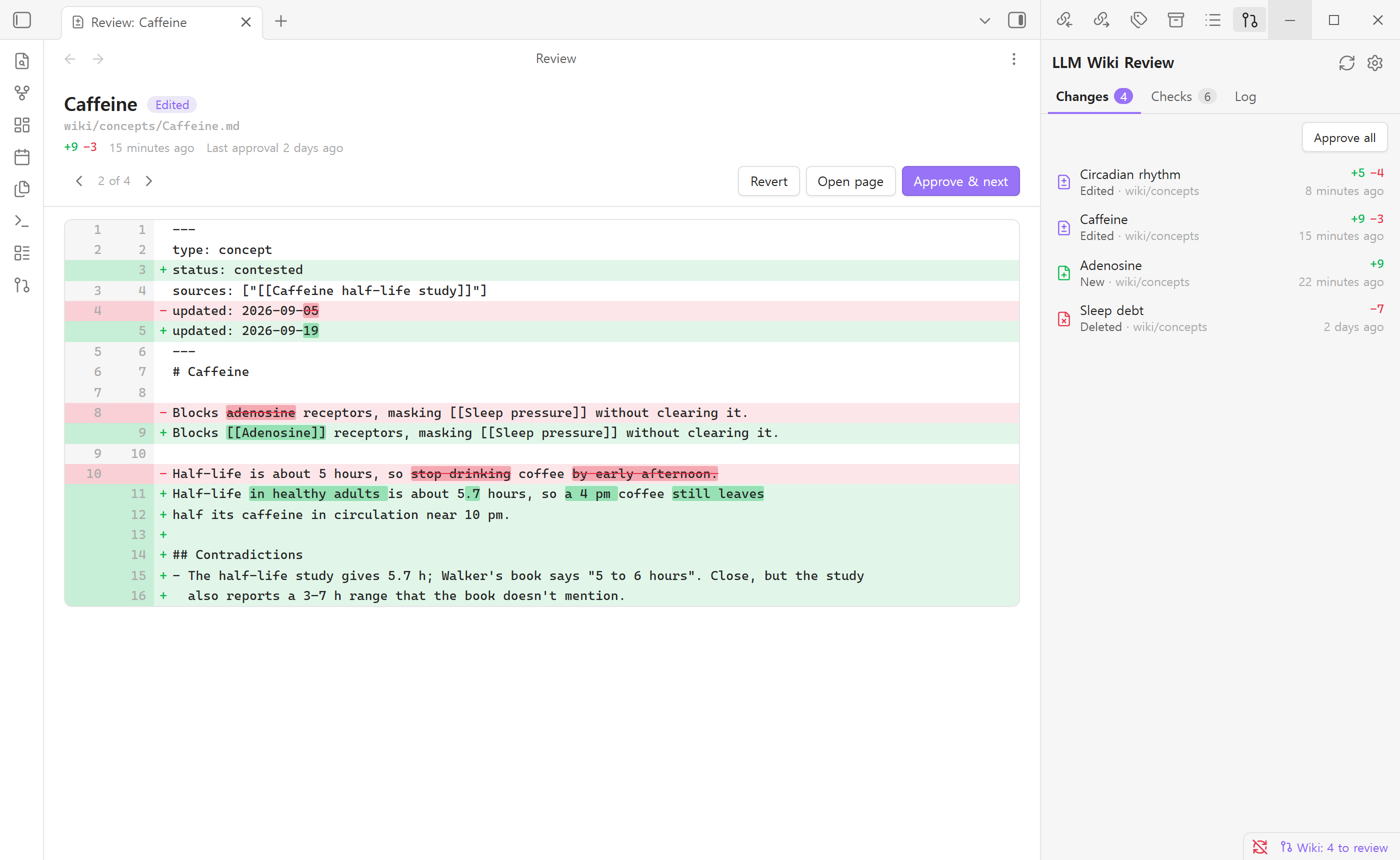
Review what your AI agent wrote to your LLM Wiki, like a pull request.
You keep a Karpathy-style LLM Wiki: raw sources in one folder, and an AI agent (Claude Code, Codex, Gemini CLI or the like) that reads them and writes the wiki. One ingest can touch 10–15 pages. This plugin shows you exactly what changed on each of them since you last looked, so you can approve the edit or roll it back. It also flags broken links, pages with no sources and sources the agent never processed.
"Obsidian is the IDE; the LLM is the programmer; the wiki is the codebase." — Andrej Karpathy
An IDE shows you the diff before you accept a change. This plugin does that for the wiki.
Why
An LLM wiki grows faster than anyone can read it. Most of the time the agent gets it right. Sometimes it misreads a source, and that mistake spreads to every page built on top of it. Karpathy's own workflow is to "read the summaries, check the updates". This plugin makes that step fast:
- See only what changed. Changes are counted from the last time you approved, not from the last git commit, so they still show up when the agent commits by itself or when there's no git at all.
- Word-level diffs. When the agent changes one number in a paragraph, the number is what gets highlighted.
- Approve or revert. Approve the edit and the page leaves the list. Revert it and the page goes back to how you last saw it: a deleted page comes back, and a new page goes to the trash.
- Works with any agent and any layout. It doesn't call an LLM, needs no API key and doesn't care which agent wrote the files. It only compares text.
The three tabs
Changes
Every wiki page the agent created, edited or deleted since your last review, newest first, with +added −removed line counts. Click one to open the diff. Approve & next steps through them one at a time.
Your own edits don't show up. If you type into a page that had nothing waiting for review, the plugin treats that as reviewed. If the page was waiting, your edit is added to the pending diff, so the agent's change doesn't disappear without you seeing it.
Checks
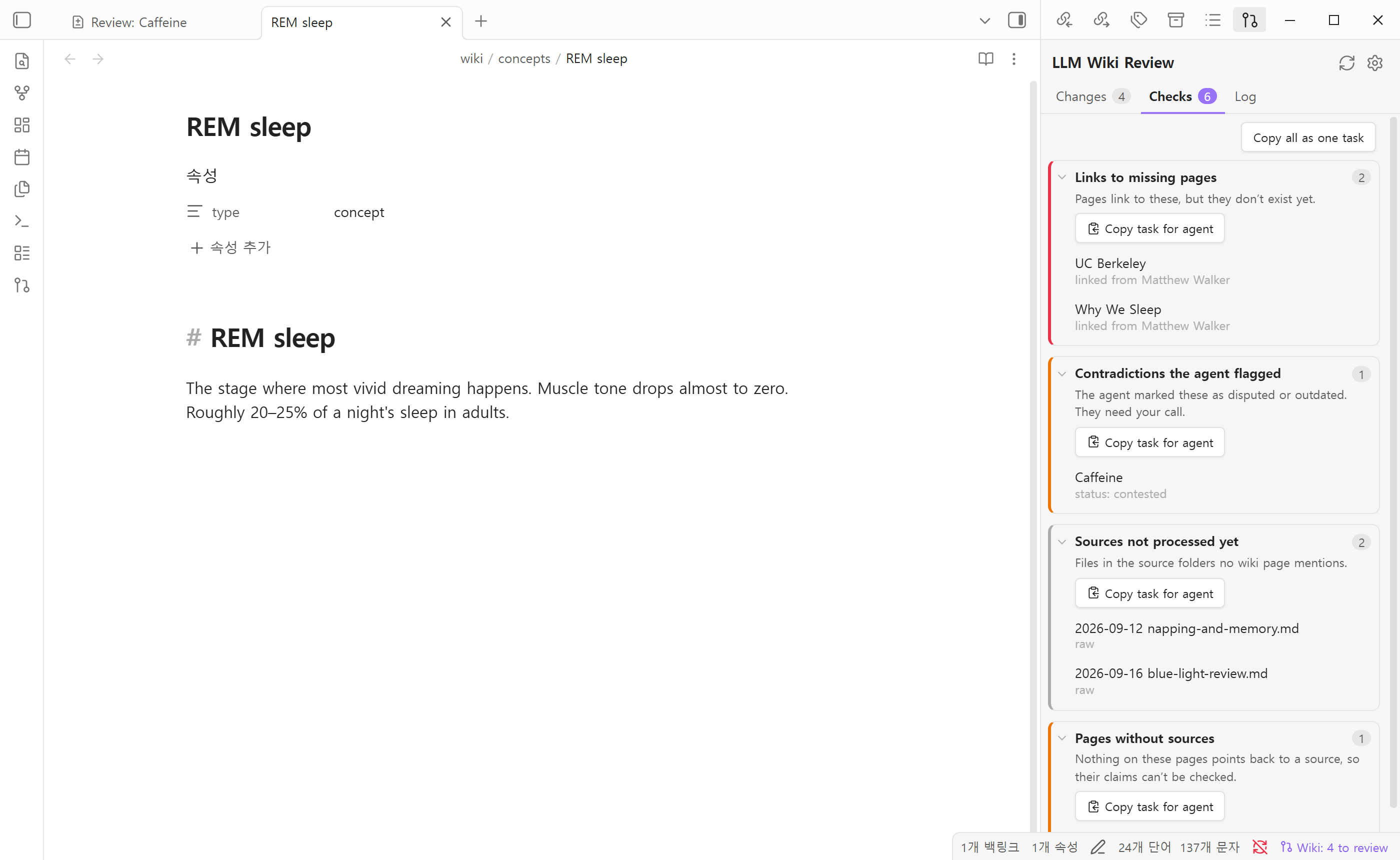
Things in the wiki that need attention. None of these need an LLM:
| Check | What it finds |
|---|---|
| Links to missing pages | [[Links]] pointing to pages that don't exist yet, grouped by target |
| Contradictions the agent flagged | Pages with status: contested / disputed / outdated, **Status: Disputed** markers or a non-empty ## Contradictions section |
| Sources not processed yet | Files in your source folders that no wiki page mentions, links to or lists under sources: |
| Pages without sources | Pages that point back to no source at all |
| Not reachable from the index | Pages you can't get to by following links from index.md |
| Orphan pages | Pages nothing links to |
Each group has a Copy task for agent button. It copies a ready-to-paste instruction that lists the exact files, for example:
Following this vault's wiki rules (CLAUDE.md / AGENTS.md), fix the items below. …

## Sources not processed yet
These source files haven't been ingested yet. Ingest them one at a time.
- raw/2026-09-12 napping-and-memory.md
- raw/2026-09-16 blue-light-review.md
Paste it into Claude Code or Codex. The plugin finds the problem and your agent fixes it.
Log
Your log.md as a timeline. It reads Karpathy's ## [2026-04-02] ingest | Title headings, tables with a date column and dated bullet lists. Click an entry to jump to that line.
Setup
- Install LLM Wiki Review from Settings → Community plugins, and enable it.
- Open the panel from the ribbon (pull-request icon) or the command palette.
- The plugin looks for folders named
wikiandraw(also.raw), and files namedlog.mdandindex.md. Check what it found, then pick a starting point:- Start from the wiki as it is now. Only changes made from here on will show up.
- Review every page from scratch. Every page is listed as new.
If your layout is different (for example Notes/wiki and Notes/sources), set the folders in the plugin settings. You can list several of each.
What it expects (all optional)
- Sources listed in frontmatter under
sources:,source:,source_file:or any keys you add in settings. Lists, comma-separated strings and[[wikilinks]]all work. - An
ingested:property on source files, if your agent marks processed sources that way. The name can be changed in settings. type:on pages, so index, overview and hub pages aren't expected to cite sources.
If your wiki doesn't track sources at all, the source checks turn themselves off instead of flagging every page.
Commands
| Command | |
|---|---|
| Open review panel | |
| Review next change | Opens the newest change |
| Approve the change being reviewed | Approves it and moves to the next change |
| Approve all changes | Asks you to confirm first |
| Copy all checks as a task for the agent | |
| Rescan the wiki |
No default hotkeys. Assign your own in Settings → Hotkeys.
Privacy and files
- No network requests. Nothing leaves your vault.
- Wiki files are only read. The only times the plugin writes to your vault are when you press Revert, or restore a deleted page.
- The last-approved copy of each page is stored in
.obsidian/plugins/llm-wiki-review/baseline.json. If your vault is a git repo you may want to ignore that file. - English and 한국어. It follows Obsidian's language, or pick one in settings.
Manual install
Copy main.js, manifest.json and styles.css from the latest release into <your vault>/.obsidian/plugins/llm-wiki-review/, then enable the plugin under Settings → Community plugins.
Development
No build step. main.js is the plugin.
node tests/run.js              # diff, log parsing and source matching
node scripts/demo-vault.js     # writes a demo vault with changes waiting for review
License
MIT
For plugin developers
Search results and similarity scores are powered by semantic analysis of your plugin's README. If your plugin isn't appearing for searches you'd expect, try updating your README to clearly describe your plugin's purpose, features, and use cases.