Mass Create
approvedby vellikhor
Create large quantities of notes easily at one time.
★ 10 stars↓ 2,188 downloadsUpdated 1y agoMIT
Mass Create Plugin for Obsidian
Overview
The Mass Create plugin for Obsidian allows users to create large quantities of notes at one time.
Features
- Mass File Creation: Create multiple files within a selected folder with ease.
- Folder Creation: Add extra folders as part of the mass creation process.
- Template Option: Use an existing file as a template for all new files, making it easy to replicate file structures and content.
Installation
-
Manual Installation:
- Create a folder titled
mass-createwithin the.obsidian/pluginsfolder of your Obsidian vault. - Download the plugin files(main.js and manifest.json).
- Place them in the
mass-createfolder. - Go to Settings > Community plugins in Obsidian and enable the "Mass Create" plugin.
- Create a folder titled
-
Community Plugin Directory (when available):
- Search for "Mass Create" in the Obsidian Community Plugins browser.
- Install and enable the plugin from there.
Usage
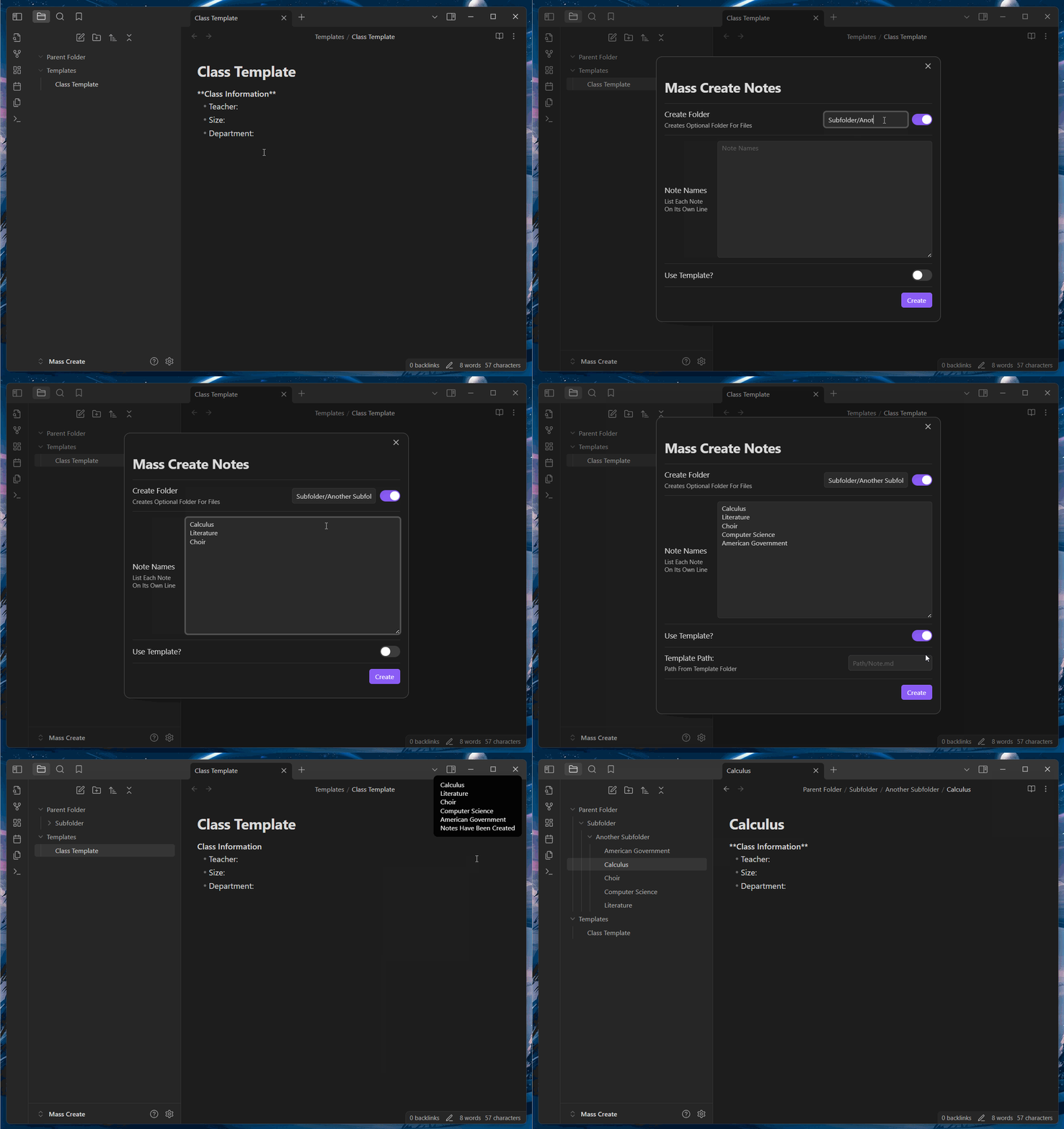
- Open a Folder's Right-Click Menu: In the file explorer, right-click on the folder where you want to create multiple files.
- Select "Mass Create": From the menu, click on "Mass Create."
- Configure File and Folder Names:
- Create any additional folders you would like the files to go within. (optional)
- Enter the names of the files you'd like to create.
- Template Selection (optional): If you’d like to use an existing file as a template, choose the template file, and its content will be duplicated in each new file.
- Finish: Confirm your selection, and the plugin will create the files and folders accordingly.
You can also run Mass Create from the command menu. It will create the files in your currently active folder. If you have no files open, the bulk files will be created in your main vault folder.
License
This plugin is open-source and licensed under the MIT License.
For plugin developers
Search results and similarity scores are powered by semantic analysis of your plugin's README. If your plugin isn't appearing for searches you'd expect, try updating your README to clearly describe your plugin's purpose, features, and use cases.