Mood Calendar
approvedby xzhi
Calendar view of your daily notes, with a mood emoji displayed beneath. 以日历视图展示你的日记,并在下方显示心情 emoji。 - This plugin has not been manually reviewed by Obsidian staff.
中文 | English
🗓️ Mood Calendar




A calendar in your Obsidian sidebar — see every day's mood at a glance.
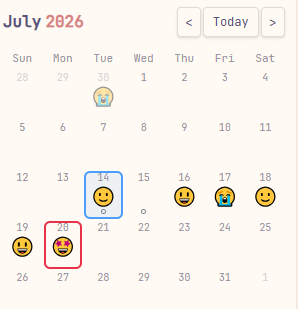
Mood Calendar displays your daily notes in a calendar view, with a mood emoji shown beneath each date. It reads the mood field from your note's frontmatter and pairs it with a one-click workflow: tap a date, pick a mood, and the note is created for you. Journaling and mood tracking become one seamless gesture. If this plugin helps you, a ⭐ would mean a lot!
Preview
✨ Features
- Sidebar calendar: Opens automatically in the right sidebar on startup; can also be summoned anytime via the smiley icon in the left ribbon. Supports embedding in any note with a
```mood-calendarcode block. - Mood visualization: Displays the mood emoji read from each note's frontmatter beneath the date. Display length is configurable (single emoji or full text).
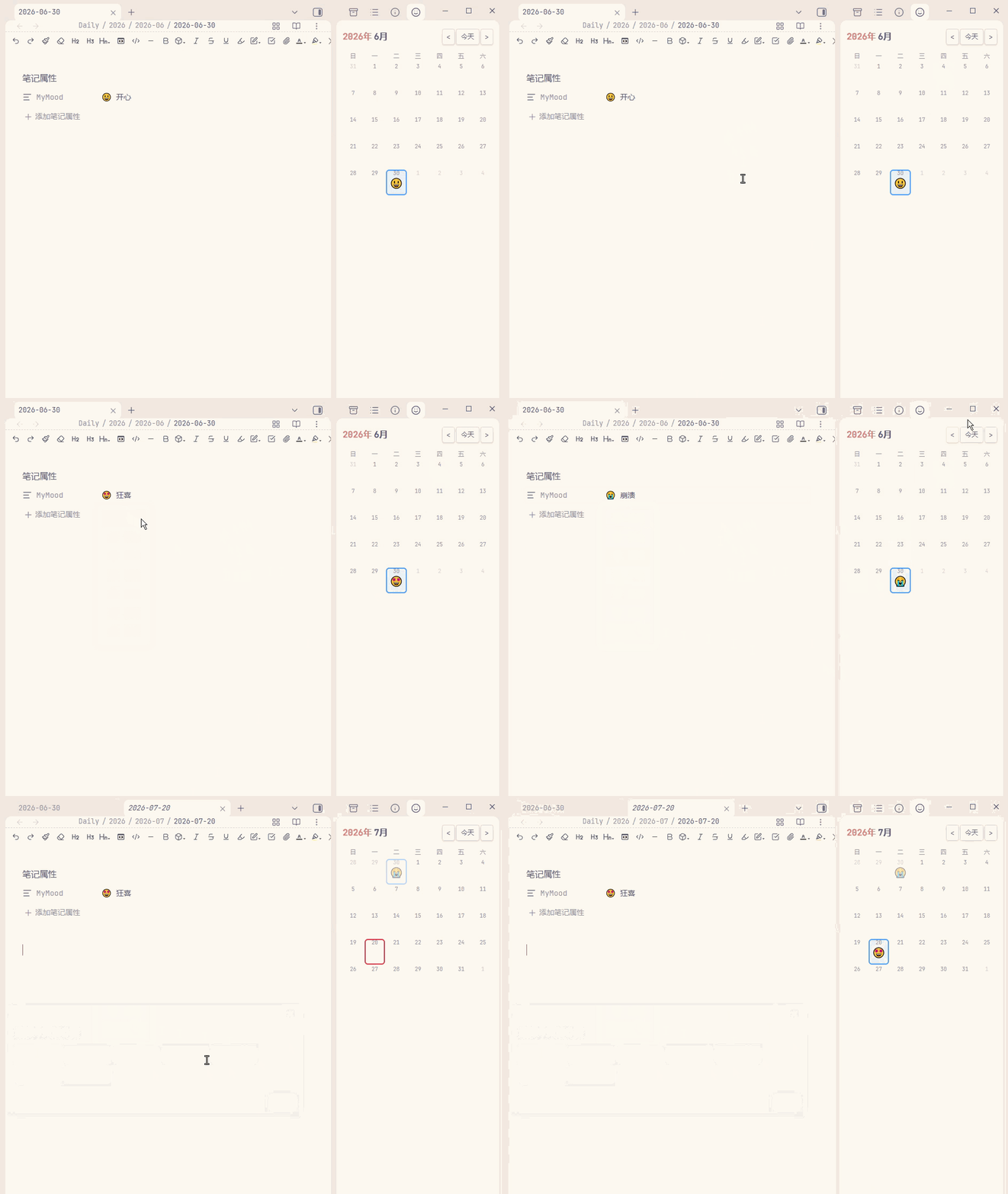
- One-click mood logging: Click a date with no note → a mood picker pops up → the note is created with the chosen mood written to frontmatter. No manual property editing needed.
- Hover to edit: Hover over the
MyMoodproperty value in the editor and a mood picker appears — one click to update that day's mood. - Note status at a glance:
- 😶 No marker — no note exists for this date
- ⚫ Filled dot — note exists but has no mood and no pending tasks
- ⚪ Hollow dot — note exists with unfinished tasks
- [ ]
- Smart follow: The calendar automatically jumps to the month of the active file and highlights today; manual month navigation won't be interrupted.
- Deep daily-notes integration: Automatically reads the date format, folder, and template from the built-in Daily Notes or Periodic Notes plugin. Supports directory-based formats like
YYYY/MM/YYYY-MM-DD. - Bilingual UI: Interface language can be switched in settings (English / 中文).
📦 Installation
Option 1: Obsidian Community Plugin (Recommended)
Search for "Mood Calendar" in Settings → Community plugins inside Obsidian.
Option 2: Manual Installation
- Download the latest
main.js,manifest.json, andstyles.cssfrom Releases. - Create the directory
.obsidian/plugins/mood-calendar/in your vault. - Place the three files into that directory.
- Restart Obsidian and enable Mood Calendar under Settings → Community plugins.
🚀 Usage
Calendar View
The calendar opens automatically in the right sidebar when the plugin loads. Click a date:
- Note exists → opens it directly.
- No note → a mood picker pops up; choose a mood and the note is created with the mood written to frontmatter. Click "Skip" to create a note without a mood.
You can disable the mood popup on creation in settings, falling back to a traditional confirm dialog or immediate creation.
Code Block Embed
Insert the following in any note:
```mood-calendar
```
This renders the current month's calendar inline.
Hover to Edit Mood
In the editor (Live Preview mode, or Reading mode if the corresponding setting is enabled), hover over the MyMood property value in a daily note. A mood picker appears — click an option to update.
⚙️ Settings
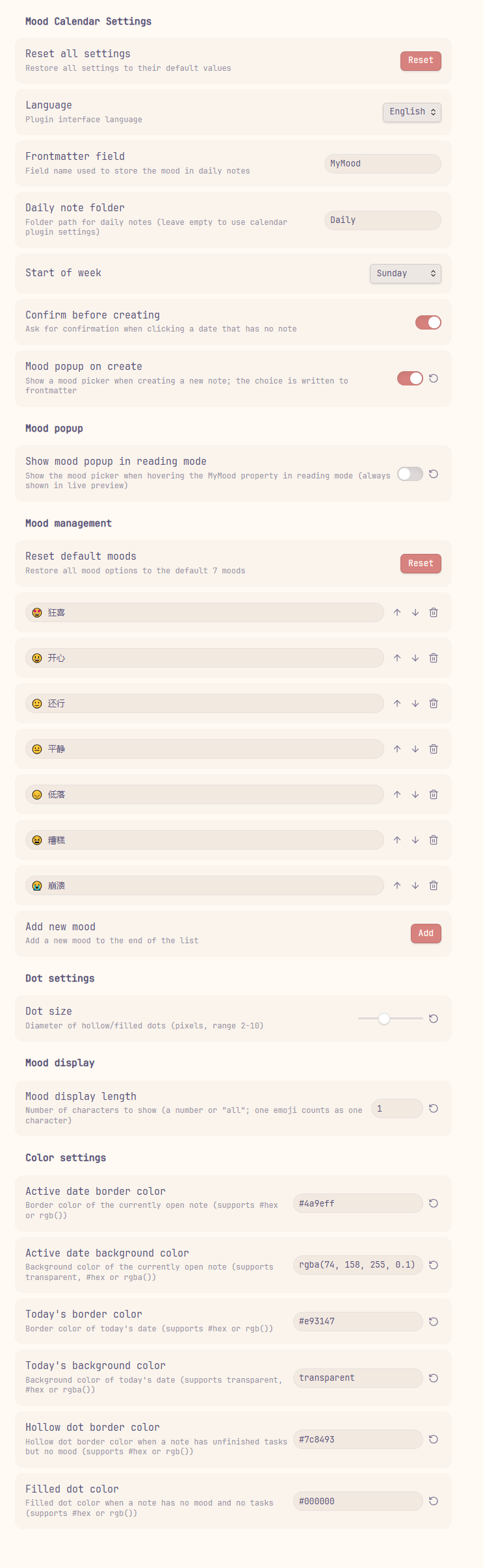
| Setting | Description | Default |
|---|---|---|
| Language | Plugin UI language | 中文 |
| Frontmatter field name | Field name used to store the mood in daily notes | MyMood |
| Daily notes folder | Folder path for daily notes; leave empty to auto-detect from calendar plugin settings | Daily |
| Week starts on | First day of the week | Monday |
| Confirm before creating | Show a confirmation dialog when clicking a date with no note | On |
| Mood popup on creation | Show a mood picker when creating a new note and write the choice to frontmatter | On |
| Mood popup in Reading mode | Show the mood picker when hovering the mood property in Reading mode | Off |
| Mood options | Customize the mood list — add, remove, reorder, or restore defaults | 7 built-in moods |
| Dot size | Status dot diameter in pixels (2–10) | 5 |
| Mood display length | Number of characters to show for mood text, or all | 1 |
| Colors | Border and background colors for active date / today / dots | — |
🔧 Compatibility
- Templater: The mood field is written to frontmatter as plain text without parsing YAML, so templates containing
<% ... %>Templater syntax won't cause errors. - Daily Notes / Periodic Notes: Automatically detects date format, folder, and template configuration from either plugin.
- Mobile:
isDesktopOnly: false— core features work on mobile.
🗂️ Project Structure
mood-calendar/
├── main.js        # Plugin logic (plain JS, no build step required)
├── manifest.json  # Plugin manifest
├── styles.css     # Styles
└── README.md
This plugin is written in plain JavaScript with no build step. Edit main.js, reload, and changes take effect immediately. Feel free to read the source or submit a PR.
📄 License
💖 Support
If you enjoy this plugin and want to say thanks, you can buy me a bubble tea!
| WeChat Pay | WeChat Tip | Alipay |
|---|---|---|
 |  |  |
For plugin developers
Search results and similarity scores are powered by semantic analysis of your plugin's README. If your plugin isn't appearing for searches you'd expect, try updating your README to clearly describe your plugin's purpose, features, and use cases.