Number Suite
approvedby ZhengYX
Display or manage heading, caption, footnote, endnote, and reference numbers without changing Markdown unexpectedly. - This plugin has not been manually reviewed by Obsidian staff.
Number Suite
Number Suite separates two decisions that Markdown tools often mix together: whether heading numbers are stored in a Markdown file and whether those numbers are visible in Obsidian. It can write, remove, virtually display, or visually conceal heading numbers without network access or telemetry.
Screenshots
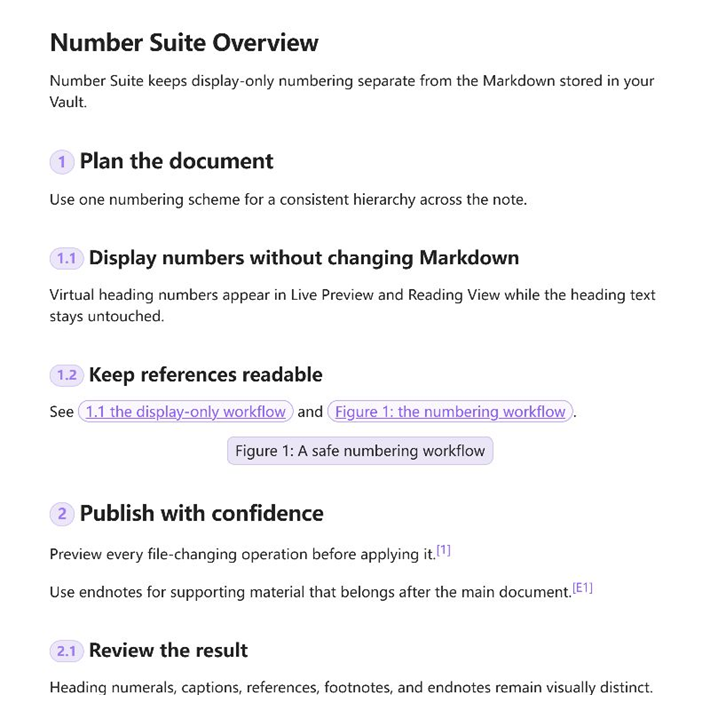
Display-only document numbering
See virtual heading numbers, caption numbers, same-file references, footnotes, and endnotes together without changing the stored Markdown.
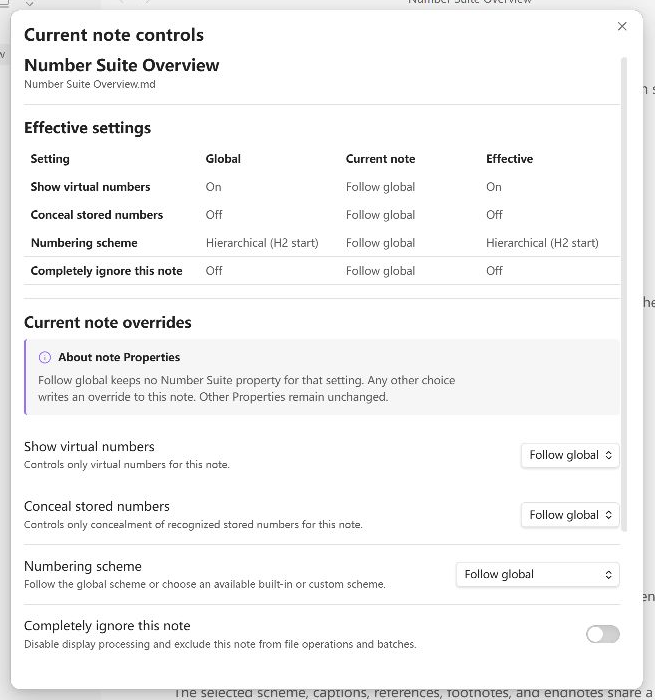
Sidebar current-note controls
Use the Current note tab in the Number Suite sidebar to compare global defaults, per-note overrides, and effective values before changing the note.
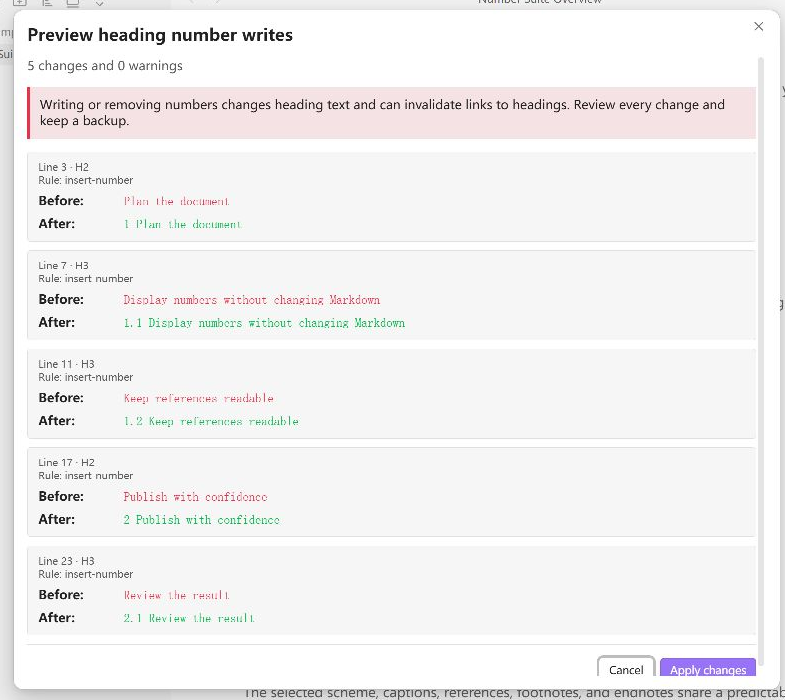
Safe file-operation preview
Review every proposed before-and-after change and any warning before Number Suite writes to Markdown.
Features
- Show calculated heading numbers in Live Preview and Reading View without changing Markdown.
- Conceal recognized stored numbers while keeping the source unchanged and accessible.
- Combine virtual display and concealment to replace one recognized stored prefix visually.
- Preview and then write, remove, or renumber headings in the current note.
- Process a folder or vault with stale-content guards, bounded recovery data, and conflict-safe rollback.
- Use built-in hierarchical, Chinese official-document, and legal-document schemes.
- Create multiple custom schemes with validated H1-H9 templates and retained cleanup history.
- Use exact seven-, eight-, or nine-hash source lines as DocWen-compatible H7-H9 extensions.
- Open a Number Suite document outline for H1-H9 headings and Figure, Table, Equation, and Code captions; select an item to navigate to its source line.
- Exclude an exact heading or its whole subtree without consuming a number.
- Show
Figure:,Table:,Equation:, andCode:captions as filled pills, with optional display-only numbers that restart independently in every Markdown file. - Center each caption type independently; Figure and Equation captions are centered by default, while Table and Code captions follow the current theme.
- Place each bound caption above or below its object in Live Preview and Reading View without rewriting Markdown; newly created captions are stored above their object.
- Show a structured hover card on an image or its Figure caption, with the rendered caption as the title and meaningful image replacement text as the content.
- Show explicit same-file heading, caption-title, and stable block references as interactive outline pills; include a target number when available, but do not require one.
- Copy a stable cross-reference from a heading or caption context menu, reusing an existing block ID or previewing one new ID before it is created.
- Show footnotes as
1,2,3and endnotes asE1,E2,E3for[^id],[^footnote:id], and[^endnote:id]; repeated references reuse the first number. - Override display, concealment, scheme, cleanup scope, starting counters, or full opt-out per note.
- Use English or Simplified Chinese interface text.
Requirements and compatibility
- Obsidian
1.12.7or later. - Desktop and Android Obsidian. Android 15 / API 35 is the baseline mobile acceptance profile.
- iOS behavior is not currently verified.
Installation
Community Plugins
Open Settings → Community plugins → Browse, search for Number Suite, install it, and enable it. If it is not available in your catalog, use the manual installation below.
Manual installation
Download main.js, manifest.json, and styles.css from one matching GitHub Release. Place those
three files in .obsidian/plugins/number-suite/, then reload Obsidian and enable the plugin.
Do not mix files from different versions.
Usage
| Source state | Desired result | Action | Changes Markdown |
|---|---|---|---|
| No stored number | Show a number only in Obsidian | Enable virtual numbers | No |
| No stored number | Save calculated numbers | Write heading numbers | Yes |
| Stored number | Hide it visually | Enable concealment | No |
| Stored number | Replace it with a calculated display number | Enable virtual numbers and concealment | No |
| Stored number | Remove it from the file | Remove heading numbers | Yes |
Concealment has one global recognition rule: either only numbers carrying Number Suite source markers, or numbers matching known built-in/current/retired scheme templates. A note can override hide/show/inherit, but cannot silently broaden that recognition rule.
The ribbon icon opens a persistent right sidebar. Its Document outline tab shows Number Suite
H1-H9 headings and captions; its Current note tab contains note-level display, scheme, and file
actions. Open current note controls selects that tab directly. File-changing commands still
open a separate preview before applying anything. Writing or removing a number changes the heading
text and can invalidate [[Note#Heading]] links, heading embeds, or external anchors; the plugin
does not guess and rewrite those links.
Extended H7-H9 headings
Number Suite and DocWen share an explicit extension for Word heading levels 7 through 9. Write
exactly 7, 8, or 9 leading # characters, followed by whitespace. Ten or more hashes remain
ordinary text. The extension participates in numbering, starts, resets, exclusions, writes,
Live Preview, Reading View, and the read-only number-suite.interop.v2 consumer snapshot.
H7-H9 are not native Obsidian/CommonMark heading levels, so Obsidian's built-in Outline, Backlinks,
heading-path navigation, and other native heading indexes may not recognize them. Number Suite's
own sidebar outline does include them and its navigation uses source lines. Use an authored stable
block ID such as ######## Deep topic ^deep-topic for reliable interoperation and references. Put
each extended heading in its own paragraph, with a blank line around it, when Reading View
enhancement is required. The Markdown source remains canonical and unchanged by display-only use.
Caption and cross-reference display never writes Markdown. A caption is a top-level paragraph that
starts with exactly Figure:, Table:, Equation:, or Code:. Listing: is not an alias. A
recognized caption is displayed as one filled pill; its optional number is part of that pill. Normal
[[#...]] links remain entirely Obsidian's.
The caption keyword controls its semantic label and counter, while the adjacent standalone block is
its visual carrier. Any caption type may bind an image, Markdown table, display equation, or fenced
code block, so a Figure: caption can label a table that lays out a composite figure. Zero or one
blank line may separate the pair; two blank lines separate them. A caption with candidates on both
sides, or an object with multiple candidate captions, stays unbound. An unbound caption remains a
numbered, referenceable caption pill but has no object placement or object hover behavior.
Caption alignment is independent from caption numbering. Figure and Equation captions are centered
by default; the four fixed caption types can each be changed independently in the Captions tab.
Each type also has an independent visual Above the object or Below the object setting; all
four default to above. Every bound caption is anchored to the carrier block with the same compact,
theme-independent gap; changing position never rewrites the file. When the cursor enters a caption
in Live Preview, its pill disappears and the exact authored Figure: ... ^id-style source returns
at its stored location. Source Mode always shows the authored Markdown. An individual
cross-reference likewise reveals only its own @[[...]] source while it is being edited. Touch and
IME editing follow the same local rule: only the active heading, caption, or reference reveals its
source, while unrelated virtual numbers and pills remain visible.
In editing mode, right-click a standalone ![[image.png]] or  image to add its
Figure caption; right-click any row of a top-level Markdown table for Table, a standalone $$...$$
display equation for Equation, or a top-level fenced code block for Code. The action follows the
actual right-click target, so an image does not need to be selected first. The same Table action is
contributed to the rendered context menu when Structural Tables owns a table in Live Preview,
including ordinary-table takeover and multi-row structural headers. Either plugin also continues
to work normally when the other is absent.
The dialog previews the exact Markdown line before one bounded editor transaction. All newly
created captions are stored above their objects. A legacy Figure caption found immediately below
its image offers a bounded move-above action. If the adjacent keyword differs only in case, such as
figure:, the same action corrects it instead of adding a duplicate. An existing adjacent caption
of any type suppresses a second caption action. Existing exact captions, note
embeds, inline images, inline math, inline code, and images/math/code inside table cells do not offer
an independent caption action. Cross-references may still be written inside table cells. Creating a
caption never creates a block ID.
Show image and Figure-caption hover details is on by default. Hovering either member of a bound
Figure pair shows the rendered caption and non-size wiki replacement text or Markdown alt text.
Equal caption and replacement text is shown once; filename-only and 500/500x300 size values are
suppressed. An inline or table-cell image may show replacement text only, but remains ineligible for
its own Figure caption.
Same-file cross references
Open Settings → Number Suite → Cross references and enable Show same-file cross references.
Prefix a same-file target link with @. A unique heading can be referenced by heading name, and a
unique caption can be referenced by its complete typed name. A number is included when the target
has one, but heading and caption numbering can both be off.
## Installation

See @[[#Installation]] or @[[#Installation|installation section]].

Figure: Architecture ^fig-architecture

See @[[#Figure: Architecture]] or @[[#^fig-architecture|architecture diagram]].
If the heading displays as 1 and the caption displays as Figure 1: Architecture, the reference
pills display as 1 Installation, 1 installation section, Figure 1: Architecture, and
Figure 1: architecture diagram. With numbering off, the same references remain pills but omit the
number. Heading virtual numbers use compact filled pills; caption targets use filled pills; references
use an interactive outline treatment so targets and links remain distinguishable.
For a readable manual reference, use @[[#Heading]] or a complete caption name such as
@[[#Figure: Architecture]]. Heading and caption names share one same-file lookup space; zero or
multiple exact targets fail closed. Untyped names resolve only as headings. Number Suite never
auto-rewrites an existing title reference if a later edit introduces ambiguity.
For a stable reference, right-click a heading or caption and choose Copy cross-reference. If the
target already has a block ID, Number Suite reuses it and copies immediately. Otherwise it previews
one bounded Markdown change and creates an ID only after confirmation. Caption IDs are appended to
the caption line; heading IDs use the valid following block-ID line. It then copies a reference with
a readable alias. This explicit command is the only caption/reference workflow that creates an ID.
Ordinary [[#...]] links, cross-file links, and missing or ambiguous targets remain unchanged.
Footnotes and endnotes
Typed note display also leaves Markdown unchanged. [^id] and [^footnote:id] are footnotes and
display as 1, 2, 3; [^endnote:id] is an endnote and displays as E1, E2, E3. Both
counters start at 1 per file and follow first-reference order. A repeated reference reuses its first
number.
The Footnotes & endnotes settings tab can keep original markers visible in Live Preview or replace them with formatted numbers. With formatted numbers enabled, click a displayed number or move the cursor to it to reveal and edit the stored marker. Reading View keeps numbered native navigation. Missing, duplicate, conflicting, or render-mismatched definitions remain native Obsidian content. Two-space multiline note bodies are protected from heading, caption, and semantic-reference scanning.
Settings
Settings use one accessible seven-tab surface on every supported Obsidian version: General, Heading numbering, Captions, Cross references, Footnotes & endnotes, Write and cleanup, and Display and batch. The tab itself identifies the current section, so its content starts directly with the first control or guide. Headings are reserved for genuine subgroups such as caption placement and alignment, appearance, and batch operations.
Numbering schemes
Templates use {heading-level.number-format} placeholders, such as {1.arabic} or
{2.chinese_lower}. Supported formats are Arabic, full-width Arabic, lower/upper Chinese, circled,
upper/lower Latin letters, and upper/lower Roman numerals.
An empty Hn template does not output a number, but that heading remains structural: it increments
its counter, resets deeper counters, and can be referenced by descendant templates. A non-empty Hn
template must include an Hn placeholder and must not reference a deeper heading level. Scheme
templates are the per-level rule used by the numbering core. Templates must be single-line, must not
start with whitespace, and must not contain HTML comments or U+2060 source markers. A bare letter or
Roman-numeral counter is rejected unless the template adds an explicit delimiter, such as
{1.letter_lower}..
Custom schemes may exclude exact logical heading titles. A whole-subtree exclusion skips the heading and all descendants; a heading-only exclusion leaves descendants to the selected skipped-level strategy. Exclusions do not use fuzzy matching or regular expressions.
Cleanup and source markers
The cleanup preview starts from the saved default scope and lets you choose source markers, known templates, or the broader common-manual-number scope for that operation. Ambiguous decimals, versions, years, dates, and measurement-like prefixes are preserved by default.
Optional U+2060 source markers make plugin-written numbers exact to identify. They are experimental and disabled by default because invisible characters can affect interoperability, copied text, and heading links. A dedicated command removes markers while retaining visible numbers.
Per-note Properties
The sidebar's Current note tab exposes global, override, and effective values. Untouched notes receive no plugin Properties. Returning a control to Follow global deletes that property; Restore all removes every Number Suite override and preserves unrelated Properties.
---
number-suite:
  - heading.virtual=true
  - heading.hide-stored=true
  - heading.scheme=hierarchical-h2
  - heading.first-number.h2=3
  - heading.skip-first.h2=2
---
heading.first-number.h2=3 means the first participating H2 displays 3. It does not skip headings.
heading.skip-first.h2=2 skips the first two non-empty H2 headings without consuming their counter.
Use number-suite: [disabled=true] to opt the note out of display and file operations. Cleanup
scope is deliberately not note metadata; choose it in each cleanup or renumber preview.
Legacy Number Suite Properties remain readable. An explicit change in Current note migrates that note to the canonical list and removes only the old Number Suite fields. Equivalent old/new values are accepted; conflicts, duplicate directives, unknown directives, invalid values, and unavailable schemes fail closed.
Limitations
- One Markdown file has one effective numbering scheme; section-local scheme switching is not supported.
- Caption counters and semantic-reference resolution are also scoped to one Markdown file. Embedded files use their own source and counters; cross-file semantic references are not recognized.
- Number Suite keeps caption semantics separate from carrier structure during DocWen handoff. The
current exact-two contract preserves all four caption labels on any supported carrier; for
example,
Figure:on a Markdown table remains a native table while using the Figure counter and cross-reference label. Release acceptance still validates this against the exact DocWen candidate instead of inferring conversion support from display behavior alone. - Footnote and endnote counters are independent and file-scoped. Obsidian still owns note anchors, navigation, layout, and definition rendering; the plugin changes only validated visible labels.
- Top-level ATX H1-H6 plus Number Suite/DocWen H7-H9 extension headings are handled. Setext headings, blockquotes, lists, comments, frontmatter, fenced code, and HTML blocks are not numbering targets. Native Obsidian heading indexes remain limited to their own supported syntax.
- Canvas, Obsidian's built-in Outline, Backlinks, Search Results, and PDF export integration are not supported. Number Suite provides its own H1-H9-and-caption sidebar outline.
- Source Mode decorations are disabled by default so stored Markdown remains directly visible.
- Reading View concealment changes visible text, not the heading DOM
id; anchors still follow the stored heading. - If a third-party renderer changes heading count or levels, Reading View fails closed for that section.
Privacy and security
Number Suite runs locally and contains no networking, telemetry, analytics, advertisements, remote fonts, or remote assets. Virtual display and concealment never call file-write APIs.
Opening a batch tool enumerates the Vault's folder tree and Markdown file list so Number Suite can filter the chosen scope, exclude configured folders, and produce an exact preview before writing.
Current-note changes use one editor transaction. Batch operations preview all targets, revalidate their exact content, persist bounded recovery data, and avoid overwriting concurrent edits. These safeguards reduce risk but do not make first-run testing in an ordinary or production vault appropriate. Use an isolated test vault for acceptance.
Report security or data-loss concerns through GitHub Security Advisories without including private vault content.
Development
Use Node.js 24.19.0 and npm 11.17.0.
npm ci
npm run check
Project documents:
Project links:
Support
Use GitHub Issues for reproducible bugs and feature requests. Include plugin and Obsidian versions, operating system, minimal synthetic Markdown, the selected scheme, and the exact action taken. Do not attach private vault content.
License
Current note number fields save after a short typing pause, on Enter, or when leaving the field. The save status retains failed input for Retry. Outline navigation stays in the originating pane.
For plugin developers
Search results and similarity scores are powered by semantic analysis of your plugin's README. If your plugin isn't appearing for searches you'd expect, try updating your README to clearly describe your plugin's purpose, features, and use cases.