by amber
A mobile-first local planner with calendar, sketch notes and task boards. Shares planning data through files in your vault.
NyaHome Mobile
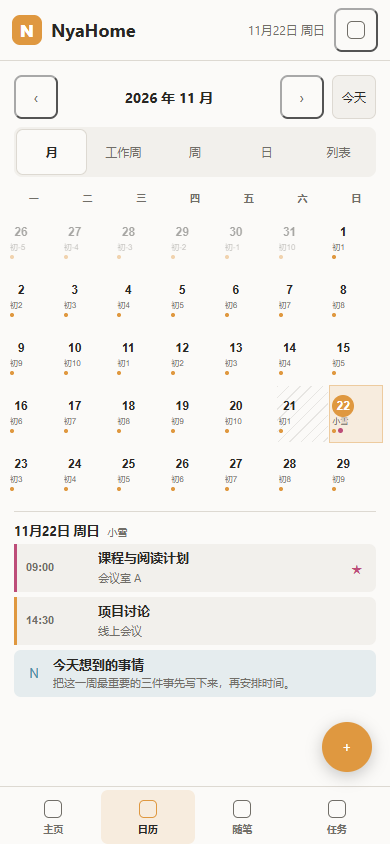
NyaHome Mobile is the small-screen companion to desktop NyaHome. It turns a vault into a focused local planner without loading the desktop mail, market, reader or translation stack.
Features
- Month, work-week, week, day and agenda views for a local
.icscalendar. - Create, edit, complete and delete local events.
- Sketch notes with auto-save and text strikethrough.
- Mobile task-board view over ordinary
obsidian-kanbanMarkdown files. - Home dashboard with today's schedule, upcoming events, sketches and open tasks.
- Chinese lunar dates and China rest-day marking.
- Mobile-first bottom navigation, touch-sized controls and bottom sheets.
- Shared vault files for folder-sync tools such as Nutstore.
Shared files
NyaHome Mobile intentionally keeps planning data in ordinary vault files:
Calendar/Local.icsstores local events.NyaHomeData/workspace.jsonstores sketches, event stars and shared planner metadata.Boards/*.mdstores task boards in the same format as desktop NyaHome.
Do not put IMAP credentials, translation keys or other desktop secrets in the shared workspace file. This plugin does not contain mail, market, reader or translation features.
Installation
Install NyaHome Mobile from the community plugin directory, or copy main.js, manifest.json and styles.css into .obsidian/plugins/nyahome-mobile/ and enable it in Settings → Community plugins.
Desktop and mobile can be installed together. They use separate plugin IDs but read and write the same calendar, sketch, star and task-board files.
Development
npm install
npm test
npm run build
The production bundle depends only on Obsidian's API and the pure TypeScript dependencies bundled into main.js. It does not use Node networking, shell execution, filesystem access outside the vault, or desktop-only Electron APIs.
License
MIT
For plugin developers
Search results and similarity scores are powered by semantic analysis of your plugin's README. If your plugin isn't appearing for searches you'd expect, try updating your README to clearly describe your plugin's purpose, features, and use cases.