Asciimath
approvedby widcardw
Add asciimath support.
Obsidian Asciimath
A handy plugin that integrates with default Obsidian math, bringing AsciiMath power to your vault.
Table of contents
[!IMPORTANT] Follow link below if you keep getting depreciation warning from the plugin
Updating notes created with plugin version 0.6.3 and lower
Install
- (Recommended) Goto Obsidian plugin market, search for
obsidian-asciimathand install it. - (Manually) Goto the release page, download the zip, unzip it and add it to your plugins folder.
Advantages
AsciiMath has simpler syntax compared to LaTeX, which is the default math language for Obsidian. With this plugin, you can easily bring power of AsciiMath to your vault, as well as speed up process of math editing.
[!NOTE] Some of the rules are not exactly consistent with http://asciimath.org, especially the matrix. For more information, please refer to https://asciimath.widcard.win.
Features
Obsidian AsciiMath ships with set of features that will help to get more productive when writing math in Obsidian.
Dollar-sign math integration
This plugin integrates with Obsidian's dollar-sign math blocks. It is fully compatible with your previous notes written in LaTeX.
Just start writing AsciiMath as you would write LaTeX formulas and enjoy simpler syntax.
Examples
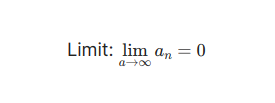
Inline math:
$lim_(a->oo) a_n = 0$
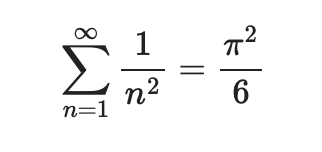
Display-style math:
$$
sum_(n=1)^oo 1/n^2 = pi^2/6
$$
Code-block math
If you do not want to use dollar-sign math blocks, you can use code-block for AsciiMath.
This will be rendered the same as double dollar sign blocks.
```am (or asciimath)
sum_(n=1)^oo 1/n^2 = pi^2/6
```
[!NOTE] Inline math is only available via dollar-sign blocks.
Commands
The plugin ships with some handy commands for you:
Select and insert AsciiMath symbol
How to use
- Hit
Ctrl + P - Search for
Insert AsciiMath symbol - Hit Enter
- Search for desired symbol
- Select it & hit enter.
[!Note] Pro tip: You can assign a hotkey for this command to do this faster. My personal preference is
Ctrl + M
Insert asciimath codeblock.
This will insert code block around current selection.
Convertion to LaTeX
- Convert AsciiMath into LaTeX in current file.
- Convert AsciiMath into LaTeX in the entire vault.
Notes update commands
- Update asciimath blocks to new syntax in current file.
- Update asciimath blocks to new syntax in the entire vault.
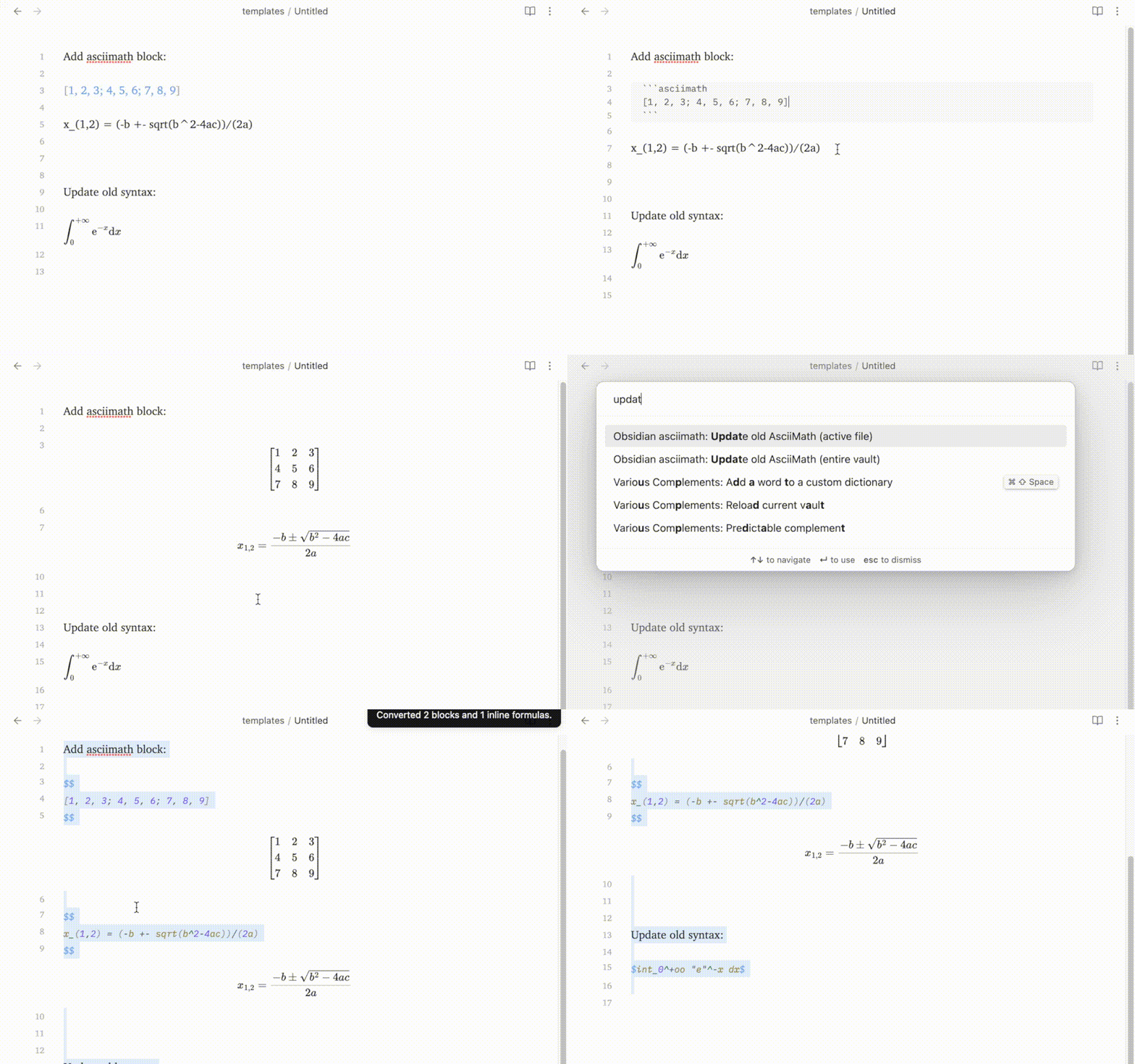
Click to see showcase for all of the commands above
Updating old notes
In previous versions of the plugin users had to use special syntax for inline math. This feature is deprecated and will be removed in the future.
Note: default code blocks with three backticks will be supported as usual.
New syntax integrates with default Obsidian math blocks (dollar-sign blocks), which fully compatible when using both LaTeX and AsciiMath.
From now on, you should create inline blocks like this:
++ $<my_ascii_math>$
instead of
-- `$ <my_ascii_math> $`
For more on new syntax, refer to this section
To prepare your notes for the newer version of the plugin, you must convert your old AsciiMath notes to new syntax. This can be easily done with plugin commands:
- Hit
Ctrl + Pto open up command pallet. - Search for "Update old AsciiMath". Choose one of the two available commands by the "obsidian-asciimath" plugin.
- Confirm the changes.
- You're good to go!
Development
git clone git@github.com:widcardw/obsidian-asciimath.git
pnpm i
pnpm run dev
Support
During my use, this plugin often causes Obsidian rendering problems (especially in live preview mode). If you are interested in helping me to improve it, please feel free to give suggestions on github issues or pull requests. Thank you!
For plugin developers
Search results and similarity scores are powered by semantic analysis of your plugin's README. If your plugin isn't appearing for searches you'd expect, try updating your README to clearly describe your plugin's purpose, features, and use cases.