Binary File Manager
approvedby qawatake
Detect new binary files in the vault and create Markdown files with metadata.
Binary File Manager Plugin
This plugin detects new binary files in the vault and create markdown files with metadata.
By using metadata files, you can take advantage of the rich functionality provied by Obsidian such as
- full text search,
- tags and aliases,
- internal links, and so on.
For example, if you add tags to the metadata of an image file, then you can indirectly access the image file by tag-searching (and following an internal link in the metadata).
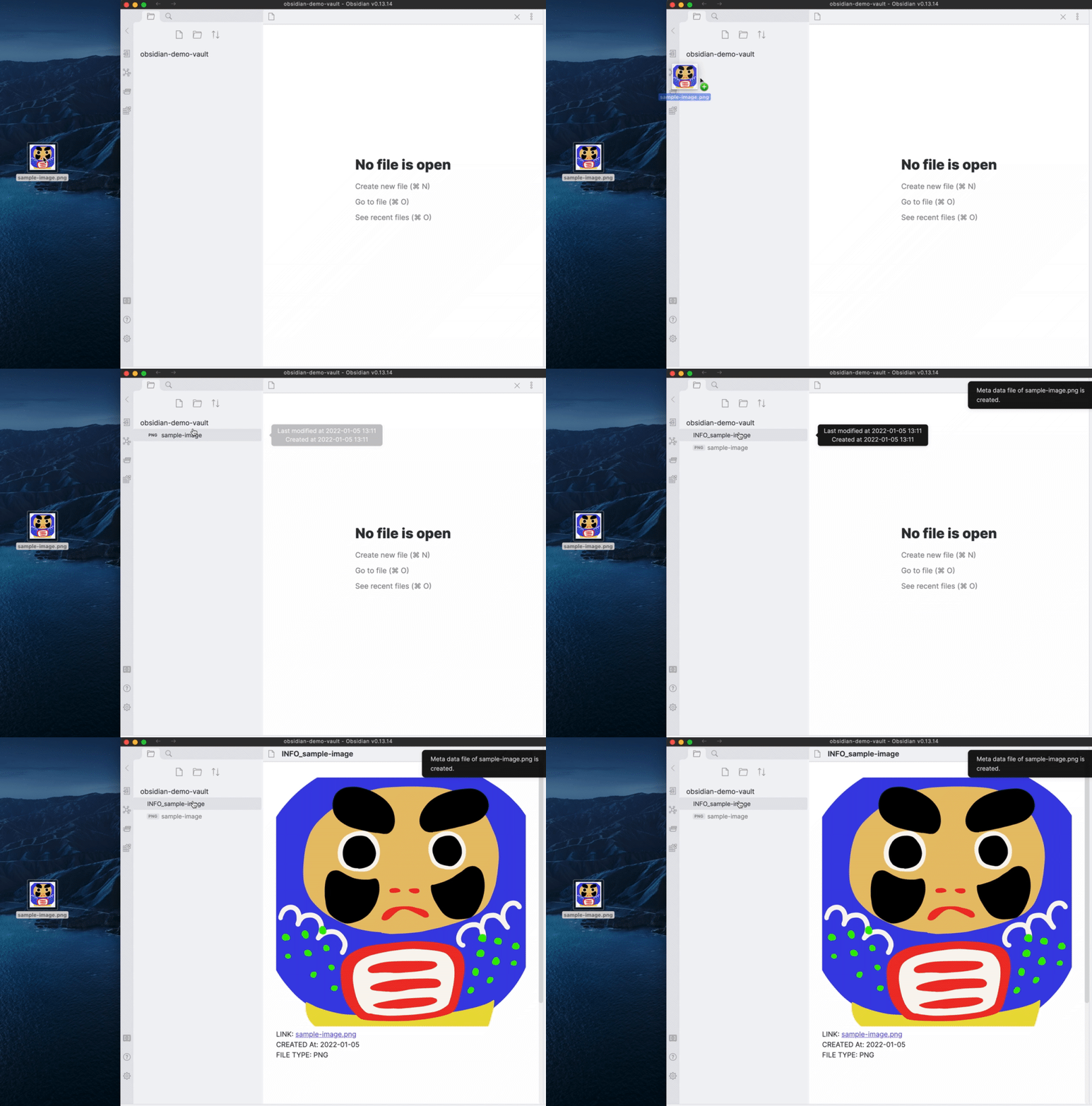
Quick start
- Install and enable this plugin.
- Go to the setting tab of Binary File Manager and enable auto detection.
- Add a static file like
sample.pdfto your vault.
Then you will find a meta data file INFO_sample_PDF.md in the root directory.
You can customize the new file location and the templates for names and contents of metadata files.
Format syntax
You can use the following syntax to format the names and contents of metadata files.
Date
| Syntax | Description |
|---|---|
{{CDATE:<FORMAT>}} | Creation time of the static file. |
{{NOW:<FORMAT>}} | Current time. |
- Replace
<FORMAT>by a Moment.js format.
Link
| Syntax | Description |
|---|---|
{{LINK}} | Internal link like [[image.png]] |
{{EMBED}} | Embedded link like ![[image.png]] |
Path
| Syntax | Description |
|---|---|
{{PATH}} | Path of a static file. |
{{FULLNAME}} | Name of a static file. |
{{NAME}} | Name of a static file with extension removed. |
{{EXTENSION}} | Extension of a static file. |
- You can choose between uppercase and lowercase letters by adding suffixes
:UPand:LOW, respectively. For example,{{NAME:UP}}.
Templater plugin support
You can also use Templater plugin to format your meta data files.
Just install Templater plugin and set Use Templater in the setting tab of Binary File Manager.
For plugin developers
Search results and similarity scores are powered by semantic analysis of your plugin's README. If your plugin isn't appearing for searches you'd expect, try updating your README to clearly describe your plugin's purpose, features, and use cases.