Filename Heading Sync
approvedby dvcrn
Keep the filename with the first heading of a file in sync.
Obsidian Filename Heading Sync
This is a Obsidian plugin to keep the filename and the first heading of a file in sync
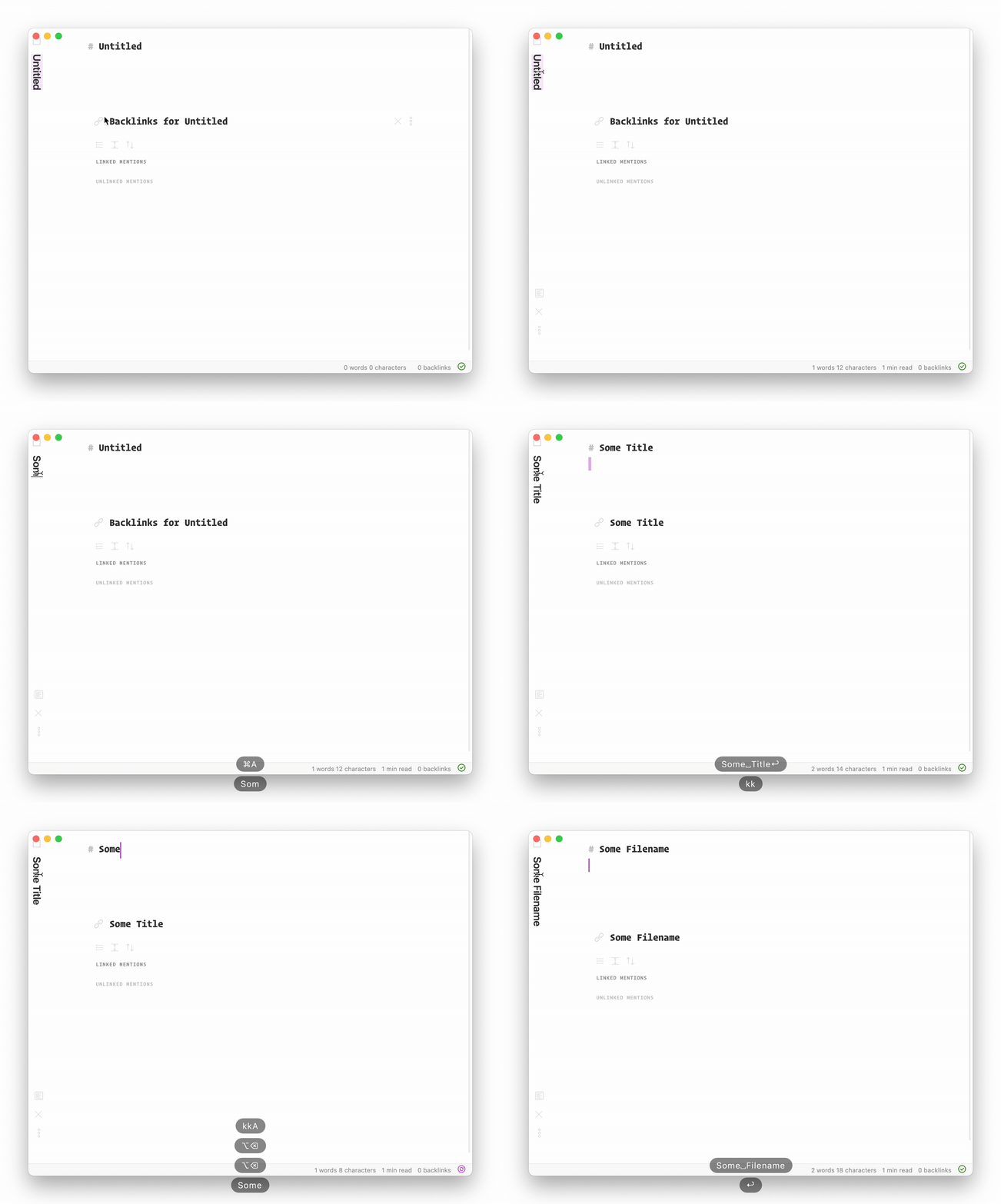
Note: This plugin will overwrite your first heading at the top of the file the moment you open it, so this can be considered destructive.
Discussion on the obsidian forum here
Features
- When renaming the current file -> will update the heading
- When opening a file that doesn't have a heading yet -> will insert one
- When opening a file with a different heading than the current file name -> will update the heading
- When updating the heading of a file -> will rename the file
If you're not a fan of automatic renaming you can also disable the "File Save Hook" and "File Open Hook" in settings and just use the manual sync commands (thanks @mnaoumov!)
This plugin conflicts with plugin X, how do I solve this?
-
First check if this is already solvable by adding a regex rule. For example if your file always ends in
myfile.foo.md(endingfoo), you can exclude this globally by adding the following regex rule in the plugins settings:.*\.foo\.md -
If that didn't do it, see if the other plugin acts on file-open. If it does, you can go into the settings of this plugin and disable the 'file open hook' as a workaround. (You can also fully disable automatic syncing by disabling 'file save hook' as well)
-
If this still didn't solve the issue, open a new issue with steps and examples how to reproduce the problem.
Conflict with 'templater'
Disable the file-open hook in settings and they should play together nicely (#40)
Current limitations and to do
- When renaming a file that isn't the current file, nothing will happen. The heading will get updated the next time the file is opened in edit mode
- Special characters that obsidian can't handle will get auto-stripped
Development
Building the plugin
To build the plugin for production:
mise run build
Watch mode with auto-sync to Obsidian
If you want to develop with automatic syncing to your Obsidian vault, you can set the OBSIDIAN_PLUGIN_PATH environment variable to point to your plugin directory:
export OBSIDIAN_PLUGIN_PATH="/path/to/your/vault/.obsidian/plugins/obsidian-filename-heading-sync"
mise run watch-sync
The watch build will automatically copy the compiled plugin files to your Obsidian vault whenever changes are detected.
LICENSE
MIT
For plugin developers
Search results and similarity scores are powered by semantic analysis of your plugin's README. If your plugin isn't appearing for searches you'd expect, try updating your README to clearly describe your plugin's purpose, features, and use cases.