Quran Lookup
approvedby abuibrahim2
Easily add Quran verses and translations.
بِسْمِ ٱللّٰهِ ٱلرَّحْمٰنِ ٱلرَّحِيْم
Obsidian Quran Lookup Plugin

This is a simple utility/text replacement plugin for Obsidian that fills in the quran ayaat (verses) based on a surah:verse(s) shorthand. This uses the 'current editor selection command' capability to replace the selected text with the lookup result.
It looks up based on Surah-Number:Ayah-Number or Surah-Name:Ayah-Number syntax. For the Surah-Name lookup it uses Fuse.js to do a "fuzzy search" since it's an english transliteration. It replaces that syntax with an Obsidian call-out showing verse+ayah name, arabic, and english.
How to Use:
- Open a Note in Obsidian.md
- In the note, type the
surah:verseas shown in the examples below - Select the recently typed text
- In the command panel (cmd+P or ctrl+P) select 'Retrieve Ayat' command
- Alternatively, you can assign a hotkey to the command (like cmd+shift+k)
Examples
- Single Ayah lookup
112:1

- Multiple Ayaat range
56:24-26

-
Fuzzy search surah title
Zumar:3-5Zomar:3Zumaar:6
-
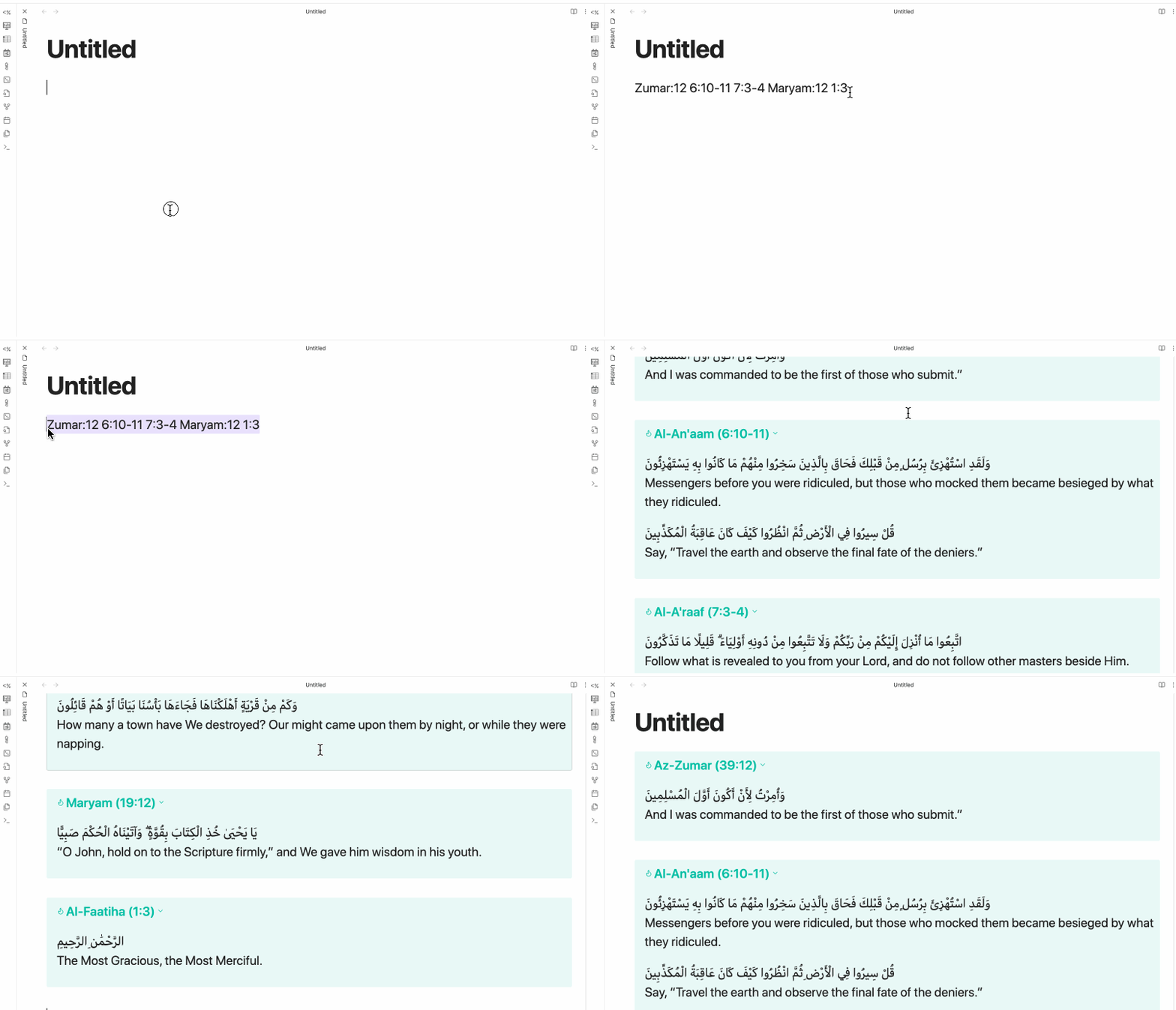
Chained together in single line (separated by spaces)
Zumar:12 6:10-11 7:3-4 Maryam:12 1:3
-
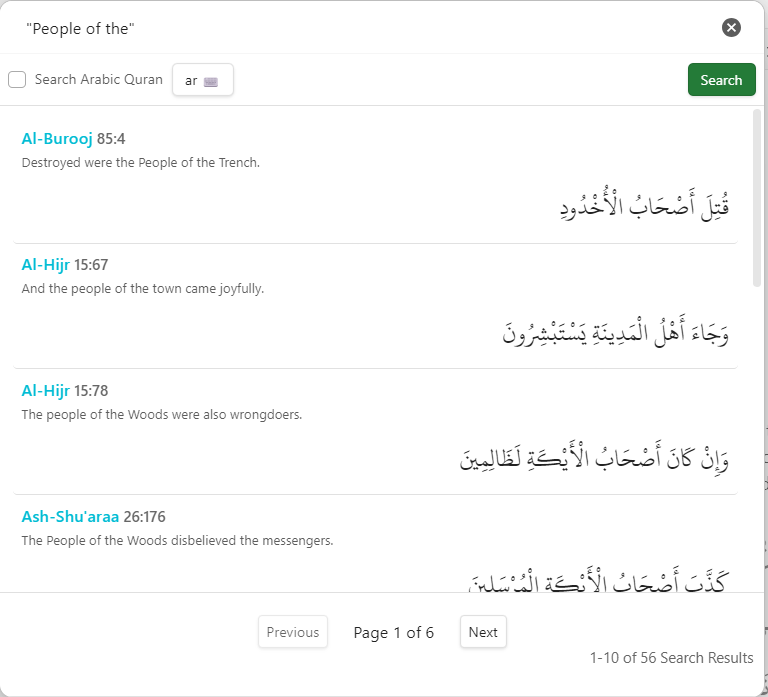
Searching for verses with a specific word or phrase in a translation
-
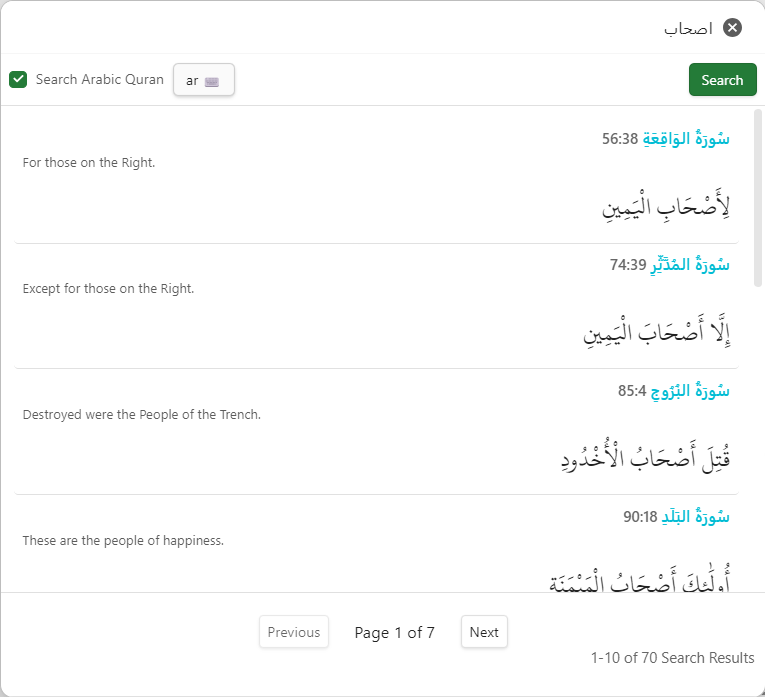
Searching for verses with a specific word or phrase in the Arabic text
-
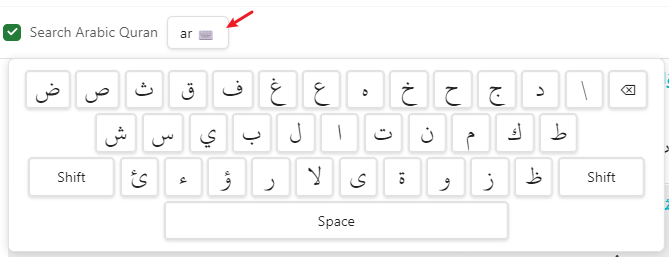
Using the draggable Arabic floating keyboard to insert Arabic text
New in Version 0.2
A few new features have been added in v0.2.
- The ability to hide or show the translation, useful for those who just want the arabic to be displayed
- All language and translator selection, now users can get any language and translation API provides. This removes the previous custom translator option as that exists now in the present options
- Arabic Styling Options with CSS so that the Arabic text can display using more appropriate font-family and font-size. This adds the choice for a few nicer looking arabic fonts, as well as font-size selection options
- Display Container types, text-only, markdown table, and additional Obsidian Callout customization
- Live Preview in the Settings screen so you can see what a setting change would look like in Obsidian
New in Version 0.3
- Support for Offline Mode for downloading and retrieving verses and translations from the locally downloaded full Quran & Translations
- Add a NEW command to search for a verse using search API (displaying results in a dialog) or Offline store and insert into note
- Added more arabic font options
- Added error notification for when'surah not found' or 'ayah' index out of range
Settings
This plugin has some customizations: in Community Plugins > Installed Plugins > QuranLookup (Options)
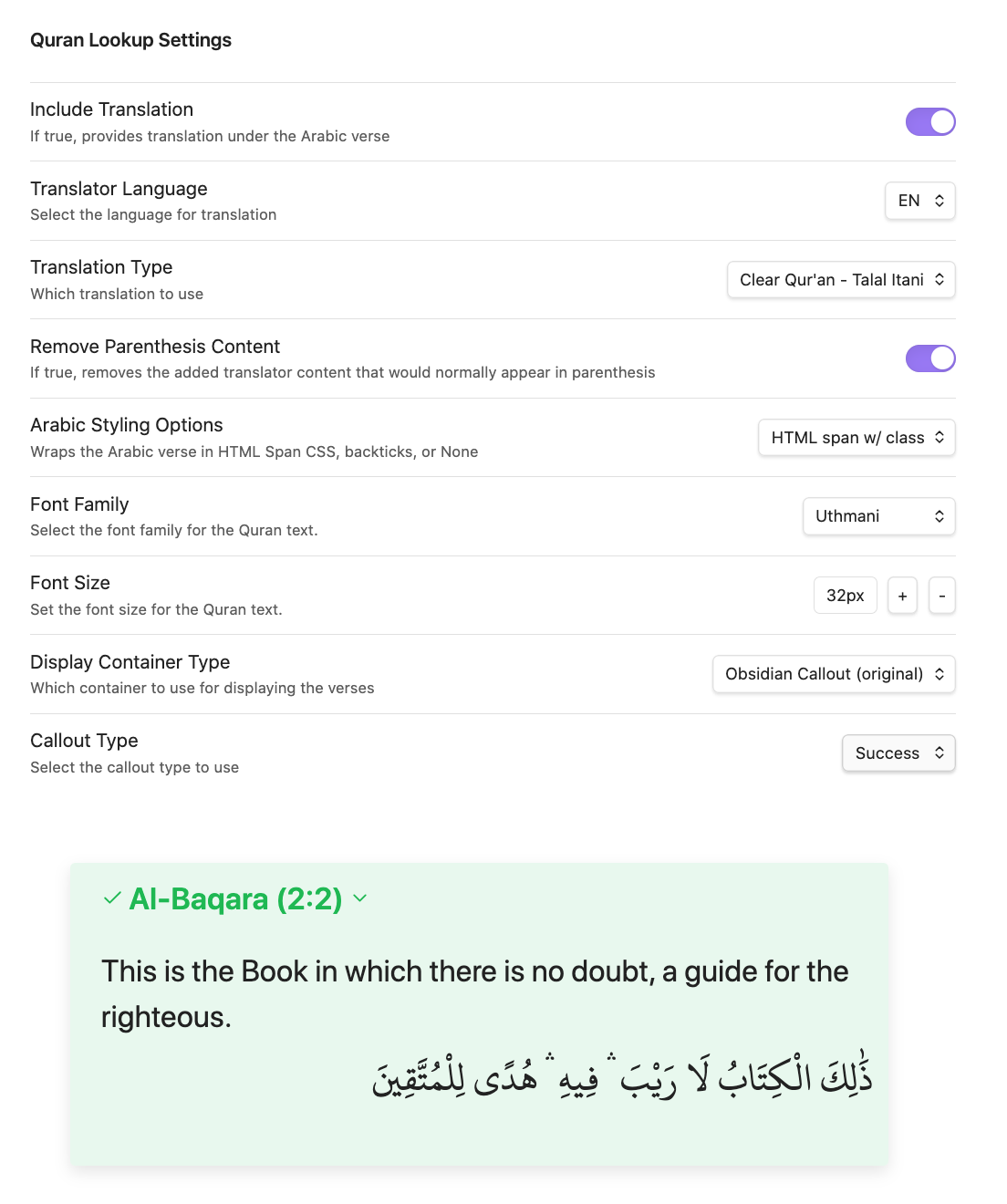
Translator languages and Translation Types
- You can choose from a variety of languages, and translators based on the API language selections:
| Code | Language | Translators |
|---|---|---|
| EN | ENGLISH | Ahmed Ali, Ahmed Raza Khan, Arberry, Asad, Daryabadi, Hilali & Khan, Pickthall, Qaribullah & Darwish, Saheeh International, Sarwar, Yusuf Ali, Maududi, Shakir, Transliteration, Ibrahim Walk, Clear Qur'an - Talal Itani, Mubarakpuri, Qarai, Wahiduddin Khan |
| FR | FRENCH | Hamidullah |
| DE | GERMAN | Abu Rida, Bubenheim & Elyas |
| AZ | AZERBAIJANI | Məmmədəliyev & Bünyadov, Musayev |
| BN | BENGALI | Muhiuddin Khan |
| CS | CZECH | Hrbek, Nykl |
| DV | DHIVEHI | Office of the President of Maldives |
| FA | FARSI | Ayati, Fooladvand, Elahi Ghomshei |
| HA | HAUSA | Gumi |
| HI | HINDI | Suhel Farooq Khan and Saifur Rahman Nadwi |
| ID | INDONESIAN | Bahasa Indonesia |
| IT | ITALIAN | Piccardo |
| JA | JAPANESE | Japanese |
| KO | KOREAN | Korean |
| KU | KURDISH | Burhan Muhammad-Amin |
| ML | MALAYALAM | Cheriyamundam Abdul Hameed and Kunhi Mohammed Parappoor |
| NL | DUTCH | Keyzer |
| NO | NORWEGIAN | Einar Berg |
| PL | POLISH | Bielawskiego |
| PT | PORTUGUESE | El-Hayek |
| RO | ROMANIAN | Grigore |
| RU | RUSSIAN | Kuliev, Osmanov, Porokhova |
| SD | SINDHI | Amroti |
| SO | SOMALI | Abduh |
| SQ | ALBANIAN | Sherif Ahmeti, Feti Mehdiu, Efendi Nahi |
| SV | SWEDISH | Bernström |
| SW | SWAHILI | Al-Barwani |
| TA | TAMIL | Jan Turst Foundation |
| TH | THAI | King Fahad Quran Complex |
| TR | TURKISH | Suleyman Ates, Ali Bulaç, Diyanet İşleri |
| TT | TATAR | Yakub Ibn Nugman |
| UG | UYGHUR | Muhammad Saleh |
| UR | URDU | Ahmed Ali, Fateh Muhammad Jalandhry, Syed Zeeshan Haider Jawadi |
| UZ | UZBEK | Muhammad Sodik Muhammad Yusuf |
Remove Parenthesis Contents
${🛑\ {\color{red}Experimental}}\ 🛑$
- Some translations provide additional commentary and explanation in parenthesis ( ) and brackets [ ] to give context and allow the translator the opportunity to explain a nuanced, complex term. While this is useful at times, it makes the text very verbose and breaks the flow for the reader. With the toggle enabled, this plugin removes that additional text so that the translation is succinct like the arabic.
- See example below:
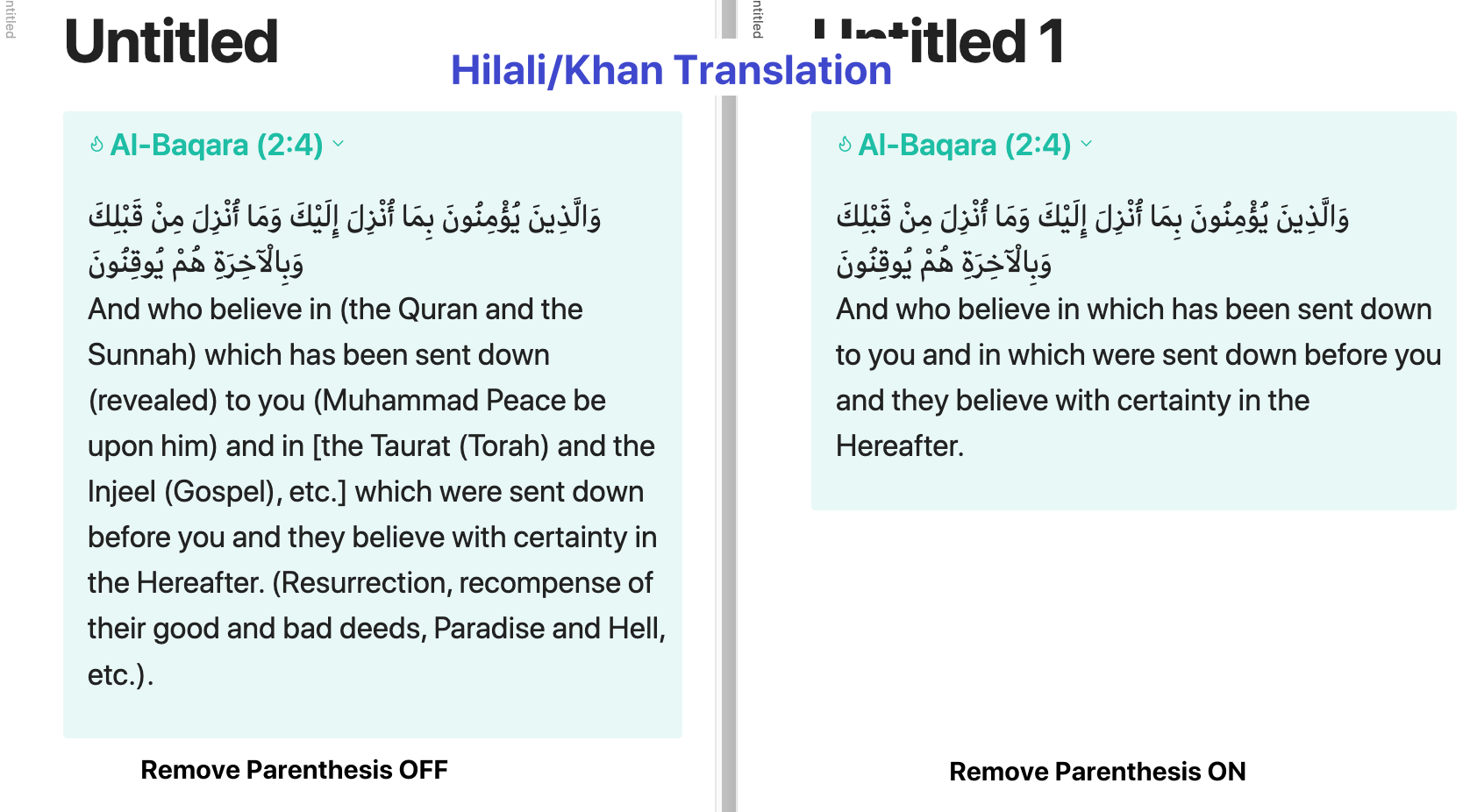
- NOTE: This is experimental and while I have tried to test it, it may not work 100% all the time so extra eyes QA'ing it are appreciated!
Arabic Styling Options
Wrap Quran Arabic in HTML Span, Code Snippet, None
- I wanted to use customized fonts and custom CSS for the Arabic script because the default isn't as appealing and I like the Arabic font larger to be easier to read.
My options were to embed these settings in a CSS file and either:
A. Wrap the Arabic text in an explicit class assignment like
arText = `<span class="quran-arabic">${arText}</span>`
This applies the styling however puts html code in with the text which gets in the way when selecting orediting or copying
B. Override/Repurpose markdown functionality to apply the class, for example, the backtick "`" for code, like
arText = "`" + arText + "`"; // Wrap in backticks if the setting is enabled
This applies the styling with minimal impact to selecting or copying the text, however it does override the code styling so any code markdown you have will now have this same CSS styling applied to it. Not an issue if you don't typically use backticks code.
C. None No application of custom tags or styling in the Arabic script (you like the default font or you are applying the font you prefer in the way you like)
Display Container Type
The previous version only had one display option which was the (usually green colored) Obsidian TIP Callout. For info on Obsidian callouts you can refer to this documentation.
I've added more customization to the Obsidian Callout display type as well as two more display options: Text Only, and Markdown Table
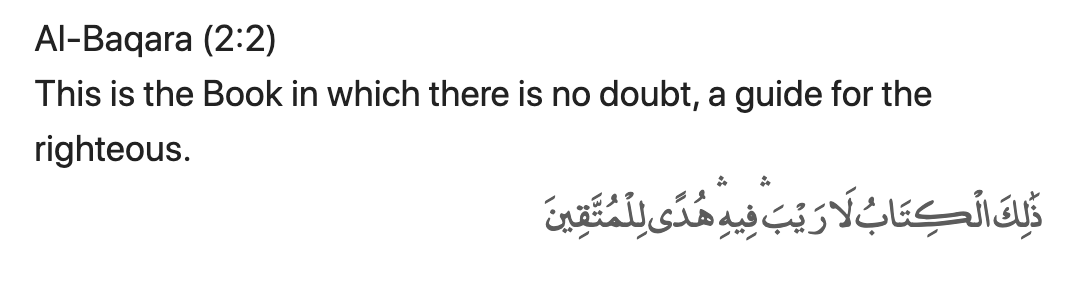
Text Only (NEW)
Self explanatory, this would only output the text of the translation and verse without additional markdown wrappigns
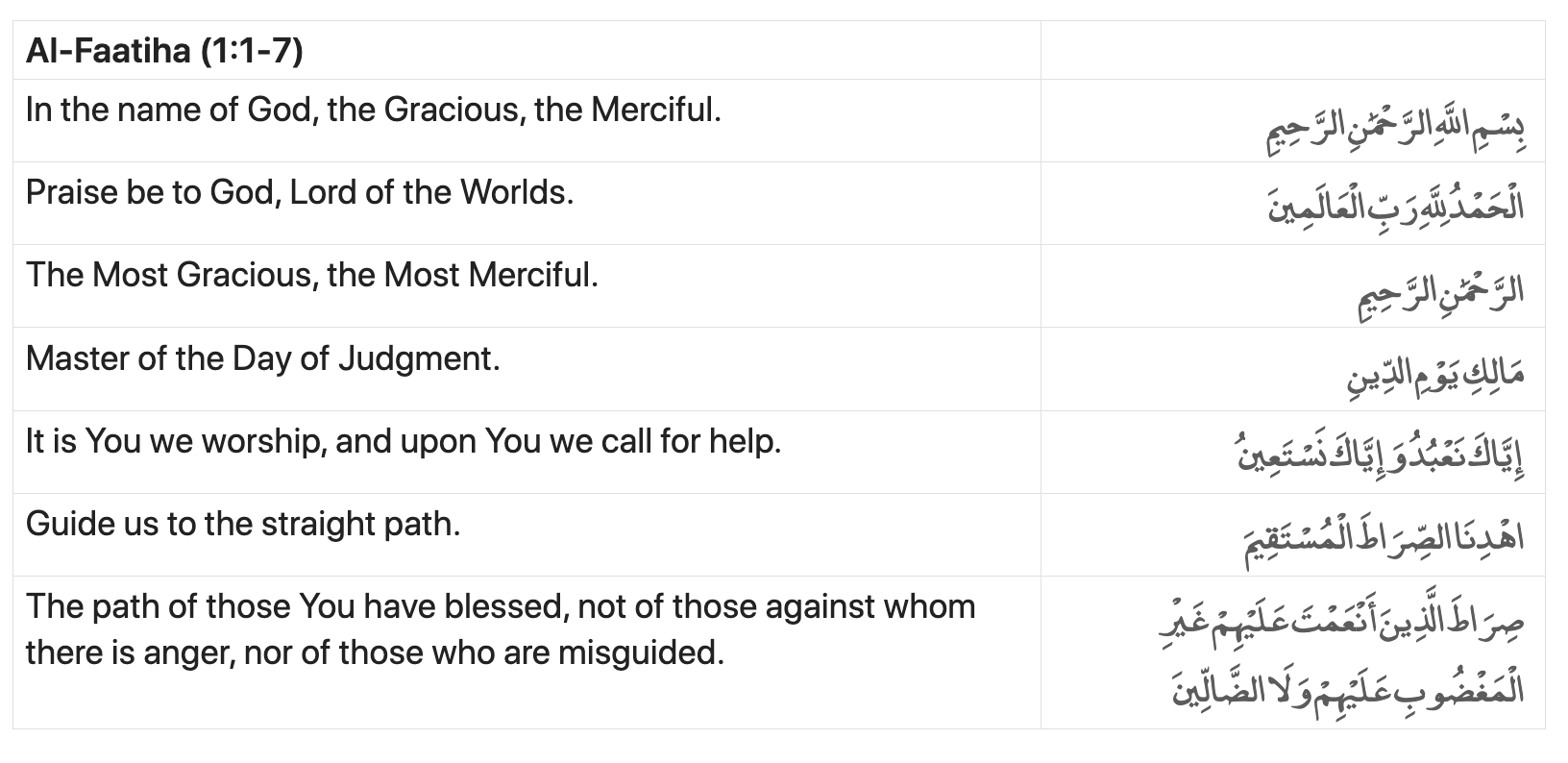
Markdown Table (NEW)
This pastes the verse or verses in a Markdown Table view with the arabic verse on the right column and the translation on the left.
Obsidian Callout
Encapsulates the verse in an obsidian callout like previously except this time an additional setting will appear that will allow you to choose which Callout type to apply any of the various Callout Types that obsidian supports. For more information see: Obsidian Callouts
Live Preview
Now there is a Live Preview shown at the bottom of the Settings Page so you can see how your selections will look when applied on your page.
Offline Mode
If true, the plugin downloads the Quran and selected translation at onces and uses that data for subsequent retrieval and search requests. If false, the plugin uses the API to retrieve data for Quran verses
Attributions
The Quran API and Source(s)
The Quran verses are retrieved from
- alquran.cloud : An opensource Quran API made by the Islamic Network (github) and respective contributors.
Fuzzy Search
The Fuzzy search feature is made possible using
How to use
- Install & enable the plugin (see section below )
- Select the ayah reference string in your note
- Use the command palette or a hotkey to apply the replace command
How it works
The lookup uses api.alquran.cloud API to lookup the verses by surah and verse number For the fuzzy name search, it uses a simple index file surahSlim.json and fuse.js to find the closest sura name and retrieve it's index number.
Future Feature Ideas (logged in project Issues)
- Add error notification for 'surah not found' or 'ayah index out of range' (currently doesn't do anything if invalid string is attempted to be upon)
- Show the translator name in the settings
- Toggle Display of verses callout sections: e.g. show Arabic Only, Translation Only
- Right-To-Left alignment for Arabic text
- Support display of alternate arabic fonts
- Add support for translations in other languages
- Allow for customization of the Call-out style in the settings (e.g. abstract, info, note, success, question, warning, failure, danger, bug, example, quote, custom, none)
- Give option to show dialog with preview and style options each time (like the Admonition plugins 'Insert Admonition' dialog)
- Add option to toggle to use 'Admonition' style syntax instead of obsidian call-out style
- Provide external links to ayah in websites like quran.com
- Add "Offline Mode" option which downloads and retrieves verses and translations from the locally saved vault rather than calling API
- Add command to search for an ayah using search API (displaying results in a dialog)
- Add audio playback capabilities to playback the verse
- Other ideas?... feel free to suggest!
Manually installing the plugin
- Copy over
main.js,styles.css,manifest.jsonto your vaultVaultFolder/.obsidian/plugins/quranlookup/. - Reload Obsidian to load the new version of your plugin.
- Enable plugin in settings window.
How to Contribute
I'm one person who just quickly put this together because I wanted this capability in my notes. This is still in need of much refactoring and improvement.
Similar Projects
- Obsidian Quran Vault
- Obsidian Bible Reference - Notable mention, I styled this readme doc after theirs.
For plugin developers
Search results and similarity scores are powered by semantic analysis of your plugin's README. If your plugin isn't appearing for searches you'd expect, try updating your README to clearly describe your plugin's purpose, features, and use cases.