Task Marker
approvedby wenlzhang
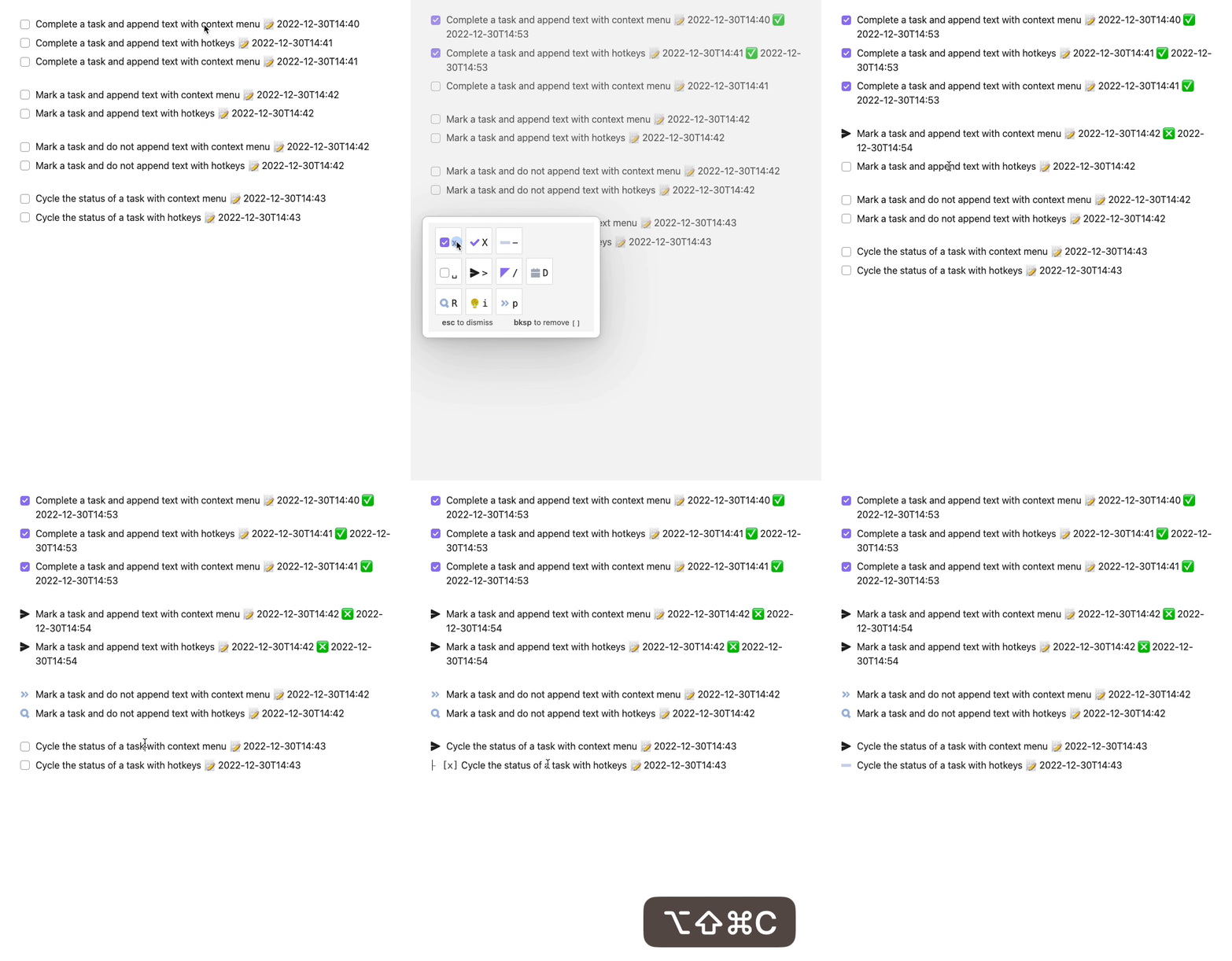
Change task status and append text with hotkeys and context menu. Create, complete, cancel and mark tasks, cycle among configured task statuses, and append text (automatically).
Task Marker


An Obsidian plugin to change task status and append text with hotkeys and right-click context menu.
Why You Need Task Marker
Task management in Obsidian can be challenging when tasks of varying statuses—such as open, completed, or transferred—are scattered throughout extensive notes like meeting summaries. Recognizing this need, we created Task Marker, guided by two essential PTKM Core Principles:
- Task-Centered Workflow: Prioritizing efficient task management
- Focus on Important Matters: Helping users concentrate on what truly matters
The Challenge
When dealing with lengthy notes filled with numerous list items, key information can easily get lost in the clutter. Consider meeting notes, where ideas, questions, action points, and follow-ups often blend into a single, overwhelming document. Without clear differentiation, finding relevant tasks during reviews becomes time-consuming and error-prone.
The Solution
Task Marker was developed to tackle this challenge head-on by allowing users to assign distinct statuses to tasks directly within their notes. Important items can be marked and highlighted, making it easy to spot critical elements like action points, ideas, questions, pros, and cons at a glance.
Through intuitive status cycling and customizable hotkeys, you can seamlessly update task states while focusing on what matters most. Moreover, every task status change is timestamped, enabling you to track when tasks were created, completed, or updated.
Given the importance of accurate time records, we also developed the [[Introducing Timestamp Link|Timestamp Link]] plugin, ensuring time-based task management is built right into your workflow.
With Task Marker, your tasks gain clarity, context, and focus—transforming task management in Obsidian from scattered lists into a streamlined, efficient process.
Documentation
Visit the documentation site to learn how to make the most of Task Marker in your Obsidian workflow.
Support & Community
This plugin is a labor of love, developed and maintained during my free time after work and on weekends. A lot of thought, energy, and care goes into making it reliable, user-friendly, and aligned with PTKM principles.
If you find this plugin valuable in your daily workflow, please consider supporting my work. Your support would mean the world to me and would help me dedicate more time and energy to:
- Developing new features
- Maintaining code quality
- Providing support and documentation
- Making the plugin even better for everyone
Ways to Support
You can support this project in several ways:
- ⭐ Star the project on GitHub
- 💝

- Sponsor my work on GitHub
- 💌 Share your success stories and feedback
- 📢 Spread the word about the plugin
- 🐛 Report issues to help improve the plugin
Thank you for being part of this journey! 🙏
For plugin developers
Search results and similarity scores are powered by semantic analysis of your plugin's README. If your plugin isn't appearing for searches you'd expect, try updating your README to clearly describe your plugin's purpose, features, and use cases.