Cluddle Callouts
pendingby 1ordinateur
Adds CSS-defined custom callouts to the editor right-click menu and colors callout options.
Cluddle Callouts
Cluddle Callouts is an Obsidian plugin that makes callouts easier to insert, switch, and discover while editing notes.
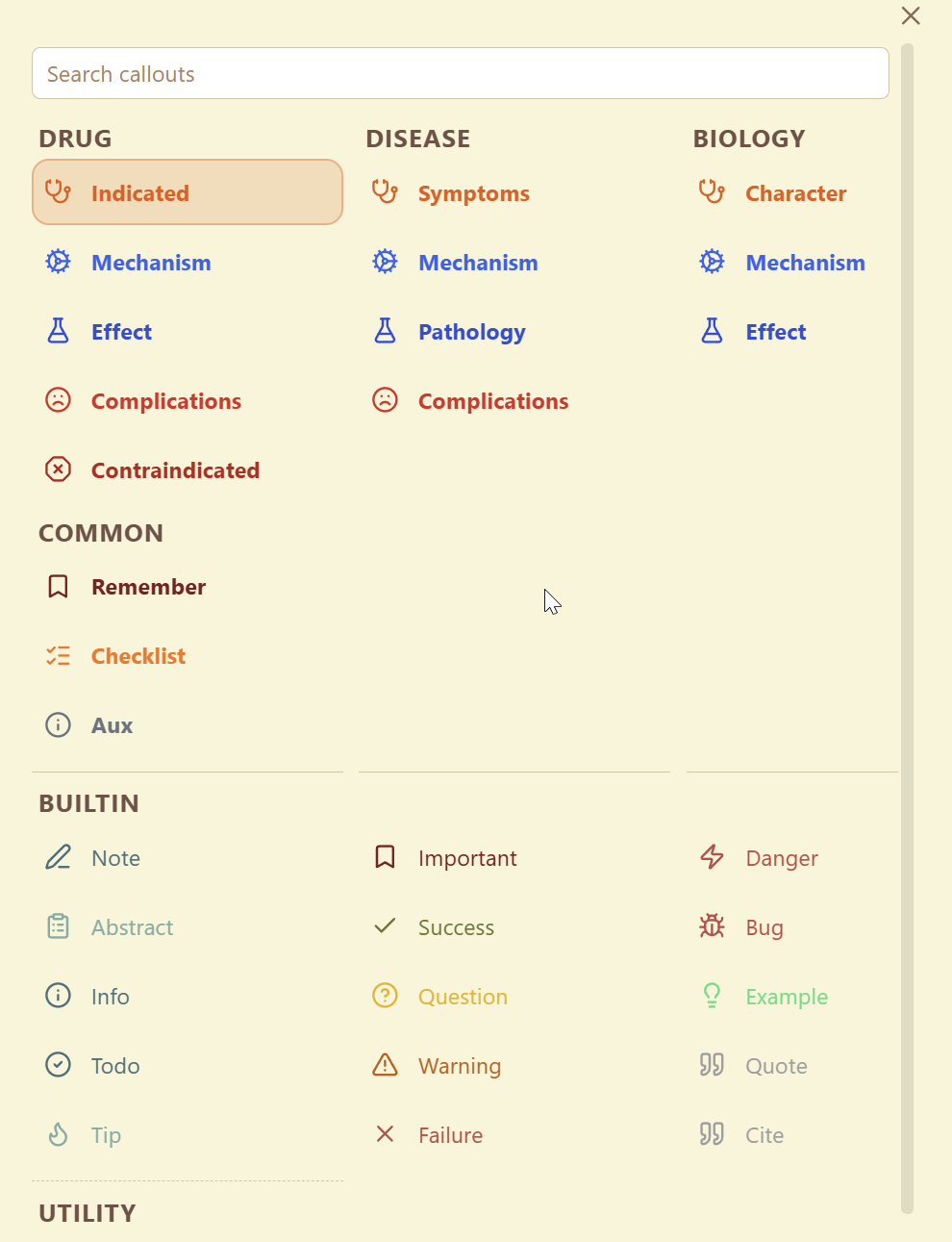
It adds a searchable callout picker to the editor right-click menu and provides a command to open the same picker from anywhere in Obsidian. The picker includes Obsidian's built-in callouts and also detects custom callouts defined by your enabled CSS snippets.
If you use a lot of custom callouts, this plugin saves you from remembering callout ids or manually rewriting block syntax. You can search, preview, insert, replace, and remove callouts from one place while staying in the editor.
Example
What This Plugin Does
- Inserts a new callout at the cursor
- Wraps the current selection in a callout
- Changes the type of an existing callout in place
- Removes a callout from the current block
- Lets you search across built-in and custom callouts from one picker
- Prefers custom callouts in search results when that setting is enabled
How To Use It
- Open a note in Obsidian.
- Right-click in the editor and choose the callout action, or run the
Open callout pickercommand. - Search for the callout you want.
- Use
ArrowUp,ArrowDown,ArrowLeft, andArrowRightto move around the picker if needed. - Press
Enterto apply the selected result, or click an item directly.
If your cursor is already inside a callout, the picker acts as a "change callout type" tool and also exposes a remove action from the editor context menu.
Custom Callouts
The plugin reads enabled CSS snippets from your vault's Obsidian config and looks for .callout[data-callout="..."] definitions. That means custom callouts can show up in the picker automatically without requiring a separate plugin-specific registry.
Here is a full example of a CSS snippet entry that this plugin can process:
.callout[data-callout="indicated"],
.callout[data-callout="recommended"] {
  --callout-color: 230, 126, 34;
  --callout-concept: drug-usage;
  --callout-groups: drug disease;
  --callout-group-drug: indicated;
  --callout-group-disease: symptoms;
}
With that snippet enabled in Obsidian:
indicatedis treated as the primary callout idrecommendedis treated as an alias for the same callout- the callout appears in the picker under the
druggroup asIndicated - the same underlying callout also appears under the
diseasegroup asSymptoms - the picker inherits the CSS callout color automatically
You can define additional groups with more --callout-group-<group-name> properties. The alias list for each group is whitespace- or comma-separated, and the first alias becomes the displayed picker entry for that group.
Settings
The plugin includes settings for:
- Whether custom callouts should rank above built-in ones in search
- Whether inserting a new callout should place the cursor on the next content line instead of the header line
- Whether the alternate insertion mode command should place the cursor on the next content line instead of the header line
There are also two commands you can bind in Obsidian Hotkeys:
Open callout pickerOpen callout picker (alternate insertion mode)
Disclosures
- Desktop only
- No network access
- No accounts, payments, ads, or telemetry
- Reads
.obsidian/appearance.jsonand enabled CSS snippet files from.obsidian/snippets/to discover custom callout definitions - Those files live in Obsidian's hidden config directory, so the plugin uses
Vault.configDirplus narrow read-only adapter access for that discovery path - Stores only its own settings in Obsidian's plugin data store
- Does not write to notes unless you choose a callout from the picker
What Ships
The plugin artifact loaded by Obsidian is:
manifest.jsonmain.jsstyles.css
Development
Source files live under src/. Build the runtime plugin artifact with:
npm install
npm run build
That bundles the source tree into the shipped main.js at the repository root.
Notes
- Release assets for Obsidian should contain only
manifest.json,main.js, andstyles.css - The picker layout and size are static in CSS so the plugin does not inject layout styling from JavaScript
- Hidden config-dir reads are isolated to a single helper because Obsidian does not expose enabled CSS snippets through the Vault API
- Desktop only
- No network access
- Reads local Obsidian appearance settings and enabled CSS snippets from the vault config directory
For plugin developers
Search results and similarity scores are powered by semantic analysis of your plugin's README. If your plugin isn't appearing for searches you'd expect, try updating your README to clearly describe your plugin's purpose, features, and use cases.