Recent Notes for Dataview
pendingby Fat Elephant aka Waghmare
Extract recently opened notes with help of dataview. Can exclude folders to prevent junk. 5-10 recent files can be shown in dataview table
🕐 Recent Notes for Dataview
An Obsidian plugin that tracks your recently opened notes and lets you display them anywhere using Dataview queries.


✨ Features
- 📋 Tracks recently opened notes automatically in the background
- 🔢 Configurable count — choose to show 5, 6, 7, 8, 9, or 10 recent notes
- 🚫 Folder exclusions — block entire folders (and their subfolders) from being tracked
- ⚡ DataviewJS integration — expose your recent notes to any Dataview query
- 💾 Persistent — recent notes survive Obsidian restarts
- 📱 Mobile compatible — works on Obsidian mobile too
📋 Requirements
🚀 Installation
From Community Plugins (Recommended)
- Open Obsidian → Settings → Community Plugins
- Disable Restricted Mode if prompted
- Click Browse and search for "Recent Notes for Dataview"
- Click Install, then Enable
Manual Installation
- Download
main.jsandmanifest.jsonfrom the latest release - Create the folder
.obsidian/plugins/recent-notes-dataview/in your vault - Place both files inside it
- Go to Settings → Community Plugins → hit Refresh → enable the plugin
🧩 Usage
Step 1 — Let the plugin track notes
Just open notes normally. Every .md file you open is silently added to your recent list (unless it's inside an excluded folder).
Step 2 — Paste the DataviewJS snippet
In any note (e.g. your Dashboard), create a dataviewjs block:
// ── Recent Notes (powered by Recent Notes for Dataview) ──
const rn = app.plugins.plugins["recent-notes-dataview"];
if (!rn) { dv.paragraph('⚠ Plugin not enabled.'); }
else {
  const files = rn.getRecentFiles();
  if (files.length === 0) {
    dv.paragraph("No recent notes yet — open a few notes first!");
  } else {
    dv.table(["Note", "Modified", "Folder"],
      files.map(f => [
        dv.fileLink(f.path),
        new Date(f.stat.mtime).toLocaleString(),
        f.parent?.path || "/"
      ])
    );
  }
}
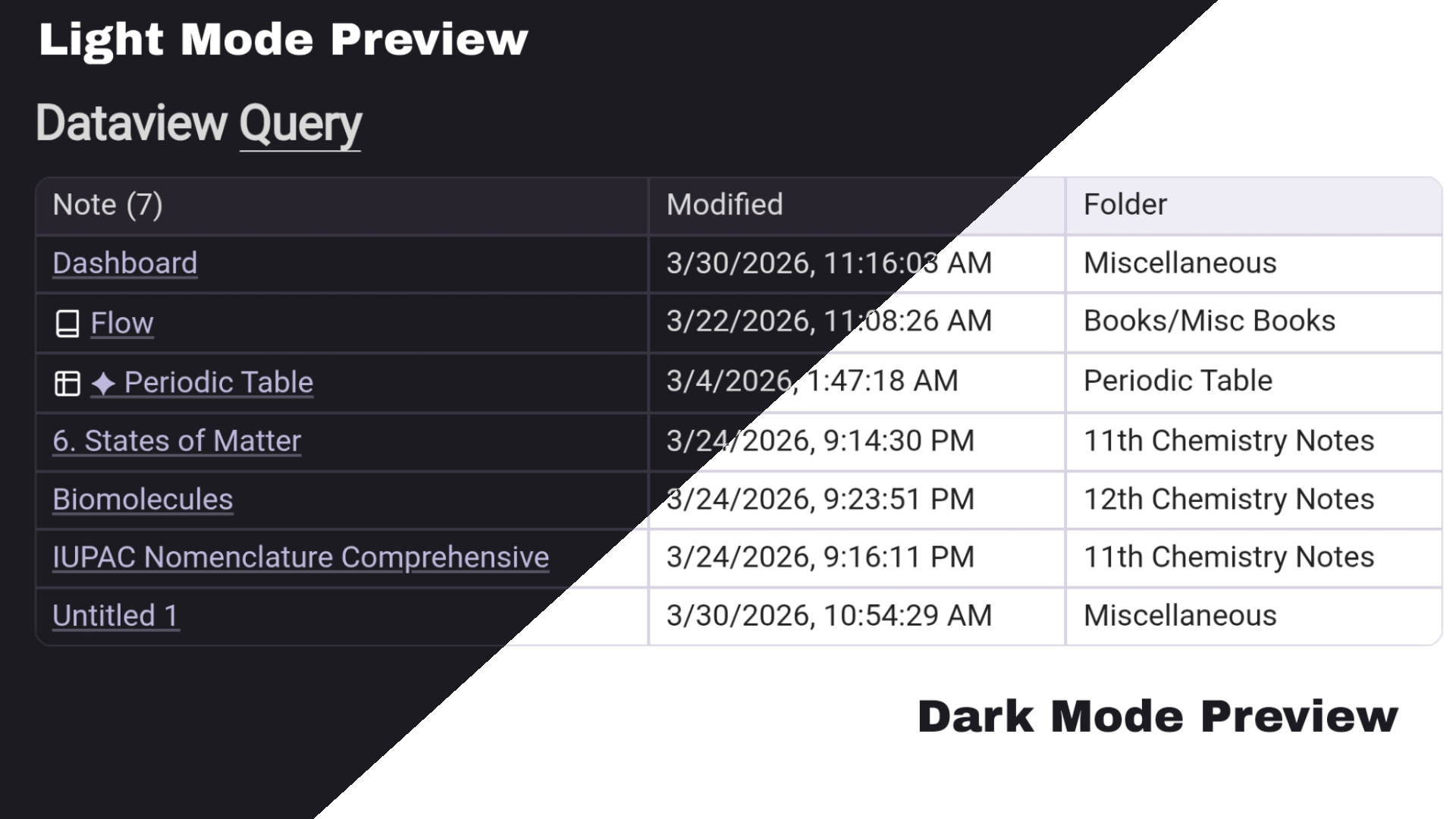
This renders a live table with clickable note links, last-modified timestamps, and folder paths.
💡 You can also copy this snippet directly from the plugin's Settings page.
⚙️ Settings
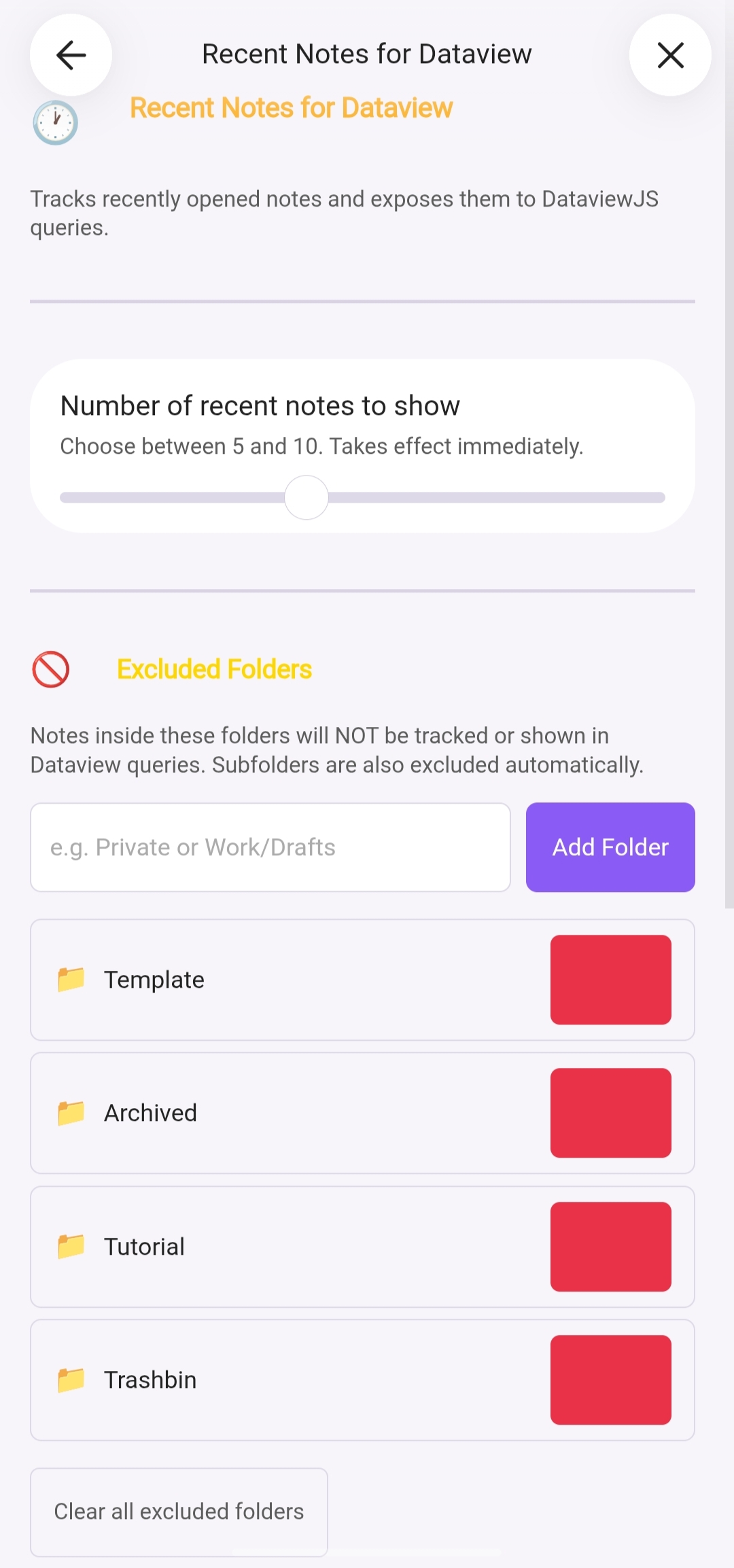
Navigate to Settings → Recent Notes for Dataview
| Setting | Description | Default |
|---|---|---|
| Number of recent notes | How many notes to show (slider 5–10) | 5 |
| Excluded Folders | Folders whose notes are never tracked | (none) |
Excluded Folders
- Type a path like
PrivateorWork/Draftsand click + Add Folder - Folder input autocompletes from your vault
- Subfolders are excluded automatically — adding
PrivateblocksPrivate/Journal/,Private/Archive/, etc. - Notes already tracked inside a newly excluded folder disappear immediately from Dataview output — no restart required
- Paths are case-sensitive on Mac/Linux
🖼 Screenshots
Dataview Table
Settings Page
🛠 Development
# Clone the repo
git clone https://github.com/bigelephant67/recent-notes-dataview
cd recent-notes-dataview

# Install dependencies
npm install

# Development mode (watches for changes)
npm run dev

# Production build
npm run build
Copy main.js and manifest.json into your vault's plugin folder to test.
🤝 Contributing
Pull requests and issues are welcome!
- 🐛 Bug reports → Open an issue
- 💡 Feature requests → Start a discussion
- 💬 Community chat → Discord
📄 License
MIT © Fat Elephant aka Waghmare
☕ Support
If this plugin saves you time, consider starring ⭐ the repo — it helps others find it!
For plugin developers
Search results and similarity scores are powered by semantic analysis of your plugin's README. If your plugin isn't appearing for searches you'd expect, try updating your README to clearly describe your plugin's purpose, features, and use cases.