Claude Sidebar
pendingby Derek Larson
Run Claude Code in your sidebar.
Claude Sidebar
Run Claude Code in your Obsidian sidebar.
Built by Derek Larson. Pair with commands →
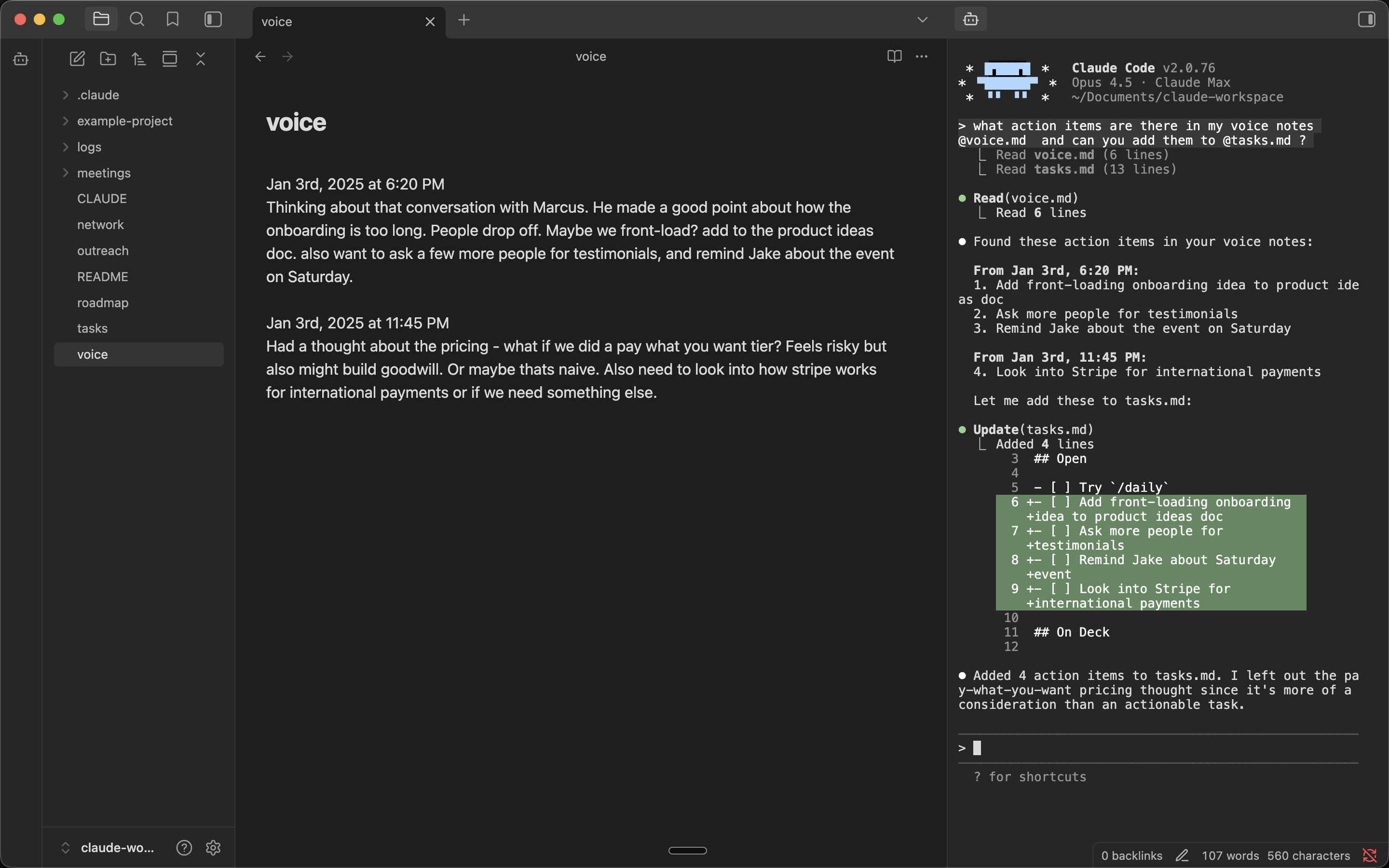
Features
- Embedded terminal - Full terminal in your Obsidian sidebar
- Auto-launches Claude - Claude Code starts automatically
- Multiple tabs - Run multiple Claude instances side by side
- Folder context menu - Right-click any folder to open Claude in that directory
- YOLO mode - Launch Claude with
--dangerously-skip-permissionsvia right-click menus - Multi-backend - Switch between Claude Code, Codex, OpenCode, and Gemini CLI in settings
Requirements
- macOS, Linux, or Windows
- Python 3
- Claude Code
Installation
Quick Install (Mac/Linux)
In your vault folder, run:
curl -sL https://github.com/derek-larson14/obsidian-claude-sidebar/archive/refs/heads/main.tar.gz | tar -xz -C .obsidian/plugins && mv .obsidian/plugins/obsidian-claude-sidebar-main .obsidian/plugins/claude-sidebar
Then in Obsidian: Settings → Community Plugins → Refresh → Enable "Claude Sidebar"
Windows: See Windows Setup below.
Manual Installation
- Download
main.js,manifest.json, andstyles.cssfrom the latest release - Create folder:
<your-vault>/.obsidian/plugins/claude-sidebar/ - Copy the downloaded files into that folder
- Reload Obsidian and enable the plugin in Settings → Community Plugins
BRAT (Auto-Updates)
- Install BRAT from Community Plugins
- In BRAT settings, click "Add Beta plugin"
- Enter:
derek-larson14/obsidian-claude-sidebar - Enable "Claude Sidebar" in Settings → Community Plugins
BRAT handles updates automatically when new releases are published.
From Community Plugins
Once approved, you'll be able to search for "Claude Sidebar" in Community Plugins → Browse.
Updating
Paste into a Claude Code session from your vault:
Update the Claude Sidebar plugin. Download main.js, manifest.json, and styles.css from https://github.com/derek-larson14/obsidian-claude-sidebar/releases/latest/download/ into .obsidian/plugins/claude-sidebar/. Tell me the old and new version numbers.
Manual
In your vault folder, run:
cd .obsidian/plugins/claude-sidebar
curl -LO https://github.com/derek-larson14/obsidian-claude-sidebar/releases/latest/download/main.js
curl -LO https://github.com/derek-larson14/obsidian-claude-sidebar/releases/latest/download/manifest.json
curl -LO https://github.com/derek-larson14/obsidian-claude-sidebar/releases/latest/download/styles.css
Then restart Obsidian or disable/re-enable the plugin.
Usage
https://github.com/user-attachments/assets/de98439a-8a1f-4a8a-9d02-44027d756462
- Click the bot icon in the left ribbon to open Claude
- Right-click the bot icon for YOLO mode, folder targeting, or resuming a conversation
- Right-click any folder for "Open Claude here" or "Open Claude here (YOLO)"
- Use Command Palette (
Cmd+P) for all commands:- Open Claude Code / New Claude Tab / Close Claude Tab
- Toggle Focus: Editor ↔ Claude - Quick switch between editor and Claude
- Run Claude from this folder - Start Claude in the active file's directory
- Resume last conversation - Pick up where you left off (
--continue) - Send File Path to Claude / Send Selection to Claude
- Press
Shift+Enterfor multi-line input - Set your own hotkeys in Settings → Hotkeys
Platform Support
| Platform | Status |
|---|---|
| macOS | ✅ Supported |
| Linux | ✅ Supported |
| Windows | ⚠️ Experimental |
Want to use it on iOS or Android? See Claude Anywhere.
Windows Setup (Experimental)
Windows requires additional dependencies:
- Install Python 3 from python.org
- Install pywinpty:
pip install pywinpty
- Install the plugin (run from your vault folder in PowerShell):
$u="https://github.com/derek-larson14/obsidian-claude-sidebar/archive/main.zip"; Invoke-WebRequest $u -OutFile s.zip; Expand-Archive s.zip .obsidian\plugins -Force; Move-Item ".obsidian\plugins\obsidian-claude-sidebar-main" ".obsidian\plugins\claude-sidebar" -Force; Remove-Item s.zip
- Then in Obsidian: Settings → Community Plugins → Refresh → Enable "Claude Sidebar"
Note: Windows support is experimental. Performance may be slower than macOS/Linux due to ConPTY overhead.
How It Works
- xterm.js for terminal emulation
- Python's built-in
ptymodule for pseudo-terminal support (macOS/Linux) - pywinpty for Windows PTY support
Development
The PTY scripts (terminal_pty.py for Unix, terminal_win.py for Windows) are embedded as base64 in main.js for Obsidian plugin directory compatibility. To rebuild after modifying:
./build.sh
Contributing
Issues and PRs welcome at github.com/derek-larson14/obsidian-claude-sidebar
License
MIT
For plugin developers
Search results and similarity scores are powered by semantic analysis of your plugin's README. If your plugin isn't appearing for searches you'd expect, try updating your README to clearly describe your plugin's purpose, features, and use cases.