Tab Link
pendingby Jon-Vii
Cursor-style ghost text autocomplete for linking to notes.
Tab Link


Ghost text autocomplete for wiki-links in Obsidian.
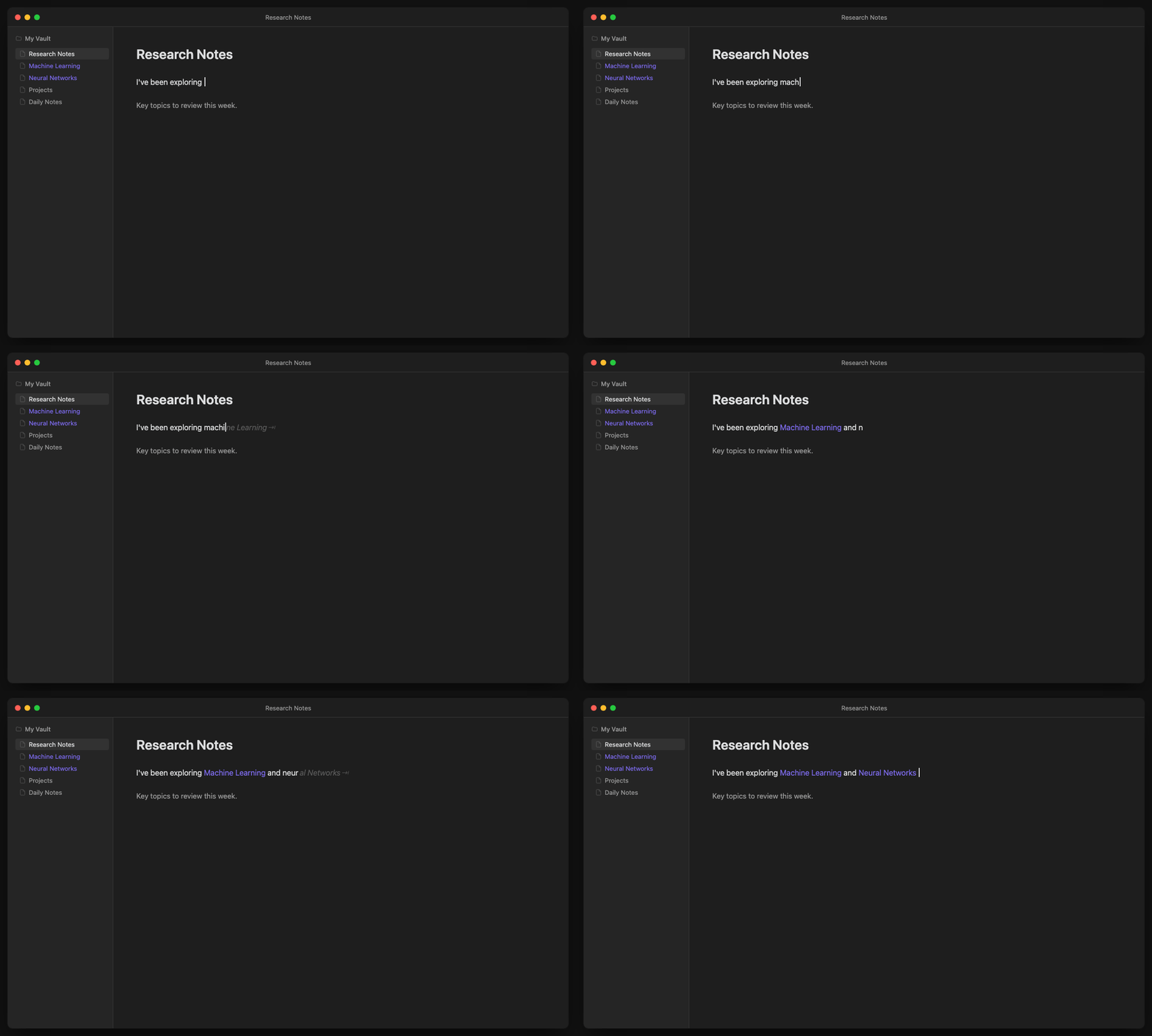
Type naturally. When you start typing a note name, ghost text appears inline. Press Tab to accept and create the link.
Features
- Ghost text, not popups — Non-intrusive inline suggestions that don't break your flow
- Tab to accept — Fast keyboard-driven workflow
- Smart context — Won't suggest inside existing links, code blocks, or frontmatter
- Frecency scoring — Ranks suggestions by frequency + recency of use
- Phrase matching — "mach learn" matches "Machine Learning"
- Alias support — Searches frontmatter aliases alongside note titles
- Auto-space — Optionally adds a space after accepting (configurable)
Installation
Using BRAT (recommended)
- Install BRAT from Community Plugins
- Open BRAT settings → Add Beta Plugin
- Enter:
Jon-Vii/obsidian-tab-link - Enable the plugin
Manual Installation
- Download the latest release from GitHub Releases
- Extract to
<vault>/.obsidian/plugins/obsidian-tab-link/ - Enable in Settings → Community Plugins
Usage
- Start typing text that matches a note name (5+ characters by default)
- Ghost text appears showing the suggested completion
- Press Tab to accept → creates the link
- Press Escape or keep typing to dismiss
| Key | Action |
|---|---|
Tab | Accept suggestion |
Escape | Dismiss suggestion |
Space | Dismiss and continue typing |
| Arrow keys | Dismiss suggestion |
Settings
| Setting | Default | Description |
|---|---|---|
| Enable ghost text | On | Toggle suggestions on/off |
| Auto-space after link | On | Add space after accepting a link |
| Minimum characters | 5 | Characters needed before suggestions appear (3-8) |
| Debounce delay | 150ms | Wait time after typing before showing suggestions |
| Excluded folders | — | Comma-separated folders to ignore |
How It Works
- Trie-based matching — O(k) prefix lookups where k = query length
- Frecency scoring — Recently and frequently linked notes rank higher
- Performance-conscious — Debounced updates, chunked indexing on startup
License
MIT
For plugin developers
Search results and similarity scores are powered by semantic analysis of your plugin's README. If your plugin isn't appearing for searches you'd expect, try updating your README to clearly describe your plugin's purpose, features, and use cases.