Chord Transposer
pendingby tunewriter
Automatically detect and transpose song chords in notes without needing special formatting.
Obsidian Chord Transposer
A minimalist, zero-friction chord transposer for Obsidian.
Chord Transposer automatically detects chord lines in your song lyrics and lets you transpose them instantly. No complex code blocks, no proprietary syntax, no lock-in. Just plain text. Works seamlessly across Desktop, Tablet, and Mobile.
✨ Why this plugin?
Most chord plugins require you to format your songs in specific code blocks (e.g., ```chords). This breaks the flow of writing and makes your notes look like code.
Chord Transposer is different:
- Plain Text First: It works on standard Markdown text. Copy-paste lyrics from the web, and it just works.
- Portable Data: When you transpose a song, the plugin updates the actual text in your file. If you open your file in another editor, the chords are still correct.
- Intuitive UI: Transpose controls appear automatically in the header, but only when chords are detected.
🚀 Features
- Automatic Detection: Uses a smart heuristic algorithm (RegEx + logical analysis) to identify lines containing chords versus lyrics.
- Live Syntax Highlighting: Instantly highlights recognized chords in your editor (CodeMirror 6 integration) without changing your theme.
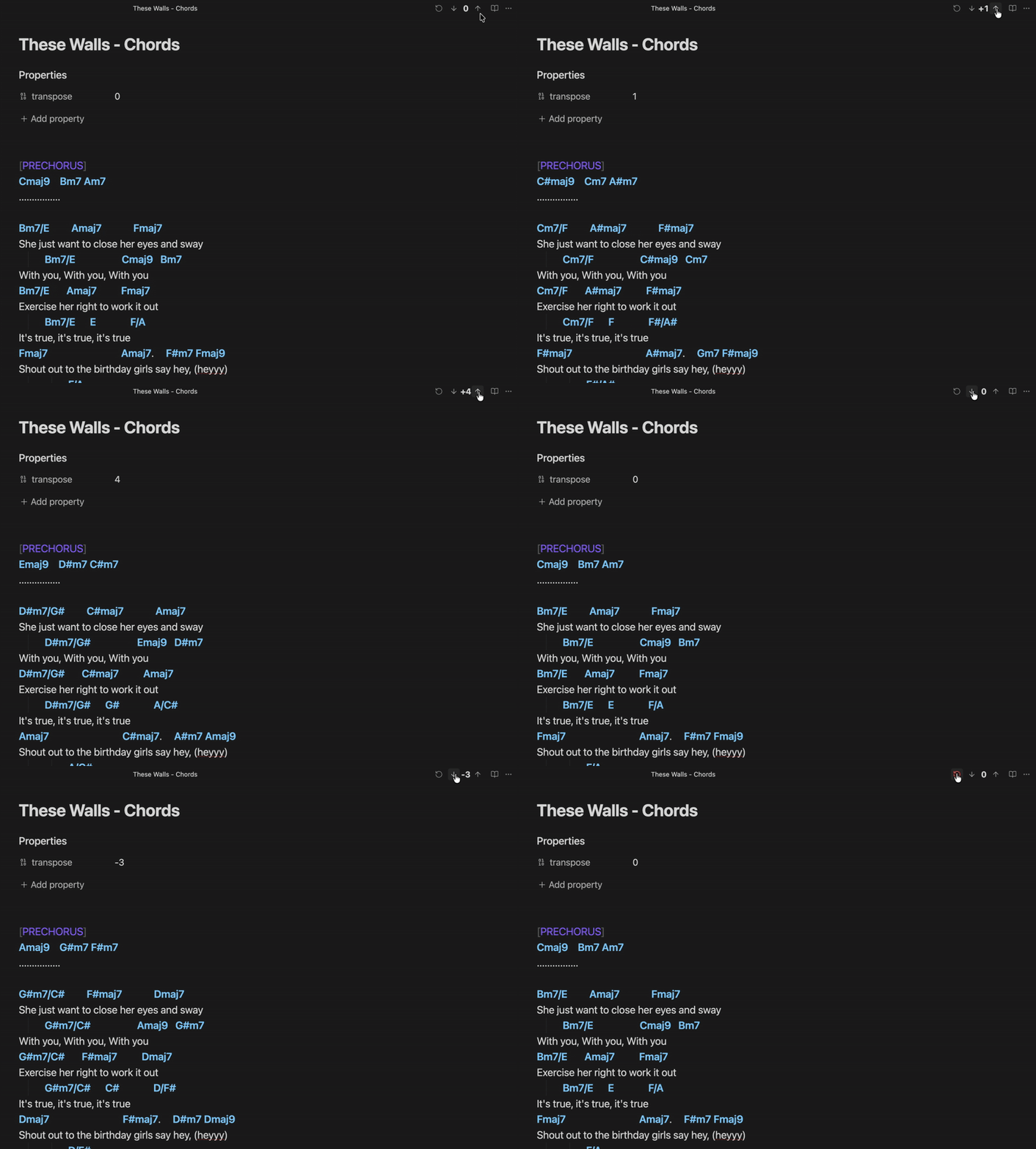
- One-Click Transposition: Transpose Up/Down semitones directly from the view header.
- Smart Parsing: Handles complex chords (
F#m7,D/F#) and ignores common English words that look like chords (e.g., "Face", "Bad"). - State Persistence: Remembers the transposition setting for each song by saving it in the file's Frontmatter (YAML).
- Octave Reset: Automatically resets the counter to 0 upon reaching +/- 12 semitones.
🛠️ Installation
Via BRAT (Recommended for Beta)
- Install the BRAT plugin from the Community Plugins browser.
- Open BRAT settings -> "Add Beta plugin".
- Paste the repository URL
Manual Installation
- Download
main.js,manifest.json, andstyles.cssfrom the latest Release. - Create a folder
obsidian-smart-chordsin your vault at.obsidian/plugins/. - Move the files into that folder.
- Reload Obsidian.
Obsidian Community
- After it got approved, directly install from Obsidian Community Plugins
🎮 Usage
- Open a note containing a song.
- That's it. The plugin scans the text.
- If chords are detected, a control widget appears in the top-right header:
- [↓]: Transpose down.
- [↑]: Transpose up.
- [↺]: Reset to original key (0).
- The current transposition value is saved in your file metadata:
---
transpose: 2
---
🧠 Logic & Recognition
The plugin uses a sophisticated "Strict Regex" approach to differentiate between music and text:
- Allowed: Standard chords (
Am,G7,F#m), Slash chords (D/F#), and extensions (6/9,maj7,dim). - Ignored: Common English words that resemble chords are automatically filtered out (e.g., "Aged", "Cafe", "Face", "Dad").
- Threshold: A line is considered a "Chord Line" if >40% of the tokens are recognized as valid musical chords.
💻 Development
This plugin was built using TypeScript and the Obsidian API.
- Clone the repository.
- Install dependencies:
npm install - Build:
npm run build
📄 License
MIT License. Feel free to fork, modify, and use it as you wish.
For plugin developers
Search results and similarity scores are powered by semantic analysis of your plugin's README. If your plugin isn't appearing for searches you'd expect, try updating your README to clearly describe your plugin's purpose, features, and use cases.