Person Network
approvedby oxilldat
Visualize the people in your vault as an interactive relationship map, with roles, filtering, potential contacts and Bases support. - This plugin has not been manually reviewed by Obsidian staff.
Person Network
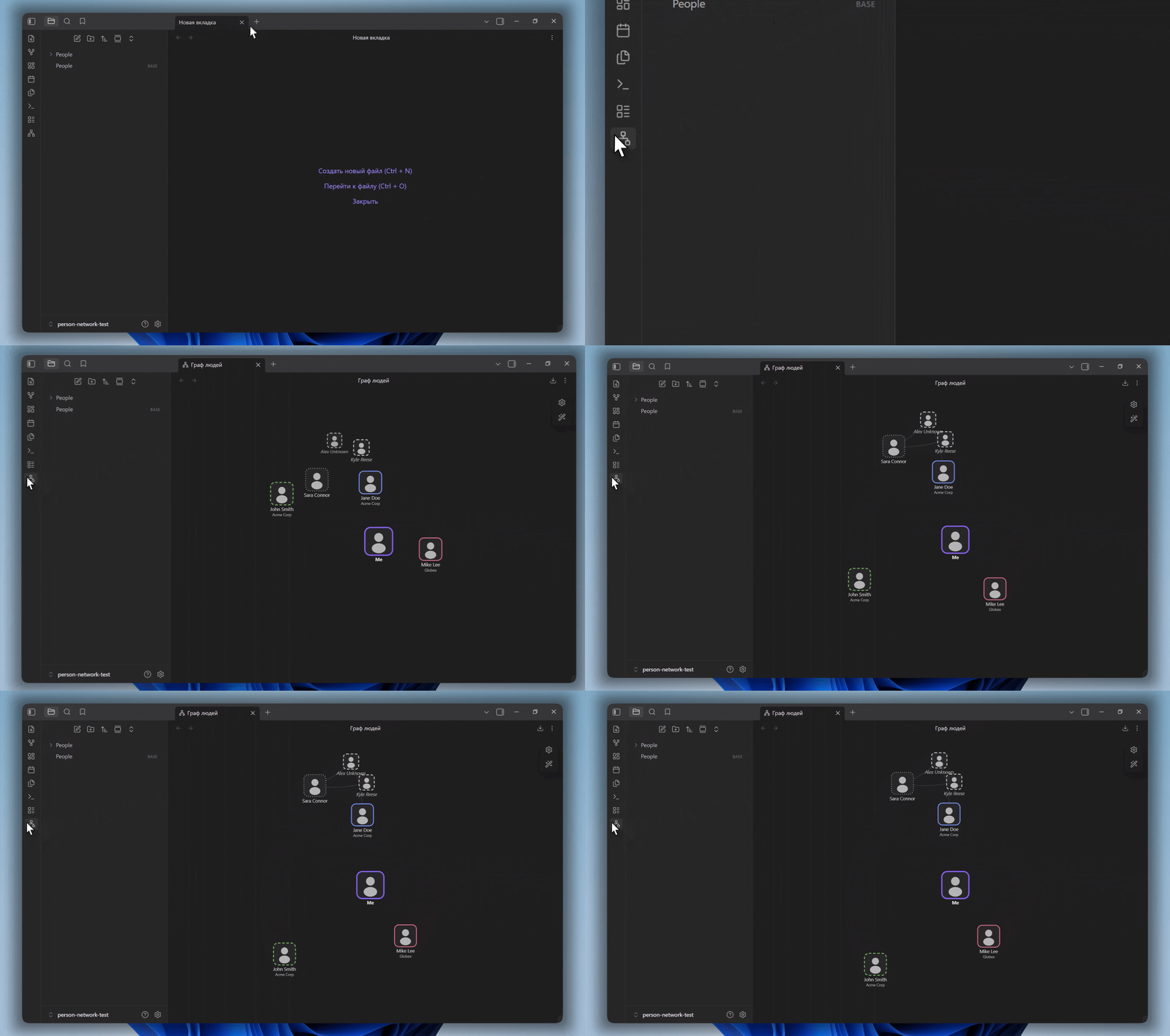
An Obsidian plugin that draws the people in your vault as an interactive, canvas-rendered relationship map. People are read from note frontmatter, positioned by a configurable role, connected by their listed contacts, and controlled through an in-graph panel modeled on Obsidian's own Graph view. The plugin can also run as a native view inside Bases.
Read this in another language: Русский
Features
- Canvas rendering with a dependency-free force simulation. The animation loop stops entirely once the layout settles, so an idle graph uses no CPU.
- People are detected by a single configurable tag. No separate index or data file is required; everything comes from note frontmatter.
- Roles map a relation value (for example friend, family, colleague) to a ring color, a ring stroke style (solid, dashed, dotted) and a position score from 1 to 10 that sets how close the person orbits the center.
- A center node represents you, taken from the note marked with
is_self, or a generic placeholder when none is marked. - Photos are drawn on nodes, decoded once and downscaled to save memory. A silhouette is shown when a photo is missing or fails to load.
- Photos keep their proportions. Right-click a person to choose the visible square with drag and zoom controls; the non-destructive framing is stored in plugin data.
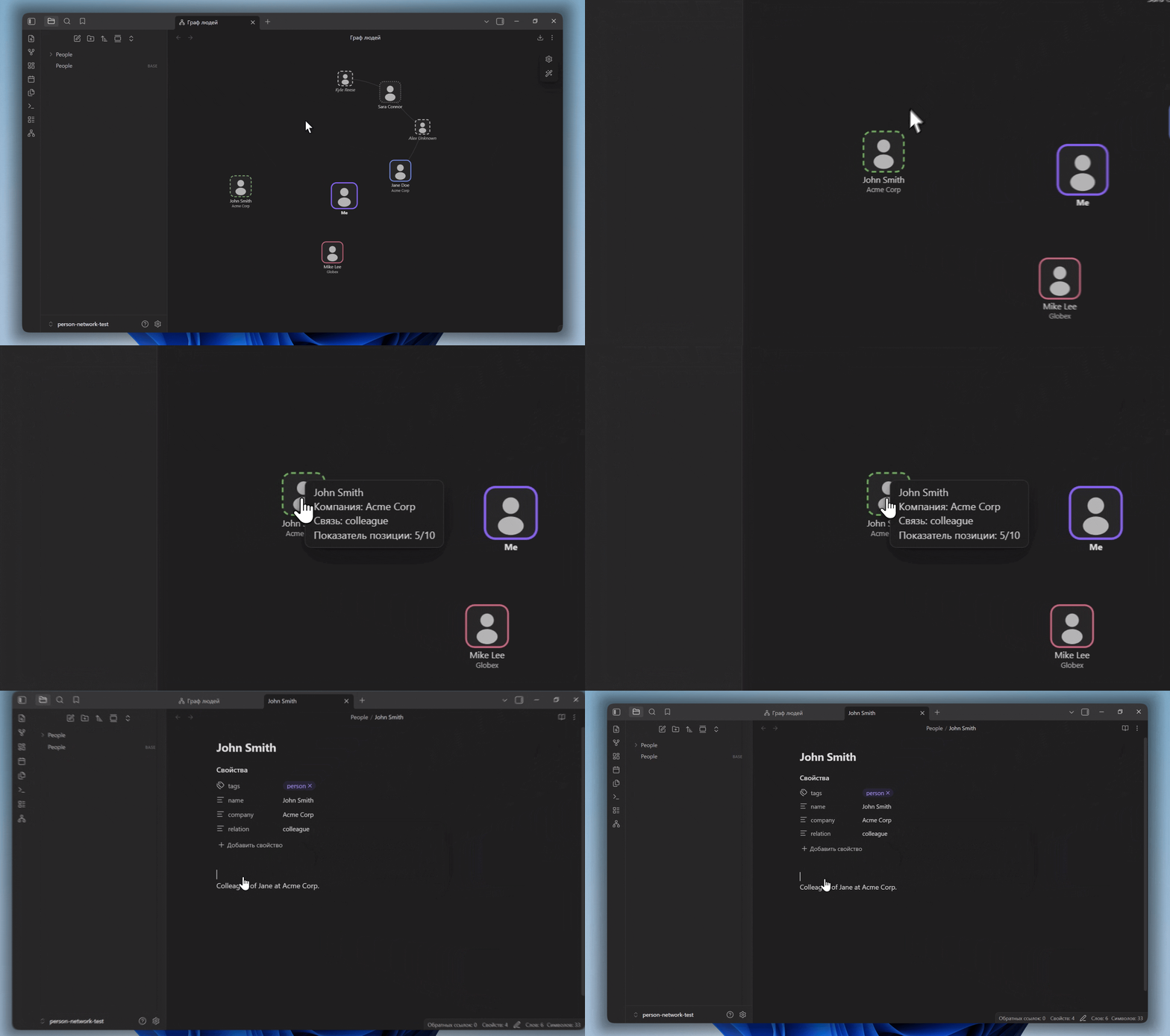
- Potential contacts: names listed in a note that do not have their own note yet appear as distinct ghost nodes. Clicking a ghost offers to create its note.
- Relationship lines are drawn between people who reference each other by name.
- An in-graph control panel with search, filters by relation type and company, display options and force sliders, built to match the layout of Obsidian's core Graph view.
- Appearance animation: nodes fade and grow in from the center outward, then the connections fade in.
- Zoom to fit, smooth camera framing, pan, wheel zoom, node dragging and double-click to refit.
- Filters, force controls, display options and camera position persist between graph sessions.
- Data warnings identify duplicate names, unknown roles and multiple notes marked
is_self. - Export the current view as a PNG image.
- Bases integration: the graph is available as a view type inside Bases, where the base's own filters decide who appears on the map.
- Light, dark and community themes are supported. All colors are read from Obsidian's CSS variables.
- Russian and English interface, detected automatically from Obsidian's language.
Installation
Install Person Network from Settings → Community plugins → Browse in Obsidian.
Manual
- Download
main.js,manifest.jsonandstyles.cssfrom the latest release. - Create a folder named
person-networkinside your vault at.obsidian/plugins/. - Place the three files in that folder.
- Open Settings, go to Community plugins, and enable Person Network.
Getting started
Create a note for a person and add frontmatter with the detection tag:
---
tags:
  - person
name: Jane Doe
photo: attachments/jane.jpg
company: Acme Corp
relation: friend
potential_contacts:
  - John Smith
  - Kyle Reese
---
Open the graph from the ribbon icon or the command palette command "Open person network". The note tagged person becomes a node. To mark yourself as the center, add is_self: true to your own note.
Frontmatter reference
| Field | Type | Description |
|---|---|---|
| detection tag | tag | Marks a note as a person. Default tag is person, configurable in settings. |
name | text | Display name. Falls back to the file name. |
photo | text | Vault-relative path to a photo. |
relation | text | The role name. Its ring style and position come from the Roles list. |
company | text | Used by the company filter and shown under the node. |
| potential contacts | list | Names of contacts. A name with its own note becomes a connection; a name without one becomes a ghost node. |
is_self | boolean | Marks the note as you. That node becomes the center. |
All field names except is_self and company are configurable in settings.
Roles
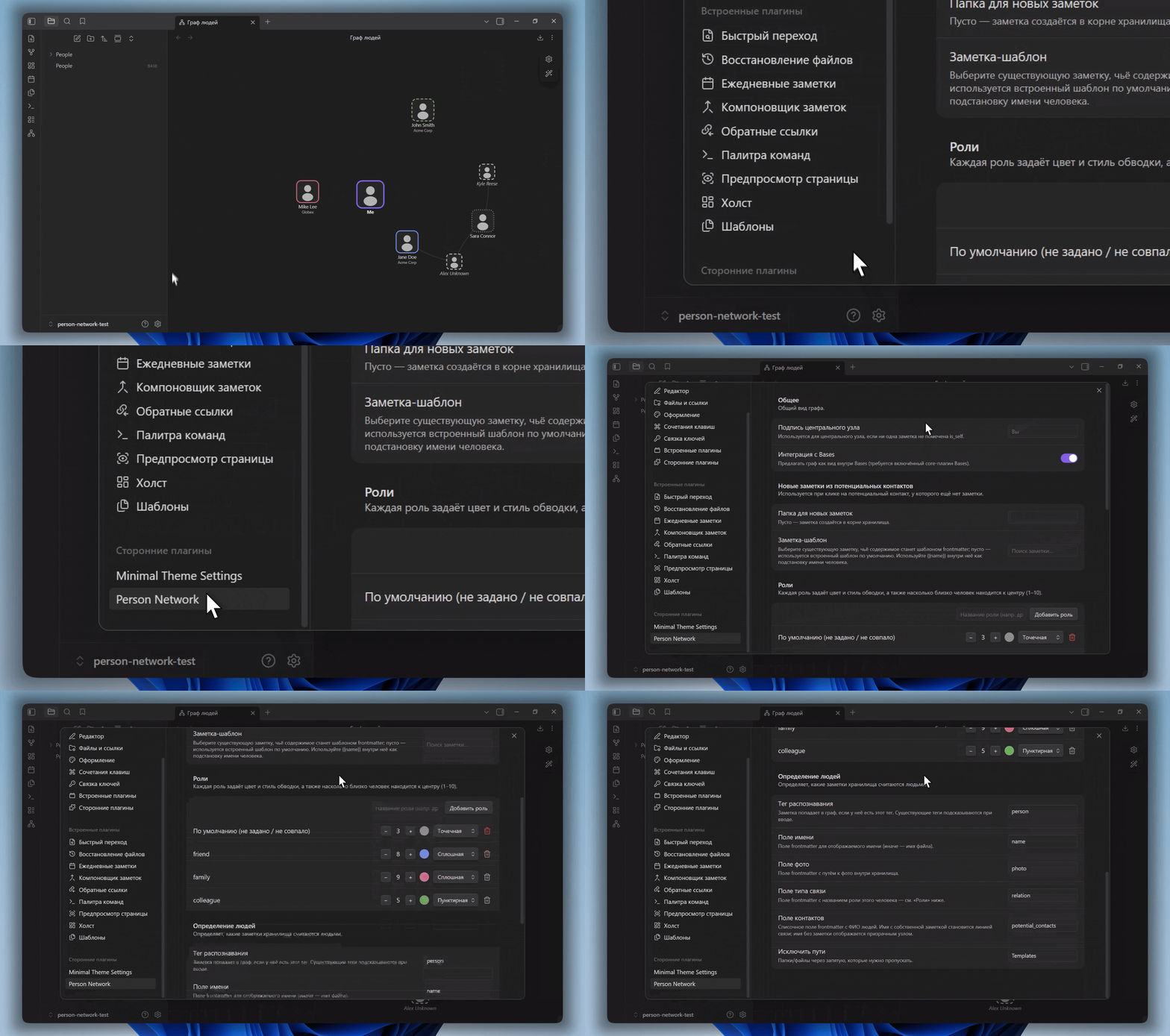
A role ties together how a person looks and where they sit. Each role has a color, a ring stroke style and a position score from 1 to 10, where 10 is closest to the center. The relation value in a note selects its role. Any note whose relation does not match a defined role uses the default role.
In-graph control panel
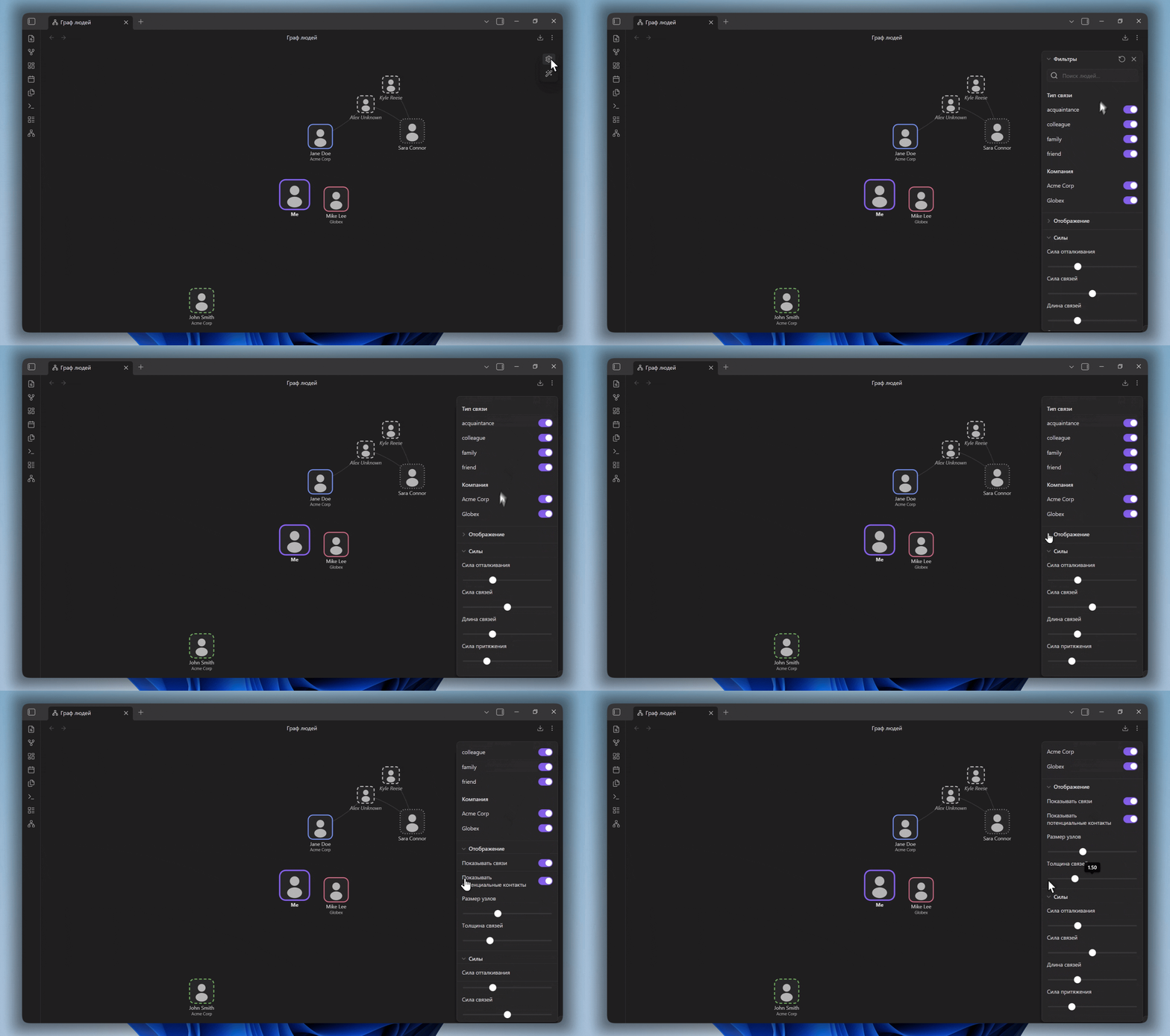
The panel opens from the gear icon in the top corner of the graph and mirrors the structure of the core Graph view.
- Filters: a search box that highlights and dims, plus toggles for each relation type and company.
- Display: toggles for connection lines and potential contacts, plus sliders for node size and line thickness.
- Forces: sliders for repel force, link force, link distance and center force.
A wand icon replays the appearance animation, and a reset icon restores the panel's controls to their defaults.
The panel state and camera position are saved automatically.
Potential contacts
List a person's contacts in the contacts field. If a name matches another person note, a connection line is drawn between them. If a name has no note yet, it appears as a muted, dashed ghost node. Clicking a ghost opens a prompt to create its note, using the configured folder and template.
Contacts may also use wikilinks such as [[People/Jane Doe|Jane]]; Person Network resolves the note path before falling back to display-name matching.
Photo framing
Right-click a person with a photo and select Edit photo crop. Drag the image inside the square and adjust the zoom, then save the display area. The source image is never modified and no duplicate image is created. Framing values are stored in the plugin's local data.json and are keyed by note path.
Bases integration
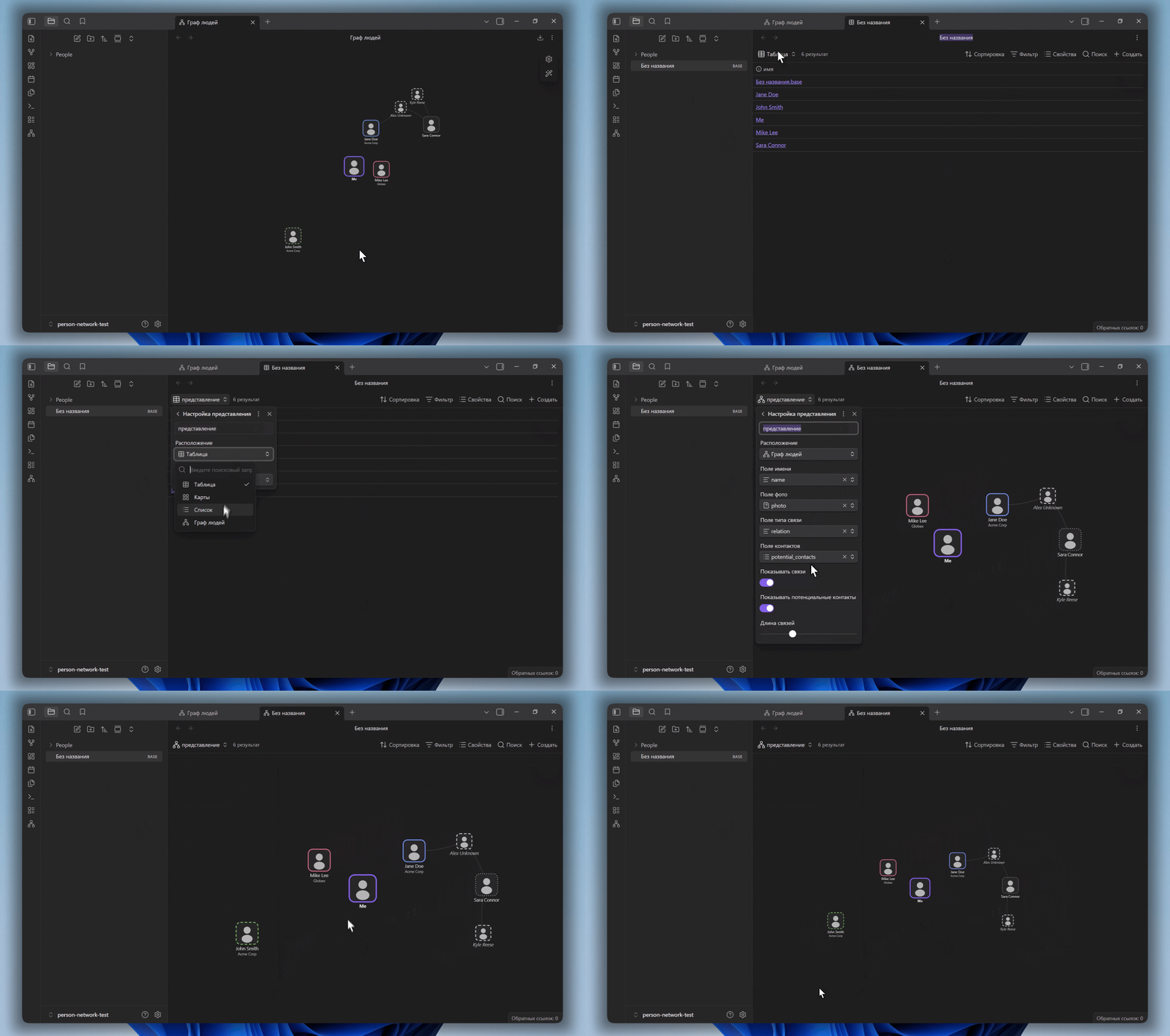
When the Bases core plugin is enabled, Person Network registers a graph view type that can be selected inside any base. The base's filters decide which notes appear on the map, and per-view options in the Bases toolbar map the name, photo, relation and contacts properties. This can be turned off in settings.
Settings
- Person detection: the recognition tag and the field names for name, photo, relation and contacts, plus paths to exclude.
- Roles: add, edit and remove roles, and set the default role.
- General: the center node label and the Bases integration toggle.
- New notes: the folder and template note used when creating a note from a ghost.
Privacy
Person Network works entirely inside your vault. It does not make network requests, require an account, display ads or collect telemetry.
For plugin developers
Search results and similarity scores are powered by semantic analysis of your plugin's README. If your plugin isn't appearing for searches you'd expect, try updating your README to clearly describe your plugin's purpose, features, and use cases.