Plugins Annotations
approvedby alberti42
Allows adding personal comments to each installed plugin.
Obsidian Plugins Annotations
Obsidian Plugins Annotations is a plugin for Obsidian that allows users to add personal annotations to each installed plugin. This is particularly useful for keeping track of why certain plugins are installed and their specific use cases.
Features
- Add personal annotations to any installed plugin in the settings pane.
- Annotations can be formatted using Markdown and can include Obsidian links.
- Annotations are saved persistently and can be edited at any time.
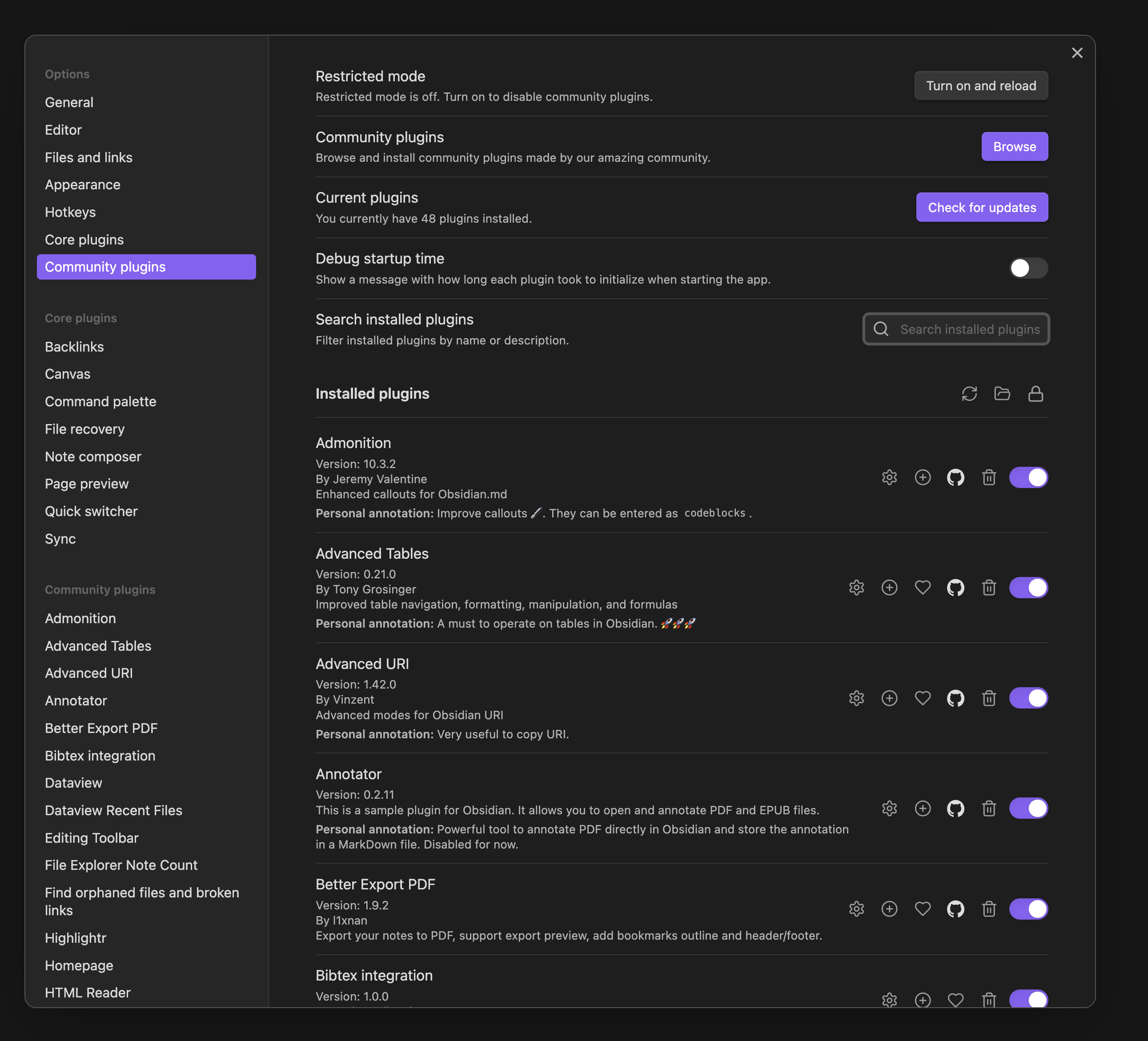
- Annotations are displayed directly below the plugin information.
- Detailed instructions how to edit the annotations are provided in the setting pane of the plugin.
- Possible to lock the annotations with the lock button next to the title "Installed plugins". This feature is useful in combination with the toggle hiding the annotations fields where there is no user annotation yet.
Installation
The preferred method to install the plugin is to use the Community Plugins Preference pane in Obsidian.
Manual installation
- Download the latest release from the Releases page.
- Extract the downloaded package and copy only the following files to your Obsidian plugins folder:
<vault>/.obsidian/plugins/plugins-annotations:main.jsstyles.cssmanifest.json
- Enable the plugin in the "Community plugins" settings pane.
Usage
- Open the "Community plugins" settings pane.
- You will see a text area below each installed plugin where you can add your personal annotation.
- Annotations are automatically saved and will be displayed whenever you open the settings pane.
Privacy
- Vault access: the plugin lists the Markdown files in your vault (via Obsidian's
vault.getFiles/file lookup APIs) only to power the file-path suggestions and case-insensitive lookup used by the optional "Store annotations in a Markdown file" feature. No vault content is read unless you enable that feature and point it at a specific file. - Network access: the plugin makes one network request, to
raw.githubusercontent.com, to fetch Obsidian's public list of community plugins (obsidianmd/obsidian-releases). This is used solely to show a GitHub icon linking to each plugin's repository, and can be disabled in the settings ("Show GitHub links").
Screenshot
Development
To contribute to the development of this plugin, follow these steps:
- Fork the repository on GitHub.
- Clone your forked repository somewhere on your local machine (replace
<your-username>with your GitHub username):git clone https://github.com/<your-username>/obsidian-plugins-annotations.git - Navigate to the cloned repository directory:
cd obsidian-plugins-annotations - Install the dependencies:
npm install - Build the plugin:
npm run build - Create a
plugins-annotationsfolder in your Obsidian plugins directory:mkdir -p <vault>/.obsidian/plugins/plugins-annotations - Copy or soft-link the compiled files from the
distfolder to theplugins-annotationsfolder:# Copy files cp -r dist/* <vault>/.obsidian/plugins/plugins-annotations/ # Or create a soft-link (on Unix-based systems) ln -s <path-to-cloned-repo>/dist <vault>/.obsidian/plugins/plugins-annotations - Enable the plugin in Obsidian and start developing!
Donations
I would be grateful for any donation to support the development of this plugin.

Author
- Author: Andrea Alberti
- GitHub Profile: alberti42
- Donations:

Feel free to contribute to the development of this plugin or report any issues in the GitHub repository.
For plugin developers
Search results and similarity scores are powered by semantic analysis of your plugin's README. If your plugin isn't appearing for searches you'd expect, try updating your README to clearly describe your plugin's purpose, features, and use cases.