Property Values Browser
approvedby Soulbits
Browse frontmatter properties and values with counts, search shortcuts, and delete actions. - This plugin has not been manually reviewed by Obsidian staff.
Property Values Browser


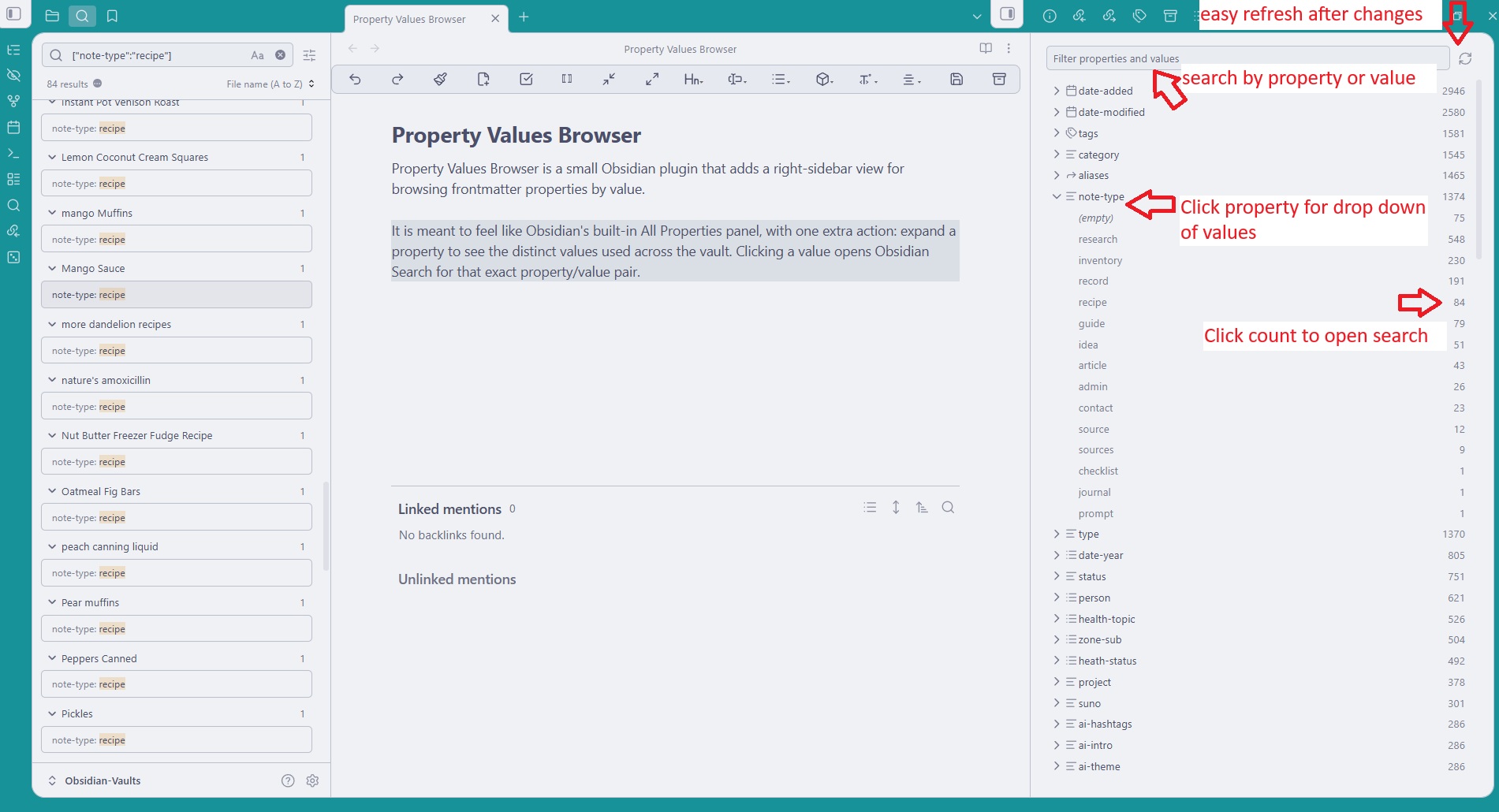
Property Values Browser is a small Obsidian plugin that adds a right-sidebar view for browsing frontmatter properties by value.
It is meant to feel like Obsidian's built-in All Properties panel, with one extra action: expand a property to see the distinct values used across the vault. Clicking a value opens Obsidian Search for that exact property/value pair, and right-click menus can delete properties or values from notes.
Features
- Shows frontmatter property names with total counts.
- Expands each property to show distinct values with counts.
- Counts list values separately, whether YAML is inline or multiline.
- Shows blank/null values as
(empty). - Filters property names and values from the top input.
- Clicks property counts to search for every note with that property.
- Clicks value rows to search for notes with that exact property/value pair.
- Right-clicks property rows to delete that property from matching notes.
- Right-clicks value rows to delete that value from matching notes.
- Adds a ribbon icon and command palette command.
- Includes a manual refresh button.
Install
Download these three files from the latest release:
main.js manifest.json styles.css
Put them in <your vault>/.obsidian/plugins/property-values-browser/.
Then reload Obsidian and enable Property Values Browser in Community plugins.
Limitations
- Delete actions update frontmatter in matching notes after confirmation, but the plugin does not provide its own undo history.
- The list is based on Obsidian's metadata cache, so very recent file changes may need a refresh.
For plugin developers
Search results and similarity scores are powered by semantic analysis of your plugin's README. If your plugin isn't appearing for searches you'd expect, try updating your README to clearly describe your plugin's purpose, features, and use cases.