PropMove
approvedby SHU-red
Move notes based on a frontmatter property value. - This plugin has not been manually reviewed by Obsidian staff.
PropMove
Automatically move notes based on frontmatter properties. It just works.
[!NOTE]
☕ Buy Me A Coffee — These are small tools, built with AI — on purpose. There isn't enough time to learn every language and dive into every rabbit hole, so AI lets me solve real problems from my daily life and homelab — and that matters more to me than clever code. The AI writes most of the code; the idea, the tinkering, testing, publishing and maintenance are mine. Issues answered, features shipped, a few stars and downloads — does that sound like AI slop? Take a look and make your own opinion. If this project helps you, buy me a coffee ☕
Features
- Auto-move on create/update — watches frontmatter changes and moves notes automatically
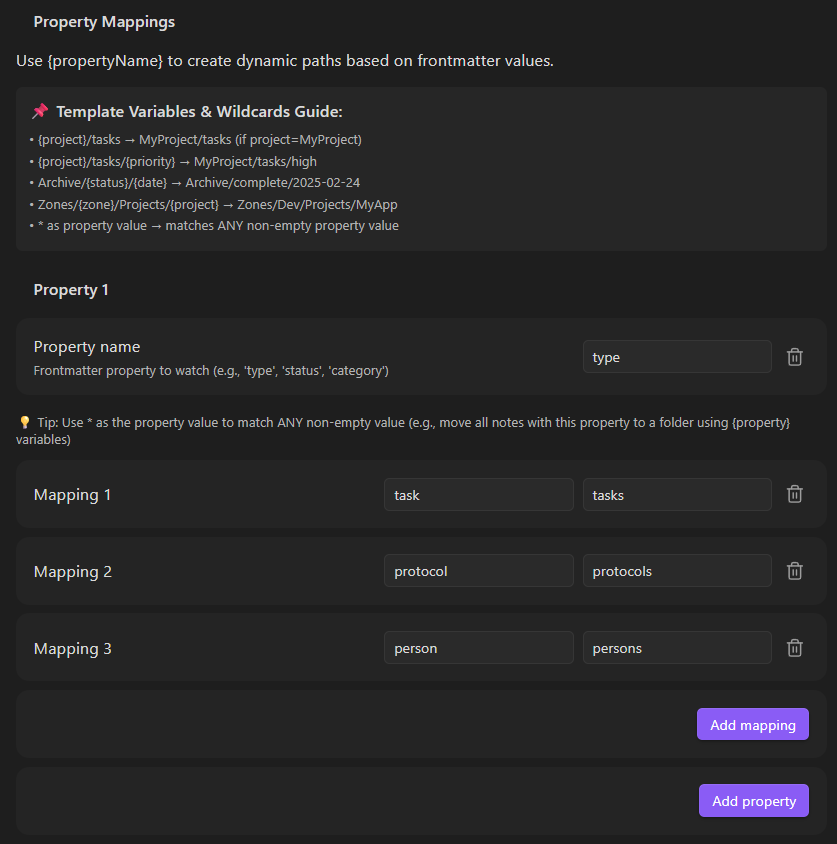
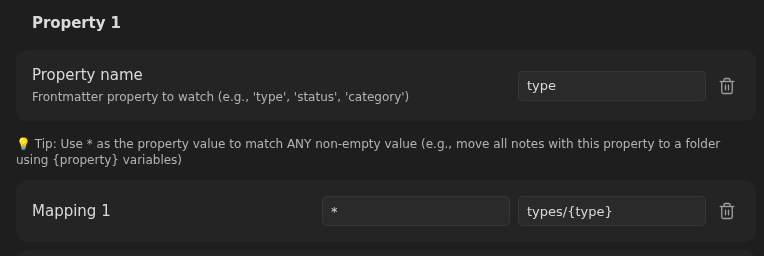
- Multiple property mappings — define value-to-folder rules per property
- Smart conflict handling — appends unique suffixes when targets exist
- Ignore folders — exclude template folders from processing
- Auto folder creation — creates missing target directories
- Wiki-link stripping —
[[Project]]resolves to clean folder name - Autocomplete — property names and folder paths suggest from your vault
- Auto-update paths — mapping folders follow vault renames automatically
- Match operators — equals, contains, is-empty, is-not-empty per mapping
Screenshots
Simple. Manually map specific values:
Variable. Use wildcards to create dynamic paths:
How It Works
- Note created or frontmatter changes
- If in ignored folder → skipped
- First matching property mapping determines target folder
- If target exists → numeric suffix appended (configurable)
- Note moved to destination, folders created if needed
License
MIT
For plugin developers
Search results and similarity scores are powered by semantic analysis of your plugin's README. If your plugin isn't appearing for searches you'd expect, try updating your README to clearly describe your plugin's purpose, features, and use cases.