Prose Lens
approvedby saiken
Live readability and style marks in the editor: passive voice, adverbs, hedges, long sentences, and a Flesch reading grade. Works fully offline. - This plugin has not been manually reviewed by Obsidian staff.
Prose Lens
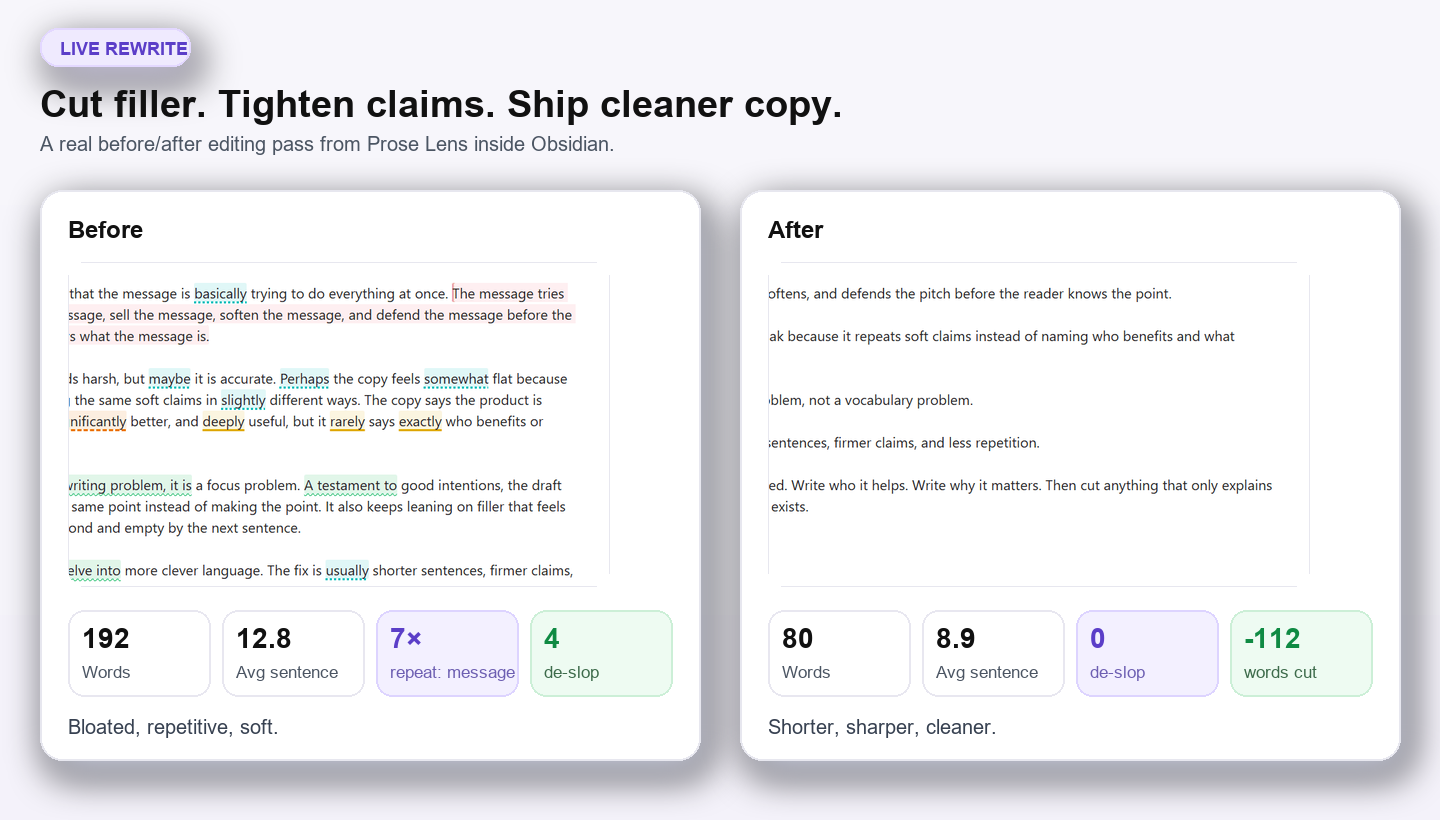
Tighten bloated drafts into cleaner copy without leaving Obsidian.
Works offline · Pay once · Unlimited updates · No account
Prose Lens gives Obsidian a real editorial pass. It surfaces filler, repetition, hedges, weak claims, and long sentences while you revise — so the draft gets sharper before it leaves the note.
- Free: the full in-editor style pass — core marks, reading grade, live counts, and the rhythm map.
- Pro — $12 one-time: the serious rewrite tools — de-slop marks, echo detector, revision delta, and focus mode. No subscription, no account, unlimited future updates.
- Buy once, unlock fast: Buy Prose Lens Pro — your key arrives automatically within seconds and activates offline.
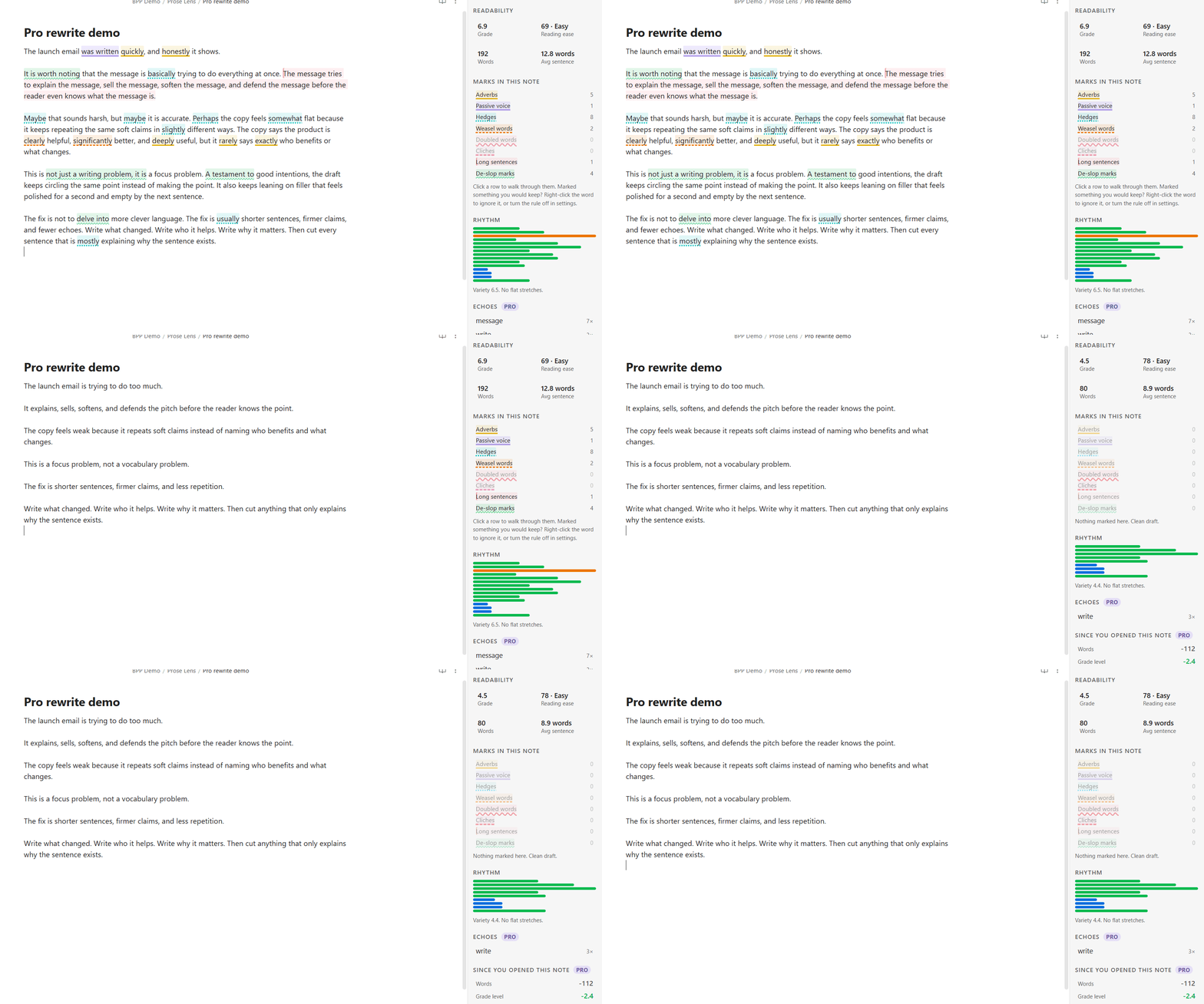
Prose Lens never writes to your notes. It only highlights. Disable it and every character stays exactly where you left it.
What makes it different from a Markdown linter
Most writing tools for Obsidian fail in one of two ways:
- They make you leave the editor.
- They lint raw Markdown, so they flag things that are not prose at all.
Prose Lens fixes both.
You keep drafting in Obsidian, and the plugin only analyses actual prose. Code fences, inline code, math, frontmatter, URLs, wikilinks, headings and table rows are masked before any rule runs.
That means:
const was_deleted = obviously(x)is not flagged as passive voice with an adverb.- A long URL is not treated like a 40-word sentence.
- You get feedback on the sentence you are writing, not noise from the syntax around it.
If a tool flags your code block, your URL and your wikilink title as bad writing, it is not being strict — it is linting Markdown instead of prose. That is the problem the masking layer exists to solve, and it is the reason the highlights are worth reading at all.
What it marks
Each rule has its own colour and its own underline shape, so the marks stay distinguishable without colour and in high-contrast mode. The panel shows the same key, with a live count for the note you are in.
| Mark | Looks like | What it catches |
|---|---|---|
| Adverbs | solid | -ly words. A stronger verb usually beats one. |
| Passive voice | double | Be-verb plus past participle. Conservative by design. |
| Hedges | dotted | maybe, somewhat, I think — the qualifiers that weaken a claim. |
| Weasel words | dashed | many, clearly, significantly — claims with nobody behind them. |
| Clichés | thick dashed | Phrases the reader's eye slides over. |
| Doubled words | wavy | the the. |
| Long sentences | tinted, with a left bar | Sentences past your threshold, with a second tier for the real wall-of-text monsters. |
Free vs Pro
Free is meant to stand on its own, not act like a crippled demo. Every mark in the table above is free, and so is the grade. There are no caps, no note limit, no session limit and no nag screen — and a switch that hides the Pro sections completely if you never want to see them.
| Feature | Free | Pro |
|---|---|---|
| All seven style marks | ✓ | ✓ |
| Mark legend with live counts, click to walk them | ✓ | ✓ |
| Reading grade in the status bar | ✓ | ✓ |
| Sentence-length heat | ✓ | ✓ |
| Rhythm map | ✓ | ✓ |
| Go to next / previous mark | ✓ | ✓ |
| De-slop marks | ✓ | |
| Echo detector | ✓ | |
| Revision delta | ✓ | |
| Focus mode | ✓ |
Pro adds the higher-leverage editorial tools:
- De-slop marks — catches mushy AI-era filler and overcooked phrasing like "it's worth noting," "a testament to," "delve," and the "not just X, it's Y" construction. Free tells you how many a note contains; Pro shows you where each one sits.
- Echo detector — shows the words and phrases you keep leaning on, and where they cluster.
- Revision delta — compares now versus when you opened the note, so editing moves a number instead of just a feeling.
- Focus mode — dims everything except the sentence under the cursor.
De-slop is a highlighter, not an AI detector. It does not pretend to know who wrote a passage, and it will never produce a confidence percentage.
Privacy
Prose Lens makes no network calls. Not for analysis, not for licensing, not for updates, not ever. Your draft is analysed inside the editor process and never leaves the machine — there is no server to send it to.
Pro license keys are verified offline with an Ed25519 signature bundled in the plugin. No account, no sign-in, no telemetry, no analytics.
The plugin also never writes to your notes. It only draws highlights. Ignored words and muted notes are stored in the plugin's own settings, never in your Markdown.
Pricing
- Free — all seven style marks, the legend and counts, the reading grade, sentence-length heat, and the rhythm map. Uncapped.
- Pro — $12 one-time — the serious rewrite tools: de-slop marks, echo detector, revision delta, and focus mode. No subscription, no expiry, no account. Yours forever, including unlimited future updates.
Activate Pro
- Buy Prose Lens Pro — $12 one-time.
- Your license key arrives automatically within seconds — no waiting, no manual delivery.
- Paste it into the plugin's settings. Pro unlocks instantly, verified offline.
One key covers all your devices. The license is not tied to a machine and has no activation limit — buy once and use the same key everywhere, forever. The key is stored in the plugin's per-vault settings, so a second device or a second vault will show Free until you paste that same key in again. You never need to buy Prose Lens Pro more than once.
Listed as Optional payments in the Obsidian community directory: a free core plus a paid Pro unlock.
FAQ
Is the free version actually useful on its own? Yes. Every mark in the table above is free, and so is the reading grade, the legend, the counts and the rhythm map. Pro adds editorial tools for people revising seriously, not the basics.
Does Prose Lens send my writing anywhere? No. There is no network code in the plugin at all — including the license check.
Is this a grammar or spell checker? No. It does not correct anything and never edits your note. It marks patterns that usually mean a sentence can be tightened, and leaves the decision to you. For grammar and spelling, LanguageTool and Harper are the right tools, and they sit happily alongside this.
The source is MIT — why pay? You are paying for the Pro features, an offline key, and for the plugin to keep improving. One purchase unlocks the paid tier and includes unlimited future updates.
Does de-slop detect AI writing? No, and it never claims to. It highlights specific phrasing — "it's worth noting," "a testament to," "delve," em-dash pile-ups. It produces no score and no percentage.
Will it work in my language? English only. Flesch and the syllable model are fitted to English; running them over another language produces confident nonsense, so the plugin does not pretend.
Honest limitations
- English only. See above.
- Passive voice is heuristic, not grammatical parsing. There is no part-of-speech tagger in the bundle. The plugin is tuned to stay quiet when unsure, which means it misses some passives rather than crying wolf.
- Very large notes are skipped rather than stalling the editor. The threshold is configurable up to 400,000 characters, and the panel says so when it happens instead of going quiet.
- The status bar is desktop-only, because Obsidian has no status bar on mobile. On mobile the grade lives in the panel, which the ribbon icon opens.
If Prose Lens marks something you would keep, right-click the word and ignore it, or turn the rule off in settings.
Who this is for
People who actually draft inside Obsidian: essay writers, bloggers, newsletter writers, students, fiction writers, and anyone writing client memos, proposals or documentation. It is especially useful if you care about privacy and hate pasting drafts into web tools.
Install
Community plugins
Search for Prose Lens in Settings → Community plugins. One click, and it auto-updates.
Manual install
Download main.js, manifest.json and styles.css, then copy them into
.obsidian/plugins/prose-lens/ and enable the plugin.
Commands
- Toggle style marks
- Mute style marks in this note
- Open the prose panel
- Go to next style mark
- Go to previous style mark
- Toggle focus mode (Pro)
No default hotkeys. Bind whatever you like.
Feedback and support
Bug reports, feature requests, and questions all go to the GitHub issue tracker. It is the only place I track them, so an issue will always get further than a review comment.
- Report a bug — please include your Obsidian version, your operating system, and the steps that reproduce it.
- Request a feature — describe the workflow you are trying to make faster; that is more useful than a proposed solution.
- Browse open issues — worth a look first, in case it is already tracked.
Not the right fit for your workflow? Email within 14 days of purchase for a refund, no argument.
More plugins by the same author
Small, local-first Obsidian plugins that each do one job and keep your data in your vault. All of them are in the community directory — search the name under Settings → Community plugins.
Search and views
- Vault Spotlight — keyboard-first command center — fuzzy search, saved workflows, and result actions.
- Bases Power Pack — kanban, calendar, Gantt, and outline views over your notes or a
.basefile.
Vault health
- Vault Triage — find stale, orphaned, unfinished, and metadata-broken notes, then work through them.
- Attachment Audit — find orphaned, duplicate, oversized, and misplaced attachments, then clean them up safely.
- Patina — score every note's staleness from edits, opens, and inbound links.
- Vault Router — move new notes out of Inbox with fast local routing rules.
- FlowKit Health Dashboard — find which add-on is breaking your vault, and score every one installed.
Writing and research
- Prior Art — show similar existing notes while you write, and merge duplicates without losing links.
- Standing Questions — track the open questions in your vault and surface new notes that may answer them.
- Unwritten — report the notes you never wrote — unexplained link pairs, stub hubs, unreasoned decisions.
- Effort Index — measure the editing time behind every note and resurface the expensive ones.
Time and billing
- Task Calendar Bridge — export dated Markdown tasks to standards-based ICS calendar files.
- Invoice Forge — turn
#billablenotes into numbered invoices, so nothing is missed or billed twice. - Time Tracker and Invoicing — track billable time against notes and projects, then invoice by client.
Development
npm install
npm run dev
npm test
npm run build
The linguistic core in src/core/*.mjs is pure JavaScript with no obsidian import and no
runtime dependency on the app, so the rule engine can be tested under plain Node without
mocking the entire editor.
License
MIT. See LICENSE.
For plugin developers
Search results and similarity scores are powered by semantic analysis of your plugin's README. If your plugin isn't appearing for searches you'd expect, try updating your README to clearly describe your plugin's purpose, features, and use cases.