by Wren
Rolls unfinished tasks to today or tomorrow, or moves the current selection to tomorrow. Based on Rollover Daily Todos by lumoe.
Rollover Plus
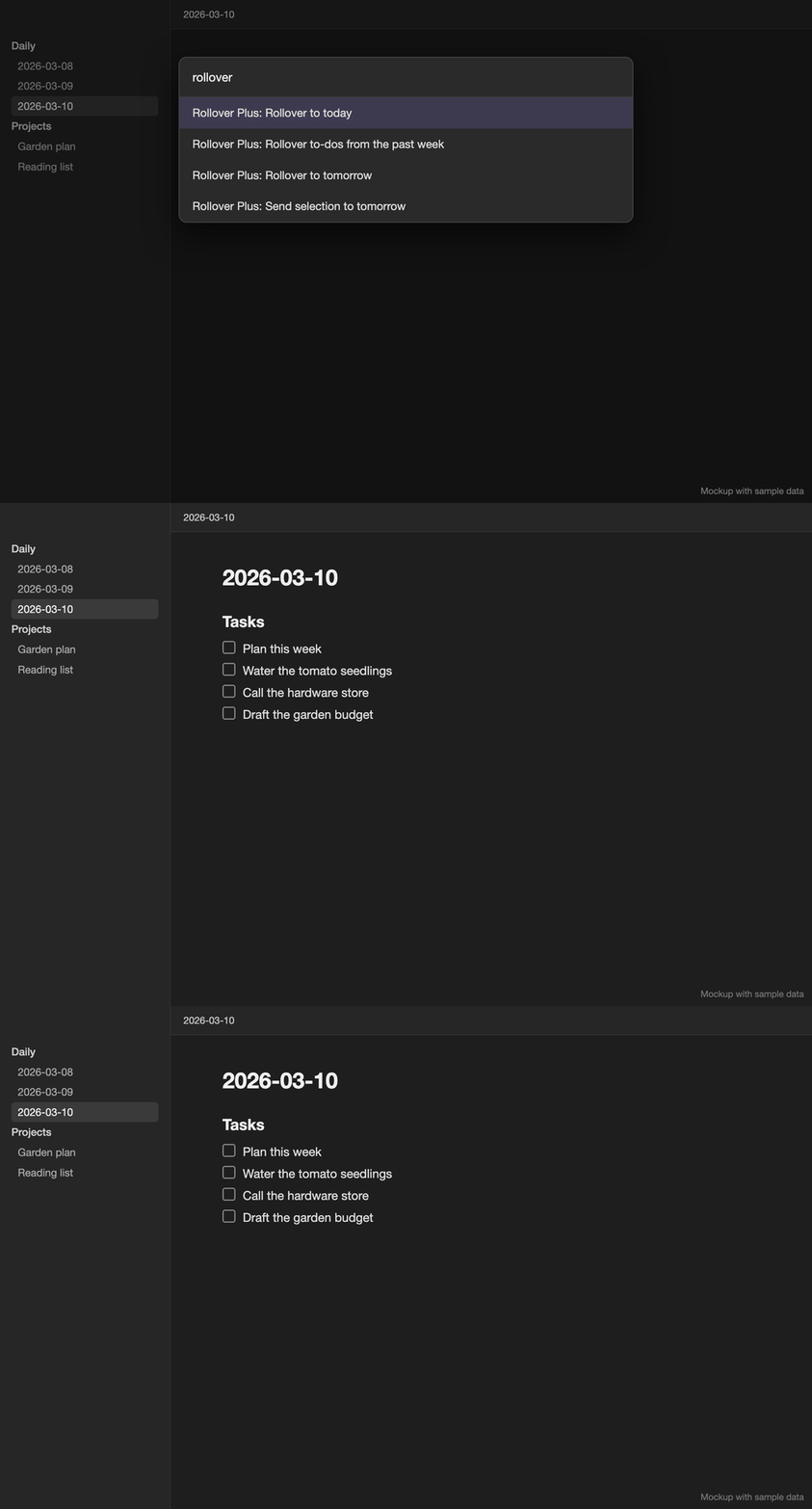
Move unfinished tasks between daily notes without copying and pasting. Rollover Plus has four commands:
- Rollover to today: Bring unfinished tasks from your most recent earlier daily note into today's note, or choose the last seven daily notes in settings.
- Rollover to-dos from the past week: Bring unfinished tasks from the seven most recent earlier daily notes into today.
- Rollover to tomorrow: Send every unfinished task in today's note to tomorrow's note.
- Send selection to tomorrow: Send the selected task or tasks from any Markdown note to tomorrow's note, from the command palette, a hotkey, or the editor's right-click menu.
The plugin uses the folder, filename format, and template from Obsidian's Daily Notes plugin or the daily-note settings in Periodic Notes. An optional folder override is available in Rollover Plus settings.
Automatic rollover
Enable Automatic rollover on daily note open in settings to bring unfinished tasks into today's note when you open it, including when Obsidian starts with that note already open. The toggle is off by default unless an existing automatic-rollover preference was saved.
Automatic rollover source sets where those tasks come from. Yesterday is the default: it looks up yesterday's note directly without scanning the daily-note folder, and does nothing if that note is missing or has no matching unfinished tasks. Past week checks the seven most recent earlier daily notes, even if there are gaps between them. If you copy tasks instead of moving them, Past week copies them again each day while they remain in those notes. Automatic rollover never creates today's note, and this setting is separate from Rollover to today source.
Rollover commands
Rollover to tomorrow
Moves or copies every unfinished task from today's daily note into tomorrow's. Tomorrow's note is created through Daily Notes or Periodic Notes, and only once tasks have been found.
Rollover to today
By default, moves or copies every unfinished task from the closest earlier daily note into today's existing note. That source can be yesterday, or an older note if there are gaps.
Set Rollover to today source to Yesterday (the default) or Past week. Past week makes this command collect from the seven most recent earlier daily notes and disables the separate past-week command until you switch back.
Create today's daily note before running this command, as with manual rollover in the original Rollover Daily Todos plugin.
If a Roll over from heading is selected, only unfinished tasks inside that section of the earlier note are included.
Rollover to-dos from the past week
Collects unfinished tasks from the seven most recent daily notes before today, newest first. Missing dates don't count toward the seven, so notes from earlier weeks are included when needed, and if fewer than seven exist it uses what's there. Notes with no matching unfinished tasks do count. Today and future notes are excluded.
It uses the same source heading, destination heading, status markers, child-task handling, empty-task cleanup, and move/copy settings as regular rollover to today. Identical task text stays separate, as it does in regular rollover. Today's note must already exist.
All collected tasks are saved to today in one write before any source tasks are removed. Undo last rollover restores the whole operation, including completed writes if a later source write fails. If a source is edited during the rollover, it's kept and a notice explains why.
Send selection to tomorrow
Put the cursor anywhere on one unfinished task, or select any part of one or more task lines, then run Send selection to tomorrow from the command palette, a hotkey, or the editor's right-click menu. Each complete task line moves into tomorrow's daily note, so no empty checkbox is left behind. The command used to be called Rollover current selection to tomorrow. Its command ID hasn't changed, so existing hotkeys still work.
A partly selected line counts, so a selection that starts or ends mid-line still moves that whole task.
This command:
- works from any Markdown note;
- moves only the exact selected tasks when identical task text appears elsewhere;
- includes indented child lines when Roll over task children is enabled, even when you select the parent and its children together;
- always removes the selected source tasks after the destination is saved, even when bulk rollover is set to copy;
- keeps the source tasks if the editor changes while tomorrow's note is being saved.
It also works inside Journal View, including from the command palette. Pending Journal View edits are saved before anything moves, and Undo last rollover restores the whole note, including frontmatter and a hidden daily-note title.
Undo last rollover
Restores every file changed by the last rollover. One undo is kept in memory for two minutes. Undo history is cleared when Obsidian closes.
Requirements
Enable either Obsidian's core Daily Notes plugin or Periodic Notes with daily notes enabled.
Attribution
Rollover Plus is based on Rollover Daily Todos by Lukas Mölschl, originally created by Matthew Sessions. The upstream project is available under the MIT License. See LICENSE.
For plugin developers
Search results and similarity scores are powered by semantic analysis of your plugin's README. If your plugin isn't appearing for searches you'd expect, try updating your README to clearly describe your plugin's purpose, features, and use cases.