Root Folder Order
approvedby Chiloh
Keep root-level folders in a custom order in the file explorer. - This plugin has not been manually reviewed by Obsidian staff.
Root Folder Order for Obsidian
Root Folder Order keeps the folders at the top level of your Obsidian vault in a custom order.
Use it when your vault has a fixed structure such as:
Reading
Clips
Notes
Archive
Resources
or:
读书
剪藏
笔记
归档
资源
Obsidian can sort files and folders by its built-in rules, but many vaults need a stable root structure that does not change just because a folder name changes. This plugin only changes the order of root-level folders in the file explorer. Notes and nested folders keep Obsidian's normal sorting behavior.
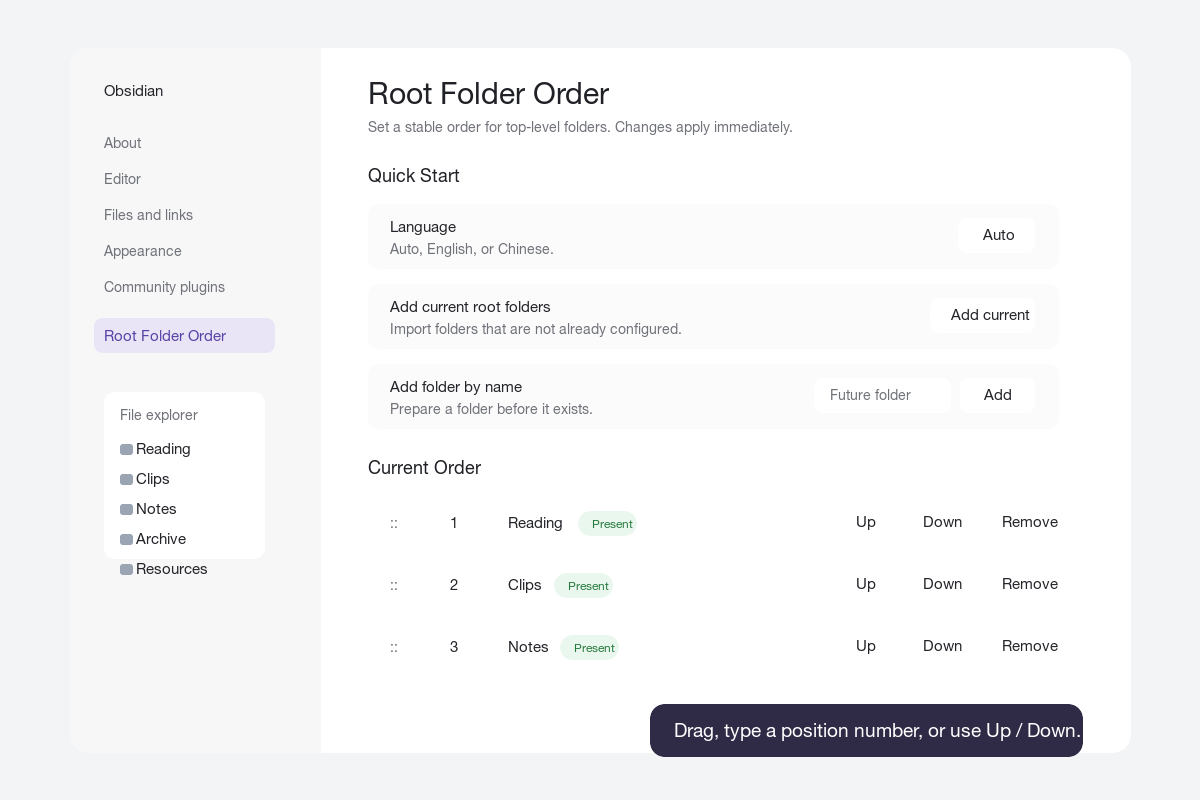
Features
- Sort root-level folders in a custom order.
- Reorder with drag and drop.
- Reorder by typing a position number.
- Reorder with Up and Down buttons.
- Add all current root folders with one click.
- Add a future folder by name before it exists.
- Mark configured folders as present or missing.
- Create a missing configured folder from the settings page.
- Optionally auto-add new root folders.
- Optionally track root folder renames.
- Optionally remove deleted root folders from the order.
- Settings UI in English and Chinese.
- No build step or runtime dependencies.
Installation
Obsidian Community Plugin Directory
- Open
Settings -> Community pluginsin Obsidian. - Search for
Root Folder Order. - Install and enable the plugin.
Manual Install
- Download the latest release from GitHub Releases.
- Copy these files into your vault:
<your-vault>/.obsidian/plugins/root-folder-order/
Required files:
main.js
manifest.json
styles.css
- Restart Obsidian or reload community plugins.
- Open
Settings -> Community plugins. - Enable
Root Folder Order.
BRAT Install
If you use the BRAT plugin, add this repository:
chilohwei/obsidian-root-folder-order
Quick Start
- Open
Settings -> Community plugins -> Root Folder Order. - Click
Add currentto import the current root folders. - Reorder folders by dragging rows, clicking
Up/Down, or editing the position number.
Changes are saved immediately and the file explorer refreshes in real time.
Settings
Quick Start
Language: Auto, English, or Chinese.Add current root folders: Adds root folders that are not already in the list.Add folder by name: Adds a root folder name to the order list, even if the folder does not exist yet.
Current Order
Each configured folder row includes:
- Drag handle for drag-and-drop sorting.
- Position number for direct ordering.
- Folder status: present or missing.
UpandDownbuttons.Createbutton when the folder is missing.Removebutton to remove it from the configured order.
Advanced Options
Configured folders position: Show configured folders before or after unconfigured root folders.Unconfigured folders: Keep Obsidian order, sort A to Z, or sort Z to A.Auto-add new root folders: Append newly created root folders to the configured order.Track root folder renames: Update saved entries when configured root folders are renamed.Remove deleted root folders: Remove configured entries when root folders are deleted or moved away from the vault root.Remove missing entries: Clean up configured folders that no longer exist.Reset to current root folders: Replace the order list with all current root folders.Bulk edit: Paste one root folder name per line and apply it as the new order.
Common Use Cases
Personal Knowledge Base
Recommended configuration:
- Configured folders position:
Top - Unconfigured folders:
Use Obsidian order - Track root folder renames:
On
Shared Vault
Recommended configuration:
- Auto-add new root folders:
On - Track root folder renames:
On - Remove deleted root folders:
On
Vault Cleanup or Migration
Useful actions:
- Use
Bulk editto paste a clean folder list. - Use
Createto create missing root folders. - Use
Remove missing entriesafter reorganizing the vault.
Chinese Guide
Root Folder Order 用于固定 Obsidian vault 顶层目录在文件列表中的显示顺序。
适合这类结构:
读书
剪藏
笔记
归档
资源
插件只影响 vault 根目录下的一级目录。子目录和笔记仍然使用 Obsidian 原本的排序方式。
快速开始
- 打开
设置 -> 第三方插件 -> Root Folder Order。 - 点击
添加当前,导入当前根目录。 - 通过拖拽、
上移/下移,或直接输入序号来调整顺序。
所有改动都会立即保存,并实时刷新文件列表。
常用配置
语言:自动、English、中文。添加当前根目录:把还不在列表里的根目录加入排序。按名称添加目录:即使目录还不存在,也可以先加入排序列表。高级选项:包含未配置目录排序、自动添加新根目录、重命名跟踪、删除清理、批量编辑等功能。
Development
This repository is intentionally simple. The plugin is plain JavaScript and does not require a build step.
Run local checks:
node --check main.js
node -e "const fs=require('fs'); for (const f of ['manifest.json','versions.json']) JSON.parse(fs.readFileSync(f,'utf8'));"
For local development, copy or clone this repository into:
<your-vault>/.obsidian/plugins/root-folder-order
Then reload Obsidian and enable the plugin.
Release Notes for Maintainers
For Obsidian community plugin releases:
- Keep
manifest.jsonat the repository root. - The GitHub release tag must exactly match
manifest.jsonversion, for example1.0.0. - Attach
main.js,manifest.json, andstyles.cssto the GitHub release. - Prefer the
ReleaseGitHub Actions workflow so release assets receive artifact attestations. - Keep personal vault configuration such as
data.jsonout of the release.
To publish a release:
git tag 1.0.3
git push origin 1.0.3
After the workflow finishes, verify the released assets:
gh release verify 1.0.3 --repo chilohwei/obsidian-root-folder-order
gh release download 1.0.3 --repo chilohwei/obsidian-root-folder-order --dir /tmp/root-folder-order-verify --clobber
gh attestation verify /tmp/root-folder-order-verify/main.js -R chilohwei/obsidian-root-folder-order
gh attestation verify /tmp/root-folder-order-verify/manifest.json -R chilohwei/obsidian-root-folder-order
gh attestation verify /tmp/root-folder-order-verify/styles.css -R chilohwei/obsidian-root-folder-order
License
MIT
For plugin developers
Search results and similarity scores are powered by semantic analysis of your plugin's README. If your plugin isn't appearing for searches you'd expect, try updating your README to clearly describe your plugin's purpose, features, and use cases.