Series Tracker
approvedby ahmed-esa
Dashboard, episode tracker, and watchlist for TV series and movie notes. - This plugin has not been manually reviewed by Obsidian staff.

Series Tracker




An Obsidian plugin: a TrackSeries-style dashboard for TV series (episode checklists, air-date awareness, automatic status) and movies (watchlist grid, ratings, favourites) — reading and writing plain Markdown notes, never owning your data.
Screenshots
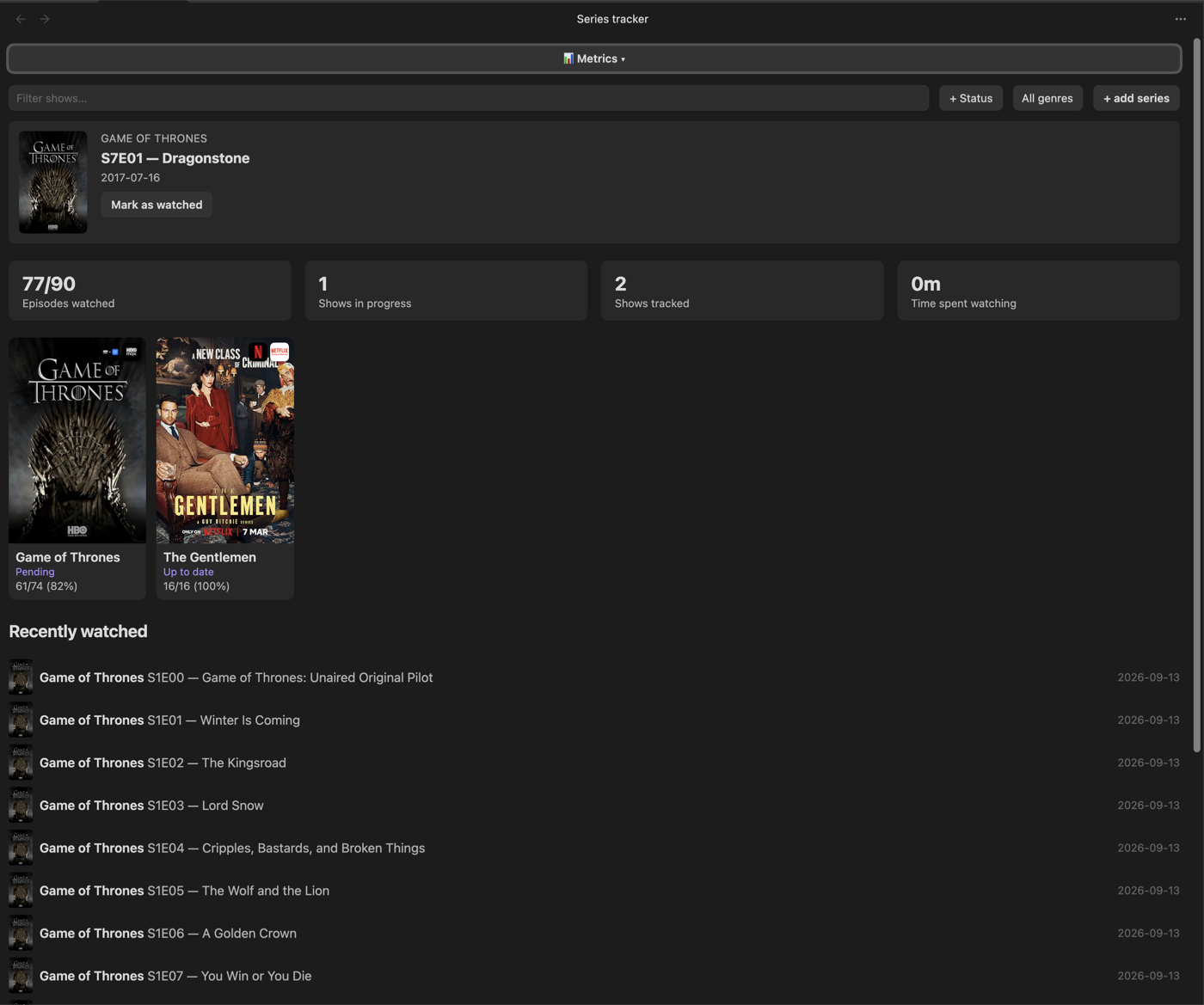
Series dashboard — filters, stats, "Next Up" spotlight, poster grid, recently watched feed
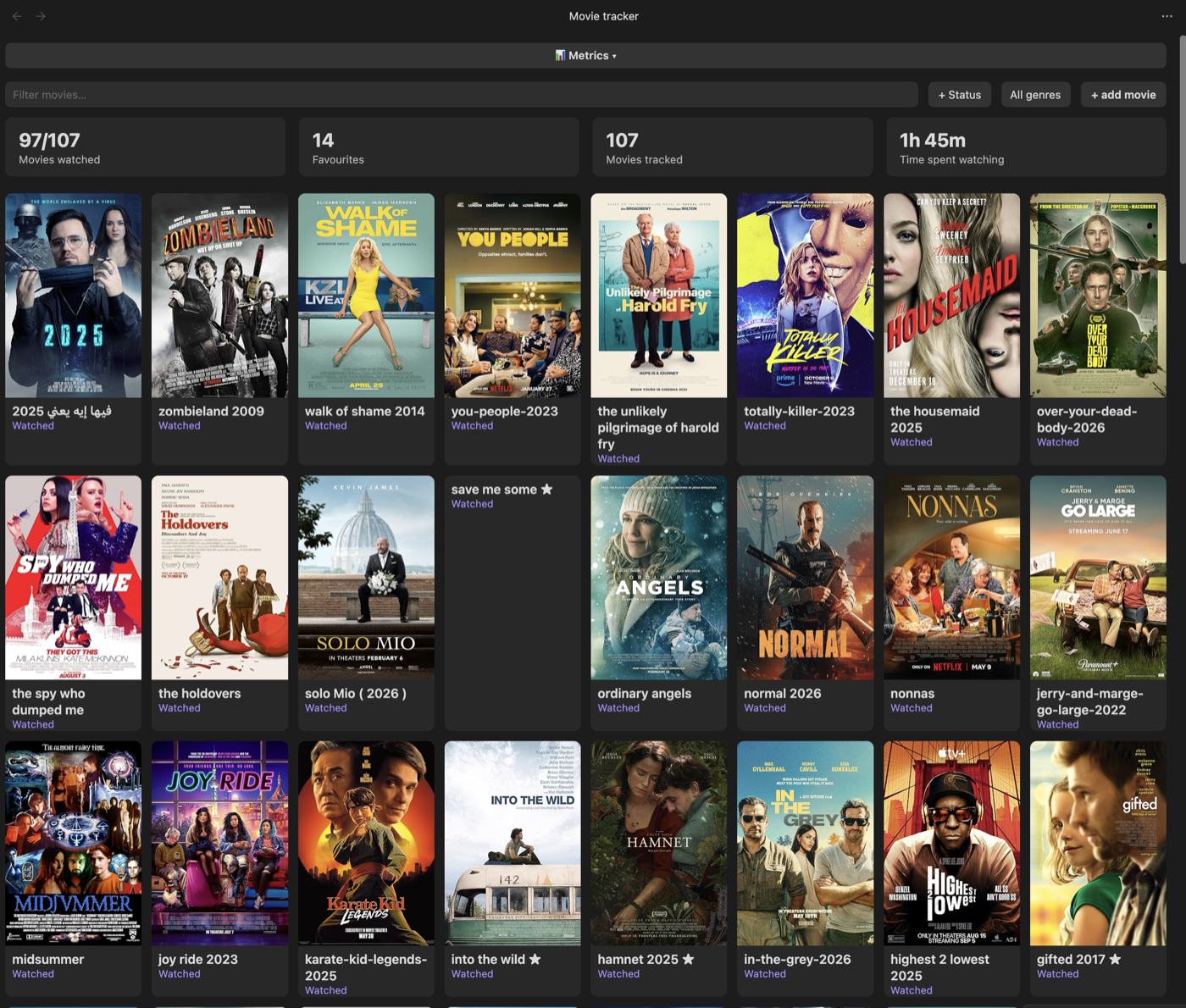
Movies dashboard — filters, stats, favourites, streaming-provider badges on posters
Features
Series
- Dashboard: poster grid, text + status + genre filters, a sort control (last edited / title / recently added / rating / status / recently watched — defaults to last edited), stats (episodes watched, shows in progress, shows tracked, favourites, time spent watching)
- "Next Up" spotlight (oldest aired-but-unwatched episode across all tracked shows) and an "Upcoming" list grouped by air date
- "Recently watched" feed
- Per-show detail view: season/episode checklists, per-episode watched-date stamps, "Mark season as watched", a "Refresh from TMDb" button that pulls in newly-aired episodes without touching your existing watch state
- Automatic status (Wishlist / Pending / Up to date / Completed), derived from watch state and air dates — "Abandoned" is the one status you set yourself and the plugin never overwrites
- Personal 0–5 rating (half-star increments), favourite toggle, a "Mood" tag, an editable completion date, and a freeform Notes section per show
- Delete a show from the detail view (moves the note to Obsidian's trash, never a hard delete)
Movies
- Dashboard: poster grid, text + status + genre filters, a sort control (last edited / title / recently added / rating / status / recently watched — defaults to last edited), stats (movies watched, favourites, movies tracked, time spent watching)
- Add via TMDb search (poster, genre, plot, etc. filled in automatically)
- Personal 0–5 rating (half-star increments), favourite toggle, status (Want to Watch / Watching / Watched), a "Mood" tag, an editable completion date, Notes section
- Delete a movie from the detail view (same trash-not-hard-delete behavior)
Both sections
- Streaming-provider badges on poster cards (which service it's on, configurable by country)
- A "Recommended for you" strip on both dashboards, built from your own top-rated genres — hidden entirely until you've rated something
- A collapsible "Metrics" panel on both dashboards: top genres, total viewing time, and a taste-index comparing your ratings to TMDb's public average — computed on demand, not on every render
- Can't find a title by name (e.g. searching in a non-English language)? Add it directly by IMDb ID or URL instead — bypasses search entirely
Both sections search and fetch metadata from the free
TMDb API — you'll need your own
key. TMDb was chosen over OMDb specifically because it indexes translated
titles, so searching in a non-English language (e.g. Arabic) actually finds
results — OMDb only matches a title's single primary (usually English)
listing. Notes still store an IMDb URL in source_url for portability; the
plugin resolves that to TMDb's internal id automatically whenever it needs
to fetch data (via TMDb's find endpoint, cached permanently once resolved).
Install
Also listed on the Obsidian community plugin directory.
- In Obsidian: Settings → Community plugins → Browse → search "Series Tracker" → Install → Enable.
- Get a free TMDb API key and set it in Settings → Series Tracker:
- Go to themoviedb.org and create a free account (or sign in).
- Go to themoviedb.org/settings/api and request an API key (choose "Developer" — it's free, approval is instant).
- Copy the API Key (v3 auth) value.
- In Obsidian: Settings → Series Tracker → paste it into the TMDb API key field.
- Set your series folder and movies folder in Settings → Series Tracker
(defaults:
Media/Series,Media/Movies).
Note format
Series
The dashboard only picks up notes under the configured series folder
(default Media/Series/) whose frontmatter includes type: series — any
note missing that field is silently skipped.
---
type: series
title: Example Show
status: watching
rating: 4
favourite: false
total_seasons: 2
source: manual
source_url: https://www.imdb.com/title/tt0000000/
tags: [Drama]
date_added: 2026-09-13
date_completed: ""
mood: ""
image: https://example.com/poster.jpg
---

## Season 1
- [x] E1 — Pilot (watched: 2026-09-13)
- [ ] E2 — Second Episode

## Season 2
- [ ] E1 — Season Opener

## Notes
type(required) — must be exactlyseries.status— one ofwant-to-watch/watching/up-to-date/finished/abandoned. The first four are auto-managed from watch state; onlyabandonedis a pure manual choice the plugin never overwrites.rating—0–5ornull.source_url— an IMDb title URL. When present, its IMDb id is resolved to a TMDb id (cached) and used to fetch season/episode air dates and series metadata from TMDb.image— poster URL, must be an absolute URL.favourite—true/false, toggleable in the detail view.date_completed— auto-stamped when status reachesfinished, cleared if it moves away; editable in the detail view ("Completed on") to correct or backdate it.mood— a short curated "how did this make you feel" tag, editable in the detail view:Feel-Good/Uplifting/Intense/Suspenseful/Sad/Relaxing/Thought-Provoking/Dark, or empty for unset.- Each season starts with a
## Season Nheading; episodes are Markdown task items directly under it,- [ ] E<number> — <title>. Checking a box in the plugin's detail view stamps(watched: YYYY-MM-DD)onto the line and rewrites that exact line in the note — nothing else in the file is touched. - A
## Notesheading (anywhere in the body) holds freeform text, editable from the detail view.
Movies
Notes under the configured movies folder (default Media/Movies/) with
type: movie frontmatter:
---
type: movie
title: "Example Movie"
status: want-to-watch
source: manual
source_url: ""
genre: ["Action", "Drama"]
language: ""
favourite: false
rating: null
tags: ["Action", "Drama"]
date_added: 2026-09-13
date_completed: ""
mood: ""
image: ""
---

# Example Movie
status— one ofwant-to-watch/watching/watched. Setting it towatchedfrom the detail view stampsdate_completed; editable there ("Completed on") to correct or backdate it.favourite,rating(0–5ornull),genre/tags— same conventions as series.mood— same short curated tag as series (see above), editable in the detail view.
Development
npm run dev starts esbuild in watch mode — re-copy main.js into the
vault's plugin folder after each change (or symlink it) and reload Obsidian
(Cmd+P → "Reload app without saving") to see changes.
npm test runs the unit test suite (vitest). npm run build type-checks
(tsc -noEmit) before bundling. npm run lint runs the same
eslint-plugin-obsidianmd
rules community.obsidian.md's plugin review checks, so issues surface
locally before a push instead of on the review page. All three must pass
before a commit.
License
MIT — see LICENSE.
For plugin developers
Search results and similarity scores are powered by semantic analysis of your plugin's README. If your plugin isn't appearing for searches you'd expect, try updating your README to clearly describe your plugin's purpose, features, and use cases.