Tag Fuzzy Find
approvedby etaiso
Quickly find a tag in your vault, then jump to a note that uses it. - This plugin has not been manually reviewed by Obsidian staff.
Tag Fuzzy Find



A keyboard-first Quick Switcher for tags. Fuzzy-find any tag in your vault, then jump straight to a note that uses it. Built for navigation, not tag management — if you've ever wished Cmd+O could search tags as well as files, this fills that gap.
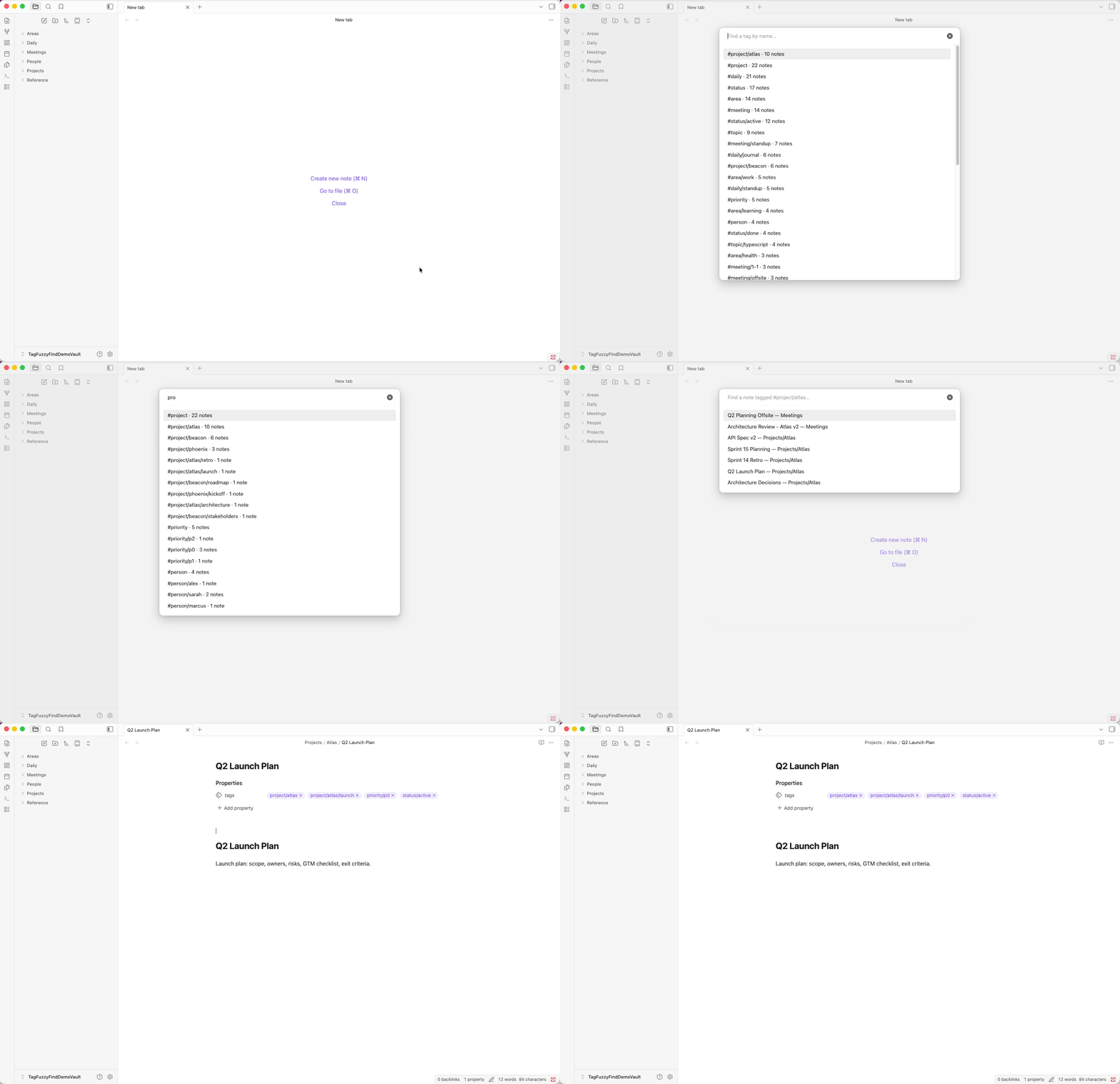
What it does
Obsidian's built-in Quick Switcher finds files and headings, but there's no first-class way to find a tag. Tag Fuzzy Find fills that gap:
- Open the modal — fuzzy-search every tag in your vault, with usage counts.
- Pick one — drill straight into the notes that carry it.
- Pick a note — open it in the current pane, a new tab, or a split.
It honors Obsidian's nested-tag semantics: choosing #project surfaces notes tagged #project/work/urgent too.
Features
- Two-step flow. Tag picker → note picker.
Backspaceon an empty query takes you back to the tag picker, with your previous query preserved. - Quick Switcher hook. Typing a configurable prefix character (default
#) as the first character in the built-inCmd+Oswitcher reroutes you straight into Tag Fuzzy Find. Works with:,@,!,>,?if#collides with your file names. - Smart initial ordering. Default: recently-picked tags first, then the rest by usage. Switch to alphabetical or usage-only in settings.
- Nested tag inclusion.
#projectincludes#project/work,#project/work/urgent, etc. - Standard keyboard shortcuts.
Enteropens in current pane,Cmd/Ctrl+Enteropens in a new tab,Shift+Enteropens in a split,Esccloses. - Zero ceremony. No background indexing, no extra settings panes — runs entirely on Obsidian's existing metadata cache.
Installation
Via Community Plugins (recommended)
Settings → Community plugins → Browse → search Tag Fuzzy Find → Install → Enable.
Via BRAT
Add the repo URL etaiso/obsidian-tag-fuzzy-find in BRAT and it will install the latest release.
Manual
- Download
main.jsandmanifest.jsonfrom the latest release. - Create the folder
<your-vault>/.obsidian/plugins/obsidian-tag-fuzzy-find/. - Copy
main.jsandmanifest.jsoninto it. - In Obsidian: Settings → Community plugins → turn off Restricted Mode → enable Tag Fuzzy Find.
Usage
Open the plugin
Either way works:
- Run the command Tag Fuzzy Find: Open from the command palette (
Cmd/Ctrl+P). Bind a hotkey in Settings → Hotkeys for fastest access. - Press
Cmd/Ctrl+Oto open the built-in Quick Switcher, then type the configured trigger character (default#). The switcher reroutes to Tag Fuzzy Find with the remaining text pre-filled.
Navigate
| Key | Action |
|---|---|
Enter | Open the highlighted note in the current pane |
Cmd/Ctrl+Enter | Open in a new tab |
Shift+Enter | Open in a split |
Backspace (when query is empty) | Return to the tag picker |
Esc | Close |
Settings
| Setting | What it does | Default |
|---|---|---|
| Initial sort | Order of tags before you type. Recent-then-usage / Most-used / Alphabetical / Empty until typing. | Recent-then-usage |
| Quick Switcher trigger | First character to type in the Quick Switcher to open Tag Fuzzy Find. | # |
| Integrate with Quick Switcher | Toggle the Cmd+O interop. | On |
| Recent tags to remember | Size of the recent-tags list (0 disables it). | 10 |
| Clear recent tags | One-shot button to wipe the recent list. | — |
Development
Built with TypeScript + esbuild + vitest. No runtime dependencies beyond Obsidian itself.
Setup
git clone https://github.com/etaiso/obsidian-tag-fuzzy-find.git
cd obsidian-tag-fuzzy-find
npm install
npm run dev   # esbuild watch — rewrites main.js on save
Testing locally against a real vault
- Create a dedicated test vault in Obsidian (don't use your real one). Example:
~/Documents/TagFuzzyFindTestVault. - Symlink the project into the test vault's plugins directory:
mkdir -p ~/Documents/TagFuzzyFindTestVault/.obsidian/plugins ln -s "$(pwd)" ~/Documents/TagFuzzyFindTestVault/.obsidian/plugins/obsidian-tag-fuzzy-find - In Obsidian: Settings → Community plugins → turn off Restricted Mode → enable Tag Fuzzy Find.
- Recommended: install the Hot Reload plugin in the same vault — it auto-reloads Tag Fuzzy Find on every
main.jsrewrite. - Seed the vault with test data:
For richer, demo-friendly content (realistic note titles and tag hierarchies — useful when recording screenshots or a GIF), use the demo seed instead in a dedicated vault:npx tsx scripts/seed-vault.ts ~/Documents/TagFuzzyFindTestVaultnpx tsx scripts/seed-demo-vault.ts ~/Documents/TagFuzzyFindDemoVault
Tests
npm test           # vitest — pure-logic suites for settings, recent tags, tag index
npm run typecheck  # tsc --noEmit
Obsidian has no headless runtime, so modal behavior and the Quick Switcher hook are verified manually against the matrix in docs/test-plan.md.
Releasing
- Bump
versioninmanifest.jsonandpackage.json(keep them in sync). - Add an entry to
CHANGELOG.md. - Commit and push.
- Tag with the unprefixed semver version (e.g.
0.2.0, notv0.2.0) and push the tag — the GitHub Actions release workflow will produce a draft release withmain.jsandmanifest.jsonattached. - Review the draft release and publish it.
License
MIT © Etai Solomon
For plugin developers
Search results and similarity scores are powered by semantic analysis of your plugin's README. If your plugin isn't appearing for searches you'd expect, try updating your README to clearly describe your plugin's purpose, features, and use cases.