Tagline
approvedby Marten Tietje
Create notes from inline text with tag-driven templates. Add inline fields, get autocomplete suggestions, and convert lines to linked notes with frontmatter. - This plugin has not been manually reviewed by Obsidian staff.
Tagline
An Obsidian plugin that lets you create notes from inline text using tag-driven templates. Write a line with a tag, add inline fields, and convert it to a linked note with proper frontmatter.
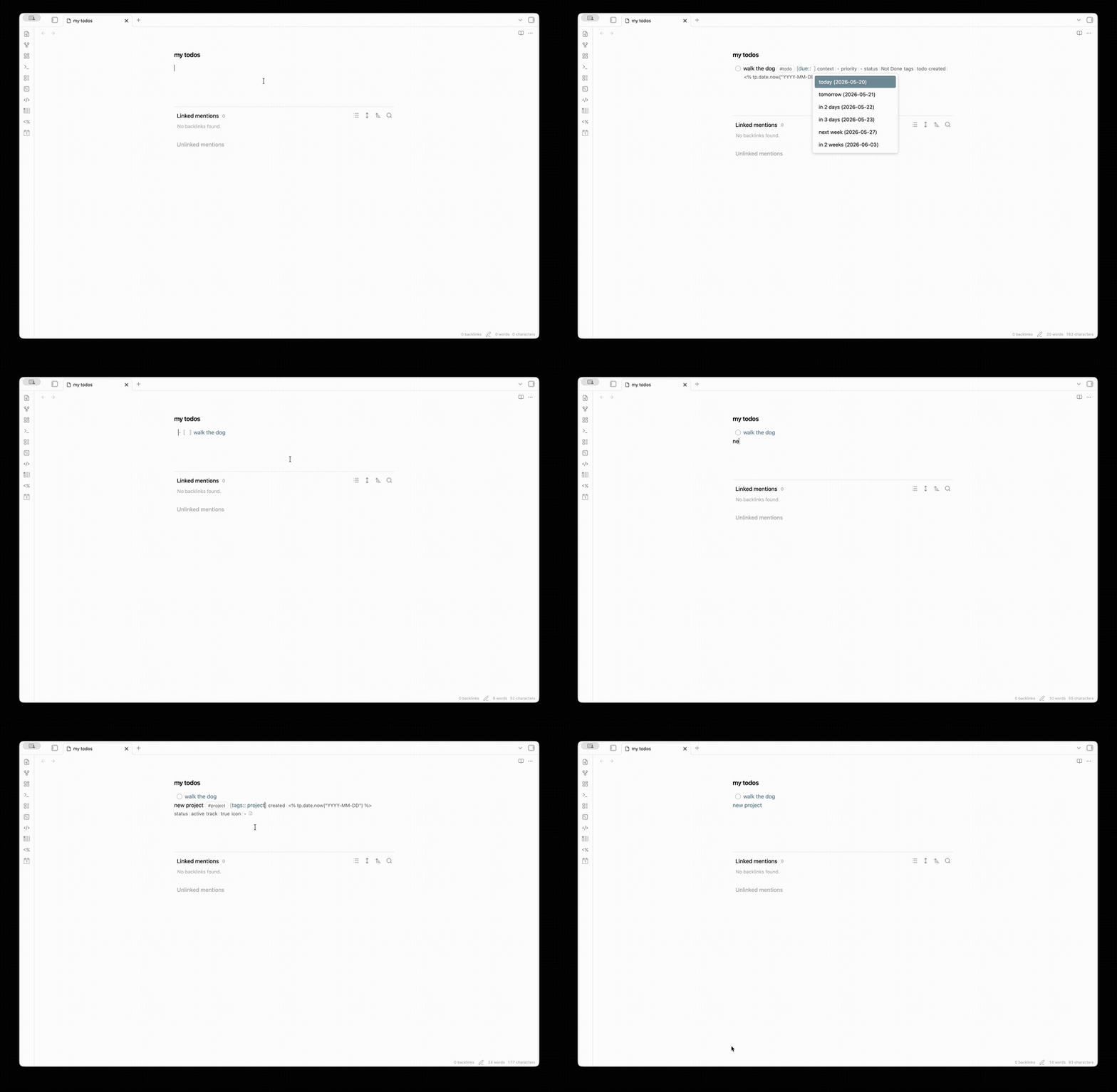
Features
- Tag-triggered note creation: Configure templates for specific tags (e.g.,
#todo,#meeting,#person) - Inline field editing: Add Dataview-style inline fields
[field:: value]with autocomplete suggestions - Template-based frontmatter: Define field types and sources in your template's frontmatter using
@type:comments - Smart suggestions: Get autocomplete for dates, folder contents, tagged notes, and custom options
- Checkbox sync: Optionally sync checkbox state with a frontmatter status field
- Templater support: Works with Templater syntax in your templates
Quick Start
-
Create a template with typed frontmatter fields:
--- title: "" # @type: text priority: medium # @type: text | options:high,medium,low due: # @type: date assignee: "" # @type: text | tag:person tags: [] # @type: list --- -
Configure a tag in plugin settings:
- Tag:
todo - Field source: Parse from template
- Template path:
Templates/Todo.md - Output folder:
Tasks/
- Tag:
-
Write a line with the tag:
Review the PR #todo -
Press
Spaceafter the tag to insert fields, then fill them in:Review the PR #todo [priority:: high] [due:: 2026-05-10] [assignee:: [[John]]] -
Click the "Create Note" button (or use the command) to convert to:
[[Tasks/Review the PR|Review the PR]]The new note will have proper frontmatter with your field values.
Field Types
Define field types in your template frontmatter using @type: comments:
| Type | Syntax | Description |
|---|---|---|
text | field: "" # @type: text | Plain text |
date | field: # @type: date | Date picker suggestions |
number | field: 0 # @type: number | Numeric value |
boolean | field: false # @type: boolean | true/false |
list | field: [] # @type: list | YAML array (comma-separated inline) |
Suggestion Sources
Add a source after the type to get autocomplete suggestions:
| Source | Syntax | Suggests |
|---|---|---|
options | # @type: text | options:high,medium,low | Fixed list of options |
folder | # @type: text | folder:People/ | Notes in a folder |
tag | # @type: text | tag:person | Notes with a specific tag |
field | # @type: text | field:status | Values used in a frontmatter field |
Keyboard Navigation
Tab/Shift+Tab: Navigate between inline fields- Standard autocomplete keys work in suggestion popups
Settings
- Open note after creation: Automatically open newly created notes
- Link format: Wiki links
[[note]]or Markdown links[note](note.md) - Field styling: Visual styling for inline fields
- Checkbox sync: Sync checkbox state with frontmatter (per-tag configuration)
Installation
From Obsidian Community Plugins
- Open Settings → Community plugins
- Search for "Tagline"
- Install and enable
Manual Installation
- Download
main.js,manifest.json, andstyles.cssfrom the latest release - Create a folder
taglinein your vault's.obsidian/plugins/directory - Copy the files into that folder
- Reload Obsidian and enable the plugin
Development
# Install dependencies
npm install

# Development build (watch mode)
npm run dev

# Production build
npm run build

# Run tests
npm test
License
For plugin developers
Search results and similarity scores are powered by semantic analysis of your plugin's README. If your plugin isn't appearing for searches you'd expect, try updating your README to clearly describe your plugin's purpose, features, and use cases.