Task Planner
approvedby selfish
Manage tasks with drag-and-drop planning, Today focus, backlog, overdue tracking, and weekly time horizons. - This plugin has not been manually reviewed by Obsidian staff.
Task Planner
Plan the tasks already in your vault.
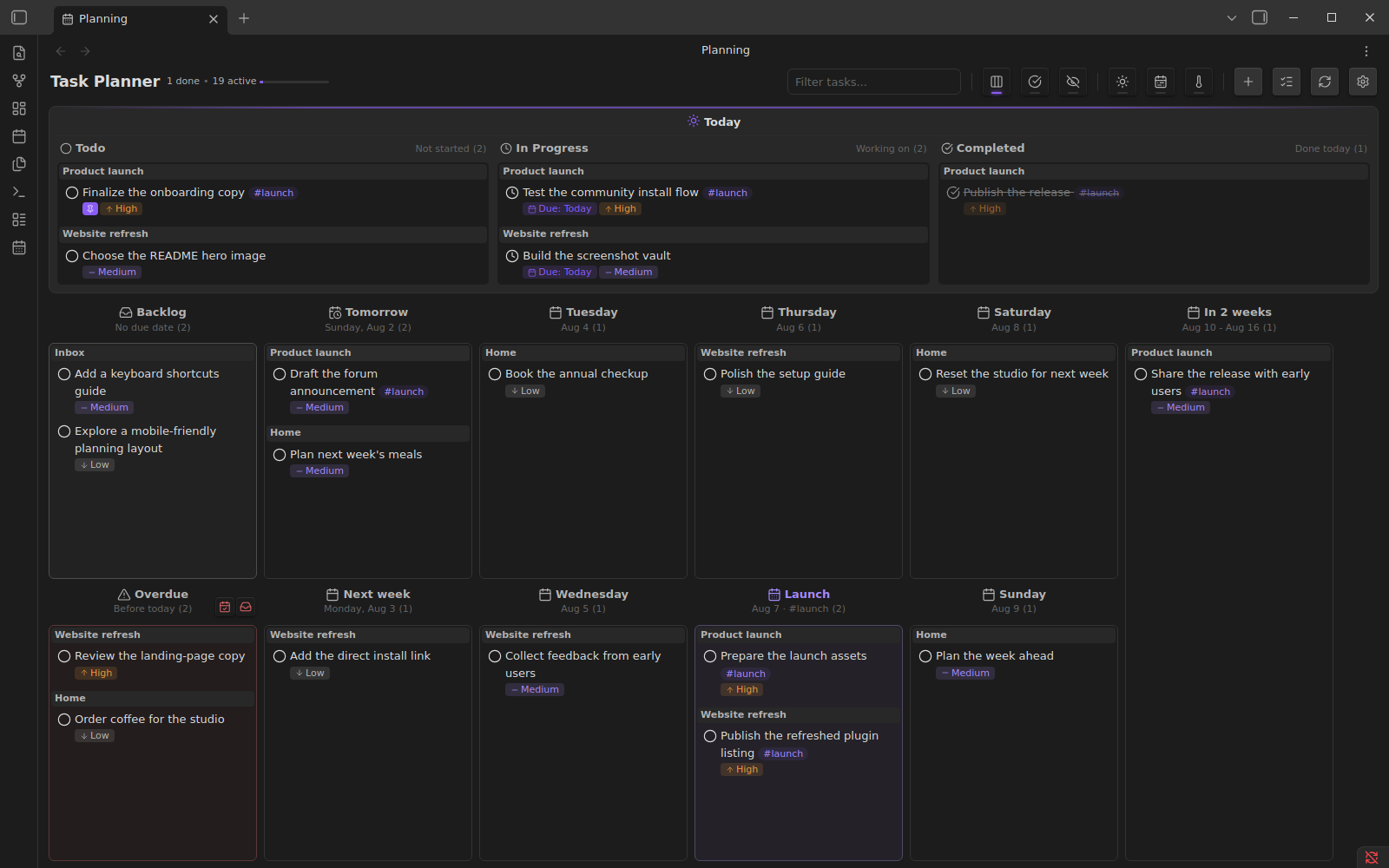
Task Planner turns Markdown checkboxes across your notes into a drag-and-drop time-planning board for Today, backlog, overdue, and future horizons. Move a card and its source task updates in place.
Install from Obsidian's plugin directory



Why Task Planner
- Keep tasks in your notes. Task Planner reads ordinary Markdown checkboxes throughout your vault instead of moving them into a separate database.
- Plan by time. Drag tasks between Today, backlog, weekdays, weeks, months, quarters, years, or your own custom horizons; overdue tasks remain visible for rescheduling.
- See the day clearly. Todo, In Progress, and Completed columns provide a focused daily workflow, with an optional WIP limit.
- Update the source. Moving a card changes the status, due date, or optional tag on its original Markdown task.
Quick start
- Open Task Planner in Obsidian's plugin directory, then install and enable it.
- Run Task Planner: Open planning from the command palette.
- Drag tasks into Today or a future horizon. Task Planner writes the change back to the source note.
Add tasks anywhere in your vault using Markdown checkbox syntax:
- [ ] Review the launch brief [due:: 2026-08-07] [priority:: high] #launch
- [>] Prepare the demo [due:: 2026-08-01]
Task Planner does not require a special task file or a separate database.
Core capabilities
Plan across the whole vault
- Gather tasks from any Markdown file
- Filter by task text
- Ignore selected folders or archived content
- Group cards by their source note
- Pin important tasks so they remain visible
- Collapse and expand subtasks
Work with time horizons
- Backlog and overdue columns
- Today, tomorrow, and individual weekdays
- Configurable week, month, quarter, and year horizons
- Custom horizons based on a date and, optionally, a tag
- Today and Future focus modes
- Drag-and-drop movement between horizons
Manage status and priority
Supported task statuses:
- [ ] Todo
- [>] In progress
- [x] Completed
- [-] Canceled
- [d] Delegated
- [!] Attention required
Priority values are critical, high, medium, low, and lowest.
Use readable Markdown metadata
Task Planner reads and writes Dataview-compatible inline fields:
- [ ] Schedule the review [due:: 2026-08-10] [priority:: medium]
- [ ] Keep this visible [selected:: true]
Dataview is not required. The Markdown remains readable and editable without Task Planner.
Optional shorthand expansion can convert attributes when you complete a line:
@today→[due:: YYYY-MM-DD]for the current day@tomorrow→[due:: YYYY-MM-DD]for the next day@high→[priority:: high]
Enter several shortcuts without leaving the task
Write the shortcuts on the same task line, for example:
- [ ] Schedule the review @tomorrow @high
While editing that line, run Task Planner: Complete line attributes from Obsidian's command palette. It expands the enabled shortcuts in place without creating another line. For repeated use, assign the command a hotkey under Settings → Hotkeys.
With Settings → Task Planner → @ shortcuts → Auto-convert enabled, leaving the task line also expands its shortcuts. Enter retains its normal Markdown editing behavior; use the command when you want to keep editing the same task.
Choose a due date from a note
On a task line, type @date and select Choose due date…, or run Task Planner: Set task due date from the command palette. Choose a date in the native calendar control and save; the task stays on the same line. The command also works when @ shortcuts are disabled and can be assigned a hotkey.
The picker uses your configured due-date field and lets you change or remove an existing date. Cancel leaves the note unchanged, and normal editor undo restores a saved change. If the note changes while the picker is open, it asks you to reopen rather than overwriting that edit. A custom date shortcut takes precedence over the calendar suggestion.
You can still edit inline metadata directly, for example [due:: 2026-10-20] (or your configured field name).
Commands
- Open planning — open the planning board
- Open todo report — review completed tasks
- Quick add task — create a task in the configured destination
- Mark task as checked / unchecked — toggle completion
- Mark task as ongoing / unchecked — toggle in-progress status
- Complete line attributes — expand enabled date, priority, and custom shortcuts
- Set task due date — choose, change, or remove the current task's due date
Configuration
Open Settings → Task Planner to configure:
- visible day, week, month, quarter, and year horizons;
- custom dated horizons with optional tag filtering;
- the daily WIP limit;
- attribute names such as
due,completed, andselected; - ignored folders and archived-task filtering;
- shortcut expansion and quick-add behavior.
Compatibility and data ownership
- Requires Obsidian 1.8.7 or newer
- Desktop only
- Stores tasks in user-owned Markdown files
- Uses inline fields for planning metadata
- Does not require Dataview or an external service
Task Planner updates the specific source task when you change it from the board. Keep normal vault backups or version control as you would for any tool that edits notes.
Support
- Report a bug or request a feature
- View releases and release notes
- Open the Obsidian community listing
Development and contributing
See CONTRIBUTING.md for the development environment, validation commands, real-Obsidian tests, and pull-request guidelines.
License and attribution
Task Planner is licensed under the GNU General Public License v2.0.
It is based on Proletarian Wizard by cfe84 and contributors, also licensed under GPL v2.0.
For plugin developers
Search results and similarity scores are powered by semantic analysis of your plugin's README. If your plugin isn't appearing for searches you'd expect, try updating your README to clearly describe your plugin's purpose, features, and use cases.