Tasks Timeline
approvedby leonezz
View and manage vault tasks on a timeline. - This plugin has not been manually reviewed by Obsidian staff.
Tasks Timeline
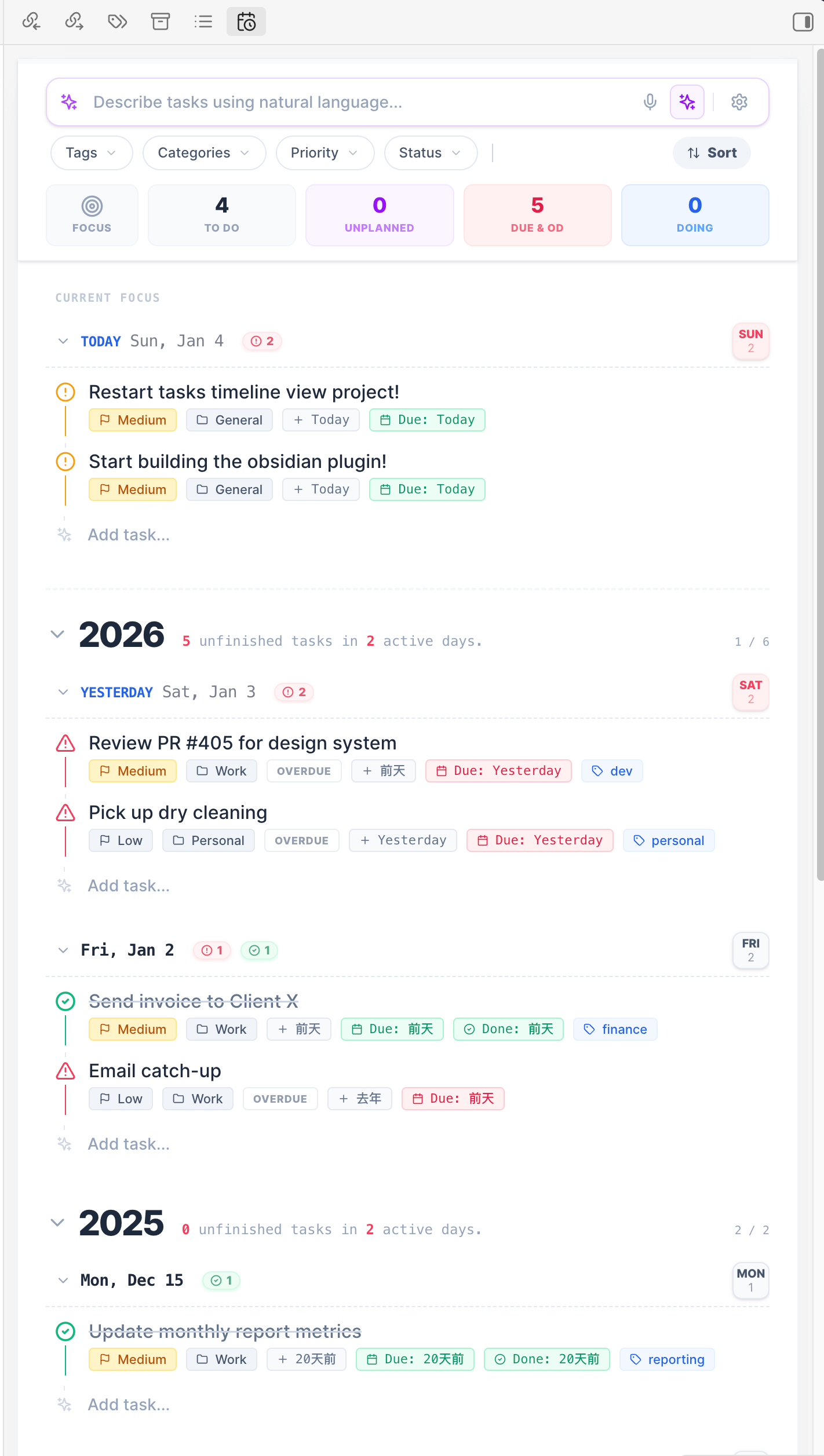
Tasks Timeline shows and manages task items in an Obsidian vault. It is a continuation of obsidian-tasks-calendar-wrapper, based on tasks-timeline-components.
MCP server
The plugin includes a built-in Model Context Protocol (MCP) server that lets AI agents read and write tasks in your vault.
Setup
- Open Settings > Tasks Timeline > MCP server
- Toggle Enable MCP server on
- The server starts on
http://127.0.0.1:27182/mcp(port is configurable)
Connecting AI clients
Add the following to your MCP client configuration (e.g. Claude Desktop, Claude Code, Cursor):
{
  "mcpServers": {
    "tasks-timeline": {
      "url": "http://127.0.0.1:27182/mcp"
    }
  }
}
Bearer-token auth is enabled by default. Copy the token from Settings > Tasks Timeline > MCP server and configure it as an Authorization: Bearer <token> header in clients that support HTTP MCP headers.
Available Tools
| Tool | Description |
|---|---|
query_tasks | Search and filter tasks by status, category, tags, date range, and free-text |
create_task | Create a new task with title, priority, dates, tags, and recurrence |
update_task | Update an existing task by ID (partial updates supported) |
delete_task | Delete a task by ID |
complete_task | Mark a task as done (handles recurring tasks) |
cancel_task | Cancel a task or recurring series |
batch_update_tasks | Update multiple tasks matching a filter |
get_task_stats | Get aggregate statistics (counts by status, priority, category) |
get_today_plan | Get tasks due today and overdue tasks sorted by priority |
Available Resources
| Resource | URI | Description |
|---|---|---|
| All Tasks | tasks://all | List of all tasks |
| Task by ID | tasks://task | Retrieve a single task |
| Overdue | tasks://overdue | Tasks that are past due |
| Today | tasks://today | Tasks due or starting today |
| Upcoming | tasks://upcoming | Tasks due in the next 7 days |
| Stats | tasks://stats | Aggregate task statistics |
Available Prompts
| Prompt | Description |
|---|---|
plan_my_day | Review today's tasks and create a prioritized daily plan |
weekly_review | Review task progress and suggest priorities for next week |
task_triage | Identify stale tasks and suggest actions |
For plugin developers
Search results and similarity scores are powered by semantic analysis of your plugin's README. If your plugin isn't appearing for searches you'd expect, try updating your README to clearly describe your plugin's purpose, features, and use cases.