by suavecito
Companion bridge plugin for The 40 Thieves' vault-access MCP server. Extends Local REST API with command dispatch and plugin firepower bridges.
Reliquary-TC
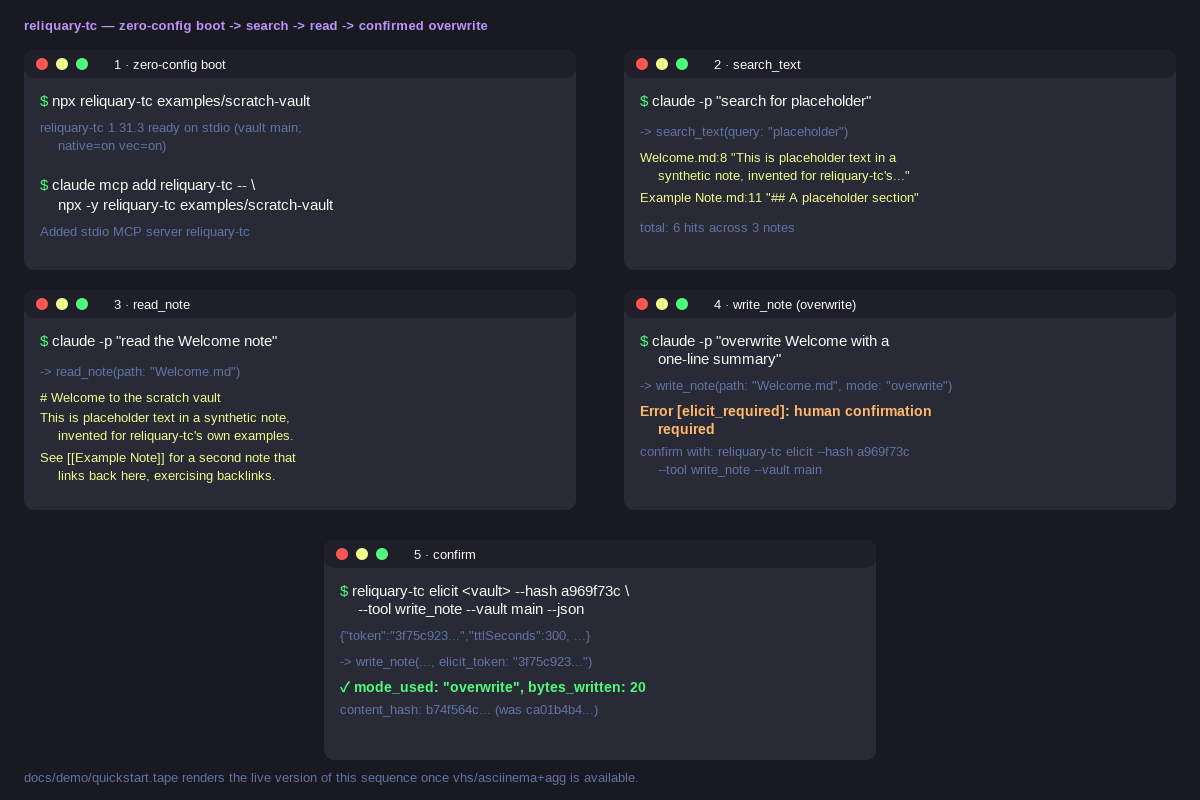
Governed, agent-ready Obsidian vault access over MCP.
Formerly obsidian-tc. Renamed in 2.0. The obsidian-tc command, OBSIDIAN_TC_* variables,
obsidian-tc:// resource URIs, obsidian_tc_* metrics and an existing ~/.obsidian-tc folder all
keep working through 2.x; see Upgrading from obsidian-tc.




What it is
reliquary-tc is a governed, agent-ready Model Context Protocol
server for Obsidian vaults, for humans and agents alike. Instead of raw
filesystem access to years of notes, every tool call runs through one pipeline — auth, folder
ACLs, a read-only kill switch, HITL confirmation on destructive ops, and an audit log. It also
adds fused retrieval (full-text, vector, graph) and a memory tier — episodes, decay, forgetting —
living inside your vault under that same ACL.
A full tool surface across every domain (all visible by default; a smaller set with opt-in
profile: "core"), via a 3-tool discovery facade plus the standard search/fetch pair, listed in the
tool catalog. Pitch: docs/WHY.md.
60-second start
No install:
npx reliquary-tc /path/to/vault
Every note tool and lexical search work immediately. Semantic search defaults to a local in-process embedder — see When NOT to use for which install methods it reaches.
For multi-vault, auth, or ACLs, use a config file:
npm install -g reliquary-tc
reliquary-tc ./reliquary-tc.config.json   # Node >= 24 or Bun >= 1.1
The default local embedder is an opt-in install, so npm install -g reliquary-tc leaves it out. To use it,
install the same version: npm install -g @the-40-thieves/reliquary-tc-embedder-local@<same version> (drop -g
for a project install), or let reliquary-tc setup offer to. Ollama and hosted embedding providers need no
local embedder; without any embedder, semantic search is off and everything else still works.
Also ships as a Docker image, .mcpb bundle, and standalone binaries. More:
docs/QUICKSTART.md.
When NOT to use reliquary-tc
Honest guidance — this is a heavier product than most:
- Smallest possible footprint, read-only access, or no MCP at all. A single trusted human over one vault, a read-only wrapper, or the Obsidian URI/Local REST API plugin may be all you need — see the full comparison.
- Zero setup, except the embedder on npm. The vault is read off disk; semantic search defaults to a local in-process embedder, which an npm install leaves out (the server prints the install command) — see Embeddings.
- Zero-config trades away auth/ACLs.
reliquary-tc /path/to/vaultboots with auth off, no folder ACL — fine only because it's local-only; governance is opt-in. Detail: SECURITY.md. - Single-maintainer project.
- Everything inside Obsidian, or vault-independent memory. See the comparison above.
Migrating from another MCP server: docs/CUTOVER.md.
How it compares
Most Obsidian MCP projects are vault-access servers, retrieval engines, or memory engines, rarely more than one. reliquary-tc is the only one we know of that is all three, with memory living in the vault under the same ACL as every other write. Full 9-project table and "where the others win".
| Tools | Group | What it's for | |
|---|---|---|---|
| reliquary-tc | full surface (3-tool facade) | all three | governed access + retrieval + in-vault memory |
| obsidian-local-rest-api | 18 | access | Obsidian's own built-in MCP server; one bearer key, no ACL |
| basic-memory | ~35 | memory | entities/relations in a separate, portable markdown KB |
More
Table of contents
TC Bridge · Status · Architecture · The interface · Claude Code / Cursor / VS Code · Docs · Trademark · License · Contributing
TC Bridge: the companion Obsidian plugin
If you arrived here from Obsidian's plugin browser: the TC Bridge listing points here because the plugin lives in this repo, but it's a small optional bridge, not the server described above. It extends Local REST API with endpoints for Obsidian-only features (Templater, Dataview, Tasks, Excalidraw, Git, Remotely Save). Every filesystem-level feature works without it.
- Install Local REST API first; TC Bridge reuses its bearer-token auth, desktop-only. The
server is installed separately (60-second start); reaching the bridges needs
restApiUrl/restApiKeyin the vault config (step 6). That key is a vault root password — read the trust boundary first. - Formerly "Reliquary-TC." Settings migrate on first load — details in packages/plugin/README.md.
Status
Shipped — v2.0.1, published to npm as provenance-signed packages, container image on GHCR. Milestones: Roadmap; releases: CHANGELOG.md.
Retrieval changes are measured, not asserted: a statistical ship rule gates every ranking change against a private golden set. Headline figures once on this README were withdrawn 2026-08-07 as unreproducible — full account and a public-corpus result since: docs/EVALUATION.md.
Architecture
Polyglot monorepo:
| Package | Language | Purpose |
|---|---|---|
packages/server | TypeScript (Bun) | MCP layer, auth, routing, tools, plugin bridges |
packages/plugin | TypeScript | Companion Obsidian plugin extending Local REST API |
packages/shared | TypeScript | Shared Zod schemas and types |
packages/native | Rust (napi-rs) | Optional acceleration, pure-JS fallback |
Dispatch-pipeline and package-layout detail: ARCHITECTURE.md.
Every capability is a governed tool with declared access scopes. Read tools (read_note,
search_vault, get_backlinks, ...) never mutate the vault. Write tools cover whole-note and
partial edits: write_note, append_note, patch_note (heading- and block-anchored edits),
update_frontmatter, tag and link maintenance. Separate scope classes gate delete and move
(delete_note, move_note), bulk operations (bulk_set_property), execute (execute_command)
and admin (add_vault, reload_vault). The complete, always-current list, grouped by access
scope and generated from the tool registry, is the
tool catalog.
The interface: five tools, every governed capability
By default the server advertises just five tools instead of the full surface: three meta-tools,
find_capability, describe_capability, call_capability (invoke by name, same pipeline as a
direct call), plus the standard search and fetch tools ChatGPT deep research needs. toolFacade.mode selects triad (default), domain or flat (a superseded auto also exists)
— boundary-only, no gate bypassed. Per-client advice: MCP clients.
Install in Claude Code, Cursor, VS Code
Claude Code plugin (launches npx -y reliquary-tc, asks for your config file path on enable):
claude plugin marketplace add The-40-Thieves/reliquary-tc
claude plugin install reliquary-tc@the-40-thieves
Grok Build and Muse Code (1.4.0+) read the same marketplace; details in Installation.


Or by hand — Cursor (mcpServers) / VS Code (servers), same object:
{"command": "npx", "args": ["-y", "reliquary-tc"], "env": {"RELIQUARY_TC_CONFIG": "/ABS/config.json"}}.
A .mcpb bundle (bun run bundle) also installs into Claude Desktop / other MCPB hosts.
For claude.ai and ChatGPT (remote HTTP), see distribution.
Docs
- docs/QUICKSTART.md — install to first governed write, ~5 min
- docs/WHY.md / SECURITY.md — threat model, governance
- docs/CUTOVER.md — migrating from another Obsidian MCP server
- docs/EVALUATION.md — how retrieval changes are measured
- ARCHITECTURE.md — dispatch pipeline, package layout
- Docs site: https://docs.the40thieves.dev/reliquary-tc (full comparison under Getting Started)
Trademark
reliquary-tc is independent and community-built, not affiliated with or endorsed by Obsidian or its maker, Dynalist Inc. "Obsidian" is a Dynalist Inc. trademark, used only nominatively. Official app: obsidian.md.
License
Apache-2.0. See LICENSE, NOTICE and the licensing page. Releases up to 1.34.x stay AGPL-3.0-only. Contributors sign the CLA once and the DCO on every commit; see CONTRIBUTING.md.
Contributing
See CONTRIBUTING.md / Code of Conduct. Security: SECURITY.md.
For plugin developers
Search results and similarity scores are powered by semantic analysis of your plugin's README. If your plugin isn't appearing for searches you'd expect, try updating your README to clearly describe your plugin's purpose, features, and use cases.