Thought Agent
approvedby tuguberk
An autonomous graph-aware AI assistant that chats with your notes, proposes edits safely, and creates intelligent mindmaps. - This plugin has not been manually reviewed by Obsidian staff.
🧠 Thought Agent
Your vault doesn't just store knowledge, it thinks with you.
An AI-powered Obsidian plugin that treats your notes, links, and diagrams as a living knowledge graph.






✦ What is Thought Agent?
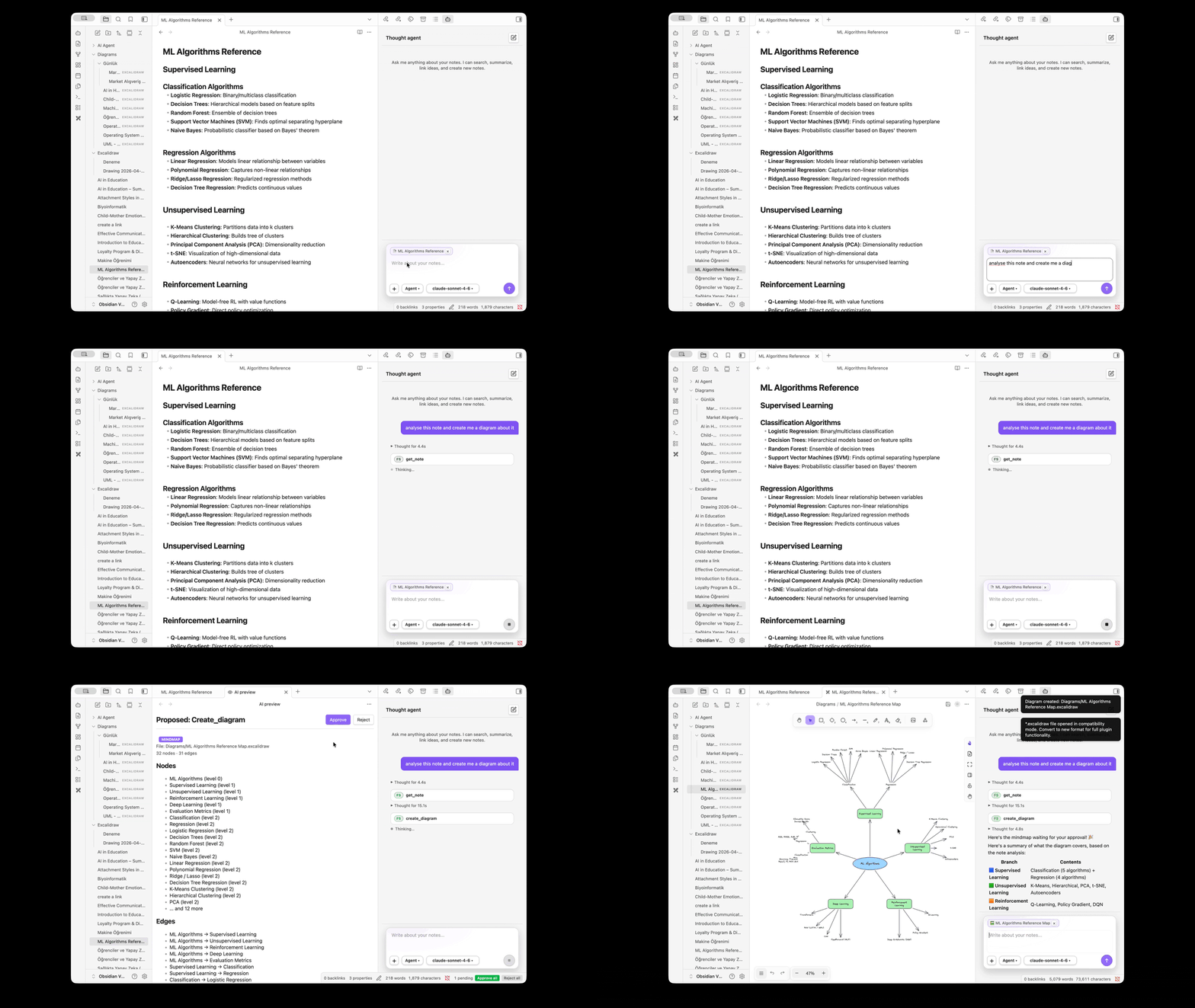
Thought Agent is not a chatbot bolted onto your notes. It is an autonomous reasoning agent that navigates your vault like a researcher, searching semantically, traversing graph links, proposing safe edits, and generating visual diagrams, all without touching a single file until you approve.
"Think of it as a second brain for your second brain."
📦 Installation
Option 1, Obsidian Community Plugins (recommended)
- Open Obsidian → Settings → Community Plugins → Browse.
- Search for "Thought Agent".
- Click Install, then Enable.
That's it — no BRAT, no manual file copying.
You can also open the plugin page directly: community.obsidian.md/plugins/thought-agent
Option 2, BRAT
BRAT lets you install plugins directly from GitHub and get pre-release updates.
- Install Obsidian42 - BRAT from the Community Plugins store.
- Open Obsidian → Settings → BRAT → Add Beta Plugin.
- Paste the repository URL:
https://github.com/Tuguberk/Thought-Agent-Obsidian - Click Add Plugin, BRAT downloads and enables it automatically.
- Go to Settings → Community Plugins and toggle Thought Agent on.
Option 3, Manual installation
- Go to the Releases page and download the latest:
main.jsmanifest.jsonstyles.css
- Copy all three files into your vault's plugins folder:
<your-vault>/.obsidian/plugins/thought-agent/ - Restart Obsidian (or reload without saving).
- Go to Settings → Community Plugins and toggle Thought Agent on.
Option 4, Build from source
# Clone into your vault's plugins folder
git clone https://github.com/Tuguberk/Thought-Agent-Obsidian \
  "<your-vault>/.obsidian/plugins/thought-agent"

cd "<your-vault>/.obsidian/plugins/thought-agent"
npm install
npm run build
Then enable the plugin in Obsidian as above.
🚀 Quick Start
Step 1, Configure a provider
Open Obsidian → Settings → Thought Agent and pick your LLM provider:
Using Anthropic (Claude):
- Set Provider →
Anthropic - Paste your Anthropic API key (
sk-ant-...) - Select a model, Claude Sonnet 4.6 is recommended for the best balance of speed and power
Using OpenRouter (hundreds of models, one key):
- Set Provider →
OpenRouter - Paste your OpenRouter API key (
sk-or-...) - Enter a model slug such as
anthropic/claude-3.7-sonnet,deepseek/deepseek-v4-pro, oropenai/gpt-4o-mini, browse the full catalog at openrouter.ai/models - Hit Test to verify the key and model, then switch models any time from the chat header
Using a local model (OpenAI compatible API):
- Start any OpenAI-compatible local server (e.g. LM Studio, Ollama, llama.cpp)
- Set Provider →
OpenAI compatible API - Default URL is
http://localhost:1234/v1, hit Test to confirm it's reachable - Your prompts never leave your machine 🔒
Step 2, Index your vault
In Settings → Thought Agent, click Re-index vault.
This builds the local semantic index (~25 MB model download on first run). You only need to do this once, and again after adding many new notes.
Embedding provider: The default embedder is a bundled local model (desktop only). On mobile — or to offload embedding to the cloud — open Settings → Thought Agent → Embeddings and choose OpenAI, Google, or OpenRouter, then paste the matching API key. Changing the embedding provider requires re-indexing the vault.
Step 3, Open the chat
Click the 🧠 Thought Agent icon in the left sidebar (or run "Open Thought Agent chat" from the Command Palette).
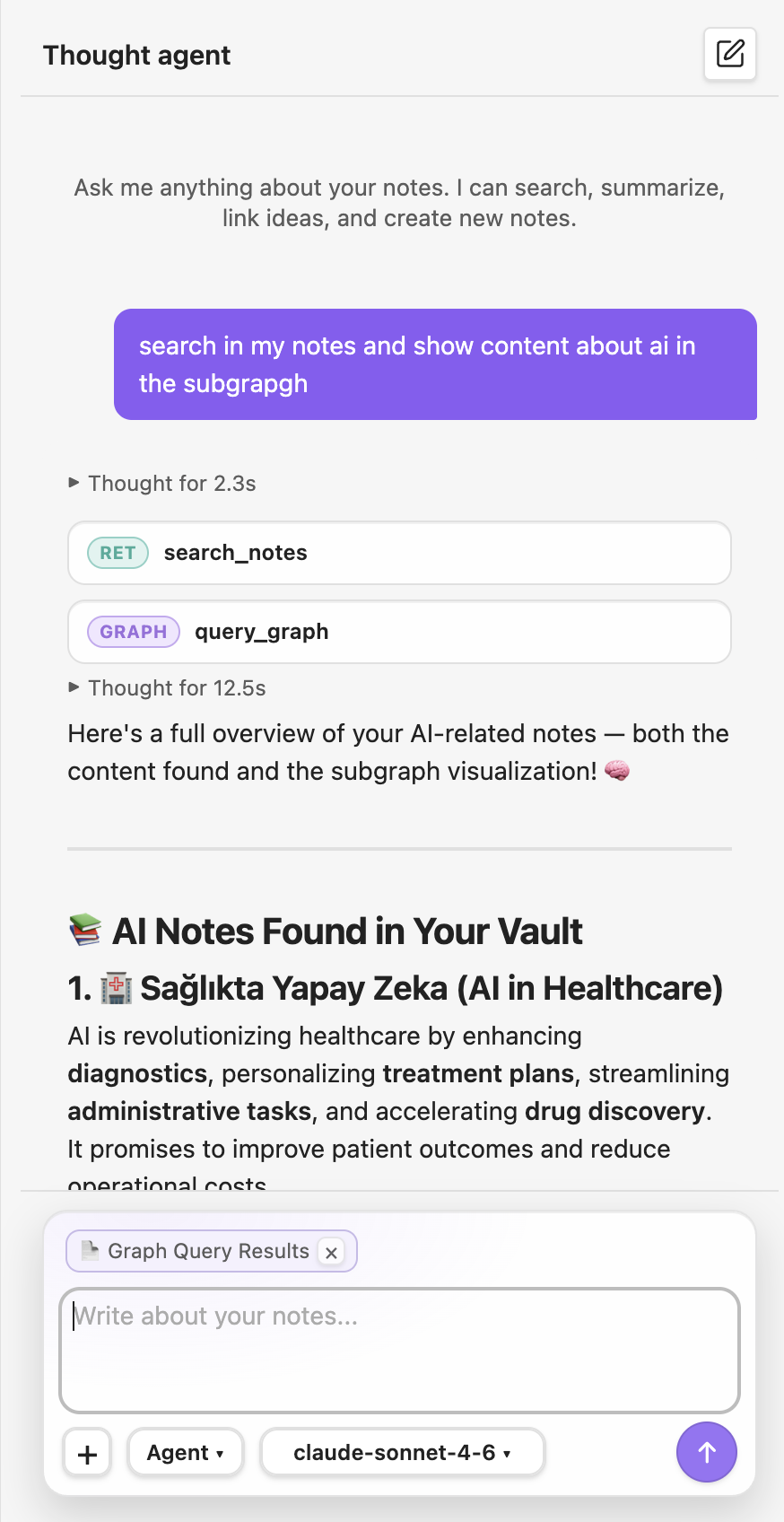
Example prompts to try:
"What do my notes say about machine learning?"
"Summarize my research on [[Attention Mechanisms]] and link related notes"
"Create a mindmap of my project ideas"
"Find notes I haven't linked yet about distributed systems"
"What are the backlinks to my MOC note?"
Step 4, Review & approve changes
The agent will never write to your vault without showing you a preview first.
Every proposed note creation, edit, and diagram goes through a diff view, approve or reject each change individually.
🖼️ Multimodal Input
Attach images and PDFs directly to your messages using the + button in the chat composer.
- Images (JPEG, PNG, GIF, WEBP) — sent as-is to vision-capable models
- PDFs — text is extracted client-side via Obsidian's built-in PDF.js and sent as readable content; no PDF data leaves your machine for local models
- Attach multiple files at once; each appears as a chip with a thumbnail preview
- Attachments are cleared automatically after each message
🏗️ System Architecture
flowchart TD
    U(["👤 User Prompt"]) --> AL["🔄 Agent Loop\nIterative reasoning"]

    AL --> TE["⚙️ Tool Executor"]

    TE --> R["🔍 Hybrid Retrieval\nVector · BM25 · Graph"]
    TE --> V["📝 Vault Operations\nCreate · Edit · Link"]
    TE --> D["🎨 Excalidraw Engine\nCreate · Update · Read"]
    TE --> G["🕸️ Graph Queries\nNeighbors · Backlinks · Subgraphs"]

    R --> CP["📦 Context Pack\nRanked, deduplicated"]
    CP --> AL

    AL --> PR["👁️ Preview & Diff\nPropose before write"]
    PR --> W(["✅ Write to Vault\nUser-approved only"])

    style U fill:#7c3aed,color:#fff,stroke:none
    style W fill:#059669,color:#fff,stroke:none
    style PR fill:#d97706,color:#fff,stroke:none
    style CP fill:#1e40af,color:#fff,stroke:none
🔌 LLM Provider Support
Thought Agent is provider-agnostic. Choose the model that fits your workflow.
flowchart LR
    TA["🧠 Thought Agent\nProvider Layer"] --> AN
    TA --> OR
    TA --> LM
    TA --> OA

    subgraph AN["☁️ Anthropic (Cloud)"]
        C1["Claude Sonnet 4.6\n✦ Recommended"]
        C2["Claude Opus 4.7\n✦ Most powerful"]
        C3["Claude Haiku 4.5\n✦ Fastest"]
    end

    subgraph OR["🔗 OpenRouter (Cloud Gateway)"]
        R1["One key → 100s of models\nClaude · GPT · Llama · DeepSeek\nChat + embeddings"]
    end

    subgraph LM["🖥️ OpenAI Compatible API (Local)"]
        L1["LM Studio · Ollama · llama.cpp\nQwen · Mistral · Llama · Phi\nAny OpenAI-compat model"]
    end

    subgraph OA["🔗 OpenAI-Compatible (Remote)"]
        O1["Any server exposing\n/v1/chat/completions"]
    end

    style TA fill:#7c3aed,color:#fff,stroke:none
    style AN fill:#1a1a2e,color:#e2e8f0,stroke:#7c3aed,stroke-width:1px
    style OR fill:#1a1a2e,color:#e2e8f0,stroke:#f59e0b,stroke-width:1px
    style LM fill:#1a1a2e,color:#e2e8f0,stroke:#059669,stroke-width:1px
    style OA fill:#1a1a2e,color:#e2e8f0,stroke:#3178c6,stroke-width:1px
| Provider | Setup | Privacy | Models | Best For |
|---|---|---|---|---|
| Anthropic | API key | Cloud | Claude Sonnet / Opus / Haiku | Best reasoning quality |
| OpenRouter | API key | Cloud | 100s (Claude · GPT · Llama · DeepSeek) | Widest model choice, one key |
| OpenAI compatible API | localhost:1234 | 100% local | LM Studio · Ollama · llama.cpp | Offline / private vaults |
OpenRouter also powers cloud embeddings — select it under Settings → Thought Agent → Embeddings to use models like
openai/text-embedding-3-smallfor semantic search (handy on mobile, where the local embedder isn't available).
🔍 Retrieval Pipeline
Every query runs through a multi-stage hybrid search before the agent sees any context.
flowchart LR
    Q["🔎 Query"] --> V["Vector Search\n(all-MiniLM-L6-v2)\nSemantic similarity"]
    Q --> B["BM25 Scoring\nKeyword frequency\n& TF-IDF"]

    V --> F["🔀 Fusion\nMin-max normalize + weighted merge\n(0.7 semantic + 0.3 BM25)"]
    B --> F

    F --> GR["🕸️ Graph Re-ranking\nBoost linked neighbors\nof top results"]
    GR --> MM["📊 MMR Filtering\nMaximal Marginal\nRelevance, diversity"]
    MM --> CTX["📦 Context Pack\nTop-K unique chunks\nwith note metadata"]

    style Q fill:#7c3aed,color:#fff,stroke:none
    style CTX fill:#059669,color:#fff,stroke:none
✏️ Safe Write Workflow
"Nothing touches your vault without your eyes on it first."
sequenceDiagram
    actor User
    participant Agent
    participant Preview
    participant Vault

    User->>Agent: "Summarize my research and link related notes"
    Agent->>Agent: Search + reason (tool loop)
    Agent->>Preview: Propose changes (diff view)
    Preview-->>User: Show before/after for each change
    User->>Preview: Approve ✅ / Reject ❌ per item
    Preview->>Vault: Write only approved changes
    Vault-->>User: Notes updated safely
🎨 Excalidraw Integration
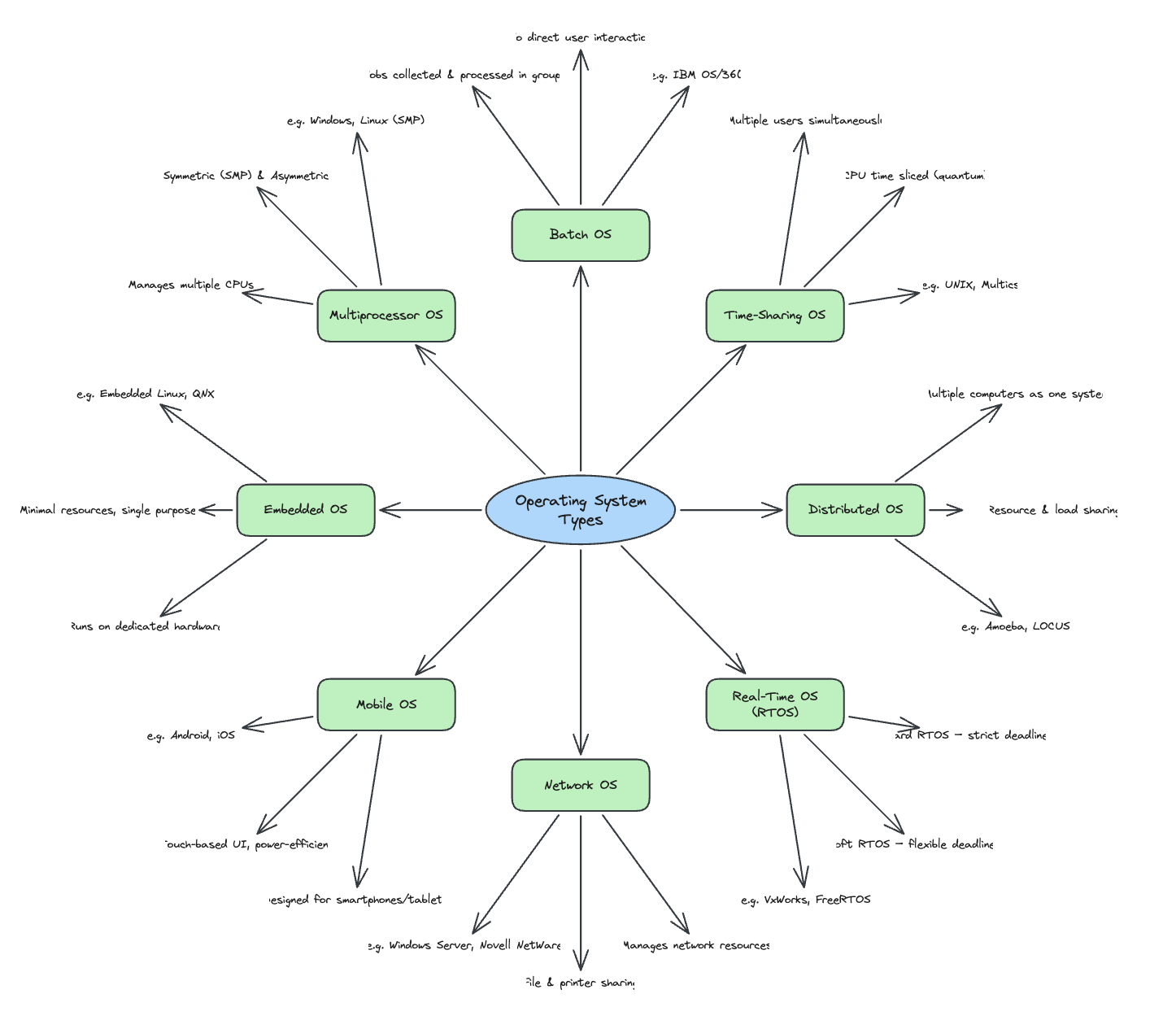
Generate, update, and search visual diagrams, directly from natural language.
flowchart TD
    NL(["💬 'Create a mindmap\nof my ML notes'"]) --> EA["Excalidraw\nAgent Tools"]

    EA --> T1["📐 create_diagram\nmindmap · flowchart\ntimeline · entity-graph"]
    EA --> T2["✏️ update_diagram\nAdd nodes · edges\nUpdate labels"]
    EA --> T3["🔍 search_diagrams\nSemantic index\nover .excalidraw files"]
    EA --> T4["📖 read_diagram\nExtract nodes, edges\n& text content"]
    EA --> T5["🔗 annotate_diagram\nBidirectional link\nnote ↔ diagram"]

    T1 --> LE["🏗️ Layout Engine\nDeterministic placement\nAnchor-aware arrows\nLayer ordering"]
    T2 --> LE
    LE --> PR["👁️ Preview\n→ User Approval"]
    PR --> OUT(["📄 .excalidraw file\nwritten to vault"])

    style NL fill:#7c3aed,color:#fff,stroke:none
    style OUT fill:#059669,color:#fff,stroke:none
    style LE fill:#d97706,color:#fff,stroke:none
Supported diagram types:
| Type | Description | Use case |
|---|---|---|
mindmap | Hierarchical radial tree | Brainstorming, concept maps |
flowchart | Process with decision nodes | Algorithms, workflows |
timeline | Chronological node chain | History, project planning |
entity-graph | Relationship network | Knowledge graphs, ERDs |
🛠️ Agent Tool Inventory
The agent has 14 tools across two categories:
📚 Vault Tools (always available)
| Tool | Description |
|---|---|
search_notes | Hybrid semantic + keyword search over the entire vault |
get_note | Fetch full content of any note by path |
get_neighbors | Walk outgoing/incoming links to depth N |
get_backlinks | Find all notes pointing to a target note |
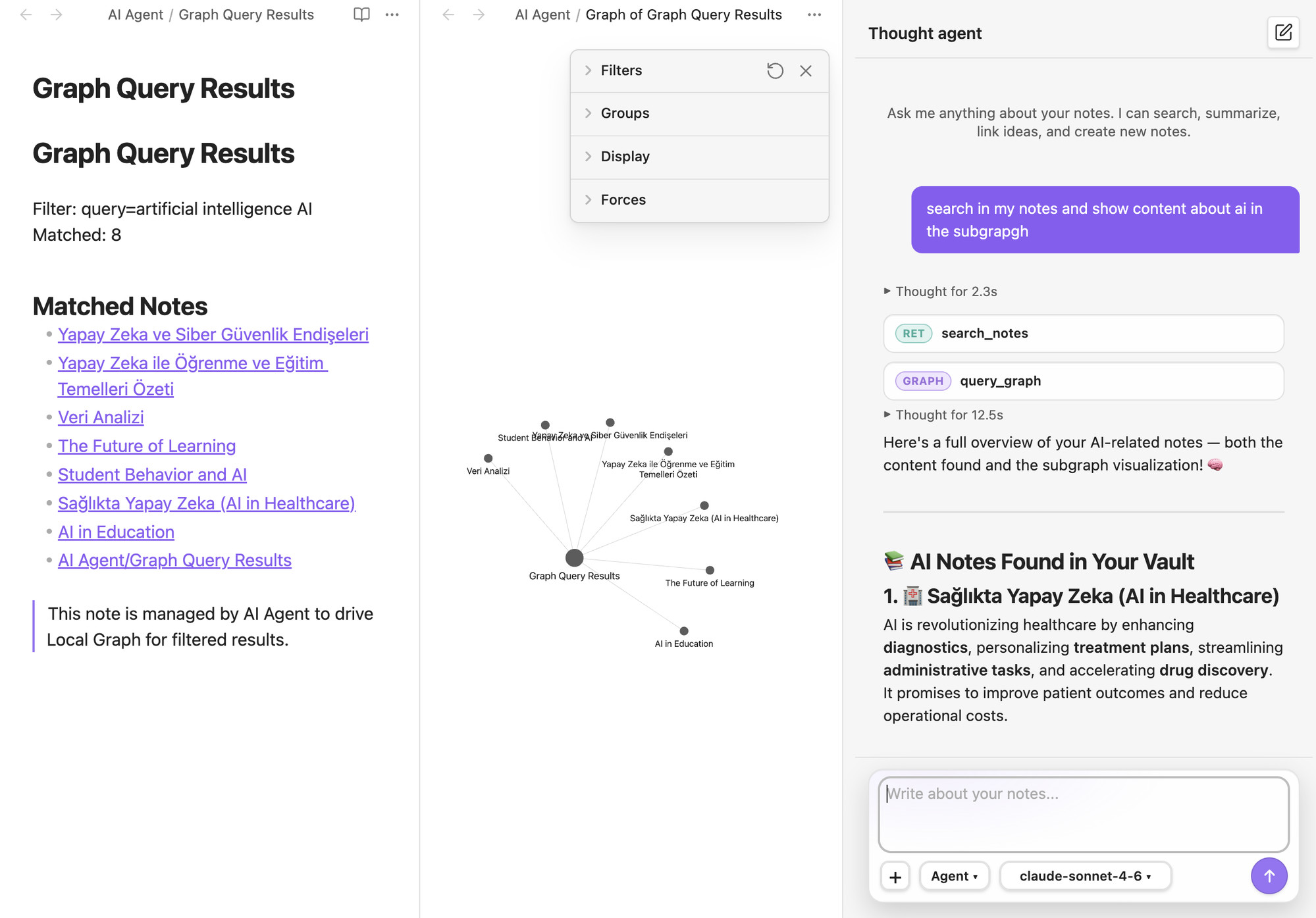
query_graph | Filter & visualize a subgraph (opens visual graph view) — see below |
create_note | Propose a new note (preview → approval) |
edit_note | Propose changes to an existing note (diff preview) |
link_notes | Add a wikilink between two notes (preview → approval) |
reorganize | Multi-step vault restructuring with per-step approval |
set_session_constraint | Scope agent to specific tags/folders for the session |
🎨 Diagram Tools (requires Excalidraw plugin)
| Tool | Description |
|---|---|
create_diagram | Generate new .excalidraw from semantic node/edge structure |
update_diagram | Add nodes/edges or relabel existing diagram |
search_diagrams | Semantic search over the diagram index |
read_diagram | Extract structured content from any .excalidraw file |
annotate_diagram | Bidirectionally link a note and a diagram |
⚡ Getting Started to Development
Requirements
- Obsidian Desktop 1.7.2+
- Node.js 18+
- npm
- (Optional) Excalidraw Obsidian plugin for diagram features
Installation (Development)
# 1. Clone into your vault's plugins folder
git clone https://github.com/Tuguberk/Thought-Agent-Obsidian \
  /path/to/vault/.obsidian/plugins/thought-agent

# 2. Install dependencies
cd thought-agent && npm install

# 3. Start the dev build (watches for changes)
npm run dev

# 4. Enable "Thought Agent" in Obsidian → Settings → Community Plugins
Production build
npm run build
📄 License
MIT © Tuğberk Akbulut
Built with ❤️ for people who think in graphs.
For plugin developers
Search results and similarity scores are powered by semantic analysis of your plugin's README. If your plugin isn't appearing for searches you'd expect, try updating your README to clearly describe your plugin's purpose, features, and use cases.