Timeflow Periodic
approvedby smirnoffmg
Infinite vertical temporal feed for your daily Periodic Notes. - This plugin has not been manually reviewed by Obsidian staff.
Timeflow Periodic
A news-feed timeline for your Periodic Notes.
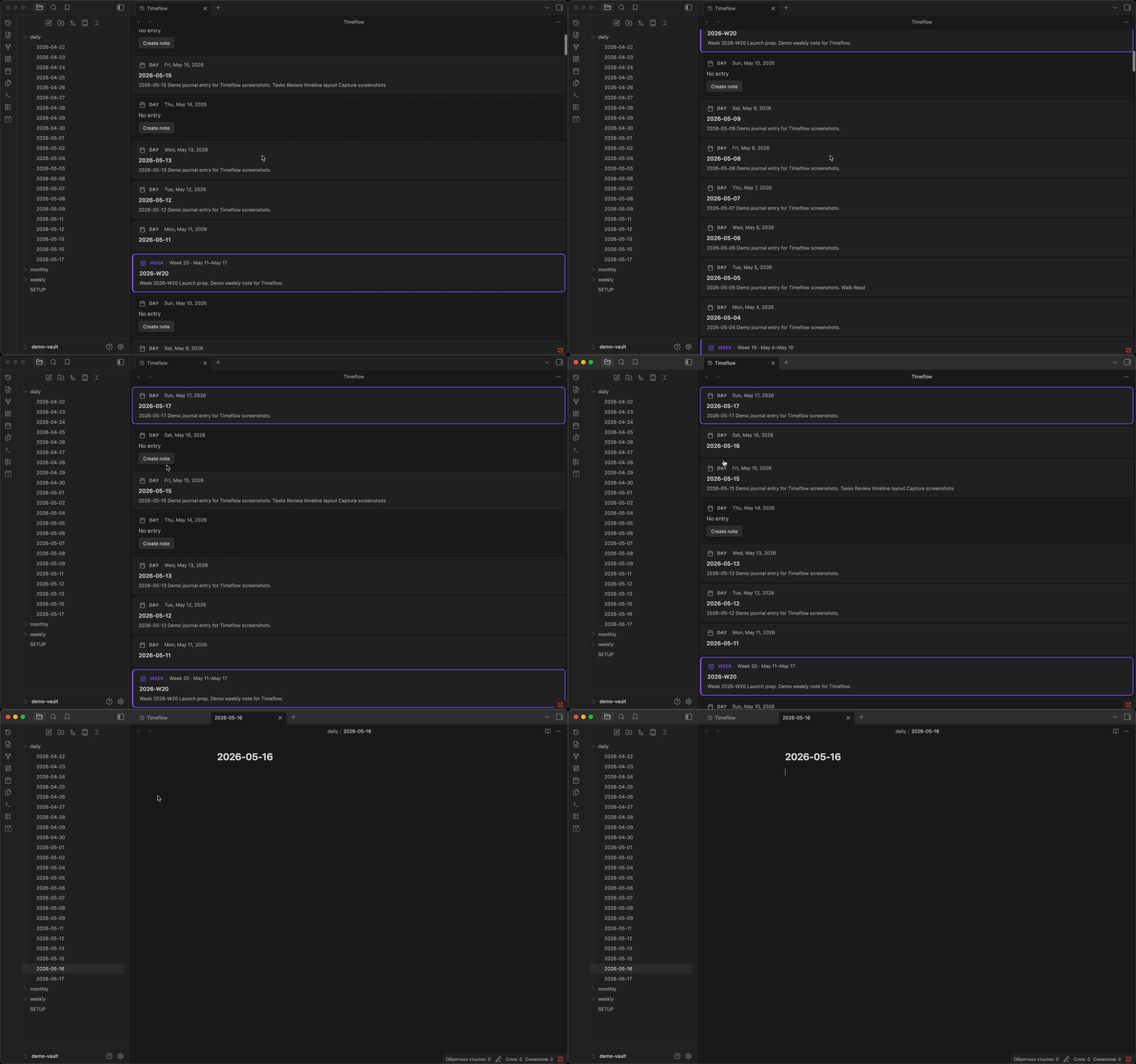
Browse your daily journal the way you browse a feed — newest at the top, one continuous scroll, no jumping between files.
Timeflow Periodic pulls your daily, weekly, and monthly notes into a single vertical view. Existing notes show a title and excerpt; missing days show a placeholder you can fill in with one click. Scroll down to reach older history; the feed extends automatically.
Features
- Continuous scroll — daily entries in one view, newest first, no future dates
- Weekly and monthly cards — period notes appear as full cards at boundaries when enabled in Periodic Notes
- Period markers — week and month dividers when period notes are off
- Note excerpts — plain-text previews on each card; Dataview TABLE queries appear as row summaries
- Gap placeholders — missing days show a Create note button
- Infinite scroll — older days load automatically as you scroll
- Live updates — vault changes (create, modify, rename, delete) refresh the feed instantly
- Jump to today — command palette shortcut to snap back to the top
Requirements
- Obsidian 1.5.0 or newer
- Periodic Notes or core Daily notes, with a folder and date format configured
- Optional: Weekly and Monthly notes in Periodic Notes for full period cards
- Optional: Dataview for TABLE query summaries on cards
Install
- Open Settings → Community plugins.
- Disable safe mode if needed, then select Browse.
- Search for Timeflow Periodic, install, and enable.
Usage
- Enable Timeflow Periodic in Settings → Community plugins.
- Open the timeline:
- Click the history icon in the left ribbon, or
- Command palette → Open timeline
- Scroll down to travel back in time; older days load automatically.
- Click a card to open the note, or select Create note on a gap day.
Configure the date range, scroll behavior, and markers in Settings → Timeflow Periodic.
Settings
| Setting | Default | Range | Description |
|---|---|---|---|
| Days before today | 90 | 7–3650 | How many past days to load initially |
| Scroll chunk size | 60 | 7–180 | Days added when scrolling into older entries |
| Week markers | On | — | Show week dividers in the timeline |
| Month markers | On | — | Show month dividers in the timeline |
| Excerpt length | 200 | 50–2000 | Maximum characters for note previews |
Privacy
Timeflow Periodic runs entirely offline in your vault. It does not send note contents elsewhere or collect analytics.
License
0-BSD — see LICENSE.
For plugin developers
Search results and similarity scores are powered by semantic analysis of your plugin's README. If your plugin isn't appearing for searches you'd expect, try updating your README to clearly describe your plugin's purpose, features, and use cases.