by nkyeah
Organize tasks, habits, deadlines, and agent handoffs in a local board.
Todolite
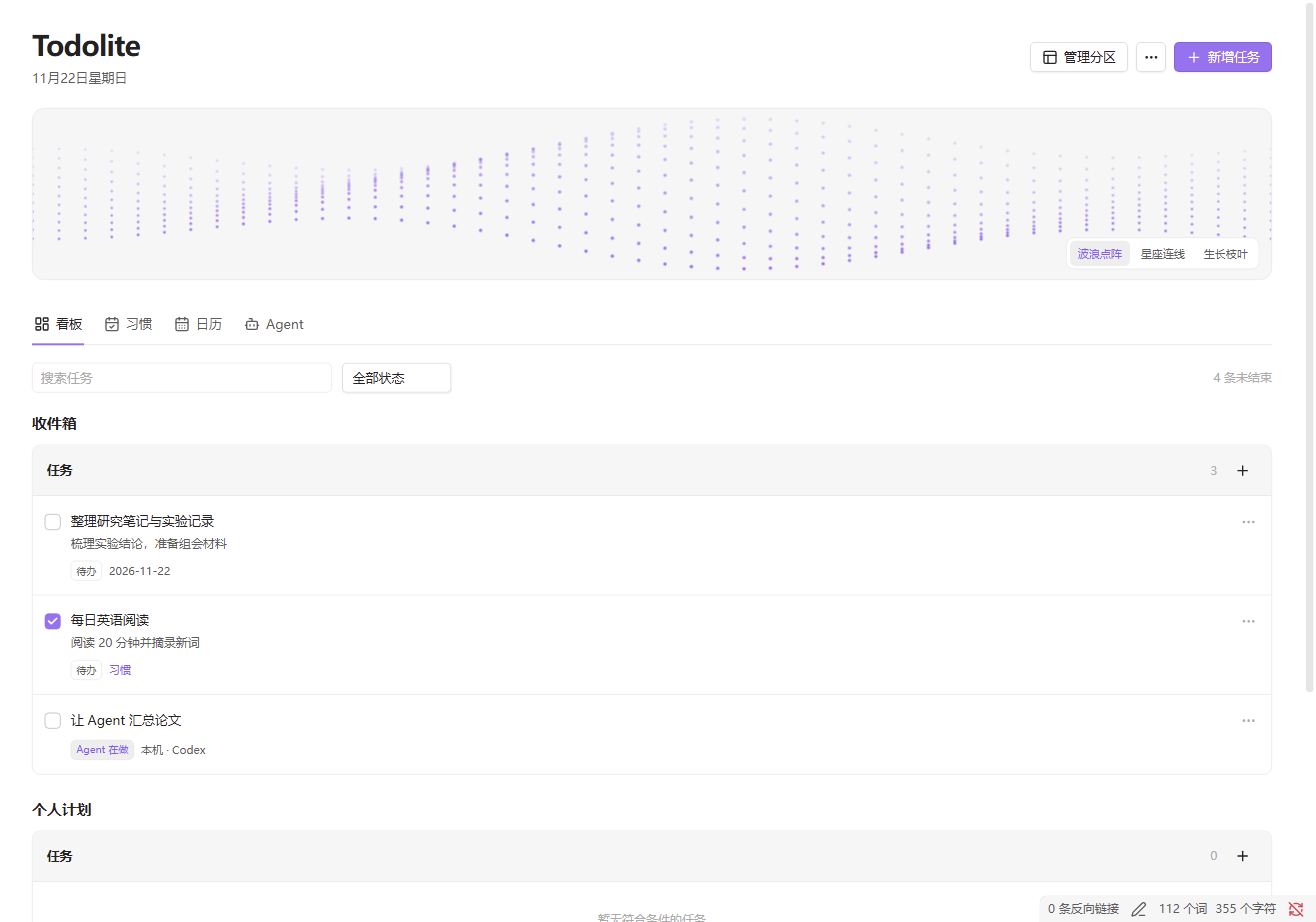
Manage tasks, habits, deadlines, and agent handoffs in a board inside your Obsidian vault.
Features
- Organize tasks into sections and cards.
- Track to do, doing, with agent, waiting, done, and dropped states.
- Record habit check-ins on selected weekdays, including the previous six days.
- View deadlines in a monthly calendar and create tasks directly from a date.
- Record an agent's running location, progress, and most recent check. Older check-ins are highlighted.
- Switch the header between wave field, constellations, and growing branches. Animations respect reduced motion.
- Follow Obsidian's light and dark themes. Choose English, Chinese, or the app's language.
- Export JSON backups and Markdown snapshots into your vault. Append tasks from a Todolite or ToDo version 2 JSON export.
Install
Requires Obsidian 1.13.0 or later.
- Download
main.js,manifest.json, andstyles.cssfrom the latest release. - Create
<vault>/.obsidian/plugins/todolite/and place the three files there. Use your vault's configured settings folder if it differs from.obsidian. - Reload Obsidian, open Settings → Community plugins, and enable Todolite.
- Select the checklist ribbon icon or run Todolite → Open board from the command palette.
Once the community directory approves the plugin, you can install it through Obsidian's community plugin browser.
Use the board
Select Add task to create your first task. Todolite creates an inbox and a task card when needed. Use Manage sections to add, rename, reorder, or delete sections and cards. Deleting a section or card asks for confirmation and removes its tasks.
Select a task's title to edit its notes, card, deadline, weekdays, or agent details. Select its status label to change its state. The status filter includes completed and dropped tasks. A habit's checkbox records today's check-in when today is scheduled. The Habits tab also supports check-ins for the previous six days.
Use Settings → Todolite to change the language, header scene, or agent reminder interval. The scene buttons on the header provide a quicker way to change the visualization.
Data and privacy
The plugin stores its board and settings in <vault>/.obsidian/plugins/todolite/data.json, using Obsidian's plugin storage API. Back up this file along with your vault. Obsidian Sync can synchronize it when plugin data synchronization is enabled. Simultaneous edits on different devices depend on your sync provider's conflict handling.
Board operations run locally. The plugin uses bundled code and procedural canvas drawings. It makes zero network requests, collects zero telemetry, accesses files within the selected vault, and is free to use without an account. Agent handoff details are manually recorded task metadata.
The More actions menu exports JSON or Markdown into the vault root. Import JSON lets you choose a JSON file in the vault. Imports append sections and create fresh IDs. Task titles, notes, states, deadlines, habit schedules, check-ins, and agent handoff details are carried across from ToDo version 2 exports. Existing timed deadlines retain their original ISO timestamp and time zone offset. The calendar displays them in the device's local time zone. Editing a deadline uses local time. App appearance settings and server integrations are configured separately for Todolite.
Development
npm ci
npm run build
npm run lint
npm test
npm run package
npm run dev watches the TypeScript source. npm run package creates the three installable assets in dist/todolite/. The production bundle includes the plugin code, and Obsidian supplies its public API at runtime.
The data tests cover serialized writes, failed-write rollback, invalid saved data, legacy import, ID collisions, local dates, and Markdown escaping. The independent-vault UI checks are documented in testing.md.
Publishing
Each release tag must exactly match manifest.json. The GitHub release workflow builds and checks the plugin and attaches main.js, manifest.json, and styles.css. The initial directory submission uses the Obsidian Community directory, following the official submission guide. See publishing.md for the listing fields.
License
MIT © 2026 newkingyeah. Todolite is an independent implementation using the Obsidian public API.
中文
Todolite 是一个在 Obsidian 笔记库内使用的待办插件,支持分区卡片、任务状态、习惯打卡、截止日期月历和 Agent 交接记录。
顶部提供 波浪点阵、星座连线、生长枝叶 三种可视化,也可以在设置中关闭。界面跟随 Obsidian 明暗主题,支持中文和英文。
下载发布版的三个文件,放入笔记库的 .obsidian/plugins/todolite/,重启后在第三方插件设置中启用。点击左侧清单图标或运行 Todolite → 打开看板。点击 新增任务 即可开始,首次保存会创建收件箱。管理分区 可新增和调整分区、卡片。
任务、打卡和设置保存在该插件目录的 data.json,可以随笔记库备份。插件在本地运行,网络请求和遥测数量均为零。Agent 功能用于手动记录运行位置、进度和检查时间。
通过 更多操作 导出 JSON 或 Markdown。导入时先把 JSON 放入笔记库,再选择 导入 JSON。支持本插件导出和 ToDo v2 导出,导入内容会追加为新分区。带时区的截止时间会保留原始时间戳,月历按本机时区显示。编辑截止时间时使用本机时区。
首次上架需要在 Obsidian 官方社区目录登录账号并关联 GitHub,提交后等待官方审核。审核通过后可从应用内的插件市场安装。
For plugin developers
Search results and similarity scores are powered by semantic analysis of your plugin's README. If your plugin isn't appearing for searches you'd expect, try updating your README to clearly describe your plugin's purpose, features, and use cases.