Trimly
unlistedby is-cout
Personal finance manager: accounts, transactions, budgets and recurring bills, stored encrypted in your vault.
Trimly
Personal finance manager for Obsidian, with everything encrypted at rest.
Your vault may be synced or pushed to a Git remote; your finances shouldn't be readable there. Trimly stores all of its data in a single file encrypted with AES-256-GCM, using a key derived from a passphrase that never leaves your device.
Built for Brazil. Trimly is made for people who keep their money in Brazil: the interface is in Brazilian Portuguese first, bank sync uses Brazilian Open Finance (Pluggy), quotes and proventos come from B3, returns are compared with CDI, IPCA, poupança, IBOV and IFIX, and features like Obrigações (DAS MEI, IRPF) and compras parceladas follow how things work there. It runs anywhere and has an English translation, but if your accounts and investments are outside Brazil, most of what sets it apart won't apply to you.
Screenshots
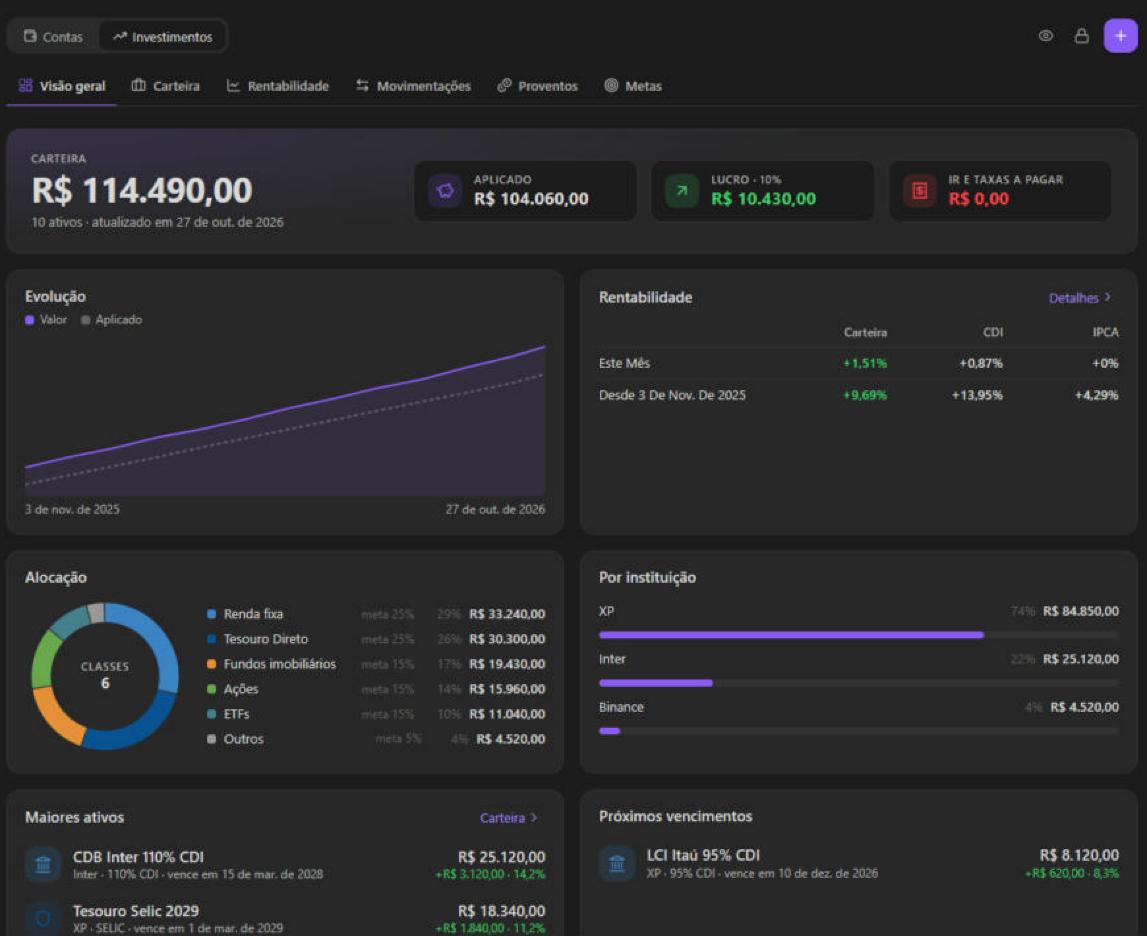
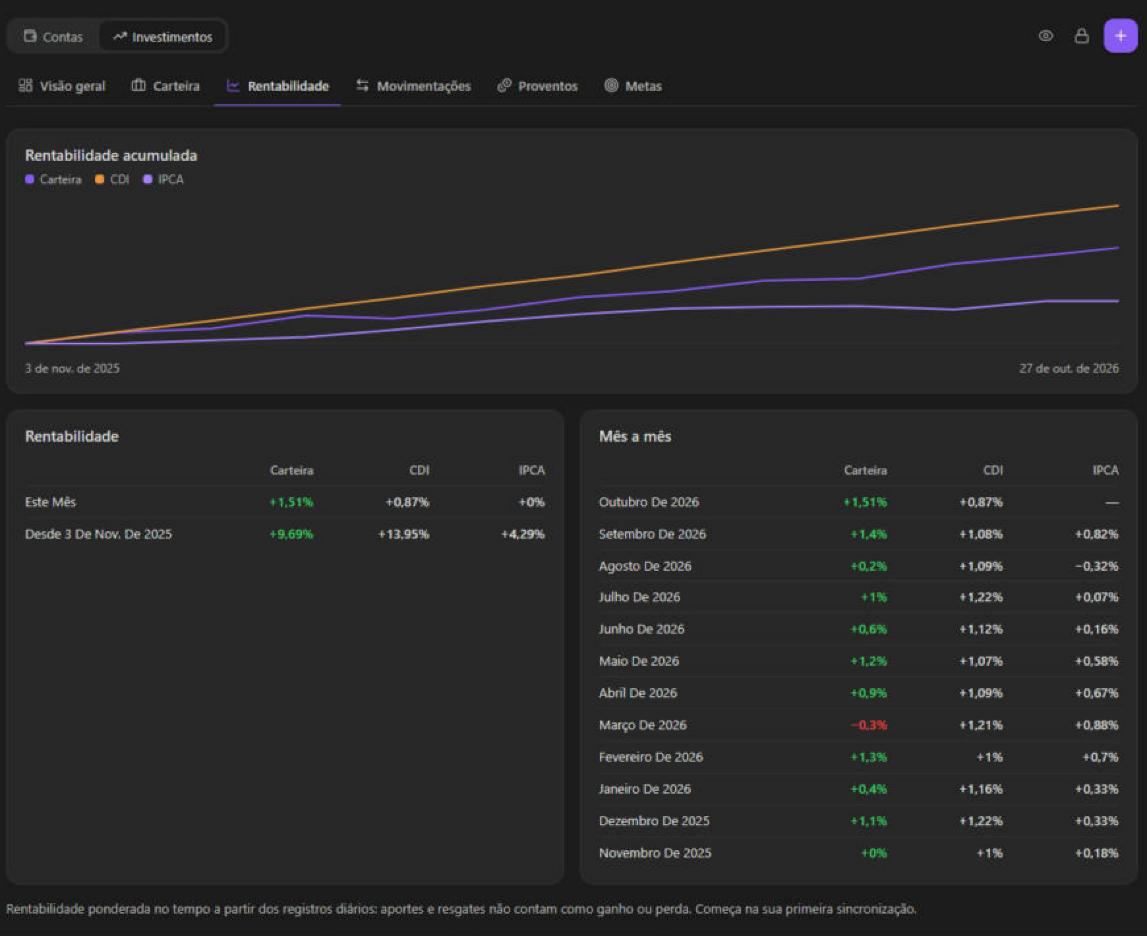
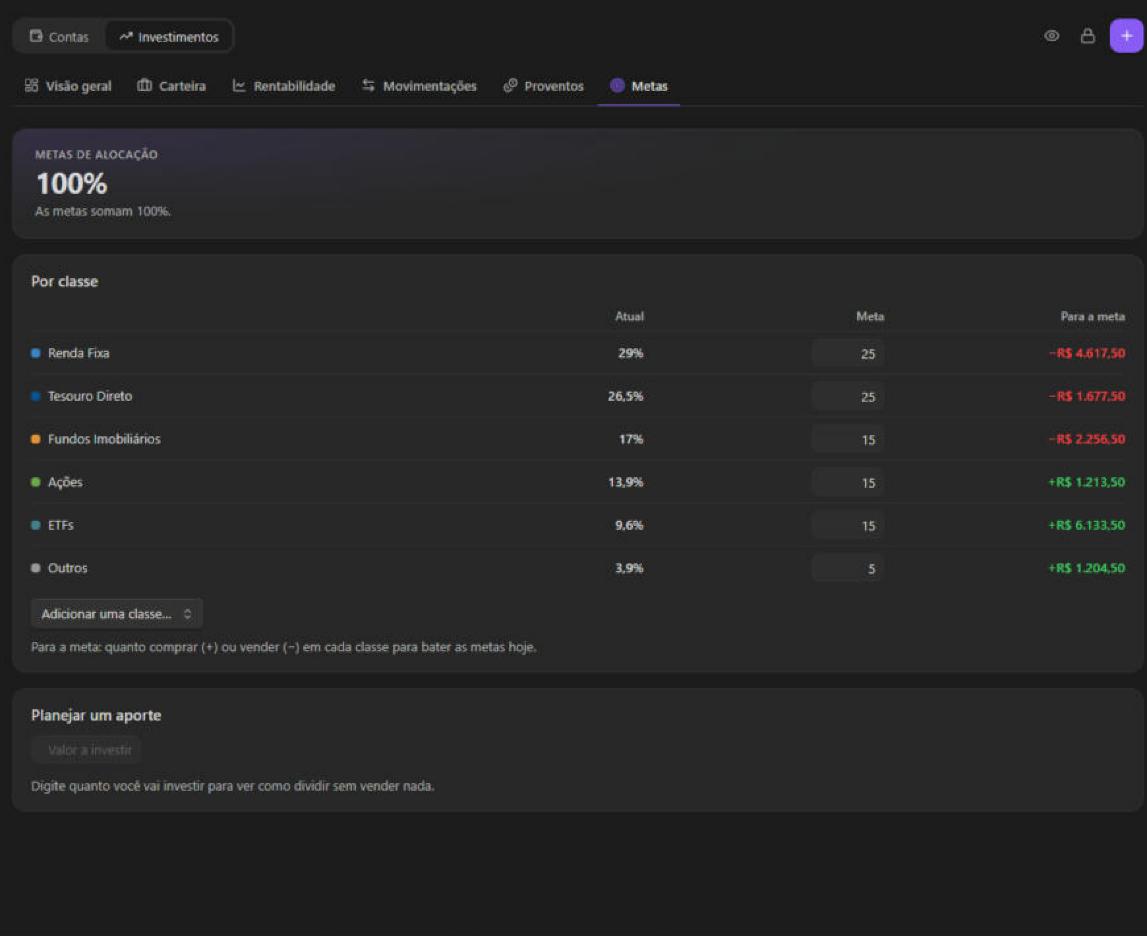
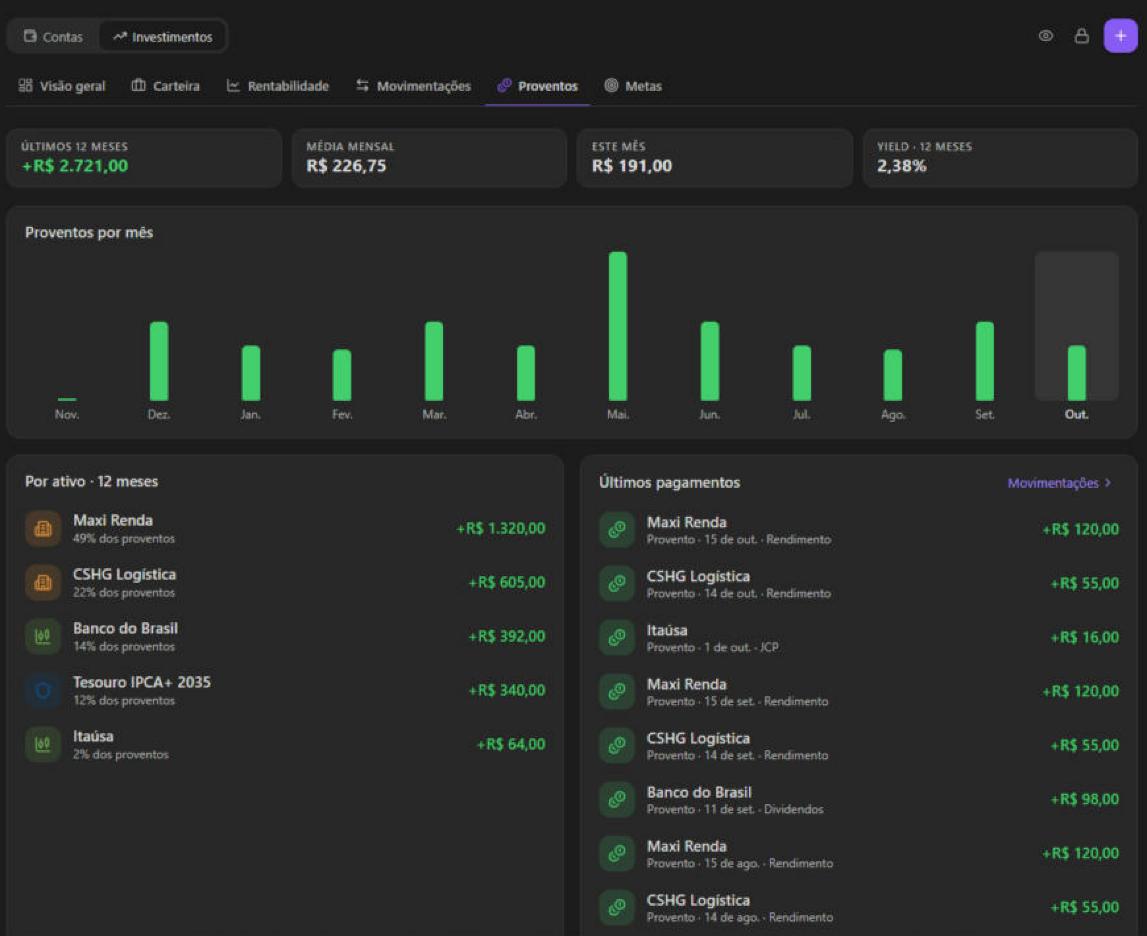
All values in these screenshots are fictitious. They come from a made-up test ledger, not anyone's real finances, so balances and amounts are not meant to be realistic.
| Overview | Accounts and cards |
|---|---|
 |  |
| Obrigações | Recurring |
 |  |
| Investments | Returns |
 |  |
| Allocation targets | Proventos |
 |  |
Features
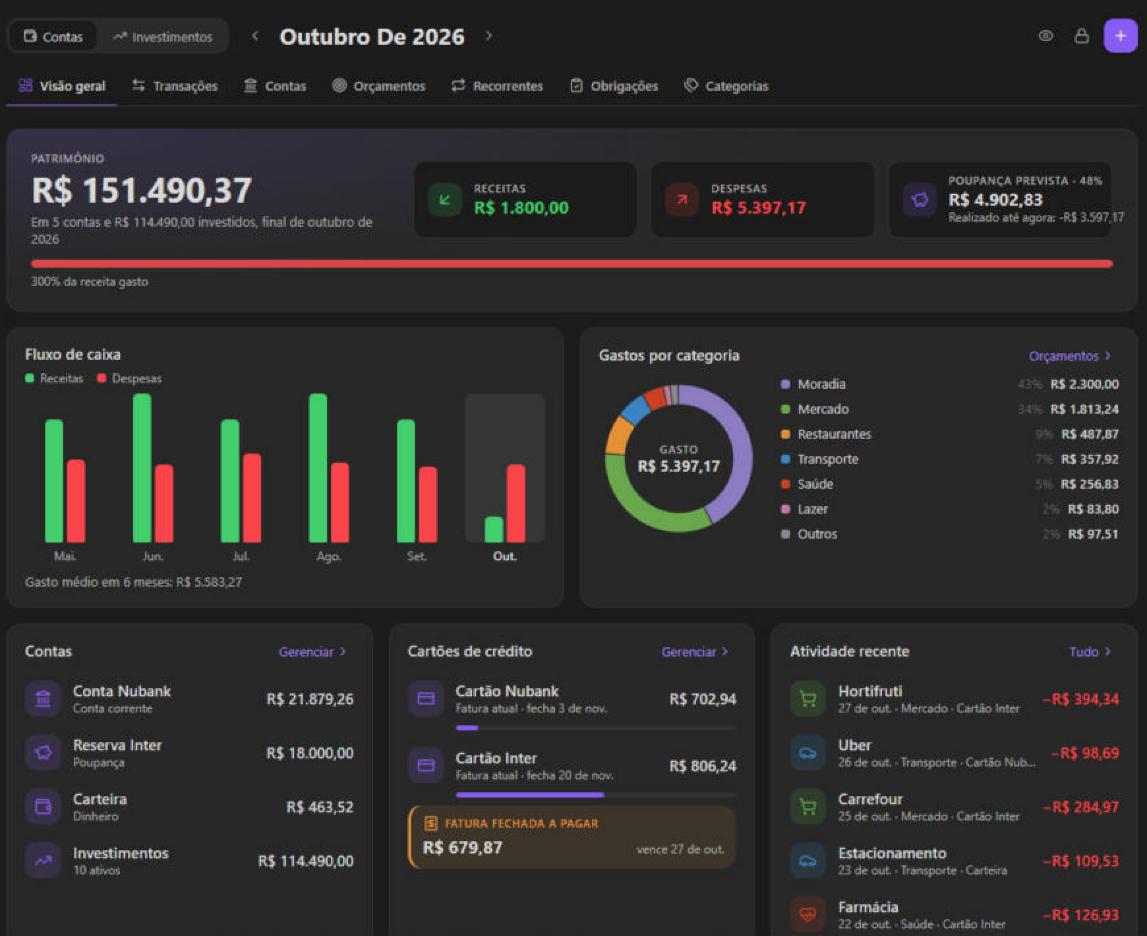
- Overview — net worth, the month's income, expenses and savings rate (projected with recurring income still due this month, e.g. a salary paid on the last days, with the actual figure under it), a 6-month cash-flow chart, spending by category (donut), account balances, recent activity and upcoming bills. Navigate month by month; switching tabs or reopening Trimly goes back to this month.
- Transactions — expenses, income and transfers between accounts, with category, account, date and notes. Search and filter by account, category, type and month. Changing a transaction's category moves every other one with the same description (digits and generic bank wording like "Pix" or "Compra" ignored) and remembers it, so the next synced ones arrive in that category.
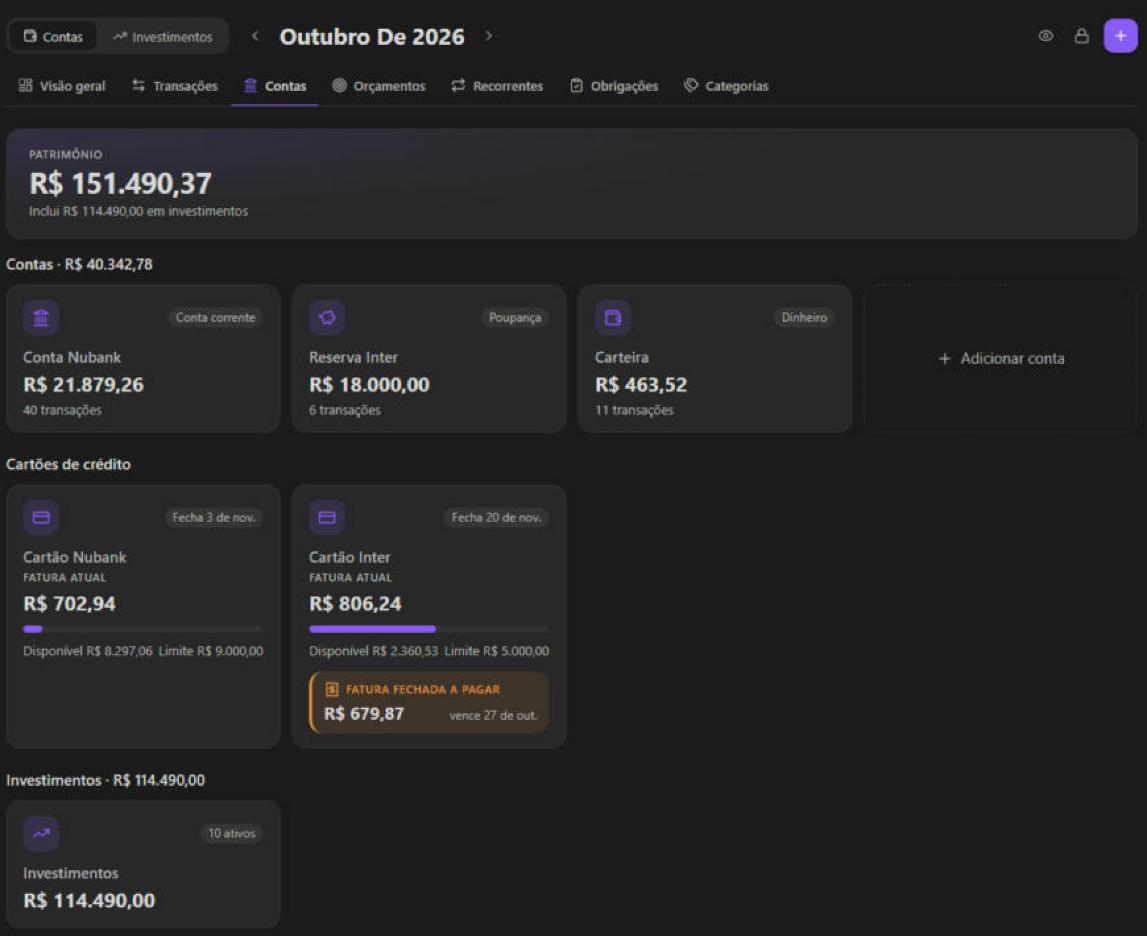
- Accounts — checking, savings, credit card, cash, investment; opening balances; archive old ones; grouped into accounts, credit cards and investments; credit cards show their current bill and limit, and their transactions are browsed bill by bill (closing and due day; a bill is named after the month it is due) without losing history. Installment purchases (compras parceladas) show which installment each charge is (3/10), and the installments the bank has not charged are counted in their bills (one per bill after the latest charge, even when the bank only ever reports the first), which can be browsed up to 12 bills ahead, and in the card's Parcelas futuras total. On a card that is not synced, pick the number of installments when adding the purchase (the amount is its total): each installment is posted when its date comes.
- Reports (Relatórios) — any period, by preset or free dates, for all accounts or one account or category, compared with the period before or a year earlier: income, expenses and net, over time, by category and by account. Transfers are left out, so paying a card bill doesn't count twice.
- Balance forecast (Projeção de saldo, in Accounts) — all your accounts together over the next 60 days, with the lowest point and the first day below zero: future transactions, recurring rules, bills and card bills. The open card bill counts what was charged so far; purchases to come and installments on later bills aren't in.
- AI assistants (optional, off by default) (Assistente, in each mode, shown only when turned on in the settings, which warn that your data goes to Anthropic) — ask about your spending or your portfolio, with your own Anthropic API key and at your cost. Trimly does the math and sends only your question and the results asked for, which you can open in the chat; the whole ledger is never sent. Past conversations are listed to open again, and stay encrypted on this device, outside the vault. It can read public articles on recommended portfolios and consult Status Invest's indicators and XP's recommendations and target prices, sending nothing about you to those sites. Answers can be wrong, and the decisions are yours.
- News (Notícias, in the investments mode) — headlines naming your tickers, filtered on the device, and articles from the last year on the portfolios brokers publish, by type (diversified, stocks, FIIs, fixed income, funds, ETFs, abroad, crypto) and filterable by house, from public RSS feeds including XP's own, plus links to the pages of houses with no feed and the classic allocation models. Trimly only gathers the links: not a recommendation. It reaches back about a day for your tickers, and has no filings.
- Export (Exportar dados, in the settings, desktop only) — a readable copy to keep outside the vault: everything as JSON, and transactions, positions and movements as CSV for Excel. No credentials or tokens go in. It is not encrypted, so never save it inside the vault; there is no import back.
- Segments — Carteira lists every class in a sortable table with each position's segment, and bars with how much of the class each segment holds. Stocks get it from B3 and FIIs from the CVM monthly report, once a month; Tesouro Direto groups by product (IPCA+, Selic, Prefixado) and renda fixa by indexer (CDI, IPCA, Prefixado). The CVM labels many funds only "Multicategoria" or "Outros": credit funds and funds of funds are told from their balance sheet, the rest stay blank, and other classes have no source, so type those in the position's form. What you type stays.
- Tesouro Direto prices — manual Tesouro Direto positions are revalued once a day from the Tesouro Transparente open data, with no token: price (what selling pays, before tax) × quantity. Name the position with its type and year, like Tesouro IPCA+ 2035, or fill in the maturity; Renda+ and Educa+ need the exact maturity, since the year in their names is when payments start. The file can lag a few days behind, and the position's details show the date of the price.
- Calculators (Calculadoras, in the investments mode) — financial independence, compound interest, how much to contribute to a goal, emergency fund, and CDB against LCI/LCA after tax. They run on the device, start from your own numbers when possible and save nothing. Simulations at a constant rate, not a forecast or a recommendation.
- Import (Importar planilha, in Movements) — buys, sales and income from a B3 statement or a broker's spreadsheet, in Excel or CSV. Banks don't report what FII shares cost: with all the buys of an asset, Trimly gets its real average price. The file is read in memory and goes nowhere. A trade the bank also reports counts once, and a repeat left over can be deleted from its row without coming back on the next sync.
- B3 position (Importar posição da B3, in Settings → Importar dados) — the position report from B3's investor area puts back stocks, FIIs, ETFs, Tesouro Direto and fixed income a bad bank sync zeroed or closed, with B3's value and quantity. Positions the bank still reports are left to it. Shown first, read in memory; products with no position in the portfolio are only listed.
- Income tax (IR, in the investments mode) — an estimate from your movements: average price per asset, each month's result and DARF with its due date, the R$ 20.000 stock exemption meter, losses to offset, and the costs for Bens e direitos. Covers common operations in stocks, BDRs, ETFs and FIIs, not day trades, options, fixed income ETFs, FI-Infra, splits or bonus shares. It issues nothing, and lists the positions whose numbers need checking; confirm with the Receita or an accountant.
- Sale calculator (Calculadoras → Venda, in the investments mode) — pick a stock, BDR, ETF or FII and a quantity to see the sale value, the average cost from the IR tab, the gross gain, the estimated income tax (FII 20% with no exemption, stocks 15% exempt up to R$ 20.000 of sales in the month, ETFs and BDRs 15% with none), the losses offset by group (common and FII apart), the costs (starting at B3's 0,03%), the net amount, the proventos of the last 12 months you would give up and the allocation before and after against your targets. It then checks the sale against your rules — rebalancing band, selling order (no tax first, then the lowest score), maximum cost, exempt income, destination below target, emergency reserve, prefer contributing — and says which pass and which fail, without deciding. Each rule can be turned off and its limit changed. Sem vender shows how many months of your monthly contribution reach the targets without selling. Fixed income and Tesouro redemptions work too: type the amount and it takes the oldest applications first, with IOF under 30 days and the regressive table (22,5% to 15%) by each application's days; LCI, LCA, CRI, CRA and LIG pay no income tax.
- Debts (Dívidas, in Planning) — a loan's balance, monthly interest and payment give today's balance, when it ends, the interest still to pay, and what paying extra would change. Kept apart from accounts and net worth; today's balance assumes the payments were made.
- Savings goals (Metas de poupança, in Planning) — an amount to have, kept in as many accounts and positions as you want, measured by what they hold today. With a date, how much to save per month until then; with none, or after it, a level to keep, like an emergency fund. Goals sharing an account or position are flagged, since the balance counts in full in each.
- Planning (Planejamento, was Budgets) — whether spending and investing follow the month's plan. The top shows spending against what was planned and aportes against the investment goal, each with a bar, then how much the month's forecast leaves to invest (and whether the goal fits). The month's plan lists income, fixed costs, variable bills and category spending, then what is available to invest, the investment and what is left, in three columns: planned (fixed income, bills and limits), so far, and forecast (what happened plus recurring occurrences and bills still due this month and what is left of each category's limit). Two bars show where the income goes, planned and forecast, on one scale; two more bars on the same scale split category spending by category, with the rest of the income greyed, to see which categories grow. Bills to pay count as fixed costs when marked Valor fixo, else as variable bills; card bills are not counted (their purchases already are, by category). Each category tile counts its bills on its own (recurring rules and obligations in that category, e.g. a health plan) plus an Extra limit you set for the rest; a category without one counts as zero. Limits and the investment goal are kept per month: a new month starts from the last one, and changing it leaves earlier months as they were. The Investir tile holds the goal, tracked by the month's net aportes in Investments (buys minus sells, so selling one asset to buy another is not new money); investing never counts as spending.
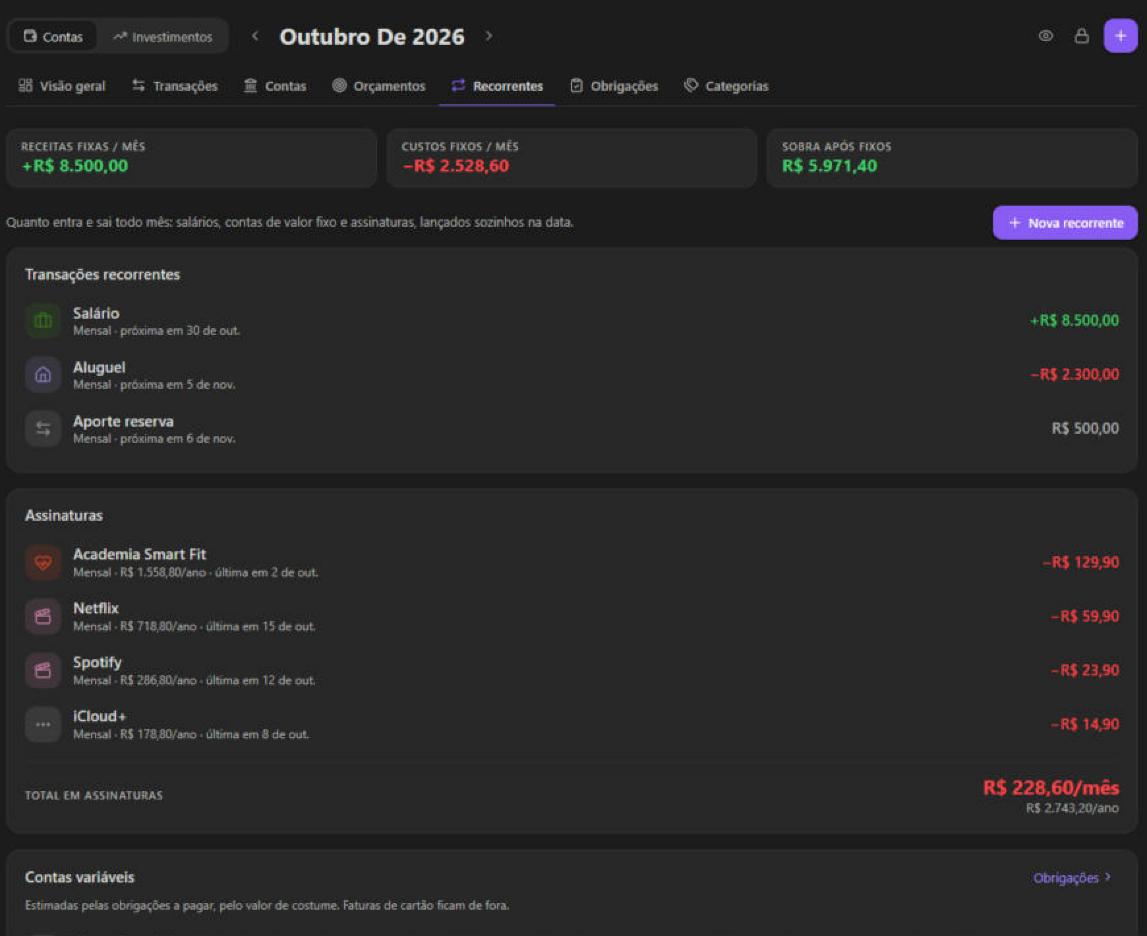
- Recurring — bills, subscriptions and salaries (weekly, monthly, yearly, optional end date), posted automatically when their date arrives. On bank-synced accounts nothing is posted: the charge imported from the bank is linked to the rule instead, so it is never counted twice. Tornar recorrente in a transaction's editor turns it into a rule, linked as its first occurrence. Below the subscriptions, Contas variáveis lists the bills paid by hand (from Obrigações, card bills excluded) at their usual amount, with the monthly total, read only. The summary on top shows fixed income, fixed costs, variable costs and what is left each month after all of them.
- Subscriptions — mark a recurring expense as a subscription to list it apart with its yearly cost, last charge and price changes, to judge whether it is still worth paying for. Monthly (and weekly) ones and yearly ones sit in two cards: yearly subscriptions show the charge, the next date and what they work out to per month as a reference only, and never count in the monthly total.
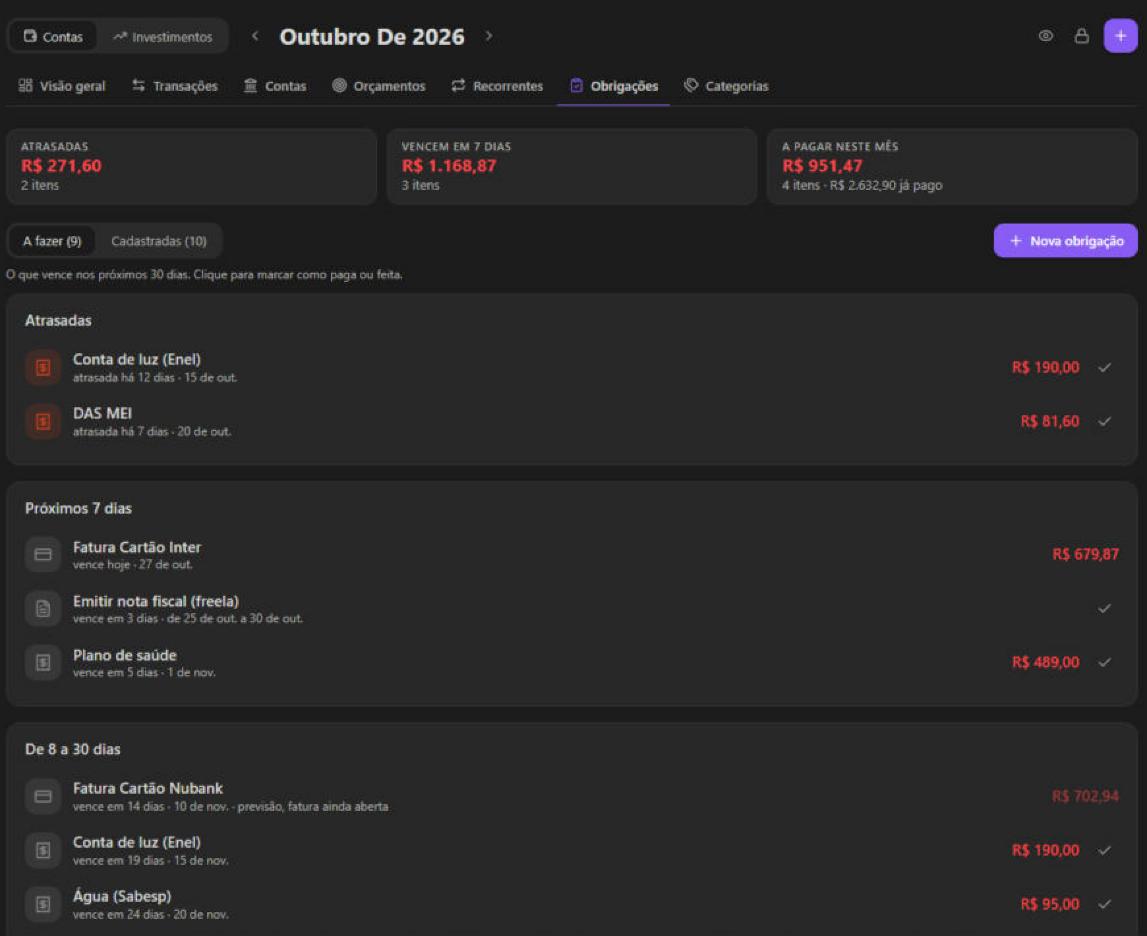
- Obrigações (obligations) — a checklist of what you must do by hand by a due date: bills to pay (electricity, water, health plan, DAS MEI) and documents to issue or file (IRPF, DASN-SIMEI, invoices). Bills take only a due day, documents a start and an end day (yearly ones a month and day for each, e.g. IRPF from March 23 to May 29); the current month and year are filled in. Mark each one paid or sent, optionally linking the transaction that paid it (from the bill or from the transaction), or as "none this time"; once a bill is linked to a transaction, its next payments that look like it (same words in the description, near the due date) are linked by themselves, and so are the months you had marked paid by hand. Payments that look like the bill (same words, a similar amount) are recognized as its payments in any month, even from before the bill was registered. A bill can be marked Valor fixo (a health plan) or left variable (electricity), and given a category (taken from its first linked payment when empty); both shape Planning. Credit cards with a due day show their unpaid closed bill here too, settled by paying it, and their open bill as a projection. The tab splits A fazer (due in the next 30 days, with overdue and 7-day totals, and this month's left to pay and already paid) from Cadastradas; a bill without a usual amount is projected at its last payment. A bill paid on a weekend or holiday shows as scheduled for the next business day. Overdue ones stay listed until dealt with. Reminders show as an Obsidian notice, and optionally a system notification on desktop, while Trimly is unlocked.
- Categories — default expense/income categories, fully editable, with colors and icons. Drag a category onto another to reorder them (desktop). Mark one expense and one income category as Categoria padrão (e.g. Outras despesas) and uncategorized transactions of that kind, past ones included, go to it instead of Sem categoria.
- Investments — a switch at the top toggles the dashboard to investments: portfolio value, profit, allocation by class and institution, upcoming maturities, every position grouped by class, an evolution chart, time-weighted returns (month by month, 12 months, since start) compared with CDI, IPCA, poupança, IBOV and IFIX (drag across the chart for any stretch, a comparison in words and what each benchmark means), every contribution, withdrawal and tax, and the income (dividends, JCP, interest, coupons) per month and per position, plus the upcoming proventos B3 has announced for positions with a B3 ticker (data-com, payment date, value per share and an estimate by your quantity), with next month's income forecast for FIIs that haven't announced yet; positions whose bank sends no income get it estimated from B3's proventos. The Proventos tab also tracks a monthly income goal (how much is missing and how many months of aportes, reinvesting the income, until the portfolio pays it), each position's yield on cost and current yield against the CDI net of income tax, alerts when a regular payer cuts its distribution 10% or more below its own 12-month average or one position pays 25% or more of the income, and a 12-month payment calendar per position. The investments overview opens with Este mês: what is left of the month's Invest goal and which classes the targets send it to. Positions come from bank sync or are added by hand (crypto, foreign brokers, anything outside Open Finance), with their own contributions, withdrawals, income and taxes. Click a position for its details. Set a target share per asset class to see how far you are from it and how to split your next contribution; a weight or score per asset takes that split down to each position inside the class. Classes include Exterior (foreign currency too), Ouro and Cripto, and a position can count under any class while keeping its own for income tax; targets exist only for Tesouro, Renda fixa, FIIs, Ações, Exterior, Ouro and Cripto, so ETFs and funds count by what they expose you to. The emergency fund can be set apart with an amount and the positions holding it: targets and contributions then apply to the rest. Previdência (PGBL/VGBL, and anything counted as Previdência, like a Tesouro Renda+) also stays apart and takes a fixed slice of each contribution, a percent or an amount, before the targets split the rest. The contribution planner starts from what is left of the month's Investir goal. Positions are imported by bank sync; net worth in the accounts view includes them.
- Hide values — the eye button in the header masks every amount on screen; click again to show them.
- Bank sync (optional) — import accounts and transactions automatically from Brazilian banks through Pluggy (Open Finance). Card bill payments are recognized as transfers so purchases aren't counted twice, and money into or out of investments (a brokerage note, an application, a redemption) as a transfer with the portfolio, never as spending or income. Off by default; see Bank sync.
- Quotes (optional) — with a brapi.dev token, stocks, real estate funds, ETFs and BDRs show their price, daily change and company name, and manual positions with a ticker and quantity follow the market.
- Language — Brazilian Portuguese by default, English in settings.
- Amount input accepts
1234.56,1.234,56or1,234.56; any ISO currency code (BRL by default). - Other currencies — accounts in another currency (e.g. a dollar account) and purchases made abroad keep their own currency: the amount shows as it was made (US$ 10,00) with its value in your currency under it. Purchases abroad count what the card actually charged; totals (net worth, month summary, spending, budgets) convert other currencies at the day's rate. A manual transfer between currencies takes both amounts, what left and what arrived; left empty, it uses the day's rate.
Security model
- Data lives in
<folder>/ledger.trimly(default folderTrimly/). The file is JSON containing only the KDF parameters, IV and ciphertext — no account names, amounts or dates in the clear. - Key derivation: PBKDF2-SHA256, 600,000 iterations, random 16-byte salt. Cipher: AES-256-GCM with a fresh 12-byte IV on every save. A wrong passphrase or a tampered file fails to open.
- The passphrase is never stored in the vault. With Remember passphrase on this device on (default), it is kept in Obsidian's local storage for this vault on this device (app data, outside the vault folder). Turn it off to be asked once per session.
- The plugin's
data.json(inside the vault) only holds the folder, currency, language, that toggle, the benchmarks, proventos calendar, Tesouro Direto prices, segments, news and AI assistants toggles, which news sources are off, the hide-values toggle and how obligation reminders are shown. - Network: Bank sync, quotes and the AI assistants stay off until you set them up. The public data below (indices,
proventos, Tesouro Direto prices, segments, news) is fetched by default, and each has its own switch in settings. With bank sync on, it
contacts
api.pluggy.aito fetch your accounts and transactions; your banking data then also passes through Pluggy. The Pluggy credentials are stored inside the encrypted ledger. With investments that have history, the investments view also fetches the public CDI, IPCA and poupança series fromapi.bcb.gov.br(Central Bank of Brazil) and the IBOV and IFIX daily closes fromsistemaswebb3-listados.b3.com.br(the B3 website's index statistics, one request per index per year); only the index and the dates are requested. The B3 address is not a documented API: if it changes, the IBOV and IFIX columns stay empty with a notice and the rest keeps working. Turn off Comparar com índices in settings to stop both. With positions that have a B3 ticker, the income tab fetches their announced proventos from the same B3 website, sending only each ticker's four-letter issuer code (PETR for PETR4), at most once a day; the result stays in memory, never in the vault. Turn off Agenda de proventos to stop it. With manual Tesouro Direto positions, Trimly downloads the public price file (about 15 MB) fromwww.tesourotransparente.gov.br, at most once a day; it has every bond, so nothing about yours is sent. Turn off Preços do Tesouro Direto to stop it. With FIIs or stocks that have a B3 ticker, once a month Trimly downloads the public FII report (about 1.3 MB) fromdados.cvm.gov.br, which has every fund, and asks the B3 website for each stock's segment, sending only the four-letter issuer code. Turn off Segmentos dos ativos to stop it. The News tab reads public RSS feeds fromwww.moneytimes.com.br,investnews.com.br,www.infomoney.com.br,www.seudinheiro.comandconteudos.xpi.com.br, at most once a day, requesting only the feed's address: your tickers are never sent, since it filters on the device. Each source can be turned off, and Notícias e carteiras turns them all off. With the AI assistants turned on, your questions and the results of the tools they call (balances, totals by category, bill, recurring and future transaction names, goals and debts, positions with their products and rates, the emergency fund, the portfolio's history and movements, income and the tax estimate) go toapi.anthropic.comwith your key, only when you ask something; the key is stored inside the encrypted ledger. When the investments assistant needs current market data, Trimly downloads the full public lists fromstatusinvest.com.brandconteudos.xpi.com.br, at most once an hour, and picks the tickers on the device, so they aren't sent to those sites (they do go to Anthropic with the tool's result). Notícias e carteiras turns it off, and XP's switch turns off XP's part. With a brapi token, Trimly sends the tickers of your positions (nothing else) tobrapi.devto fetch quotes; the token is stored inside the encrypted ledger. When an account or purchase is in another currency, Trimly fetches that day's reference rates (European Central Bank data) fromapi.frankfurter.dev, at most once a day; only currency codes are sent. - If you lose the passphrase, the data cannot be recovered. Save it in a password manager.
Install (manual)
Copy main.js, manifest.json and styles.css from a
release into
<vault>/.obsidian/plugins/trimly/, then enable Trimly in Settings → Community plugins.
Usage
Click the wallet icon in the ribbon (or run Trimly: Open dashboard). The first time, you'll be asked to create a passphrase; the encrypted ledger is created with a starter account and categories. Commands: Open dashboard, Add transaction, Sync bank accounts, Lock.
Bank sync (optional)
Trimly can pull transactions from your banks through Pluggy's free personal route, Meu Pluggy. Everything still works fully manually if you skip this.
- Sign up at meu.pluggy.ai and connect your banks there.
- Create an account in the Pluggy dashboard, add the MeuPluggy connector, and create an application to get a client ID and client secret. The developer account starts with a 15-day trial: link Meu Pluggy during it. Pluggy says you can still pull your data after it expires (see meu-pluggy).
- In the application's demo, connect your Meu Pluggy account once per bank and copy each Item ID.
- In Settings → Trimly → Bank sync, enter the client ID, secret and item IDs, then Connect.
Each sync fetches the last 12 months (what Open Finance keeps). Trimly creates one account per bank account or card, keeps its balance equal to the bank's, and treats the bank as the source of truth for the last 90 days: entries the bank no longer lists are removed, and a manually deleted imported entry comes back. Your category, description and notes on an imported entry are kept. The dashboard syncs on unlock (at most every 6 hours) and from the refresh button. Categories are filled in only while your Pluggy plan includes categorization.
Bank sync also imports the investment positions of each item (fixed income, treasury, stocks, real estate funds, funds, ETFs, retirement plans) when the item includes Pluggy's investments product. Each sync overwrites their values, imports their movements, and records the day's portfolio total with the money moved and the income paid since the day before, so the history starts with your first sync. A position the item stops reporting is shown as closed.
Quotes (optional)
- Create an account at brapi.dev and copy your token.
- In Settings → Trimly → Quotes, paste the token.
The free plan needs no card and covers quotes of B3 tickers, one ticker per request and 15,000 requests a month (as of November 2026; see brapi's plans). Proventos and IBOV/IFIX history come from B3's website, with no token, and Tesouro Direto prices from the Tesouro Transparente open data, so Trimly doesn't need brapi's paid plans for them.
Development
See docs/DEVELOPMENT.md and docs/ARCHITECTURE.md.
License
For plugin developers
Search results and similarity scores are powered by semantic analysis of your plugin's README. If your plugin isn't appearing for searches you'd expect, try updating your README to clearly describe your plugin's purpose, features, and use cases.