Feedle
unlistedby AlexMason
An RSS feed manager that integrates directly into your notes.
Feedle for Obsidian
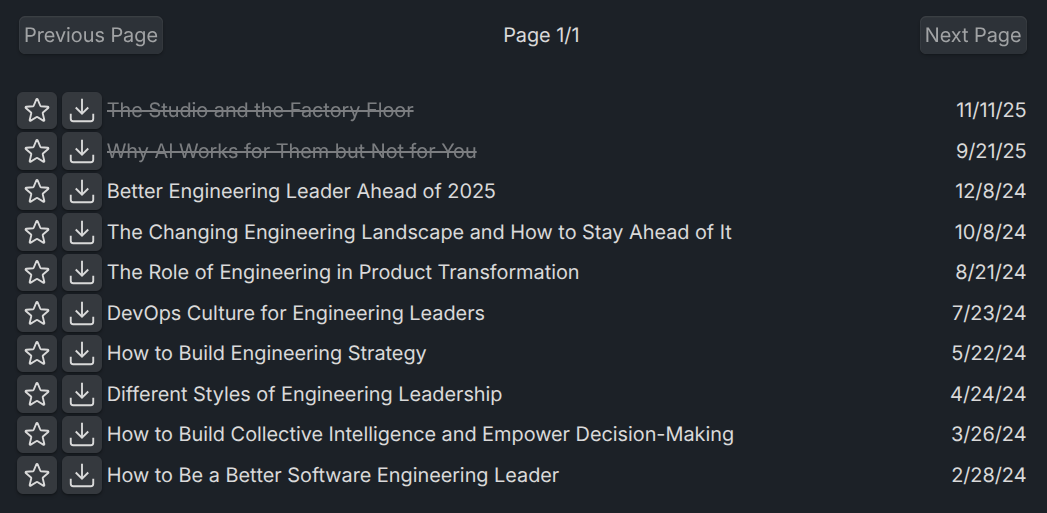
Feedle is an innovative RSS feed manager plugin designed specifically for Obsidian.md users who want to seamlessly integrate news feeds into their notes. With Feedle, staying updated with your favorite websites and incorporating valuable insights into your notes has never been easier. Simply insert a Feedle code block with a URL, and let Feedle enrich your notes with the latest content.
Why did you create Feedle?
I wanted a drop in RSS solution that just worked, without complicated menus, setup and navigation. This design decision will lead to a more conservative feature set, it offers an intuitive text-based RSS feed experience that integrates nicely into obsidian. I look to strike an ideal balance between functionality and configurability.
Features
- Easy RSS Integration: Add RSS feeds directly into your Obsidian notes with a simple code block.
- Automatic Pagination: Effortlessly browse through feed entries with built-in pagination.
- Read / Unread Tracking: Read articles are tracked. Rediscover stuff you've previously found important or interesting.
- Favorites: Mark entries as favorites for quick access and reference, enhancing your note-taking workflow.
- Save Articles: Automatically retrieve article content and ingest it into obsidian for easy viewing and note enrichment.
- Youtube Video Support: Detect if the entry is from a youtube channel, and display the video embedded in the note when saved.
Installation
Via BRAT (Recommended)
BRAT (Beta Reviewers Auto-update Tool) is the easiest way to install Feedle before it is available in the community plugin directory.
- Install the BRAT plugin from the Obsidian community plugins directory.
- Enable BRAT in your plugins list.
- Open the BRAT settings and click Add Beta Plugin.
- Enter the repository URL:
https://github.com/AlexMason/feedle - Click Add Plugin and then enable Feedle from your installed plugins list.
BRAT will also automatically notify you when updates are available.
Manual Installation
- Download
main.js,manifest.json, andstyles.cssfrom the latest release. - Create a folder called
feedlein your vault's.obsidian/plugins/directory. - Copy the three downloaded files into that folder.
- Open Obsidian, go to Settings > Community Plugins, disable Safe Mode, and enable Feedle.
Usage
Getting Started
To start using Feedle, insert a code block into your note and specify the RSS feed URL as follows:
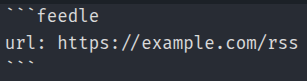
Feedle will automatically fetch and display the feed entries within your note.
Tags & Aggregated Feeds
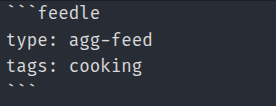
Feedle has support for aggregated feeds, which are powered by the use of tags. Add a tags property to your feedle block and populate it with one or more comma-separated tags.
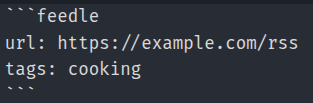
You can then create an aggregated feed combining feeds based into an single aggregated view by setting the type property in the feedle block to agg-feed.
Folder notes
Feedle integrates well with LostPaul's Folder notes plugin. Their is no direct dependency, Feedle is just designed to work this way. If Feedle snippet is in a note, and the note's parent folder has the same name as the Feedle note, Feedle will add new notes to the current folder. Otherwise Feedle will create a new folder with the same name as the Feedle Note in the same directory as the Feedle note.
Contributing
We welcome contributions and suggestions to make Feedle even better! If you're interested in contributing, please follow these steps:
- Fork the repository on GitHub.
- Clone your fork to your local machine.
- Create a new branch for your feature or fix.
- Make your changes and test them thoroughly.
- Commit your changes with a clear and descriptive message.
- Push your changes to your fork on GitHub.
- Submit a Pull Request (PR) to the main repository.
We use a simple PR management strategy to ensure that contributions are reviewed and integrated efficiently. Please provide as much information as possible about your changes, including how they improve Feedle or fix an issue.
Dependencies
Feedle relies on @extractus packages for parsing RSS feed data, Obsidian API's for interacting with editor content, and uses React and Tailwind CSS for rendering custom views.
Roadmap
I plan to continue to iterate on Feedle until I am happy with it's functionality and it works reliably.
- Settings menu
- Cache length
- Configure template (with optional templater integrations)
- Saved note prefix/suffix/format
License
Feedle is open-source software licensed under the MIT License. See the LICENSE file for more details.
Acknowledgments
Thanks to the Obsidian.md community for their invaluable support and to all contributors of Feedle for making this project possible.
Feedle is not officially affiliated with Obsidian.md.
For plugin developers
Search results and similarity scores are powered by semantic analysis of your plugin's README. If your plugin isn't appearing for searches you'd expect, try updating your README to clearly describe your plugin's purpose, features, and use cases.