Agenter
unlistedby Ali
AI agent with native Cloudflare Workers AI OAuth, live model discovery, multi-provider chat, vault-scoped tools, and a pinnable contextual popover for the current selection.
Agenter
A tool-using AI assistant, built into Obsidian.
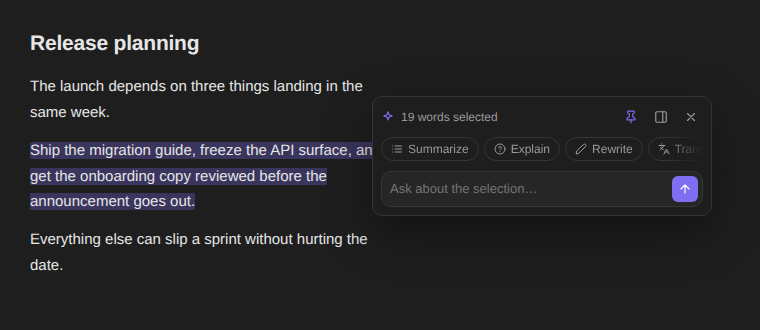
Bring your notes, research, and everyday writing into one AI workspace. Chat beside your notes, use vault-aware context, search the web, run reusable prompts, and review changes before they touch your vault.
فارسی · Installation · Features · Privacy · Development




Install · Setup · Features · Screenshots · Providers · Development
See Agenter in action
| Dark theme | Light theme |
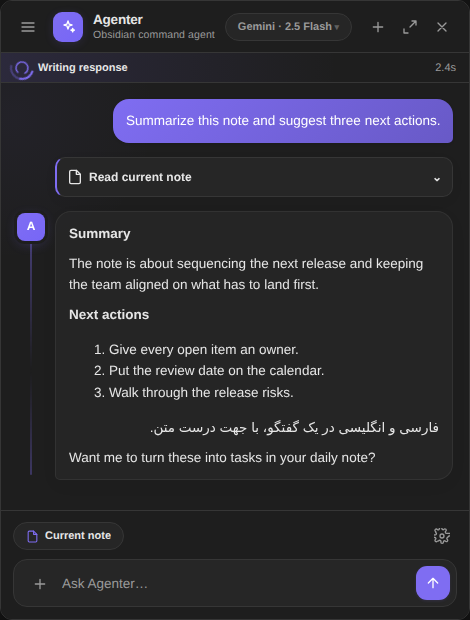 | 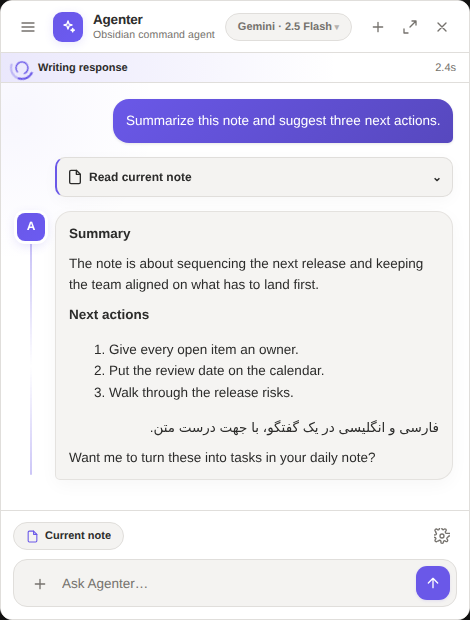 |
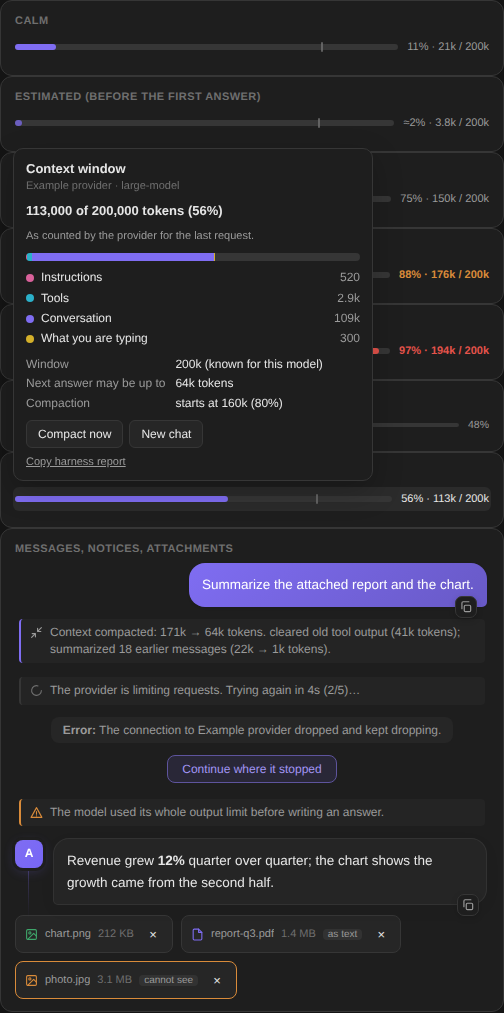
| Contextual AI popover | Live context window |
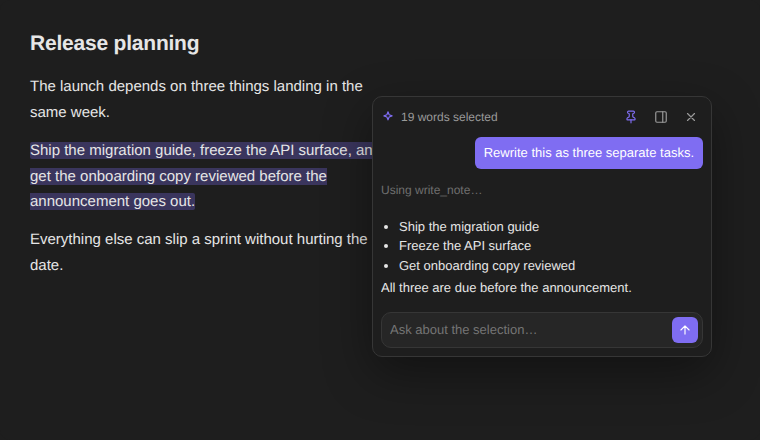 | 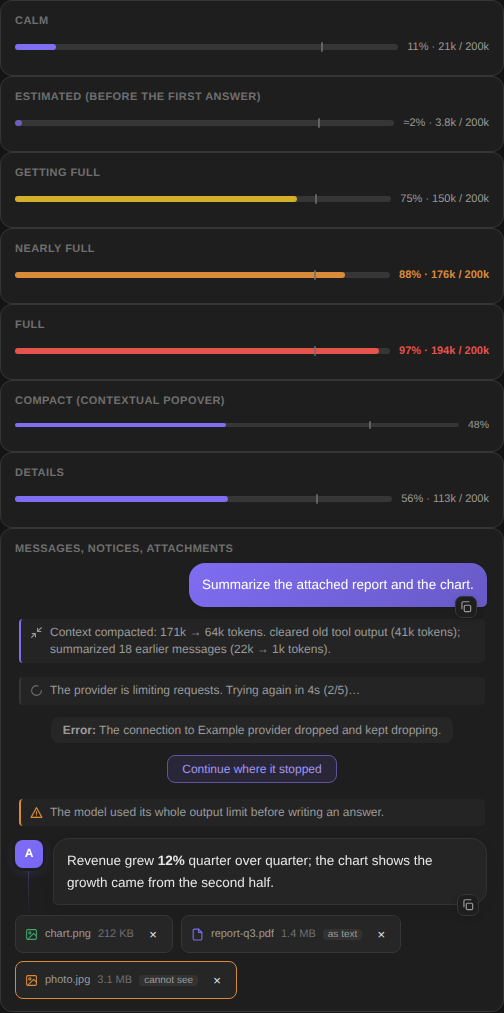 |
More screenshots
| Contextual popover | Context details |
 |  |
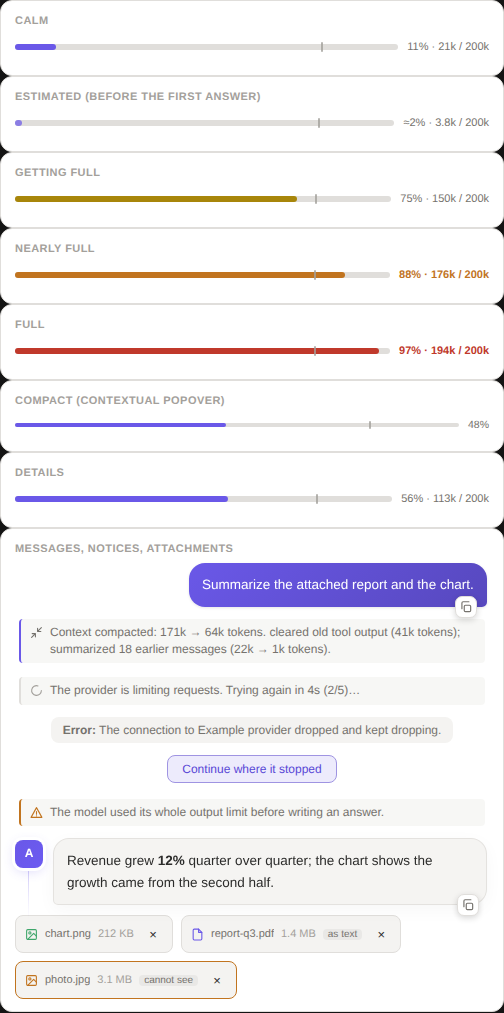
| Context meter — light theme | Context meter — dark theme |
 | |
[!IMPORTANT] Agenter is a plugin, not an AI service. It connects to the provider and model you configure. You supply your own API credentials, or use a supported local Ollama setup. Available capabilities and costs depend on that provider.
Contents
- What it looks like
- Features
- Requirements
- Installation
- Setup
- Usage
- The context window and the harness
- Attachments
- Copying text
- Providers
- Privacy and network access
- Development
- Releasing
- Security · License
Features
- Three chat modes: docked sidebar, floating window, and a contextual popover for the current selection — beside the caret, or pinned to a spot you choose once.
- Multiple providers: OpenAI, Anthropic, Gemini, OpenRouter, Ollama, Cloudflare Workers AI, any OpenAI-compatible service, and custom endpoints.
- Vault-aware context: the current note, the current folder, the whole vault, or nothing automatic.
- Tool use: read and search notes, inspect links and metadata, list folders, summarize content, search the web, fetch URLs, and read note images when the model supports vision.
- Guarded note actions: create, edit, append, move and trash notes only after the approval step you configured.
- Recoverable changes: note mutations write a safety backup into
.agenter-backups, and deletion goes through Obsidian's recoverable Trash. - One conversation: the main panel and the contextual popover share the same history, so you can start in one and continue in the other.
- Custom prompts: build reusable prompt actions in settings; they appear in the chat and in the popover.
- Obsidian-native rendering: replies, note previews, code blocks and internal links all go through Obsidian's own Markdown renderer, including right-to-left text.
- Streaming with live status: watch the answer arrive, stop generation, and follow what each tool is doing.
- No answer cap of its own: every answer may use as much of the model's output as the model allows. A bar shows how full the context window is, and long conversations are compacted before they overflow.
- A harness for every model: limits learned per model, tool calls repaired or read from text, temporary errors retried, loops stopped — so models that were fragile elsewhere keep working. See the harness.
- Goes on by itself: a model that stops in the middle of the job — after announcing the next step, writing "part 1 of 3", asking whether to go on, or when the connection drops mid-answer — is told to carry on, so you do not have to type "continue". See Going on by itself.
- Images, PDFs, Office files and text as attachments, with a fallback for models that cannot see: they get the text, or a description made by another provider, or an honest note. PDFs are laid out again from pdf.js's pieces (Persian and other right-to-left text included) and long ones are read page by page, on request. See Attachments.
- Everything can be copied: messages are selectable, each has a copy button and a right-click menu, and the whole conversation copies as Markdown.
Requirements
- Obsidian 1.7.2 or newer (this is the plugin's
minAppVersion). - Obsidian Desktop — Agenter is marked
isDesktopOnly. - An API key for at least one supported provider, or a local Ollama install.
Installation
From Community Plugins
Once Agenter is listed in the Obsidian community directory:
- Open Settings → Community plugins.
- Select Browse and search for Agenter.
- Select Install, then Enable.
Manual installation
-
From the latest release, download either
agenter-<version>.zipor the three loose filesmain.js,manifest.json, andstyles.css. -
Create this folder inside your vault:
.obsidian/plugins/agenter/ -
Unzip the archive into that folder, or copy the three files into it.
-
Restart Obsidian, or reload it.
-
Open Settings → Community plugins and enable Agenter.
For pre-release testing you can also install the repository with BRAT.
Setup
- Open Settings → Agenter.
- Add or edit a provider.
- Enter its base URL, API key, and model — or press Set up for Cloudflare Workers AI, which discovers both for you.
- Use Test connection & fetch models to confirm it works.
- Pick a default context scope and review the tool-approval switches.
API keys are stored in Obsidian's plugin data file (data.json) in plain text,
like every other Obsidian plugin. Do not commit or share that file.
Usage
- Agenter: Open chat in right sidebar from the Command Palette, or the ribbon icon.
- The header control switches between docked and floating.
- Select text in a note to open the contextual popover, or run Agenter: Run AI action on selection.
- The context chip in the composer switches between note, folder, vault, and no context.
- Type
/or use AI Actions for your saved prompts.
Contextual popover
Placement is yours to choose in Settings → Agenter → Chat → Contextual popover:
| Setting | What it does |
|---|---|
| Show on selection | Turn it off to keep the popover out of the way, and open it from the Command Palette or the editor menu instead. |
| Placement → Follow the selection | Opens beside the caret, flipping above it when there is no room below. |
| Placement → Fixed spot | Always opens on one spot, with a button to reset it to the bottom-right corner. |
You rarely need that setting, though: drag the popover by its header and drop it somewhere, and it switches to Fixed spot and remembers where it landed. The pin button in the header toggles the two modes.
Clicking the word count expands the selected text. The panel button hands the work to the main chat — the selection if you have not asked anything yet, the whole conversation if you have.
Tool approvals
Read-only tools run on their own. Tools that change the vault show an approval card first, inline in whichever surface you are using. Moving a note to Trash always takes two deliberate clicks.
File tools are restricted to the current vault and refuse protected internal paths. Network tools are separate and only run when the conversation asks for them.
The context window and the harness
Agenter puts no limit of its own on an answer. Settings → Agenter → Chat → Answer length limit is empty by default, which means auto: each request asks for the most the model can write given what is already in the window. Fill it in only to cap cost. Upgrading from a version that stored the old default of 4096 resets it to auto.
The context bar
The bar above the composer (and in the contextual popover) shows the share of the window in use, the numbers, and a tick where compaction starts. It turns yellow, orange and red as it fills, and always says the percentage in words, so colour is never the only sign. A leading ≈ means the figure is Agenter's estimate; after each answer it is replaced by the count the provider reported, and the estimate is corrected for that model from then on.
Click it to see what fills the window — instructions, tools, the conversation, what you are typing — where the window size came from, how long the next answer may be, and buttons for Compact now and New chat.
What the harness does
Several models degrade or break in a plain chat loop for reasons that are easy to fix once something is looking after them. Agenter keeps a profile per model — its window, its largest answer, what it refuses — and works from it:
| Problem | What Agenter does |
|---|---|
| The window is unknown | Takes it, in order, from your override, what the provider's errors revealed, the provider's own model list (OpenRouter, Gemini, Anthropic, Ollama, /models), a table of well-known models, then a safe default. What it learns is remembered. |
| The conversation outgrows the window | Clears old tool output, then summarizes the oldest turns with the model itself, then drops what is left over with a note. Keeps the latest question and the last tool results. |
| A single tool result is enormous | Keeps the start and the end, says what was cut, and tells the model how to ask for the rest. |
| The provider rejects a request | Reads why: a window or answer limit it names, a parameter it does not accept (temperature, max_tokens vs max_completion_tokens, stream_options, tools). Adjusts and retries without bothering you. |
| Rate limits, overload, dropped connections | Waits for Retry-After or backs off, up to five times, and says so. |
| The answer is cut at the limit | Continues where it stopped, joined into one message. |
A model writes a tool call as text (Hermes, Mistral, fenced JSON, <function=…>) | Reads it and runs it; the text never reaches the screen. |
| Broken JSON in tool arguments | Repairs what can be repaired; otherwise tells the model what was wrong and asks again. |
| A model refuses native tools | Falls back to describing the tools in the prompt. |
| Empty answers, repeated calls | Asks the model twice to answer; warns at three identical calls and, at six, asks it to answer with what it already has. |
| The model stops in the middle of the job | Tells it to go on: see Going on by itself. |
| Odd histories | Pairs every tool call with a result, makes ids unique, drops empty turns and keeps the first turn a user turn — the things stricter APIs reject. |
| Provider quirks | Anthropic and Gemini message shapes, thinking-model round-trips (reasoning_content, thoughtSignature), Gemini schema dialect, Ollama's native API with a real num_ctx. |
Ollama reserves memory for the whole window it is asked for, so Agenter asks for at most 32k tokens unless you turn on Ollama: use the model's whole context.
All of it can be turned off or tuned under Context and reliability in the settings, and in the model menu, which also has a row to set the window by hand. When a model still misbehaves, Copy harness report (settings, the details popover, or the command palette) copies what Agenter did and what it knows about the model — retries, repairs, compactions, learned limits — to paste into an issue.
Going on by itself
Models stop early for different reasons, and the harness handles each one instead of waiting for you to type "continue":
| What happened | What Agenter does |
|---|---|
| The answer reached the model's output limit — including a stop that used every token it was allowed while calling itself "stop" | Asks the model to go on from the exact word it stopped at, up to 12 pieces, and joins them into one message. |
| The connection dropped in the middle of an answer | Keeps what had arrived and asks the model to go on from there, instead of writing it all again. |
| The model announced the next step and stopped ("first I will write the middle sections:"), wrote "part 1 of 3", or asked "shall I continue?" | Tells it to do it now, in the same reply (up to four times in a row; once a continuation adds almost nothing, it stops). A model that is asking something it needs answered is left alone. |
| A thinking model spent its whole output limit thinking | Asks it to think more briefly and answer. |
| The model made the same tool call six times | Asks it to answer with what it already has, instead of ending in an error. |
| The provider kept refusing, or the connection kept dropping | Waits and retries up to eight times, then shows Continue where it stopped: one click picks the work up from where it was, with no new message. |
Each of these shows one quiet line in the chat. Settings → Agenter → Chat → Keep going until the work is done turns off the announcement, dropped-connection, thinking and repeated-call rows; continuing a cut answer, the retries and the Continue button stay.
Attachments
The paperclip in the composer (or dropping or pasting a file onto it) adds images, PDFs, Word, PowerPoint and Excel files, text and code files, and audio, up to 32 MB each. Each one gets a chip that says what the model will receive:
| File | A model that can see | A model that cannot |
|---|---|---|
| Image | Sent as a picture, downscaled when it is large. | Described by a vision helper provider, which also reads out any text in it; otherwise the model is told, plainly, that it cannot see the image. |
| Sent as a PDF where the provider reads them natively; otherwise its text is read with Obsidian's own PDF engine and laid out again (see below). Scanned pages are drawn and shown. | Its text; for scanned pages, the helper's description of them. | |
| Word, PowerPoint, Excel | Their text, slides and sheets read from the file. | The same. |
| Text and code | Included as text. | The same. |
| Audio | Sent to providers that listen (Gemini). | Transcribed by the helper when it can; otherwise the model is told that it was attached. |
How a PDF is read
pdf.js does not return text but a pile of small pieces with positions, and in real files the pile is not text yet: a Persian word arrives as separate glyphs in presentation forms, in the order they are drawn from left to right; "fl" is a piece of its own; a table row is a few pieces on one baseline. Agenter puts the page back together — lines from the positions, each line back into reading order with its right-to-left and left-to-right runs, glyphs normalised to the letters they stand for, mirrored brackets restored, wide gaps kept as columns — so that "گزارش فصلی" arrives as "گزارش فصلی" and not as single letters in the wrong order. A page whose text is mostly private-use or replacement characters (a font without a map) is treated as a scan.
A PDF too long for the window is not simply cut. The model gets as many whole pages as fit, is told which are missing, and has two tools for the rest:
| Tool | What it does |
|---|---|
read_pdf | For a PDF attached to the chat (kept in memory for as long as the chat is open) or one in the vault, by path. With nothing else: the page count, the title and the first words of each page (a short PDF comes back whole). With pages ("1-5", "3,7"): those pages as text. With query: which pages mention it, with a snippet — Arabic and Persian letter variants and digits match each other. With view and pages: the pages as pictures, for figures, charts and tables. |
find_pdfs | Lists the PDFs in the vault by folder or name. |
If the file open in Obsidian is a PDF, current_note says so and points to
read_pdf. Vault paths follow the same scope as notes (a PDF outside the chosen
note, folder or vault asks for access first); an attached PDF needs none.
The helper is chosen in Settings → Agenter → Chat → Describe images for models that cannot see: Automatic picks the first provider you configured that can see, or turn it off. Attachments share the window with the conversation — they are measured, and trimmed with a visible note if they would not fit — and the model is told never to guess at what it was not given.
Copying text
Everything the chat shows can be selected with the mouse or keyboard. Each message has a copy button (it copies the message's Markdown). A right-click on a message offers Copy for the part you selected, Copy message (Markdown), Copy message (plain text), Select message text and Copy whole conversation; the header has the same last action as a button, and the thread comes out as Markdown. The retry and compaction lines are shown but never saved into the history, so they are not part of the copy.
Providers
Every provider implements one adapter contract in src/api.ts. Shared model and
multimodal message types live in src/provider-types.ts.
| Provider | Notes |
|---|---|
| OpenAI, Anthropic, Gemini | Base URL, key, model. |
| OpenRouter | OpenAI-compatible; one key for many models. |
| Ollama | Local models, no key needed. Uses Ollama's native API, so the window Agenter asks for is the window you get. |
| Cloudflare Workers AI | Native client with OAuth or API token — see below. |
| OpenAI-Compatible / Custom | DeepSeek, Qwen, self-hosted gateways, anything that speaks the OpenAI chat API. |
Cloudflare Workers AI
Agenter ships a first-class Cloudflare Workers AI client. Authentication,
discovery and capability inference live in src/cloudflare.ts and
src/cloudflare-oauth.ts.
Connecting
The settings screen offers two routes:
- Connect Cloudflare (OAuth) opens Cloudflare in your browser, shows its consent screen, returns through a localhost PKCE callback, discovers your accounts, and syncs the model catalog. Tokens refresh on their own, and Disconnect revokes the authorization.
- Set up Workers AI (API token) follows Cloudflare's own REST API instructions: create the preconfigured Workers AI token, paste it with your Account ID, and Agenter verifies it and downloads the live catalog before saving.
No model endpoint has to be typed. The run URL is built from your Account ID and the selected model.
What the client does
- Live model discovery from Cloudflare, with an offline catalog cache and a sync timestamp.
- Capability inference for vision, audio, image generation, embeddings, reasoning, JSON mode, tool calling, streaming, free/paid tier, latency, and experimental or deprecated status.
- Readable errors for bad credentials, rate limits, unavailable models, timeouts, and Cloudflare outages.
- Streaming and tool calling through the same pipeline as every other provider, including the approval cards.
Request routing
| Model kind | Endpoint |
|---|---|
| Text generation | POST /accounts/{account_id}/ai/v1/chat/completions |
| Model-specific tasks | POST /accounts/{account_id}/ai/run/@cf/{author}/{model} |
| Live input/output schema | GET /accounts/{account_id}/ai/models/schema?model=@cf/{author}/{model} |
Use the paperclip in the composer to attach an image or audio file; vision and transcription models receive it in their documented payload, and image-generation or text-to-speech results render in the conversation.
Workers AI includes 10,000 Neurons per day at no charge on both Free and Paid Workers plans. Free-plan requests stop once the daily allocation is spent.
For plugin publishers
Distributing your own build with OAuth needs one public Cloudflare OAuth client:
- Flow: Authorization Code with PKCE (S256)
- Token authentication:
none— a public desktop client, so do not bundle a secret - Redirect URL:
http://127.0.0.1:42813/cloudflare/callback - Permissions: Workers AI Read, Workers AI Edit, Account Settings Read
Paste the Client ID into the one-time publisher field; users then only press Connect Cloudflare.
Privacy and network access
Agenter does not provide or proxy an AI service. Depending on the provider and tools you use, data may be sent to:
- the AI provider or custom endpoint you configured,
- DuckDuckGo, when the
web_searchtool runs, - whatever URL the
fetch_urltool is pointed at.
Read your provider's privacy policy before sending sensitive notes, and keep the context scope no wider than the task needs.
Development
npm install
npm run dev     # watch build
npm run build   # typecheck + production build
npm test        # the full suite
The harness has its own tests, which run against scripted HTTP servers that behave like the awkward providers they stand in for (rejecting parameters, overflowing the window, dropping connections mid-answer, writing tool calls as text) and against the real UI code:
| File | Covers |
|---|---|
test/harness-core.mjs | Token estimates, model profiles, error classification, repair, sanitizing, compaction |
test/harness-providers.mjs | The request each provider is sent and how its stream is read |
test/harness-attachments.mjs | Classifying and reading files, and what each model kind is given |
test/harness-pdf.mjs | Laying a PDF page out again (from pdf.js output captured from real PDFs, in test/fixtures/), page ranges, read_pdf, scope |
test/harness-loop.mjs | The whole agent loop, end to end, against scripted servers: retries, compaction, going on by itself, PDFs |
test/harness-ui.mjs | The context bar, notices, copy, the menu, attachment chips |
The distributable files are main.js, manifest.json, and styles.css.
node test/pdf-real.mjs is an optional check against real PDFs: Chromium prints
English, Persian, mixed-script and raster-only pages to PDF and real pdf.js reads
them back (npm i --no-save playwright pdfjs-dist@4; it skips itself when they
are missing).
Previews
test/ holds three offline harnesses that load the real styles.css over
Obsidian's default theme variables (test/obsidian-theme.css) and reproduce the
DOM the plugin builds:
| File | Shows | Query flags |
|---|---|---|
test/ui-preview.html | The docked chat panel | ?light, ?floating |
test/ctx-preview.html | The contextual popover | ?light, ?chatting, ?quoting |
test/meter-preview.html | The context bar, its popover, notices, attachment chips — with Obsidian's own button rules from test/obsidian-controls.css, which a bare browser lacks | ?light, ?open |
Open either one in a browser to check a style change without reloading Obsidian, or regenerate the images in this README:
npm i --no-save playwright && npx playwright install chromium
node test/render-previews.mjs          # the panel and the popover
node test/render-harness-preview.mjs   # the context bar
Releasing
-
Update the version in
manifest.json,package.json, andpackage-lock.json. -
Add the version and its minimum Obsidian version to
versions.json. -
Commit and push.
-
Tag the commit with exactly the manifest version, no
vprefix:git tag 1.7.1 git push origin 1.7.1
The workflow checks that the tag, manifest, package, lockfile and
versions.json all agree, runs the tests, builds, and publishes main.js,
manifest.json, styles.css, and agenter-<version>.zip holding the same
three files.
Releasing without a local tag
The same workflow runs from the Actions tab, which helps when you cannot push a tag from a clone:
| Input | Effect |
|---|---|
| (none) | Builds and uploads the zip and the three loose files as run artifacts. Nothing is tagged or published. |
| publish | Also creates the tag — taken from manifest.json, so the metadata check still has to pass — and the release with all four assets. |
| target | The commit-ish to build and tag. Defaults to the branch the run was started from; set it to main to release from the default branch. |
gh release create refuses to overwrite an existing release, so a version can
only be published once.
See CHANGELOG.md for what changed in each version.
Security
If you find a security issue, please do not put private vault content, API keys or credentials in a public issue. Contact the maintainer through the method on the GitHub profile.
License
Agenter is released under the GNU General Public License v3.0.
For plugin developers
Search results and similarity scores are powered by semantic analysis of your plugin's README. If your plugin isn't appearing for searches you'd expect, try updating your README to clearly describe your plugin's purpose, features, and use cases.