Bookcloth
unlistedby Nourix
Bookcloth
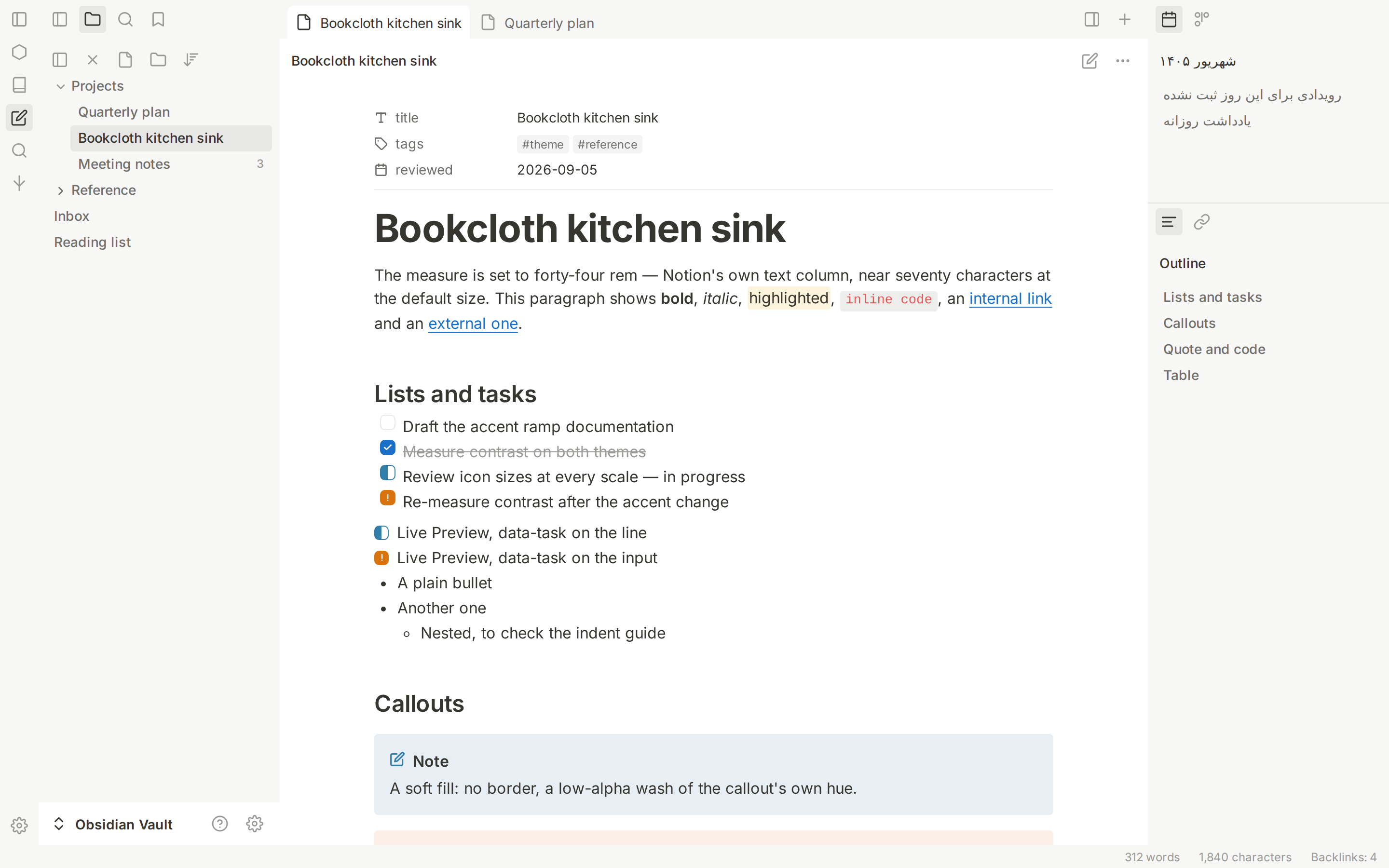
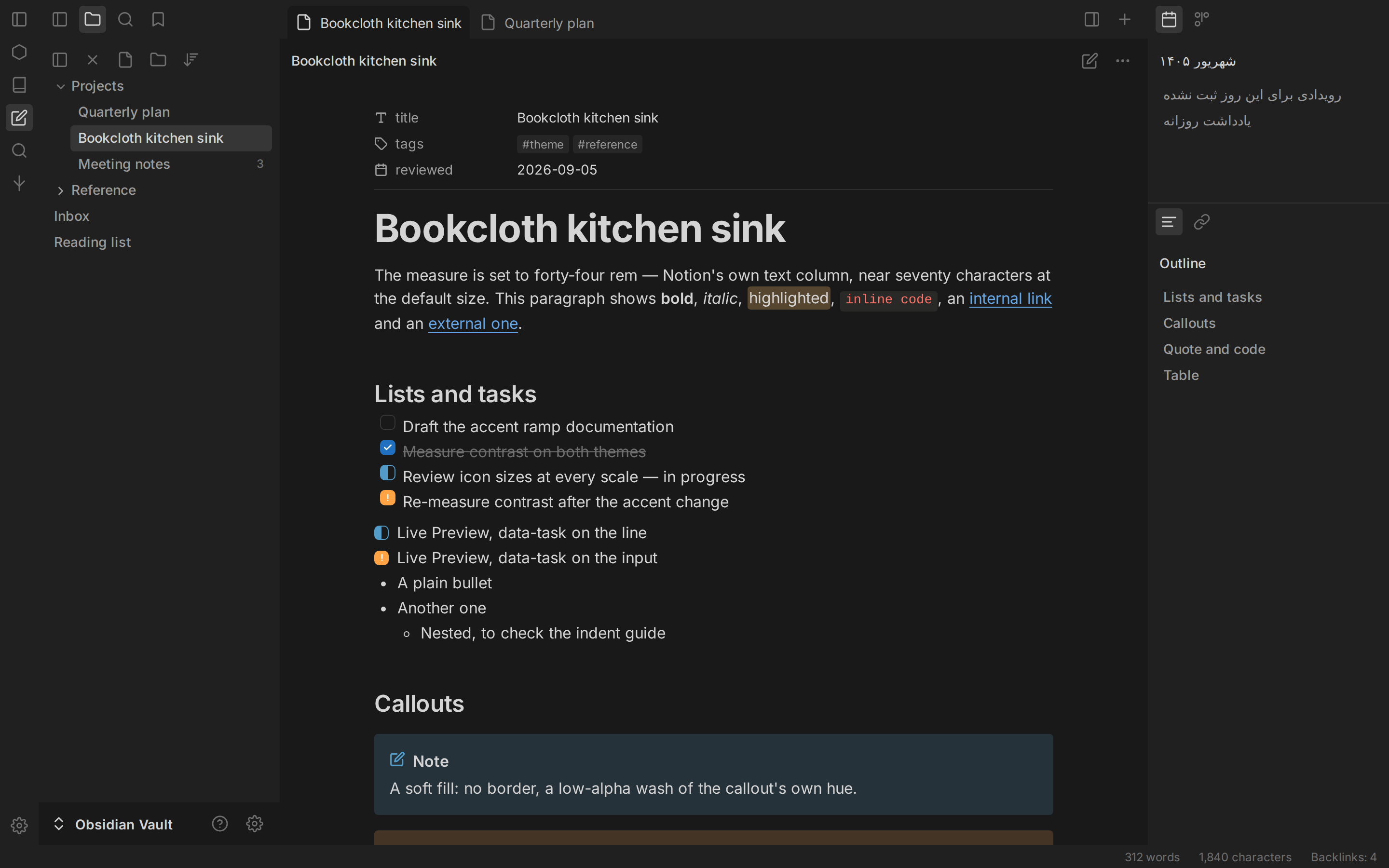
A calm, Notion-inspired theme for Obsidian.
A clean writing surface, warm neutral interface, refined typography, and thoughtful support for right-to-left writing.
فارسی · Features · Installation · Customization



Overview
Bookcloth brings the quiet, paper-like feel of Notion to Obsidian. The document stays visually prominent while the surrounding interface uses warm neutrals, compact controls, restrained borders, and clear hierarchy.
The goal is a minimal interface that remains practical for everyday note-taking—not a reduction in Obsidian's capabilities.
Features
- Light and dark modes with carefully tuned neutral surfaces.
- Notion-inspired visual language with readable typography and consistent spacing.
- Clean panels with optional floating-panel styling.
- Accent color integration with Obsidian's Appearance settings.
- Style Settings support for colors, typography, density, panels, icons, motion, callouts, embeds, and supported plugin styling.
- Editor refinements for headings, links, code, tables, lists, checkboxes, and callouts.
- Right-to-left (RTL) support for Persian, Arabic, and other RTL writing.
- Responsive layouts for desktop and mobile.
- Reduced-motion options and adjustable interface details.
Bookcloth works without additional plugins. Install Style Settings if you want access to the theme's extra customization controls.
Installation
Install through Obsidian
- Open Settings → Appearance.
- Find the Themes section and select Manage.
- Search for Bookcloth.
- Select Install, then Use.
Install manually
- Download the repository or the theme files.
- Place the theme folder in your vault at
.obsidian/themes/Bookcloth/. - Confirm that
theme.cssandmanifest.jsonare inside that folder. - Open Settings → Appearance and select Bookcloth.
Customization
For additional controls, install the community plugin Style Settings.
Customization covers accent and surface colors, text, semantic colors, typography, shape and density, floating panels, icons, editor behavior, motion, and supported plugin interfaces. These settings are optional; the default theme is ready to use.
Design principles
- Keep the note itself as the primary visual focus.
- Use warm, quiet neutrals for application chrome.
- Keep borders subtle and use surface contrast to establish hierarchy.
- Apply accent color mainly to meaningful interaction states.
- Maintain readable typography and consistent spacing.
- Treat RTL as a writing direction, not simply right-aligned text.
- Prefer readability and usability over a literal visual copy of another product.
Compatibility
- Current theme version:
3.8.1 - Minimum Obsidian version:
1.5.0 - Designed for Obsidian desktop and mobile. Exact behavior may vary by Obsidian version and third-party plugins.
- Plugin-specific styling applies only when the corresponding plugin is installed.
If something looks wrong after an update, temporarily disable other CSS snippets and Style Settings customizations to check for a styling conflict.
Troubleshooting
A plugin's interface does not match the theme
Plugins may use their own styles or override theme rules. Update the plugin, review relevant Style Settings options, and temporarily disable conflicting snippets.
The theme changed after an Obsidian update
Obsidian can change internal interface styles between releases. Include your Obsidian version, operating system, affected view, and reproduction steps when reporting the issue.
Style Settings controls are missing
Update both Bookcloth and Style Settings, then restart Obsidian. If the issue continues, include your Obsidian version and any relevant console errors.
Report a bug or request a feature
For a useful report, include your Obsidian version, operating system, light/dark mode, desktop/mobile context, steps to reproduce, screenshots when relevant, and any related plugins or snippets.
Contributing
Contributions, bug reports, and carefully scoped improvements are welcome. Please read CONTRIBUTING.md before opening a pull request. For visual changes, include before/after screenshots and test both light and dark modes where applicable.
Development
Bookcloth's styles are built from source files in src/. Edit the source partials and run the repository's build process:
node build.mjs
Review the generated theme.css after building, then test the result in Obsidian. Check light and dark modes, desktop and mobile layouts, RTL text, callouts, embeds, and any plugin interfaces affected by the change.
Do not edit generated theme.css independently when the source/build workflow can be used; keep source styles and generated output in sync.
License
Bookcloth is distributed under the GNU General Public License v3.0.
For plugin developers
Search results and similarity scores are powered by semantic analysis of your plugin's README. If your plugin isn't appearing for searches you'd expect, try updating your README to clearly describe your plugin's purpose, features, and use cases.