S3 Presign
unlistedby hczhang
Show images and open links stored in a private S3-compatible bucket by replacing them with presigned URLs when notes are rendered.
S3 Presign
English | 简体中文
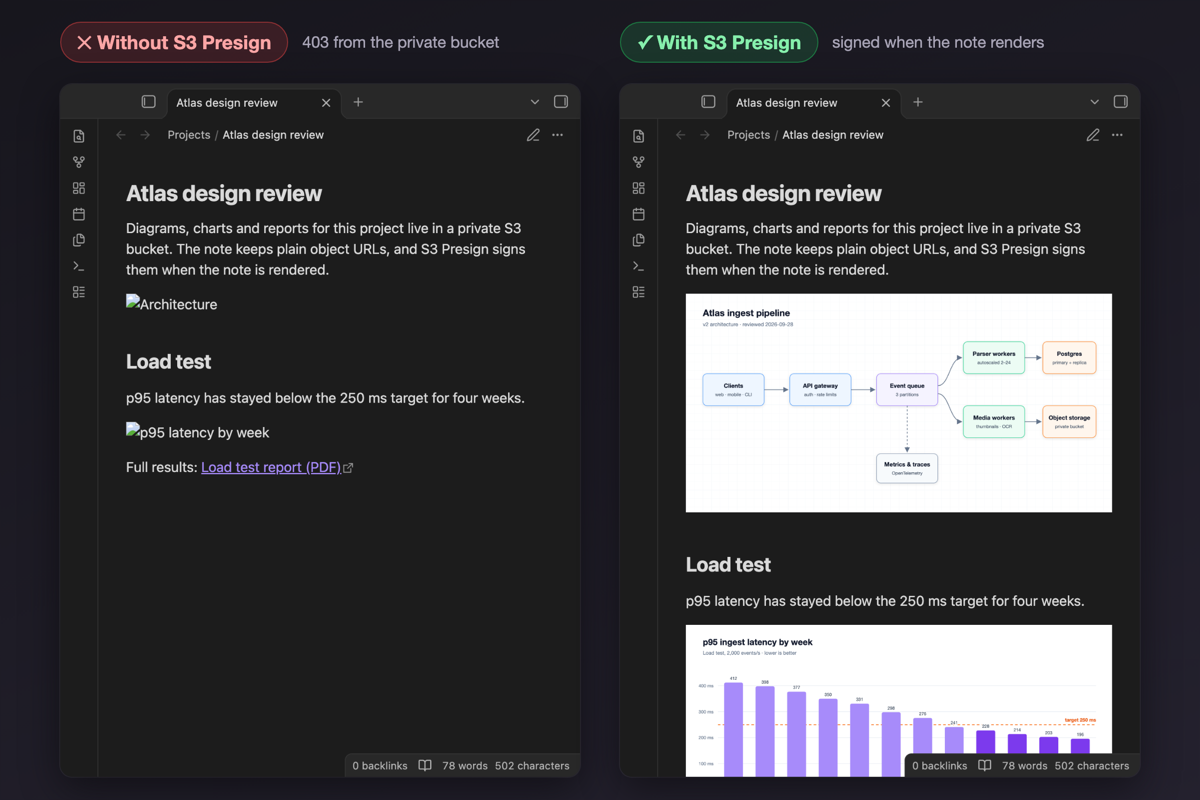
Show images and open links stored in a private S3-compatible bucket (MinIO, Amazon S3, Cloudflare R2 and others) right inside your notes. When a note is rendered, links and embeds that point at endpoint/bucket/<key> are swapped for presigned URLs. The bucket stays private, and your notes keep plain HTTPS URLs that any S3 client can use.
Features
- Works in Reading view, Live Preview embeds, hover previews, Canvas and pop-out windows.
- Signs images, video, audio and links.
- Keeps the secret key in Obsidian's keychain on each device, never in the vault.
- Reuses each presigned URL until shortly before it expires, so the browser cache keeps working.
- Hides images until they are signed, so the broken-image icon never flashes.
- Has no dependencies: SigV4 presigning uses the Web Crypto API, so it runs on desktop and mobile.
Usage
Write object URLs in path style, the same way you would for any S3 client:

[Quarterly report](https://s3.example.com/my-bucket/reports/2026-q3.pdf)
Everything that starts with the configured endpoint/bucket/ is signed when it is rendered. Other URLs are left alone.
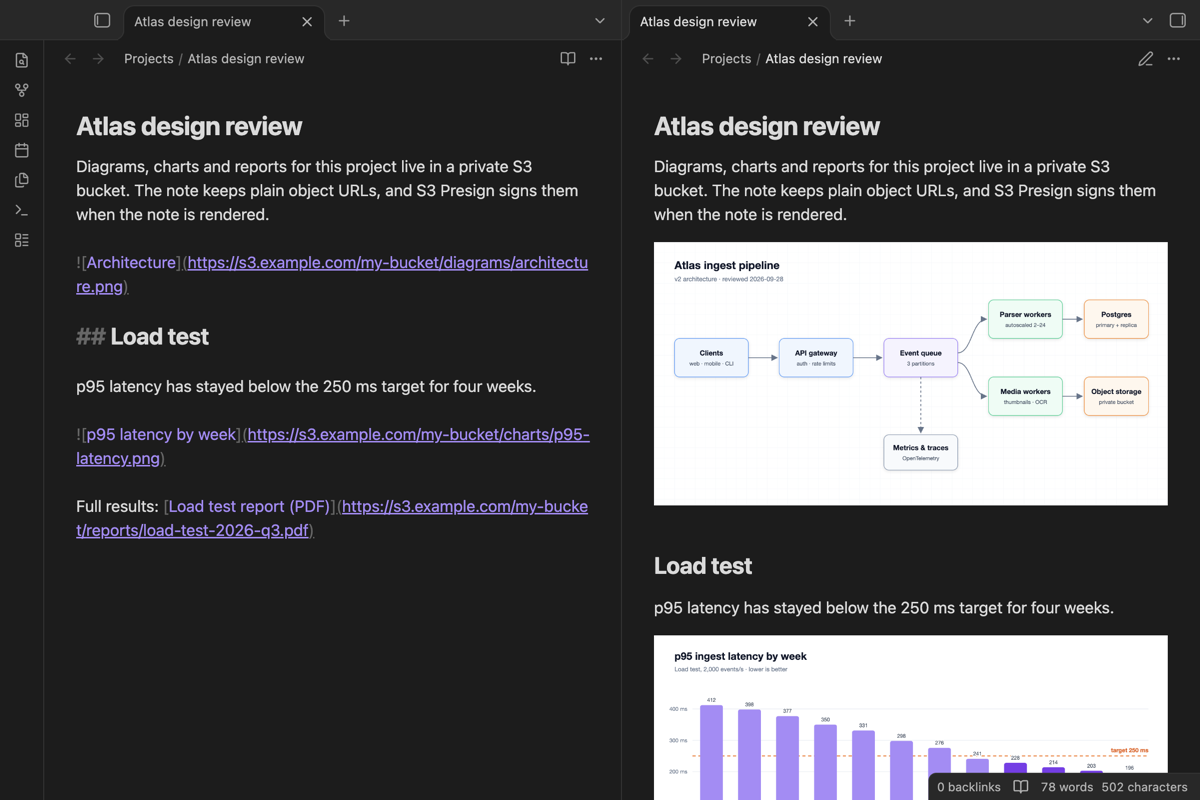
Links written as text in Live Preview are not rendered as link elements, so clicking them opens the unsigned URL. Put the cursor on the link and run S3 Presign: Open presigned URL for the link at the current position, or click the link in Reading view.
Tools outside Obsidian, such as scripts or AI agents, can fetch the same URL with a SigV4 request:
curl -f --aws-sigv4 "aws:amz:us-east-1:s3" --user "$ACCESS_KEY:$SECRET_KEY" \
  -o architecture.png "https://s3.example.com/my-bucket/diagrams/architecture.png"
Installation
Requires Obsidian 1.13.2 or later.
- Community plugins: once the plugin is listed, search for "S3 Presign" in Settings → Community plugins.
- BRAT: add
best/obsidian-s3-presignin the BRAT plugin. - Manual: download
main.js,manifest.jsonandstyles.cssfrom the latest release, put them in<vault>/<configuration folder>/plugins/s-three-presign/, then enable the plugin in Settings → Community plugins.
Settings
| Setting | Description |
|---|---|
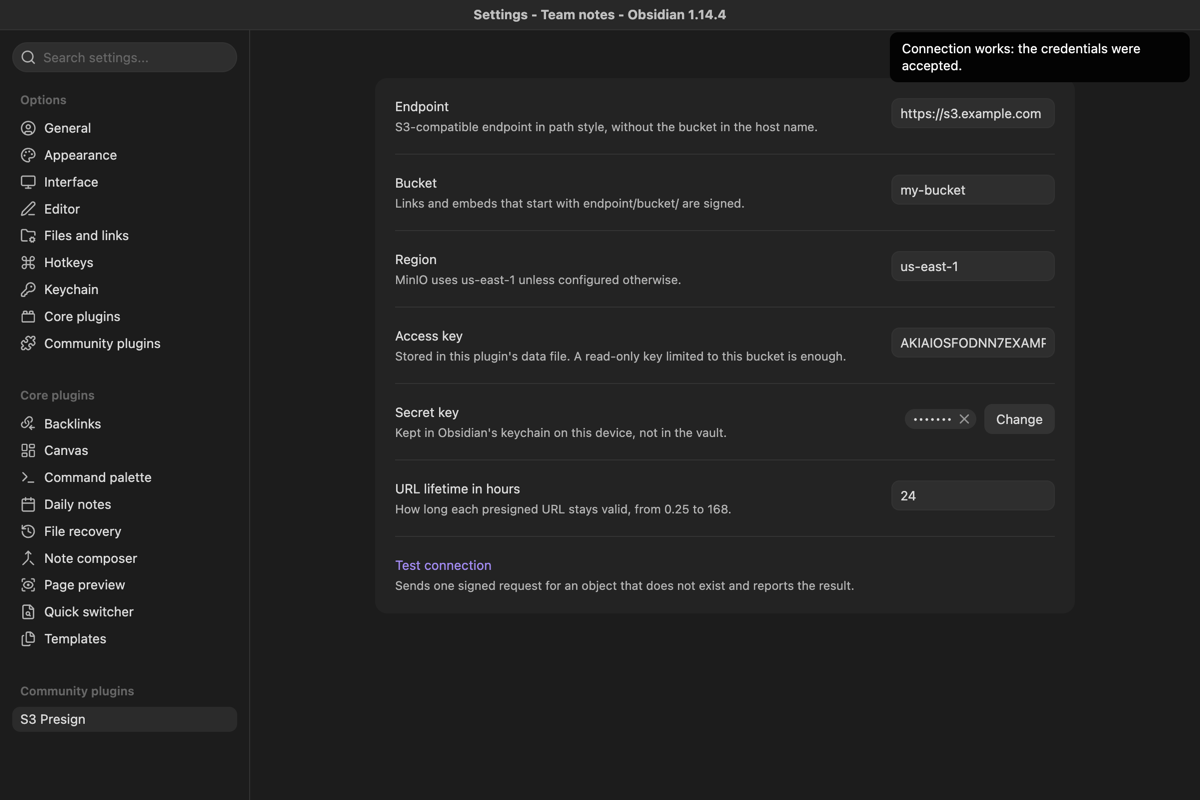
| Endpoint | S3-compatible endpoint in path style, without the bucket in the host name, e.g. https://s3.example.com. |
| Bucket | The bucket whose URLs should be signed. |
| Region | Signing region. MinIO uses us-east-1 unless configured otherwise. |
| Access key | Stored in the plugin's data file in your vault configuration folder. |
| Secret key | Pick or create a secret in Obsidian's keychain (Settings → Keychain). Secrets stay on the device and are not synced with the vault, so set it once on each device. |
| URL lifetime in hours | How long each presigned URL stays valid, from 0.25 to 168 (7 days). Default 24. |
| Test connection | Sends one signed request for an object that does not exist. A 404 means the credentials work; a 403 means the keys, region or bucket are wrong. |
Use a key that can only read this bucket. For MinIO or AWS, a policy like this is enough:
{
	"Version": "2012-10-17",
	"Statement": [{ "Effect": "Allow", "Action": ["s3:GetObject"], "Resource": ["arn:aws:s3:::my-bucket/*"] }]
}
Network use and privacy
- The plugin only contacts the S3 endpoint you configure. Images and links load from it through presigned URLs, and Test connection sends one signed
GETrequest to it. - It uses no other remote service, collects no telemetry, and needs no account or payment.
- Signing happens locally. The secret key never leaves the device.
- A presigned URL works for anyone who has it until it expires. If you copy an image address out of Obsidian, the copy carries a valid signature for the configured lifetime.
How it works
src/sigv4.tsimplements SigV4 query-string presigning (only thehostheader is signed, payloadUNSIGNED-PAYLOAD) with the Web Crypto API. It is checked against the presigning example in the AWS documentation.src/main.tsregisters a Markdown post-processor for Reading view and aMutationObserverper window for Live Preview, hover previews and anything rendered later. Matching elements get theirsrcorhrefreplaced with the presigned URL.
Limitations
- Only path-style URLs (
endpoint/bucket/key) are recognized. Virtual-hosted-style URLs (bucket.endpoint/key) are not. - One endpoint and bucket per vault.
- Presigned URLs depend on the device clock being roughly correct.
- Text links in Live Preview need the command described above.
Compatibility with other plugins
- Upload plugins: S3 Presign only displays files. Pair it with an uploader that can write to a custom endpoint in path style and insert plain object URLs, then keep the bucket private.
- Plugins that download remote images into the vault read the URL from the note text, not from the rendered page, so they get 403 for bucket URLs. Add your endpoint to their exclusion list if they have one.
- Copying an image through plugins that redraw it on a canvas needs the bucket to allow cross-origin requests (CORS) from Obsidian. Viewing works without CORS.
- Images that are not
<img>,<video>,<audio>or link elements are not signed, for example banners set as CSS backgrounds.
Development
npm install
npm run lint    # eslint-plugin-obsidianmd recommended rules
npm test        # offline tests: AWS documented example, key encoding, URL parsing
npm run build   # type check and bundle main.js
npm run dev     # rebuild on change
Set these variables to also run the live tests against a real bucket. They check that an existing object downloads with the expected SHA-256, that a missing key with spaces, CJK and reserved characters returns 404 (the signature was accepted), and that a wrong secret or an unsigned URL returns 403.
S3_TEST_ENDPOINT=https://s3.example.com S3_TEST_BUCKET=my-bucket \
S3_TEST_ACCESS_KEY=... S3_TEST_SECRET_KEY=... \
S3_TEST_KEY=path/to/existing-object.png S3_TEST_SHA256=<sha256 of that object> npm test
Contributing
Bug reports and pull requests are welcome. See CONTRIBUTING.md.
License
For plugin developers
Search results and similarity scores are powered by semantic analysis of your plugin's README. If your plugin isn't appearing for searches you'd expect, try updating your README to clearly describe your plugin's purpose, features, and use cases.