Daily Digest
unlistedby Brian Ruggieri
Compile browser history, search queries, Claude Code sessions, Codex CLI sessions, and git commits into an AI-summarized daily note.
Daily Digest for Obsidian


Your day, distilled. Daily Digest is an Obsidian plugin that reads your browser history, search queries, Claude Code sessions, Codex CLI sessions, and git commits, then compiles them into an AI-summarized daily note.
One command. One note. Everything you did today, in one place.
Why this exists
What survives my day: commits, a merged PR, a closed ticket. What doesn't: why I threw out the first approach. The searches that shifted my thinking. The rabbit hole that cost two hours and saved six. I built this because I kept losing that stuff. After the third time I re-solved the same problem from scratch, I figured I needed a record.
Daily Digest captures all of that and turns it into something you can actually read tomorrow, next week, or six months from now.
What it does
Every day (or whenever you want), Daily Digest:
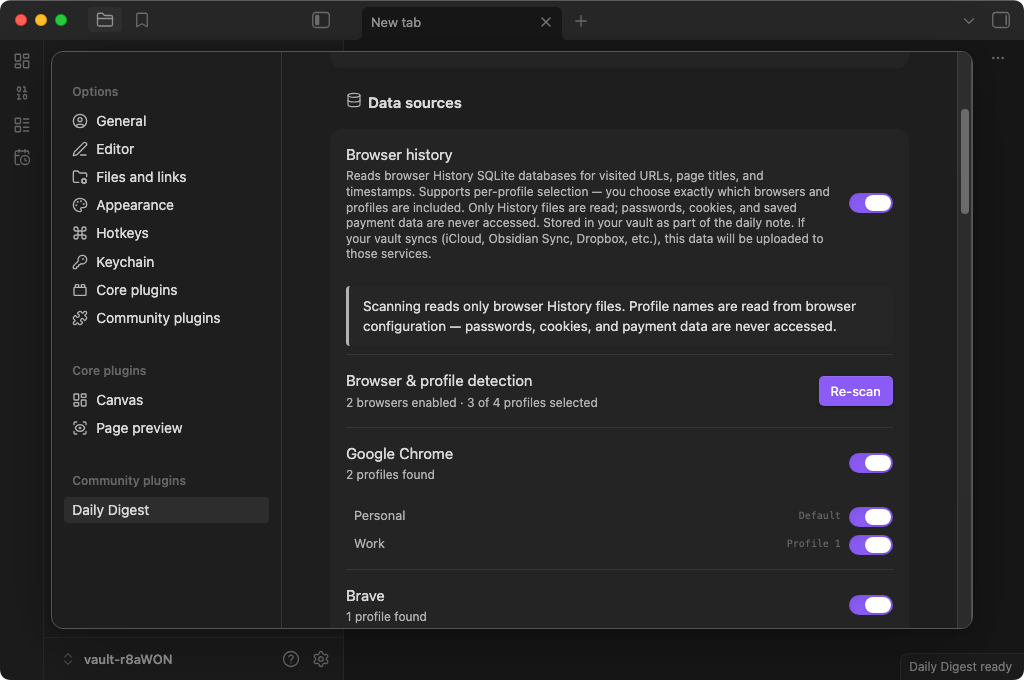
- Collects your browser history, search queries, Claude Code sessions, Codex CLI sessions, and git commits
- Sanitizes everything. Scrubs API keys, tokens, passwords, and sensitive URLs before anything touches your vault
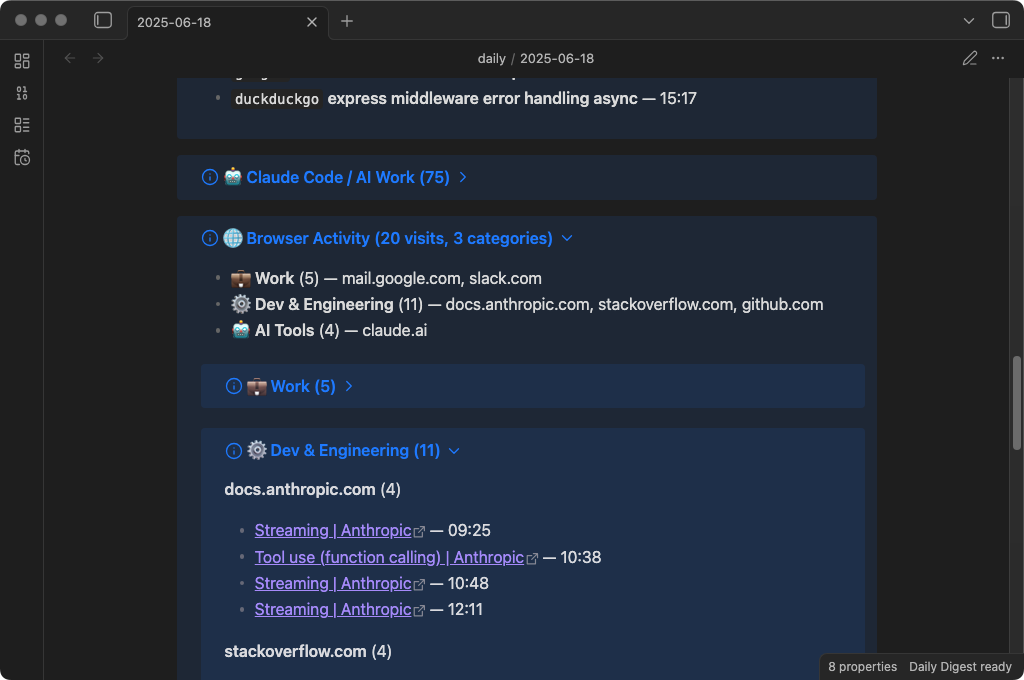
- Categorizes browser visits into groups (Dev, Research, Work, News, etc.)
- Summarizes the day with AI. Headline, key themes, notable moments, and reflection questions
- Writes a structured markdown note with frontmatter, tags, and Dataview-compatible fields
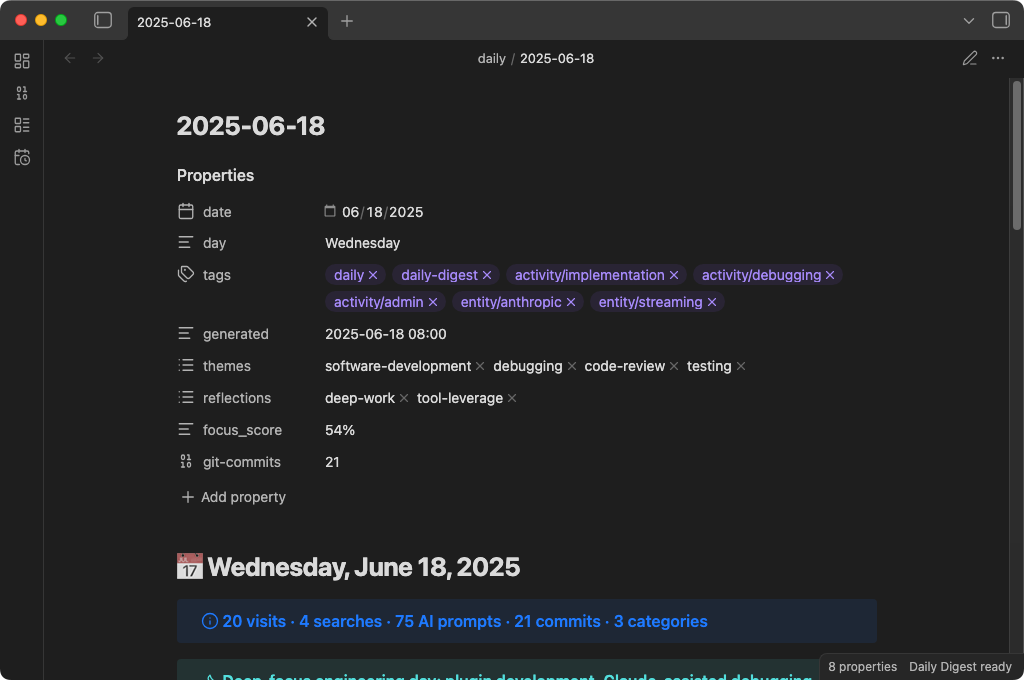
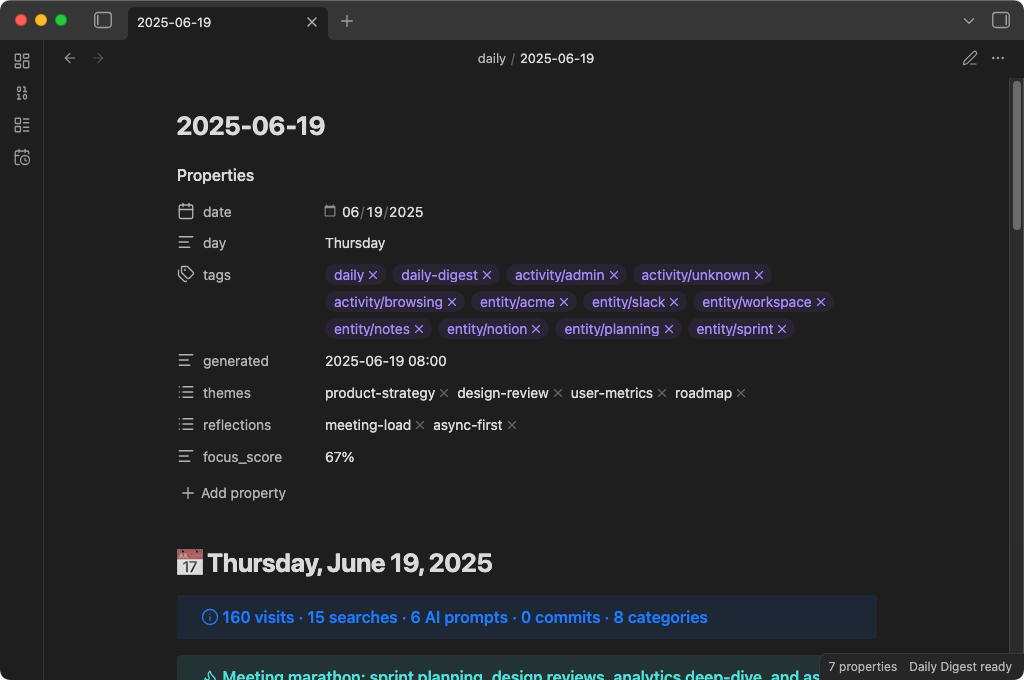
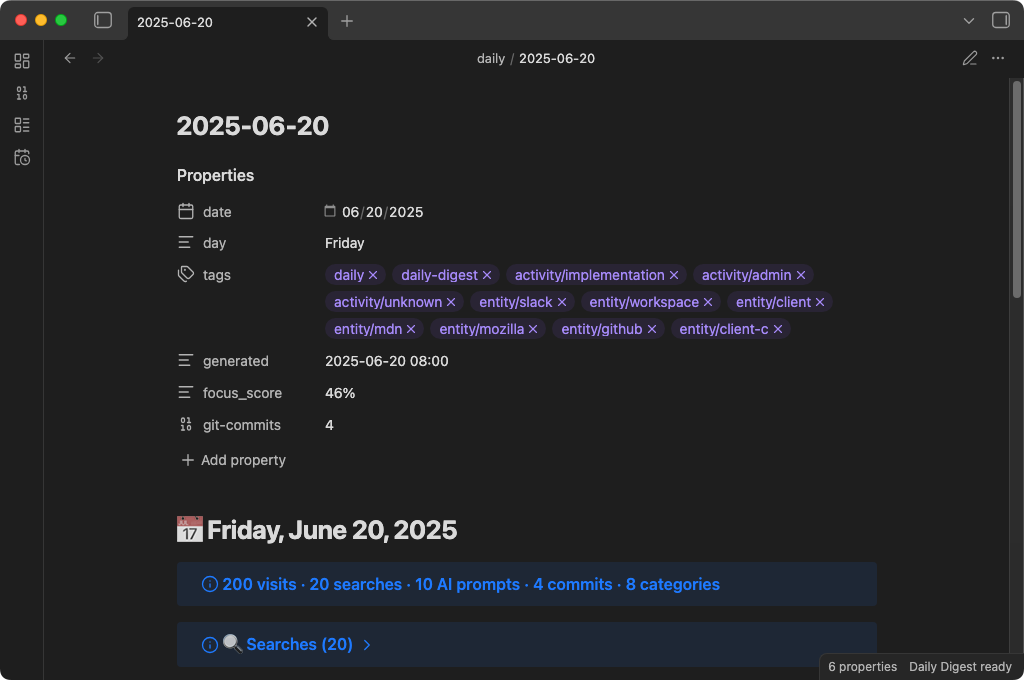
The result is a note that looks like this:
Data sources
| Source | What it reads | How |
|---|---|---|
| Browser history | URLs, page titles, timestamps | SQLite databases (read-only copy) |
| Search queries | Queries from Google, Bing, DuckDuckGo, Yahoo, Kagi, Perplexity | Extracted from browser history URLs |
| Claude Code sessions | Your prompts to Claude Code (not responses) | ~/.claude/projects/**/*.jsonl |
| Codex CLI sessions | Your prompts to Codex CLI (not responses) | ~/.codex/history/*.jsonl |
| Git commits | Commit messages, timestamps, file change stats | Local .git directories under a configurable parent folder |
Supported browsers
Chrome, Brave, Edge, and Firefox on macOS, Windows, and Linux. Safari on macOS only.
AI providers
- Local models (Ollama, LM Studio, or any OpenAI-compatible server) — all data stays on your machine
- Anthropic API (Claude) — with a privacy escalation chain that controls exactly what gets sent
You can also skip AI entirely and just get the raw, organized activity log.
Disclosures
Network use
Daily Digest can optionally send data to Anthropic's API (api.anthropic.com) to generate AI summaries. This requires you to supply your own API key and is disabled by default — the plugin defaults to local AI models (Ollama, LM Studio) that keep all data on your machine. When Anthropic is enabled, a data preview is shown before any request is made, and a 4-tier privacy escalation chain controls the minimum data necessary for the summary.
No other network requests are made. There is no telemetry, analytics, or tracking of any kind.
Files accessed outside your vault
To collect activity data, the plugin reads files from outside your Obsidian vault. These are read-only operations — nothing outside your vault is modified. All sources are opt-in and disabled by default.
| Source | File path(s) | Why |
|---|---|---|
| Browser history | Platform-specific SQLite database inside the browser's profile directory (e.g., ~/Library/Application Support/Google/Chrome/…/History) | To build a record of URLs you visited, including search queries extracted from them |
| Claude Code sessions | ~/.claude/projects/**/*.jsonl | To include your AI coding prompts, grouped by project |
| Codex CLI sessions | ~/.codex/history/*.jsonl | To include your Codex CLI prompts |
| Git commits | .git/ directories under a configurable parent folder | To include commit messages and file change statistics |
Installation
Manual install
- Download
main.js,manifest.json,styles.css, andsql-wasm.wasmfrom the latest release - Create a folder:
<your-vault>/.obsidian/plugins/daily-digest/ - Drop all four files into that folder
- Restart Obsidian and enable the plugin in Settings > Community plugins
Build from source
git clone https://github.com/brianruggieri/obsidian-daily-digest.git
cd obsidian-daily-digest
npm install
npm run build
Then copy main.js, manifest.json, styles.css, and sql-wasm.wasm into your vault's plugin directory, or run npm run deploy to do it automatically.
Getting started
When you enable the plugin for the first time, you'll see an onboarding screen:
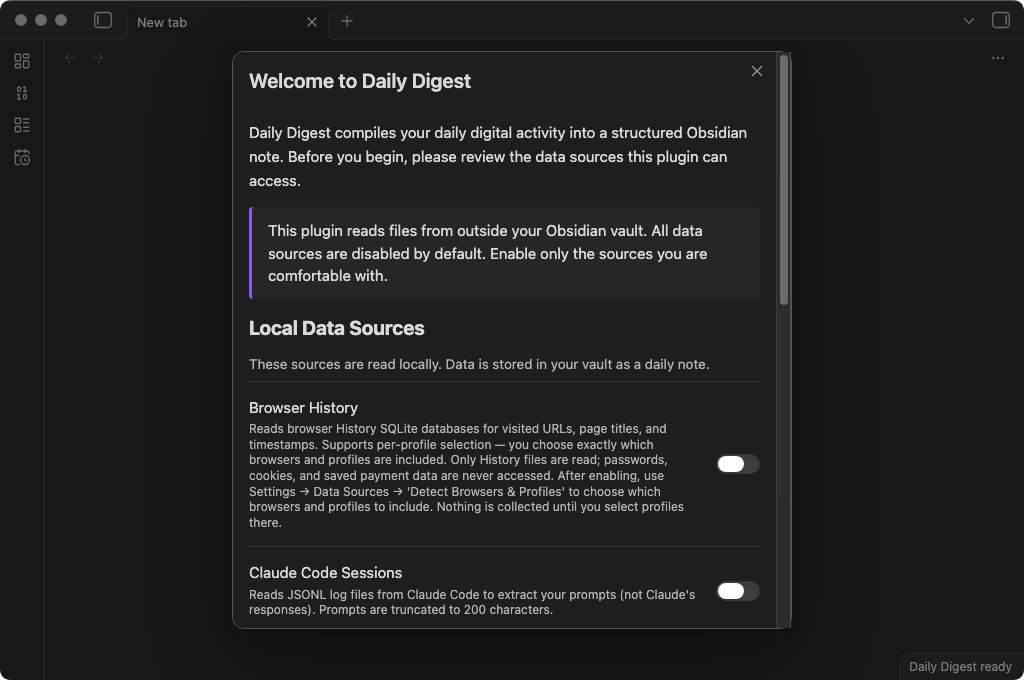
Everything is off by default. You choose which data sources to enable and whether you want AI summaries. Nothing is collected until you opt in.
Quick setup
- Enable the data sources you want — browser history, Claude Code sessions
- Choose an AI provider (or skip AI for raw data only):
- Local model: Install Ollama, pull a model (
ollama pull llama3.2), and start the server (ollama serve). Your data never leaves your machine. - Anthropic API: Add your API key in settings or set the
ANTHROPIC_API_KEYenvironment variable.
- Local model: Install Ollama, pull a model (
- Generate your first note — click the calendar-clock icon in the ribbon, or use the command palette:
Daily Digest: Generate today's daily note
Commands
| Command | What it does |
|---|---|
| Generate today's daily note | Collect, summarize, and write today's note |
| Generate daily note for a specific date | Same thing, but for any date you pick |
| Generate today's daily note (no AI) | Just the raw data, organized and categorized |
The daily note
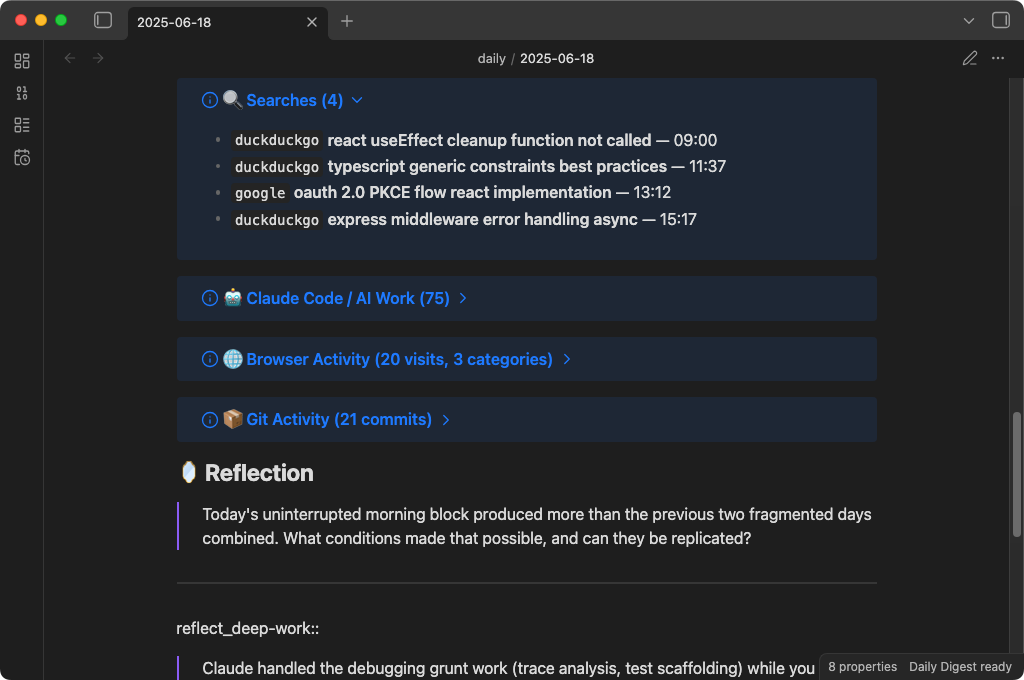
Here's what a generated note looks like:
Structure
Every note includes:
- Frontmatter with date, tags, categories, themes, and focus score — ready for Dataview
- AI headline and TL;DR — a quick summary of your whole day
- Themes — 3-5 labels capturing what you were focused on
- Notable moments — the interesting stuff the AI picked out
- Searches — every query, with engine badges and timestamps
- Claude Code / AI Work — your prompts to Claude Code, grouped by project
- Browser Activity — visits organized by category (Dev, Research, Work, etc.) and grouped by domain
- Reflection — AI-generated questions with Dataview inline fields for your answers
- Notes — a section for your own thoughts (preserved across regenerations)
Regeneration is safe
Already added notes to today's digest? No problem. When you regenerate:
- Your Notes section content is preserved
- Your Reflection answers are carried forward
- Any custom sections you added are kept
- A timestamped backup is created before any changes
If anything goes wrong during merge, your original content is never lost.
Privacy architecture
Everything here is designed around one constraint: nothing leaves your machine unless you opt in.
The defaults
- All data sources are off by default — you opt in to each one
- AI summarization defaults to local models — nothing leaves your computer
- Sensitive data is scrubbed automatically — API keys, tokens, passwords, emails, file paths
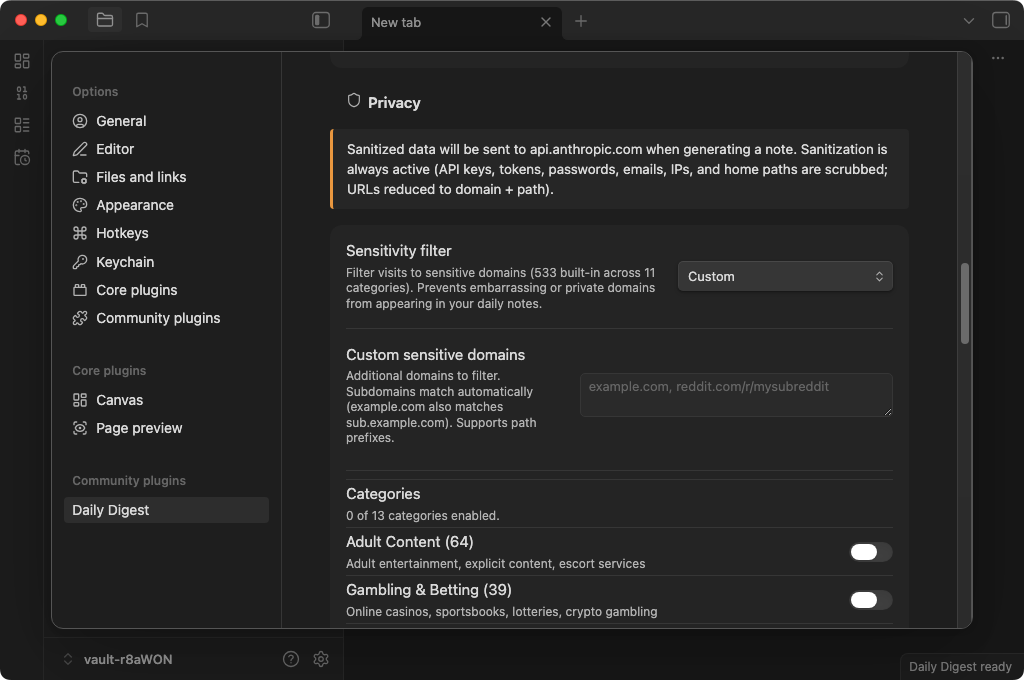
- A 419-domain sensitivity filter catches embarrassing or private domains before they reach your notes
The privacy escalation chain
When you use Anthropic's cloud API, a 4-tier system controls how much context the cloud model sees:
Tier 4 ─── De-identified ──── Only aggregated statistics. Zero per-event data.
  │         (Most private)     Topic distributions, focus scores, temporal shapes.
  │                            No individual URLs, queries, commands, or prompts.
  │
Tier 3 ─── Classified ─────── Structured abstractions only.
  │                            Activity types, topics, entities — no raw data.
  │
Tier 2 ─── Compressed ─────── Budget-proportional activity summaries.
  │                            Domain counts, top titles, and queries — no full URLs.
  │
Tier 1 ─── Standard ────────── Full context (sanitized). All data types included.
            (Least private)     Used only with local models by default.
The plugin automatically selects the most private tier available based on your configuration:
- Classification + Patterns enabled? Anthropic sees only Tier 4 — aggregated distributions and trends, nothing per-event.
- Classification enabled? Anthropic sees only Tier 3 — abstractions like "researched authentication" instead of your actual URLs and queries.
- Local model? All tiers run on your machine. Nothing is transmitted.
When Anthropic is your provider, you also get a data preview modal before anything is sent — showing exactly what data will leave your machine, with the option to cancel or proceed without AI.
What gets scrubbed
The sanitization pipeline catches:
- GitHub tokens, Anthropic keys, OpenAI keys, AWS credentials
- Slack tokens, npm tokens, Stripe keys, SendGrid keys, JWTs
- Database connection strings with passwords
- Authorization headers, private key blocks
- Sensitive URL parameters (27 patterns:
token,key,secret,auth, etc.) - Email addresses, IP addresses, home directory paths
This runs before anything touches AI, your vault, or any external service.
Sensitivity filter
For domains you'd rather not see in your daily notes at all, the built-in sensitivity filter covers 419 domains across 11 categories:
- Adult, gambling, dating, health, finance, drugs, weapons, piracy, VPN/proxy, job search, social/personal
You can add your own domains (including path-level filtering like reddit.com/r/specific-subreddit), and choose whether to exclude matching visits entirely or redact them to just a category label.
Advanced features
Event classification
Turn on event classification and your raw activity gets transformed into structured data:
- Activity types: research, debugging, implementation, infrastructure, writing, learning, admin, communication
- Topics: extracted noun phrases describing what you were working on
- Entities: tools, libraries, and technologies mentioned
- Intent: compare, implement, evaluate, troubleshoot, configure, explore
Classification runs locally on your machine (requires a local model). When Anthropic is your AI provider, only the structured output — not raw URLs or queries — is sent to the cloud.
Pattern extraction
Daily Digest extracts statistical patterns from your activity without any LLM calls:
- Temporal clusters — when your activity concentrated and what you were doing
- Topic co-occurrences — which topics appeared together
- Entity relations — how tools and technologies connected across your work
- Focus score — a 0-100% measure of how scattered or focused your day was
- Recurrence signals — tracks topics across days to spot rising interests, returning themes, and stable focus areas
With event classification enabled, pattern quality improves significantly — but patterns always run regardless.
Dataview integration
Reflection questions are rendered as inline fields:
### What token storage strategy is safest for our SPA?
answer_what_token_storage_strategy_is_safest_for_our_spa:: httpOnly cookies with refresh rotation
Query your reflections across all daily notes with Dataview:
TABLE answer_what_token_storage_strategy_is_safest_for_our_spa AS "Answer"
FROM #daily-digest
WHERE answer_what_token_storage_strategy_is_safest_for_our_spa
Frontmatter includes focus_score, themes, categories, and tags for cross-day queries.
Configuration
All settings live in Settings > Daily Digest within Obsidian.
| Setting | Default | What it does |
|---|---|---|
| Daily notes folder | daily | Folder in your vault where notes are saved |
| Filename template | YYYY-MM-DD | Date format for note filenames |
| Browser history | Off | Collect browser visits and search queries |
| Claude Code sessions | Off | Include AI coding session summaries |
| Codex CLI sessions | Off | Include Codex CLI session summaries |
| Git commits | Off | Collect commit history from local repos |
| Enable AI summaries | Off | Add AI headline, themes, and reflection questions |
| AI provider | Local | Local model (Ollama/LM Studio) or Anthropic API |
| Anthropic model | claude-haiku-4-5 | Which model to use when Anthropic is selected |
| Sensitivity filter | Off | Filter domains by category (adult, gambling, etc.) |
| Event classification | Off | Structured activity tagging via local model |
| Track recurrence | On | Highlight topics you return to across multiple days |
See the settings panel for full descriptions and inline setup guides for local models.
Platform support
Daily Digest is desktop only (isDesktopOnly: true) — it requires filesystem access not available on mobile.
| Feature | macOS | Windows | Linux |
|---|---|---|---|
| Browser history (Chrome, Brave, Edge) | ✓ | ✓ | ✓ |
| Browser history (Firefox) | ✓ | ✓ | ✓ |
| Browser history (Safari) | ✓ | — | — |
| Claude Code sessions | ✓ | ✓ | ✓ |
| Codex CLI sessions | ✓ | ✓ | ✓ |
| Git commits | ✓ | ✓ | ✓ |
Browser history is read using sql.js (SQLite compiled to WebAssembly) — no native binaries, no system dependencies. The WASM binary (~644 KB) ships as a separate file alongside main.js in each release.
FAQ
Does this work without AI? Yes. The "Generate today's daily note (no AI)" command gives you a fully structured activity log with categorized browser visits, searches, and Claude Code sessions — just no headline, summary, or reflection questions.
Does my data leave my computer? Only if you choose Anthropic as your AI provider. With a local model (or no AI), everything stays on your machine. Even with Anthropic, the privacy escalation chain minimizes what gets sent, and a preview modal shows you exactly what will be transmitted before you confirm.
Will this slow down Obsidian? No. Generation takes 3-6 seconds (mostly waiting for the AI response) and only runs when you trigger it. There are no background processes.
What if I regenerate a note I already edited? Your custom content is preserved. Daily Digest extracts your notes, reflection answers, and any custom sections, creates a backup, then merges everything into the fresh note.
Can I use this with Obsidian Sync / iCloud / Dropbox? Yes, but be aware that your daily notes (which contain your activity data) will be synced to those services. The API key is stored in Obsidian's secure credential store and is not synced.
Roadmap
Features already shipped are in the current release. The following is planned but not yet implemented:
Cross-day embeddings — Persist each day's embedding index and enable semantic search across a date range. Will be implemented in a future release.
Contributing
See CONTRIBUTING.md for development setup, testing guide, project structure, and how to submit a pull request.
Bug reports and feature requests are welcome — please open an issue first for major changes so we can discuss the approach.
Built with AI
This project was developed extensively with AI coding tools, primarily Claude Code. AI assisted with implementation, testing, and documentation across the codebase.
All code is human-reviewed, tested, and maintained by Brian Ruggieri. I made the architecture and product decisions. The AI made me faster.
License
MIT — 2026 Brian Ruggieri
For plugin developers
Search results and similarity scores are powered by semantic analysis of your plugin's README. If your plugin isn't appearing for searches you'd expect, try updating your README to clearly describe your plugin's purpose, features, and use cases.