Extraboard
unlistedby Brookit
Markdown-backed Kanban and calendar boards with typed card properties, checklists, and an archive. Mobile-friendly.
Extraboard
A Markdown-backed Kanban, calendar and list board plugin for Obsidian.
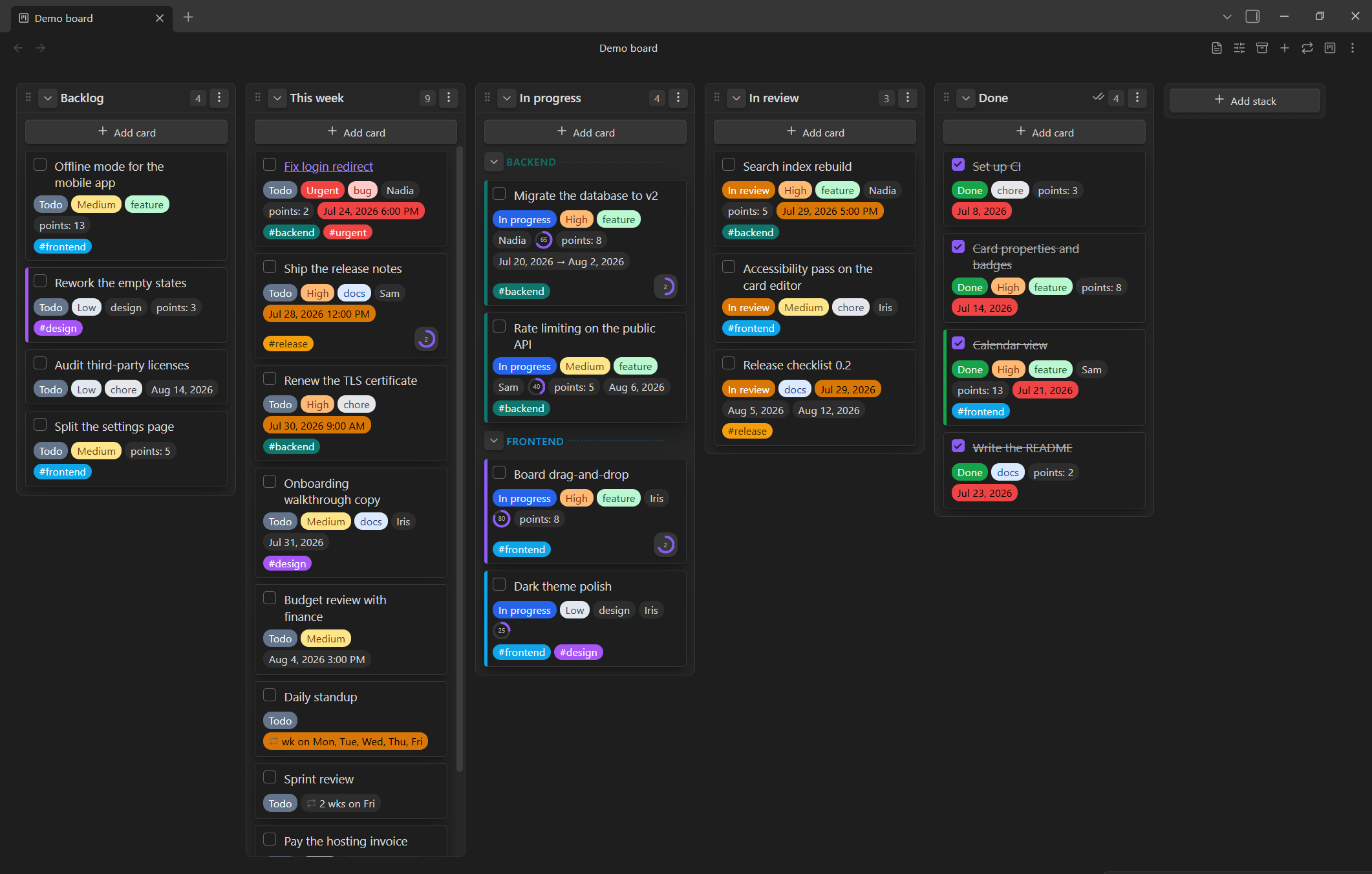
Each board is a single Markdown file: stacks are headings, cards are list items, and card properties are stored inline. The board is deserialized on open and re-serialized after changes, so the underlying note stays clean and portable. Designed to be mobile-friendly.
Inspired by obsidian-kanban by mgmeyers and the Obsidian community — Extraboard is an independent plugin with its own file format, not a fork.
Features
- Your board is a normal note.
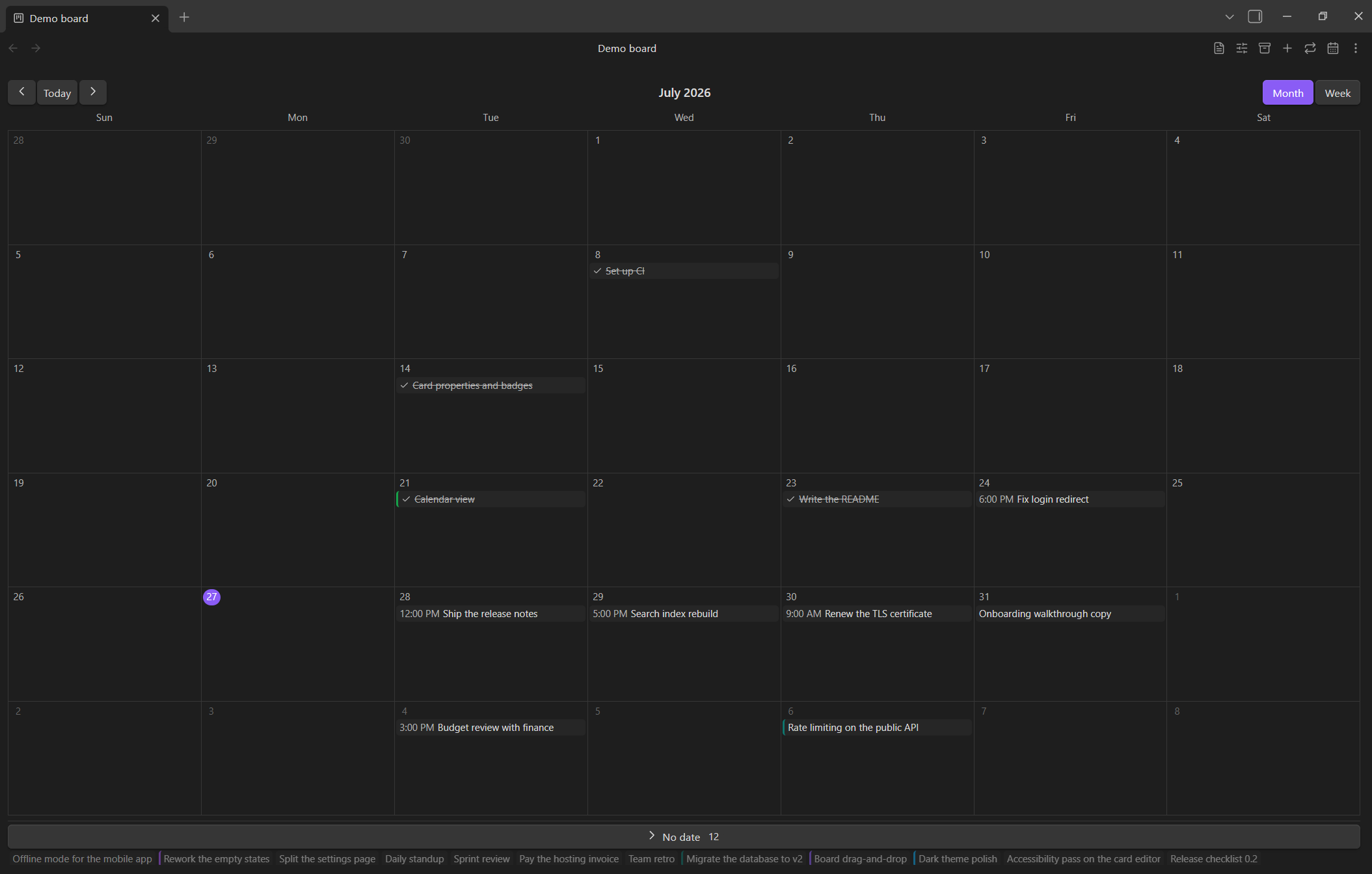
## Headingis a stack,- itemis a card, and the board's configuration is JSON in anextraboard-settingscode block at the top of the file. Frontmatter carries a singleextraboardproperty whose value is the active view name; anything else you keep there — including comments — survives a load/save cycle untouched. - Three views over the same file: a Kanban board, a month/week calendar, and a list that groups every card by its named dividers into collapsible sections, with a composer that picks which stack the new card goes to. A board can define several views and cycle through them from its header, and a new board can open as a list instead of a board.
- A calendar can read several date properties at once — a card with a start and a due date shows on both days, and once where they fall on the same one.
- Filters and sorting for a list: a condition builder with AND / OR / NOT groups over any property plus the card's own text, tags, checkbox and linked note, and as many sort keys as you like, each with its own direction.
- Per-view card settings: choose which property badges, tags, checkbox, progress and color a view draws — remembered per view, across restarts.
- Drag and drop cards within and across stacks — including collapsed stacks — whole stacks, and cards onto a calendar day to move their date. Touch drag works on mobile.
- Typed card properties written inline as
@{name|value}: text, number, percent, checkbox, color, single-select and multi-select lists with per-value badge colors, date, date range, list of dates, and recurrence. - Calendar-backed date editing: select a day or an inclusive range directly in a card; date-list values keep dates and ranges as separate removable items.
- Recurring dates in a readable phrase —
every 2 weeks on Fri,every month on the last Friday— expanded onto the calendar. - Date highlighting: ordered rules color a date badge as its date approaches or after it has passed; a board can override the plugin-wide list.
- Nested checklists on a card with automatic
N/Mprogress, shown as a ring, a fraction or a percentage. - A note per card: link a card to its own note, created on demand in a folder you choose, with hover previews and Obsidian's rename handling.
- Archive section in the same file: archived cards remember the stack they came from and can be restored or deleted from the archive view.
- Stacks and dividers that mean something: a stack can mark the cards entering it as done, and a named divider can color the cards in its group.
- Tags with per-board colors; selecting one searches the vault for it. While editing a card, a tag button opens a searchable picker over the board's and the vault's tags — add, remove, or create one without leaving the card.
- English and Russian interfaces, with configurable date/time formats
(including relative dates and custom
moment.jspatterns) and first day of the week. - Optional reduced filesystem writes: before a save requested by the board view, Extraboard can compare the complete logical board state with the file and skip the write when debounced edits were reverted.
Status
Post-MVP active development. The full feature set above is implemented and manually verified on desktop and mobile. The current version is 0.5.3; packaging and draft GitHub Releases are automated.
Development
npm install       # install dependencies
npm run dev       # watch build
npm run build     # production build (tsc type-check + esbuild bundle)
npm run package   # build a distributable ZIP
npm run lint      # eslint
npm test          # run the unit tests
The build assembles the complete plugin into dist/ (main.js,
manifest.json, styles.css). Run npm run package to also create
release/obsidian-extraboard-<version>.zip; it contains an
obsidian-extraboard/ directory with those plugin files. For manual testing,
copy or symlink dist/ to <Vault>/.obsidian/plugins/extraboard/, then reload
Obsidian and enable the plugin under Settings → Community plugins. Pushing a
version-matching Git tag automatically creates a draft GitHub Release with both
the ZIP and the individual plugin files.
License
0-BSD — see LICENSE.
For plugin developers
Search results and similarity scores are powered by semantic analysis of your plugin's README. If your plugin isn't appearing for searches you'd expect, try updating your README to clearly describe your plugin's purpose, features, and use cases.