Mermaid Direct Edit
unlistedby Peter Beck
Edit Mermaid diagrams directly in the rendered drawing, the code block stays the source. Wardley maps and flowcharts; renders with a current Mermaid.
Mermaid Direct Edit
Edit Mermaid diagrams in Obsidian by dragging the drawing itself. Every change is written back into the ```mermaid code block as plain text, so the code stays the single source of truth and keeps working everywhere else Mermaid runs.
It covers Wardley maps (wardley-beta) and flowcharts (flowchart / graph). More diagram types are planned, and contributions are welcome (see Contributing).
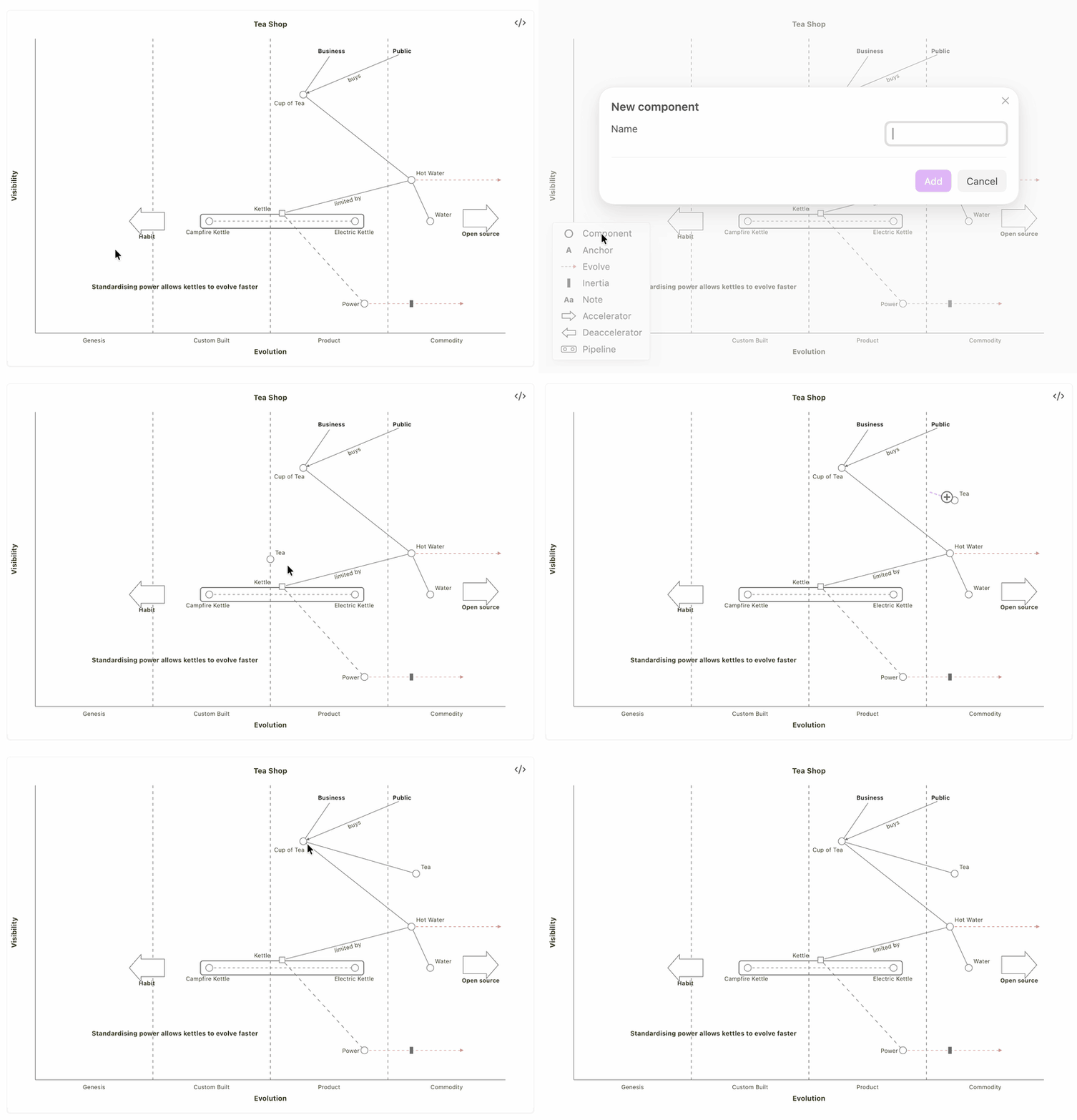
What it does
1. Renders with a current Mermaid. Obsidian bundles its own, older Mermaid (11.13 in Obsidian 1.14). This plugin draws every native ```mermaid block with a pinned Mermaid 12.1.0, so newer diagram types such as wardley-beta work in reading view, live preview and PDF export. It keeps the classic look (look: classic, layout: dagre, theme: default). Disable the plugin to return to Obsidian's own Mermaid.
2. Lets you edit Wardley maps directly. In a rendered wardley-beta map you can:
| Do this | To get this in the code |
|---|---|
| Drag a component, anchor, note, accelerator or deaccelerator | its [visibility, evolution] changes |
| Drag a component's label | label [dx, dy] |
| Drag the tip of a red evolve arrow | evolve Name 0.62 |
| Drag the inertia bar along the evolve arrow | a plugin comment %% mp-inertia Name 0.66 (see below) |
| Drag a pipeline box | the pipeline and its components move together |
| Drag an annotation's numbered circle, or the box listing the annotations | annotation 1,[v, e] "…", or annotations [v, e] |
| Grab a link's end and drop it on another element | A -> B becomes A -> C |
| Click next to an element (a "+" appears), drag to another one | a new link A -> B |
| Click the middle of a link | a dialog: label, direction (line, dashed, arrow either way or both), delete |
| Click a red evolve arrow's shaft (long press on touch) | the evolve arrow is deleted |
| Double-click (double-tap) an element | a dialog: rename everywhere, toggle inertia, set the type ((build), (buy), (outsource), (market) or none), all written together with Save; delete |
| Double-click an annotation's circle or its line in the box | a dialog: edit the text, delete (the box goes with the last one) |
| Hover a bottom corner of the map | a legend to add a component, anchor, note, annotation, evolve arrow, inertia, accelerator, deaccelerator or pipeline |
| Drag from beside an element into free space | a new component right there, linked from the first |
| Click beside an element (the "+"), then click another one | a new link A -> B |
Every edit is checked with Mermaid's own parser before it is written; an edit that would break the diagram is refused with a notice. In live preview an edit can be undone with Cmd/Ctrl+Z. It works with mouse and touch, on desktop and mobile.
3. Lets you edit flowcharts directly. A flowchart has no stored positions (Mermaid lays it out), so editing is about what is connected to what, how it looks and which group it is in:
| Do this | To get this in the code |
|---|---|
| Double-click (double-tap) a node | a dialog: label, shape (15 shapes), color, group (or a new one), delete with its links |
| Click a link, its label or near its end | a dialog: from and to (swap them to reverse), label, line (solid, dotted, thick, invisible), ends (arrow, circle, cross, one or both), minimum length, delete |
| Hover a node: small "+" marks appear beside it. Drag from one onto another node | a new link A --> B (or click the "+", then click the other node) |
| Drag from a "+" into free space | a dialog for the label, then a new node linked from the first: A --> NewNode[Label] (in A's group if it is in one); it flashes once after the redraw |
| Grab a link near one of its ends and drop it on another node | A --> B becomes A --> C |
| Drag a node onto a group (subgraph) | the node moves into that group; dragged outside every group, it leaves its group (a hint at the pointer says which) |
| Double-click a group's title or border | a dialog: title, direction, ungroup (keep the nodes), delete with its nodes |
| Hover a bottom corner of the flowchart | a legend to add a node of a shape, put a node into a new group, or change the direction |
| Right-click a node, a link, a group or empty space | the same actions as a menu |
Edits change only what they must: a label edit touches the label, chains like A --> B --> C and A & B --> C are split only when an edit needs it, and linkStyle numbers follow when links are added or removed. Before anything is written, the editor checks that the result means exactly what you asked for and nothing else (no other node's label, group or link changes); if not, it refuses with a notice. Deleting, re-linking, moving into or out of a group and adding confirm with a notice that has an Undo button, which also works in reading view and on a phone. On a phone, swiping across a flowchart always scrolls and never edits: edit with taps (double-tap for the dialogs, tap a "+" and then a node to link). A flowchart whose drawing the editor cannot match to its code exactly (rare syntax) is shown as usual and left alone, with a notice on the first click.
4. Wardley maps as data, for scripts and agents. Two Obsidian CLI commands (desktop, Obsidian 1.12+) read a map as JSON and bring a map in line with a JSON model, by the same in-place edits: everything the model does not mention stays exactly as written.
obsidian mermaid-direct-edit:wardley-read  path="Maps/Tea Shop.md"
obsidian mermaid-direct-edit:wardley-apply path="Maps/Tea Shop.md" model='{"elements":[…]}' dry-run
wardley-read lists elements, pipelines, links, evolve arrows, notes, accelerators and annotations with their line numbers, positions normalised to 0-1, plus the problems Mermaid would not tell you (a value outside 0-1, a link to an undeclared element). wardley-apply reports every change and every conflict, and removes nothing unless asked. The JSON shape is versioned: docs/wardley-model.md.
Example
```mermaid
wardley-beta
title Tea Shop
anchor Business [0.95, 0.63]
component Cup of Tea [0.79, 0.61]
component Hot Water [0.52, 0.80]
component Kettle [0.43, 0.35] (inertia)
Business -> Cup of Tea
Cup of Tea -> Hot Water
Hot Water -> Kettle
evolve Kettle 0.62
note "Standardising power allows kettles to evolve faster" [0.30, 0.49]
```
Installation
The plugin is not yet in Obsidian's community plugin list. Until then:
- With BRAT: add the beta plugin
CurlyPeter/obsidian-mermaid-direct-edit. - By hand: download
main.js,manifest.jsonandstyles.cssfrom the latest release into<your vault>/.obsidian/plugins/mermaid-direct-edit/, then enable Mermaid Direct Edit under Settings → Community plugins.
Requires Obsidian with Mermaid enabled for the vault. main.js is about 5 MB because it contains Mermaid; it is evaluated only when the first diagram is drawn.
Settings
- Edit Wardley maps and Edit flowcharts (on by default, per device): turn one off to keep that diagram type's rendering without any editing.
- Full-width diagrams without readable line length (off by default): while Obsidian's Readable line length is off, every diagram fills the width of the note, small ones included, which suits presenting on a second screen. With it on, diagrams keep their usual size. Switch with Obsidian's command Toggle readable line length (assign it a hotkey under Settings → Hotkeys). Screen only; PDF export keeps the usual size.
Good to know
- Inertia position is a plugin extension. The Wardley grammar knows inertia only as a flag; Mermaid draws the bar at a fixed spot. A dragged bar is stored as a Mermaid comment
%% mp-inertia <name> <evolution>. Other renderers ignore the comment and show the default position. - Flowcharts that render but are not editable: very large ones (as below), and the rare ones whose drawing cannot be matched to the code exactly. Edit those in the code.
- Maps that render but are not editable: maps written on the 0-100 scale (the editor writes 0-1), maps inside a callout, list or quote, maps embedded from another note (open that note), maps with a multi-line
accDescr { … }block, and very large maps (a line over 1000 characters or more than 64 KB). Edit those in the code. - Security: Mermaid runs with
securityLevel: strict, as in Obsidian. The plugin makes no network requests. Edits only ever change the one code block they belong to.
Contributing
Ideas, bug reports and pull requests are welcome, including small ones. The goal is direct editing for more Mermaid diagram types. See CONTRIBUTING.md for a five-step setup and how to open a pull request.
License
MIT. The bundled Mermaid is MIT licensed as well; its license notices are kept in main.js.
For plugin developers
Search results and similarity scores are powered by semantic analysis of your plugin's README. If your plugin isn't appearing for searches you'd expect, try updating your README to clearly describe your plugin's purpose, features, and use cases.