Raindrop.io Integration & Explorer
unlistedby Lukas '@dotWee' Wolfsteiner <lukas@wolfsteiner-media.de>
Browse Raindrop.io links with note-aware search filters.
Raindrop.io Plugin for Obsidian
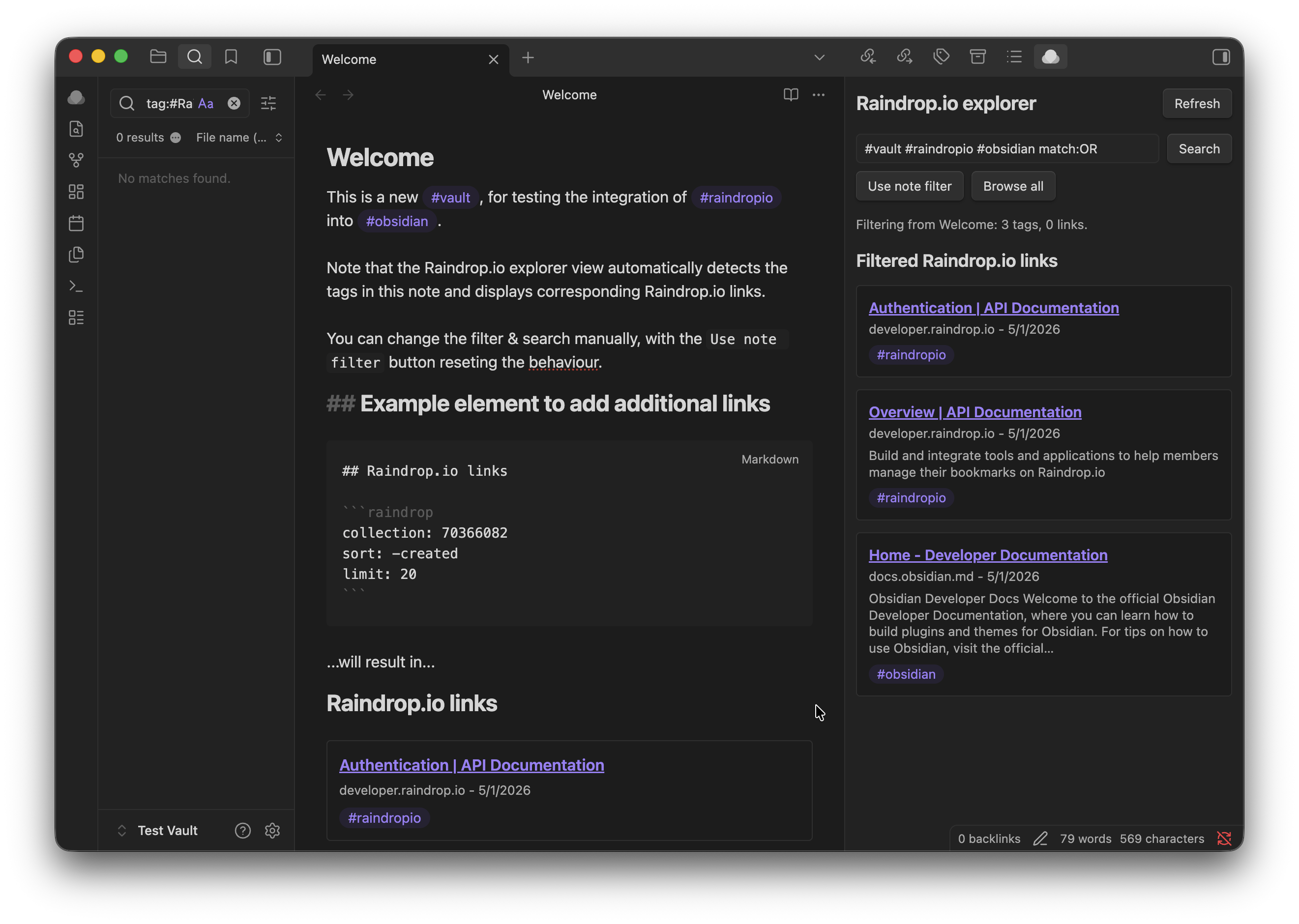
Raindrop.io Plugin for Obsidian shows saved Raindrop.io bookmarks inside notes and in a note-aware explorer side pane.
The plugin uses a Raindrop.io access token and the official Raindrop.io REST API. OAuth is planned for a later release.
Features
- Raindrop.io explorer: Browse saved bookmarks from the configured collection in a side pane.
- Note-aware filtering: Let the explorer follow the active note by turning note tags and external links into a Raindrop.io search query.
- Manual search: Search Raindrop.io directly with keywords,
#tagfilters, exact phrases, or operators such astype:article,notag:true, andcreated:2024-01. - Note blocks: Render saved Raindrop.io links inline from fenced
raindropcode blocks. - Configurable tag clicks: Choose whether tags on rendered Raindrop.io items search Obsidian notes, filter the explorer, or do nothing.
- Native Obsidian UI: Uses Obsidian commands, a ribbon icon, theme-friendly styling, and no hidden telemetry.
Setup
- Create or copy a Raindrop.io access token.
- Open Settings -> Community plugins -> Raindrop.io Plugin for Obsidian.
- Paste the token into Access token.
- Use Open explorer from the command palette or ribbon icon.
- Optionally add a
raindropblock to a note for inline results.
The access token is stored in Obsidian plugin data and sent only to the Raindrop.io REST API.
Explorer
The side pane opens as Raindrop.io explorer. It can browse all saved links from the configured collection, run manual searches, and load more paginated results.
Controls:
- Search: Runs the query in the search field against Raindrop.io.
- Use note filter: Rebuilds the query from the active markdown note.
- Browse all: Clears the query and shows the configured collection.
- Refresh: Reloads the current explorer state.
- Load more: Requests the next page of results when more are available.
When the explorer follows a note, it uses:
- Obsidian tags from the active note as Raindrop.io tag filters, for example
#project. - External
httpandhttpslinks as exact phrase searches. match:ORwhen multiple note-derived filters are present, so a bookmark can match any note tag or link.
Opening and interacting with the explorer preserves the last active markdown note as context, so the note filter remains stable while you browse.
Note blocks
Add a fenced code block to any note:
```raindrop
collection: 0
tag: project-x
search: important
sort: -created
limit: 20
```
Options:
collection: Raindrop.io collection ID. Use0for all collections. Defaults to Default collection.tag: Raindrop.io tag to include in the search. Multi-word tags are quoted automatically, for example#"coffee beans".search: Raindrop.io search query. This is passed through to Raindrop.io.sort: Raindrop.io sort value, for example-created. Defaults to Default sort.limit: Number of links to request, clamped between 1 and 100. Defaults to Default limit.
You can combine tag and search; the plugin joins them into one Raindrop.io query.
Settings
- Access token: Token used for Raindrop.io API requests.
- Default collection: Collection ID used by the explorer and note blocks unless a block overrides it. Use
0for all collections. - Default limit: Number of links requested per page or block render. Values are clamped between 1 and 100.
- Default sort: Sort value passed to Raindrop.io, such as
-created. - Tag click behavior: Controls clicks on tags shown on Raindrop.io items.
Tag click behavior options:
- Search notes for the tag: Opens Obsidian search for the clicked tag.
- Filter explorer by the tag: Opens the explorer and applies the clicked tag as a Raindrop.io filter.
- Do nothing: Leaves tag clicks inactive.
Commands
- Open explorer: Opens the Raindrop.io explorer side pane.
- Refresh explorer: Reloads open explorer panes.
Search syntax
The plugin passes search text through to Raindrop.io. Useful examples:
#project-x: Bookmarks taggedproject-x.#"coffee beans": Bookmarks with a multi-word tag."exact phrase": Exact phrase match.type:article: Article bookmarks.notag:true: Bookmarks without tags.created:2024-01: Bookmarks created in January 2024.#work #research match:OR: Bookmarks matching either tag.
Privacy and network access
- The plugin only makes network requests to
https://api.raindrop.io. - The access token is stored locally in Obsidian plugin data.
- Note-aware filtering sends the generated Raindrop.io search query to Raindrop.io. If the active note contains external links, those URLs can be included in the query.
- The plugin does not collect analytics or use hidden telemetry.
Release files
Obsidian release assets are built at the repository root:
main.jsmanifest.jsonstyles.css
Do not commit generated main.js; attach it to GitHub releases together with manifest.json and styles.css.
Development
Install dependencies and build the plugin:
npm install
npm run build
For watch mode:
npm run dev
Quality checks:
npm run lint
License
Copyright (C) 2026 Lukas '@dotWee' Wolfsteiner lukas@wolfsteiner.media
Licensed under the DO WHAT THE FUCK YOU WANT TO BUT IT'S NOT MY FAULT PUBLIC LICENSE.
For plugin developers
Search results and similarity scores are powered by semantic analysis of your plugin's README. If your plugin isn't appearing for searches you'd expect, try updating your README to clearly describe your plugin's purpose, features, and use cases.