Objects
approvedby Finn
Instantly create and organize notes from templates using customizable @-triggers without breaking your flow. - This plugin has not been manually reviewed by Obsidian staff.
Objects
Rethink your notes as objects. Create structured, perfectly organized notes directly in your flow using simple triggers.


Why Objects?
This plugin was built for a specific kind of note-taker: The Obsidian Lover who misses Objects.
If you've experimented with apps like Anytype or Capacities because you loved their object-oriented approach, but ultimately found yourself returning to the power, privacy, and flexibility of Obsidian, then this is for you.
Objects brings that missing piece to your vault. No more manual folder navigation or messy template applications—just pure, structured creation without leaving your keyboard.
What it does
Objects bridges the gap between thinking and documenting. Instead of breaking your creative flow to manually create files, navigate folders, or apply templates, you simply define "Objects" (like @person, @meeting, or @atomic-note) and trigger them anywhere.
- Unified Workflow: Creation, organization, and linking happen in one single interaction.
- Smart Routing: Notes are automatically moved to their designated folders based on their type.
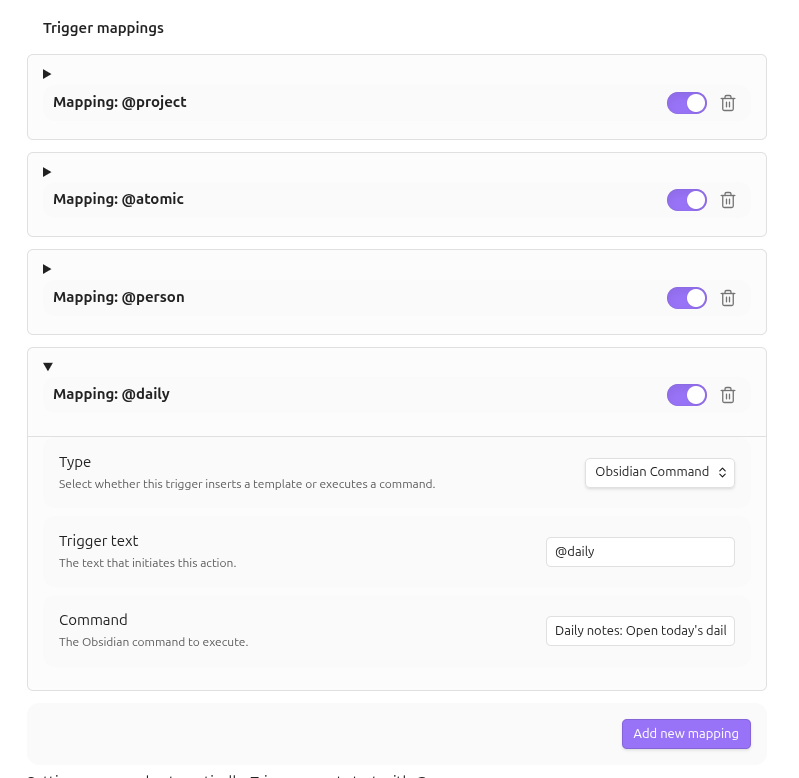
- Command Execution: Map triggers to any Obsidian command (e.g.,
@reloadto reload the app,@dailyto open the daily note) to stay in your flow. - Dynamic Content: Uses a powerful fallback system (
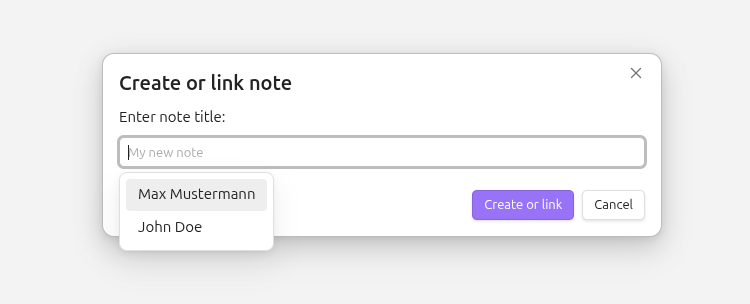
{{title}},{{date}},{{time}}) or integrates natively with Templater. - Intelligent Linking: If an object already exists, the plugin links to it instead of creating a duplicate. The creation modal suggests existing notes in real-time.
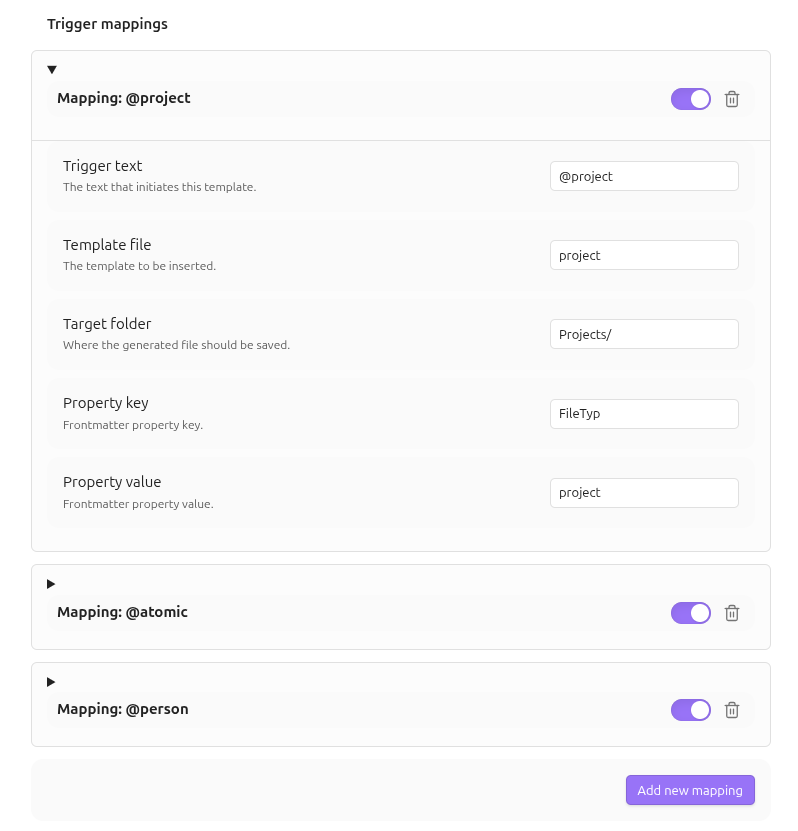
- Property Management: Automatically add frontmatter properties (e.g.,
type: project) to newly created notes and filter suggestions by them. - Archive Awareness: Define tags or properties to mark notes as archived, excluding them from your active suggestion flow.
Preview

Try it out (Demo Vault)
To see Objects in action without configuring anything, check out our Demo Vault:
- Download the
demo/Objects-Demo-Vaultfolder from this repository. - Open Obsidian and select "Open folder as vault".
- Choose the downloaded
Objects-Demo-Vaultfolder. - Open the
Welcome.mdfile inside the vault for a quick guided tour.
The demo vault is pre-configured with sample templates, folders, and triggers to show you the power of object-oriented note-taking.
How to use it
- Trigger: Type your trigger symbol (default
@) followed by the object type (e.g.,@project) anywhere in your editor. - Identify: A suggestion list appears—select your desired object.
- Name: A modal pops up. Type the name of your new object (e.g., "Deep Work Initiative"). The modal will suggest existing notes based on your folder and property mappings.
- Confirm: Hit
Enter. - Result: A clean markdown link is inserted at your cursor. The note is created or linked in the background using your specified template and properties.
[!TIP] Trigger Conflicts: If the
@symbol is already being used by other plugins (like Mention or Calendar), you can easily change the Trigger symbol in the plugin settings to something else, like#or!. Existing mappings will update automatically.
Settings
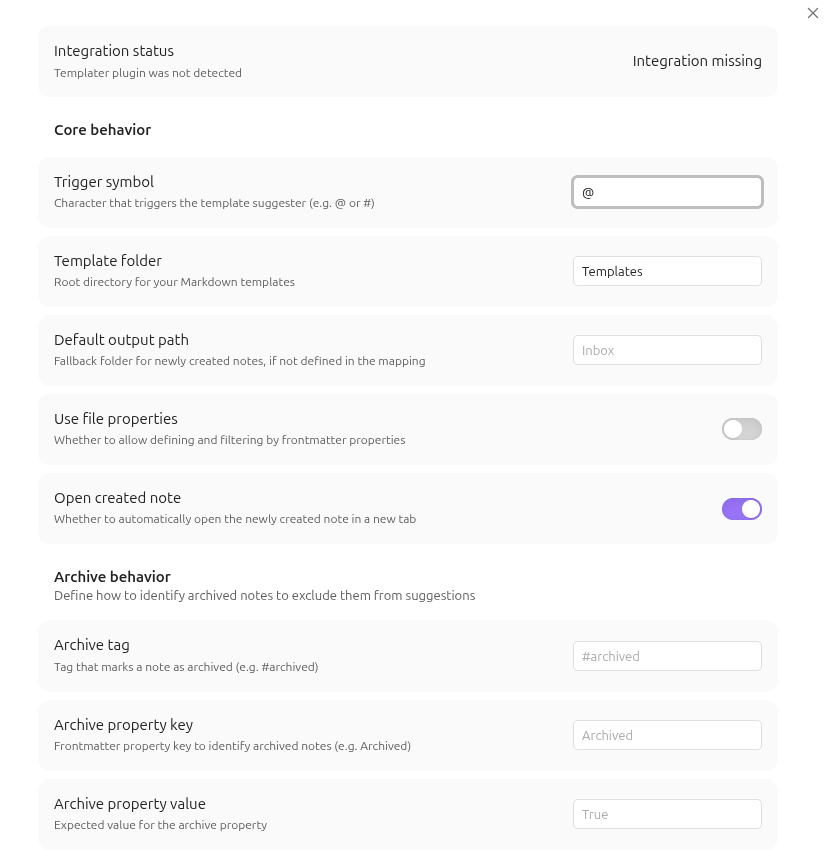
Customize Objects to fit your personal knowledge management system:
| Setting | Description |
|---|---|
| Trigger symbol | Character that triggers the suggester (e.g. @, #, or !). |
| Core Configuration | Set your global Template Folder and a Default Output Path. |
| Behavioral Toggle | Enable Open created note to automatically open new notes in a new tab. |
| Property Support | Enable Use file properties to add and filter by frontmatter keys and values. |
| Archive Behavior | Define tags (e.g. #archived) or properties to exclude notes from suggestions. |
| Trigger Mappings | Map triggers to specific templates, folders, and properties with an enable/disable toggle. |
| Status Check | Real-time validation of your Templater integration. |
Platform Support
Objects is designed for both Desktop and Mobile environments.
- Tested on: Linux, Android (Mobile), iOS (Mobile)
- Compatible with: macOS, Windows
Installation
Via Obsidian (Recommended once released)
- Open Settings > Community Plugins.
- Click Browse and search for
Objects. - Click Install, then Enable.
Via BRAT (Recommended)
- Install the BRAT plugin.
- Open Settings > BRAT.
- Click Add Beta Plugin.
- Paste:
Finn-Kraemer/obsidian-objects - Click Add Plugin and enable Objects.
Manual Installation
- Download the
main.jsandmanifest.jsonfrom the latest release. - Create a folder named
obsidian-objectsin your vault's.obsidian/plugins/directory. - Move the downloaded files into that folder.
License
This project is licensed under the MIT License. See the LICENSE file for details.
For plugin developers
Search results and similarity scores are powered by semantic analysis of your plugin's README. If your plugin isn't appearing for searches you'd expect, try updating your README to clearly describe your plugin's purpose, features, and use cases.