Spider Media
unlistedby ivanzwb
Publish Markdown notes to WeChat Official Account, Toutiao and other Chinese self-media platforms via an embedded webview. Renders Mermaid diagrams to images and inlines styles automatically.
Spider Media — Obsidian 自媒体发布插件
把 Obsidian 笔记一键发布到微信公众号、头条号等自媒体平台
An Obsidian plugin for one-click publishing of Markdown notes to WeChat Official Account (公众号), Toutiao (头条号) and other Chinese self-media platforms.




关键词 / Keywords:Obsidian 公众号插件 · Markdown 转公众号 · Obsidian 头条号 · 自媒体发布 · WeChat publisher · Mermaid to PNG · juice CSS inliner · ProseMirror paste injection
English Overview
Spider Media is a desktop-only Obsidian plugin that helps Chinese-speaking authors publish their Markdown notes to WeChat Official Account (微信公众号), Toutiao (头条号) and similar self-media platforms.
It does not bypass any platform login or auto-click the final "Publish" button. The publishing flow is:
- The plugin renders the active note to platform-ready HTML (Mermaid → PNG, juice CSS inlining, template wrapping).
- The plugin opens an embedded Electron
<webview>pointing at the platform's official editor (mp.weixin.qq.com/mp.toutiao.com). - The user signs in inside the webview (QR code scan) — the session is persisted via
partition="persist:..."and stays local. - The plugin injects the rendered HTML into the platform's editor via
webview.executeJavaScript. - The user manually reviews and presses the platform's native "Publish" button. The plugin never auto-publishes and never uploads vault content to any third-party server.
No external Chrome / puppeteer is required. No telemetry. MIT-licensed.
Install (Manual)
- Download
main.js,manifest.json,styles.cssfrom Releases. - Copy them to
<your-vault>/.obsidian/plugins/spider-media/. - Reload Obsidian → Settings → Community plugins → enable Spider Media.
Install (From source)
Clone & build, then use the bundled installer to drop the artifacts into your vault:
git clone https://github.com/ivanzwb/spider-media.git
cd spider-media
npm install
npm run install:vault -- "/absolute/path/to/your/vault"
# or:  node install.mjs "/absolute/path/to/your/vault"
# or:  SPIDER_MEDIA_VAULT="/path/to/vault" node install.mjs
The script auto-runs npm run build if dist/ is missing, then copies
main.js / manifest.json / styles.css to
<vault>/.obsidian/plugins/spider-media/. Re-run anytime to update.
Limitations
- Desktop only (
isDesktopOnly: true) — relies on Electron<webview>. - Tested against current WeChat / Toutiao editor DOM; platform redesigns may temporarily break injection (please open an issue with DevTools logs).
痛点
- 写好 Markdown 笔记 → 复制到公众号编辑器 → 重新排版 → 格式全乱
- Mermaid 流程图无法直接粘贴 → 手动截图
- 代码块在不同平台样式丢失
- 图片需要逐个上传
- 每次在多个平台重复发布
解决方案
在 Obsidian 中直接完成格式转换 + 内容填充的全流程:
写笔记 (MD)  →  选择平台  →  一键同步  →  审查后发布
     │              │            │            │
     │         ┌─────┴────┐      │            │
     │         │ 公众号    │      │           │
     │         │ 头条号    │  自动填充         │
     │         │ 更多...   │  到平台后台       │
     │         └──────────┘      │            │
     │                           ▼            │
     │                    浏览器打开           │
     │                    内容已就绪           │
     │                    只需点击发布         │
     └─────────────────────────────────────────┘
核心特性
| 特性 | 说明 |
|---|---|
| 一键同步 | 选择平台 → 点击同步 → 浏览器自动填入内容,Review 后发布 |
| Mermaid → 图片 | 笔记中的 Mermaid 流程图自动转为高清 PNG |
| 代码块保真 | 代码块保留格式 + 语法高亮 |
| 图片完整 | 本地图片自动处理(小图内嵌 / 大图上图床) |
| 手机阅读优化 | 默认模板适配移动端阅读体验 |
| 样式模板 | 5 套内置主题(精简绿/橙心/蓝调/雅黑/极简),支持自定义字号/颜色/间距/标题装饰/代码主题 |
| 易于扩展 | 添加新平台只需 ~300 行代码 |
截图 / Screenshots
| 场景 | 预览 |
|---|---|
| 发布编辑器视图 | 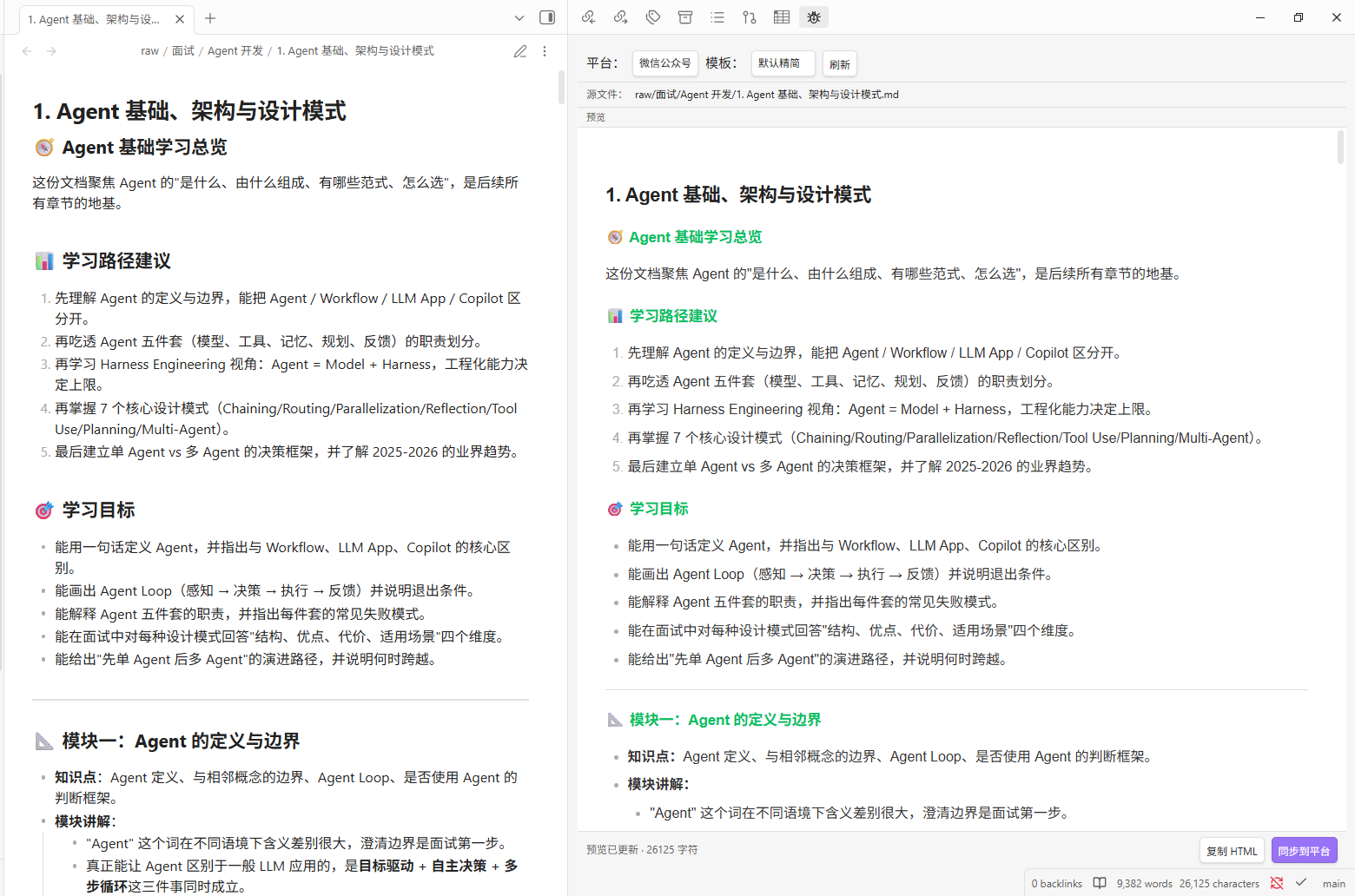 |
| 微信公众号注入 | 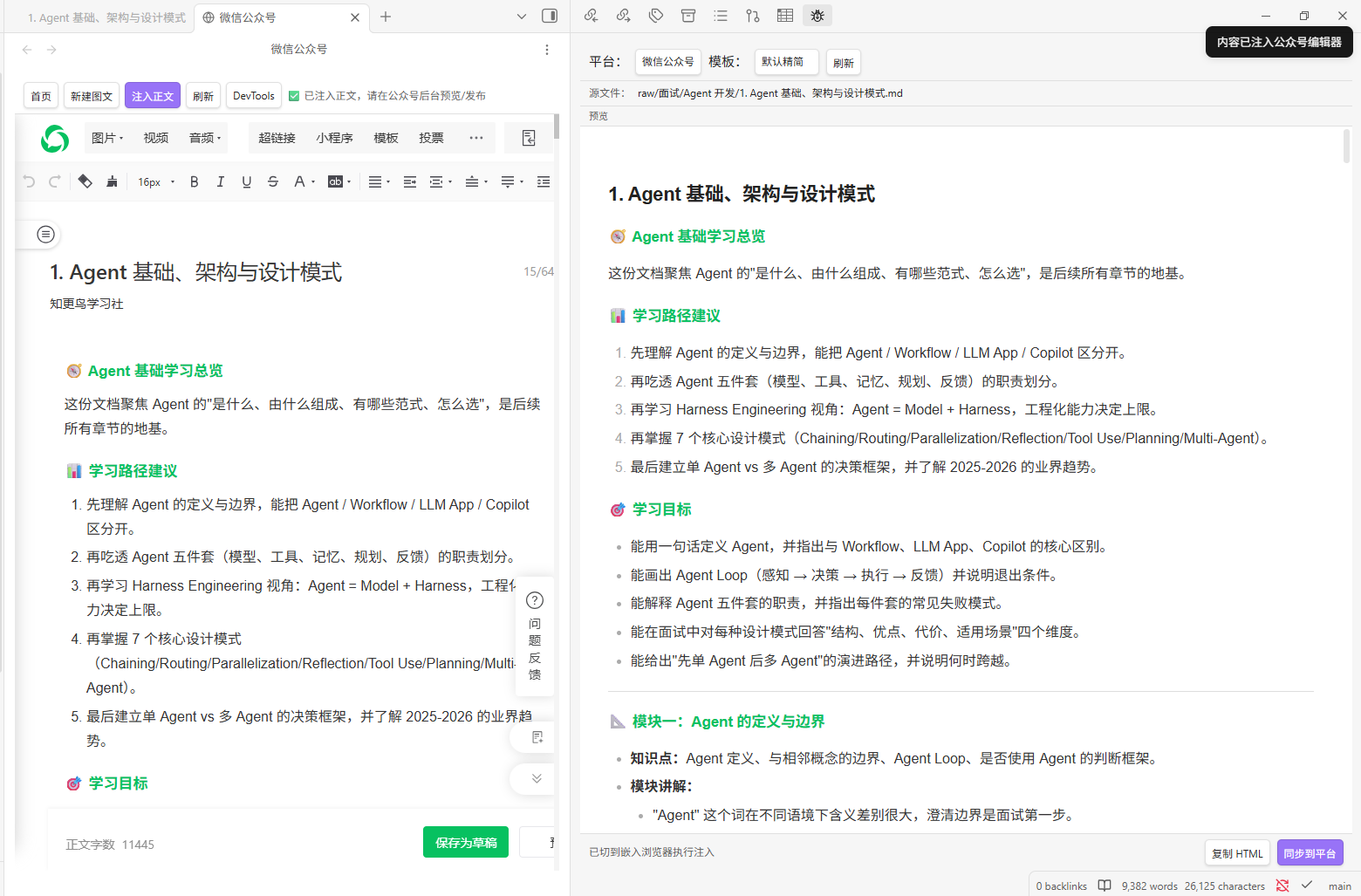 |
| 设置页 | 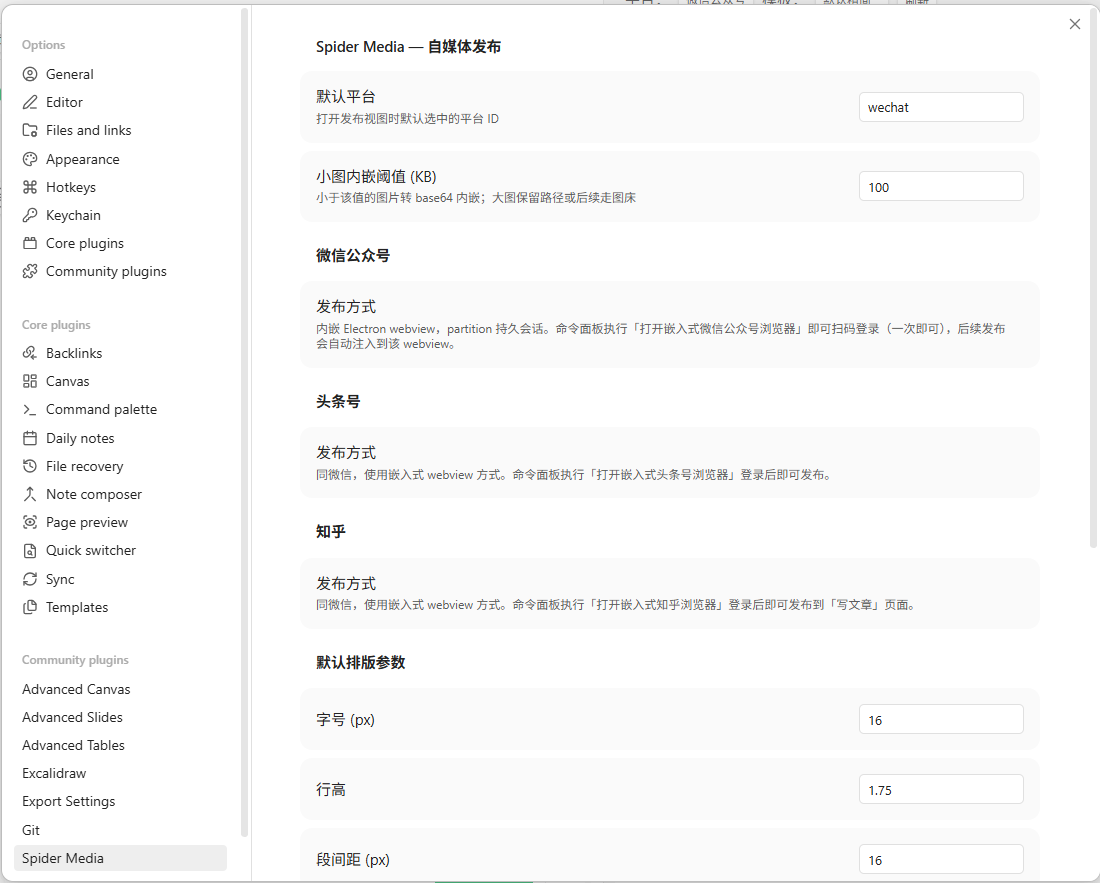 |
快速开始
安装
方式 A:手动下载
- 从 Releases 下载
main.js、manifest.json、styles.css - 在 vault 目录创建
.obsidian/plugins/spider-media/ - 将下载的文件放入该目录
- 重启 Obsidian,在设置 → 第三方插件中启用
方式 B:从源码一键安装
git clone https://github.com/ivanzwb/spider-media.git
cd spider-media
npm install
npm run install:vault -- "D:/path/to/your/vault"
install.mjs 会自动完成:
- 检查 vault 路径合法(必须含
.obsidian/子目录) - 缺
dist/时自动跑npm run build - 创建
<vault>/.obsidian/plugins/spider-media/并复制三件套 - 可反复运行以更新插件
也可用环境变量:SPIDER_MEDIA_VAULT="D:/path/to/vault" node install.mjs
使用
- 在 Obsidian 中打开你要发布的 Markdown 笔记(这就是源 — 编辑仍在 Obsidian 自身的编辑器里完成)
- 点击左侧 Ribbon 的 📱 图标(或执行命令"打开自媒体发布编辑器")
- 右侧滑出预览面板,自动加载当前活动笔记;切换笔记或保存修改时预览自动刷新
- 选择目标平台与样式模板
- 在「设置 → Spider Media」里调整字号 / 行高 / 主题色等排版参数(实时反映到预览)
- 点击「同步到平台」 → 浏览器自动打开 → 扫码登录 → 自动跳转新建图文 → 注入正文
- 在公众号后台审查后手动点击「发布」
配置
打开 Obsidian → 设置 → Spider Media。
通用
| 字段 | 说明 |
|---|---|
| 默认平台 | 打开发布视图时默认选中的平台 ID(当前仅支持 wechat) |
| 小图内嵌阈值 (KB) | 小于该值的图片转 base64 直接内嵌到 HTML;大图保留原路径 |
| 默认排版参数 | 字号 / 行高 / 段间距 / 内边距 / 图片圆角 / 主题色 — 作用于预览与发布 |
| 标题装饰 | 跟随模板 / 下划线 / 描边胶囊 / 左竖条 + 渐变,叠加到模板基础样式之上 |
| 代码块配色 | 跟随模板 / 暗色 / 浅色 / GitHub Light / Dracula,覆盖模板默认的 pre/code 配色 |
| 首行缩进 | 段落首行缩进 2em(文艺/学术风常用) |
样式模板(微信)
参考 mspringjade/wechat-formatter 的视觉体系,内置 5 套模板,可在视图顶栏切换:
| 模板 | ID | 适用场景 |
|---|---|---|
| 默认精简 | wechat-default | 微信品牌绿,h2 底线 / h3 着色,暗色代码块 |
| 橙心 · 温暖 | wechat-warm | 温暖橙调,h2 左侧粗竖条 + 渐变,h3 圆角胶囊 |
| 蓝调 · 科技 | wechat-blue | 冷色调,h2 左短粗块,浅色 GitHub 风代码 |
| 雅黑 · 文艺 | wechat-serif | 宋体衬线,h2 居中带前后短杠,首行缩进、引用块仿书摘 |
| 极简 · 黑白 | wechat-minimal | 无主题色装饰,仅排版与字号区分层级 |
每套模板都通过 juice 把 CSS 内联到 style="",发布前再叠加排版参数与可选的标题装饰 / 代码主题。最终复制到公众号编辑器的 HTML 已经不依赖 class,可被微信编辑器原样保留。
微信公众号 / 头条号
两者均通过 Obsidian 内嵌 Electron <webview> 完成发布,无需外部 Chrome / puppeteer:
- 在命令面板执行「打开嵌入式微信公众号浏览器」或「打开嵌入式头条号浏览器」
- 在 webview 中扫码 / 账号密码登录(partition 持久会话,登录一次即可长期复用)
- 切回笔记,在发布视图选择目标平台 → 点「同步到平台」
- 插件自动跳转到对应平台的发布页面,注入标题 / 正文 / 作者
- 在平台后台审查后手动点「发布」
注入路径:
- 微信公众号:调用官方 MP_Editor JsApi 写正文;标题与作者通过 ProseMirror contenteditable / 隐藏 textarea 注入
- 头条号:构造
ClipboardEvent('paste')携text/html投到 ProseMirror 编辑器,由其自带 paste handler 解析
如平台 DOM 改版导致注入失败,请打开 webview DevTools(工具栏「DevTools」按钮)把 console 中 [spider-media] 日志反馈给开发者。
支持平台
| 平台 | 状态 | 说明 |
|---|---|---|
| 微信公众号 | ✅ 已实现 | 内嵌 webview + MP_Editor JsApi 注入正文,自动跳转新建图文 |
| 头条号 | 🚧 实验性 | 内嵌 webview + ProseMirror paste 注入正文 / 标题(接口未稳定,DOM 可能变更) |
| 知乎 | 🚧 实验性 | 内嵌 webview + Draft.js / ProseMirror paste 注入专栏正文 / 标题 |
| 小红书 | � 实验性 | 内嵌 webview 登录创作中心;正文退化为纯文本注入,图片需手动上传 |
| CSDN | 📝 待定 | - |
架构设计
obsidian-media-publisher/
├── src/
│   ├── main.ts                  # 插件入口
│   ├── core/                    # 核心管线
│   │   ├── MarkdownParser.ts    # Markdown 解析
│   │   ├── ImageManager.ts      # 图片处理
│   │   └── MermaidConverter.ts  # Mermaid 转换
│   ├── platforms/               # 平台适配器
│   │   ├── base/                # 抽象基类
│   │   ├── wechat/              # 公众号
│   │   ├── toutiao/             # 头条号
│   │   ├── zhihu/               # 知乎
│   │   └── xiaohongshu/         # 小红书
│   ├── ui/                      # 编辑器 UI + 嵌入 webview 视图
│   └── settings/                # 配置页
├── manifest.json
├── package.json
├── tsconfig.json
└── styles.css
技术栈
- 语言: TypeScript 5
- 运行时: Obsidian API (Electron/Chromium)
- MD 解析: marked 17
- 样式内联: juice
- 发布: Electron
<webview>(内置于 Obsidian) - 构建: esbuild
开发
# 克隆
git clone https://github.com/ivanzwb/spider-media.git

# 安装
npm install

# 开发 (watch 模式)
npm run dev

# 构建
npm run build
License
MIT
常见问题 FAQ
Q: 这个插件需要安装外部 Chrome 或 puppeteer 吗?
A: 不需要。Spider Media 直接使用 Obsidian 内置的 Electron <webview> 标签,零额外依赖,登录态通过 partition="persist:..." 持久化,扫码一次长期可用。
Q: 支持移动端 Obsidian 吗?
A: 不支持。isDesktopOnly: true,因为 Electron <webview> 只在桌面端可用。
Q: 公众号/头条号 DOM 改版后注入失败怎么办?
A: 在嵌入浏览器视图工具栏点 DevTools 打开 console,把 [spider-media] 开头的日志贴到 issue 中,作者会跟进修复 selector。
Q: Mermaid 图为什么转成 PNG 而不是直接插 SVG?
A: 微信公众号 / 头条号编辑器都会过滤 inline <svg>。插件用 Obsidian 全局 mermaid 渲染 SVG 后用 canvas 栅格化为 base64 PNG 内嵌,保证发布后图形不丢失。
Q: 发布后能直接群发吗? A: 不能。插件只把内容注入到平台后台编辑器,用户需在平台原生页面 Review 后手动点击「发布」/「保存并群发」,避免误发。
Q: 如何添加新平台(例如知乎、小红书、CSDN)? A: 参考 add-platform skill 与 ARCHITECTURE.md §4,新增一个平台约 ~480 行代码(formatter + adapter + BrowserView + templates)。
支持作者
如果 Spider Media 帮你节省了发布到自媒体平台的时间,欢迎请作者喝杯咖啡 ☕。
更多说明见 DONATE.md。也欢迎通过 issue / PR 参与项目改进。
For plugin developers
Search results and similarity scores are powered by semantic analysis of your plugin's README. If your plugin isn't appearing for searches you'd expect, try updating your README to clearly describe your plugin's purpose, features, and use cases.