Severino Labs
unlistedby Joe Severino
Site-accurate writeup preview (using jseverino.com's own renderer) plus authoring power-ups: asset doctor, publish-gate badge, and block-DSL inserts.
severino-obsidian
The editor-side cockpit for the Severino Labs vault — an Obsidian plugin that turns the vault into a working surface for the whole fleet: a backlog cockpit, task capture and triage, project launchers, and a site-accurate writeup preview.
It is built on one rule — own nothing but the UI. The hard parts already have owners; this plugin renders them and delegates to them, so it can grow without becoming a second source of truth. The full design is in docs/ARCHITECTURE.md.
| Concern | Owner (single source of truth) | How the plugin uses it |
|---|---|---|
| task logic, schema, search, the one writer | severino-vault-mcp (the MCP) | shells out to its CLI subcommands |
the writeup preview: markdown, the ::figure/::table/::terminal DSL, article layout, styles | jseverino.com (site render --document) | pipes the unsaved buffer to site render - --document --json and shows the page it returns |
| brand tokens + the JS mark | severino-brand → site mark.svg | the mark is bundled from source at build time |
If a feature would re-implement an owner's piece, it's out by design.
What it does
The cockpit (a brand-skinned side panel — ribbon ▦ or Cockpit: open):
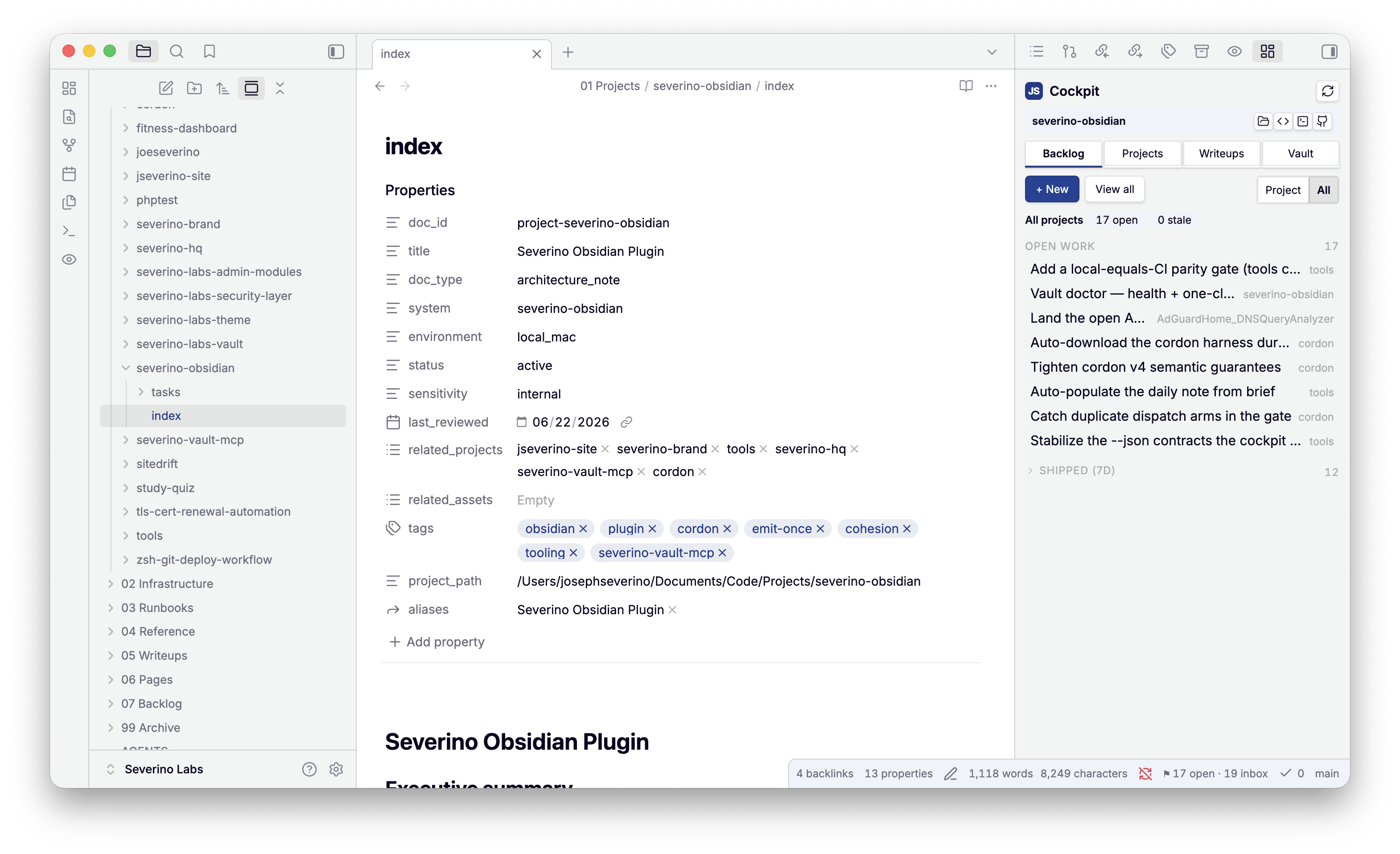
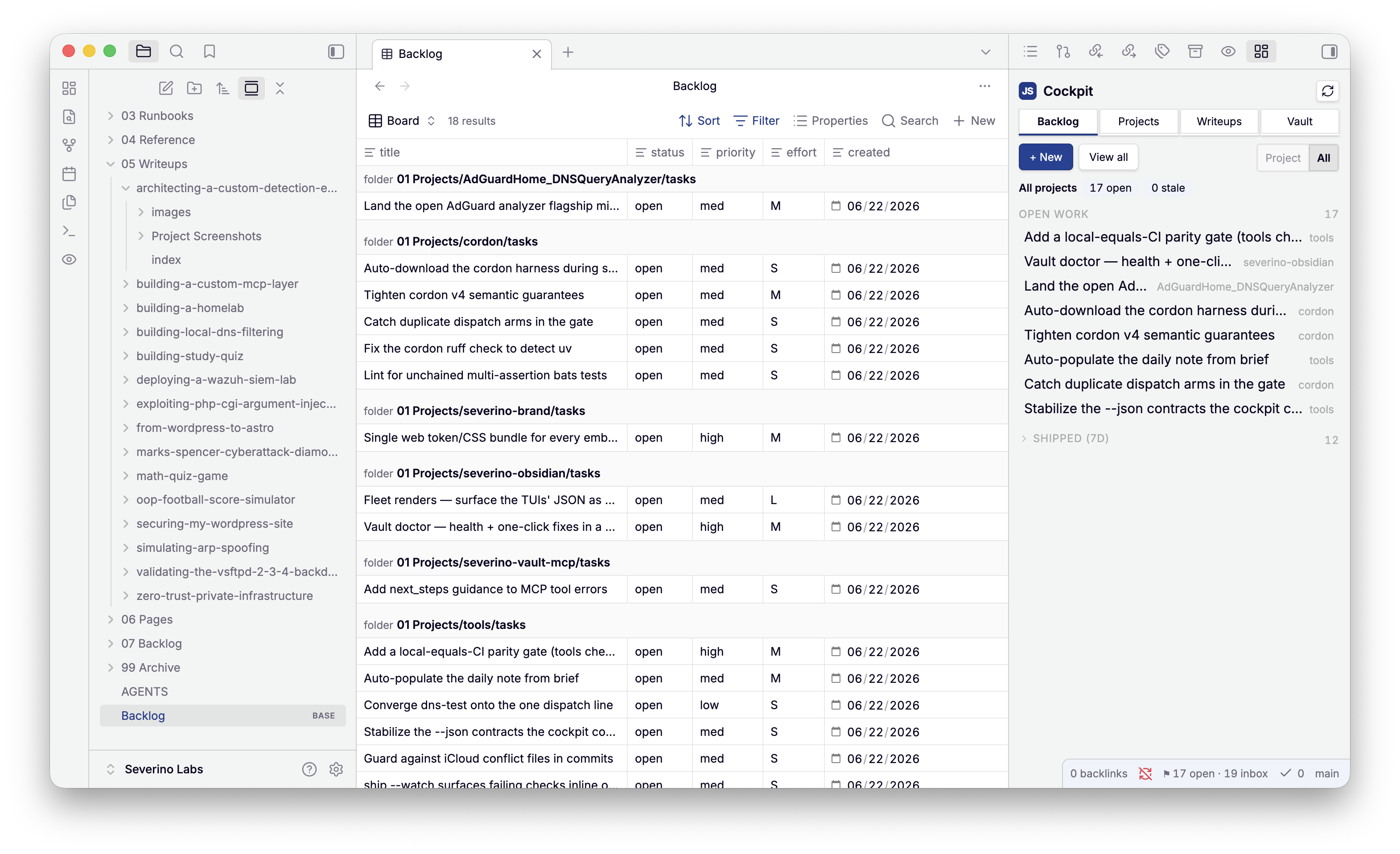
- Backlog — open work + a collapsible Shipped (7d) feed, scoped to the
project you're in (Project / All toggle).
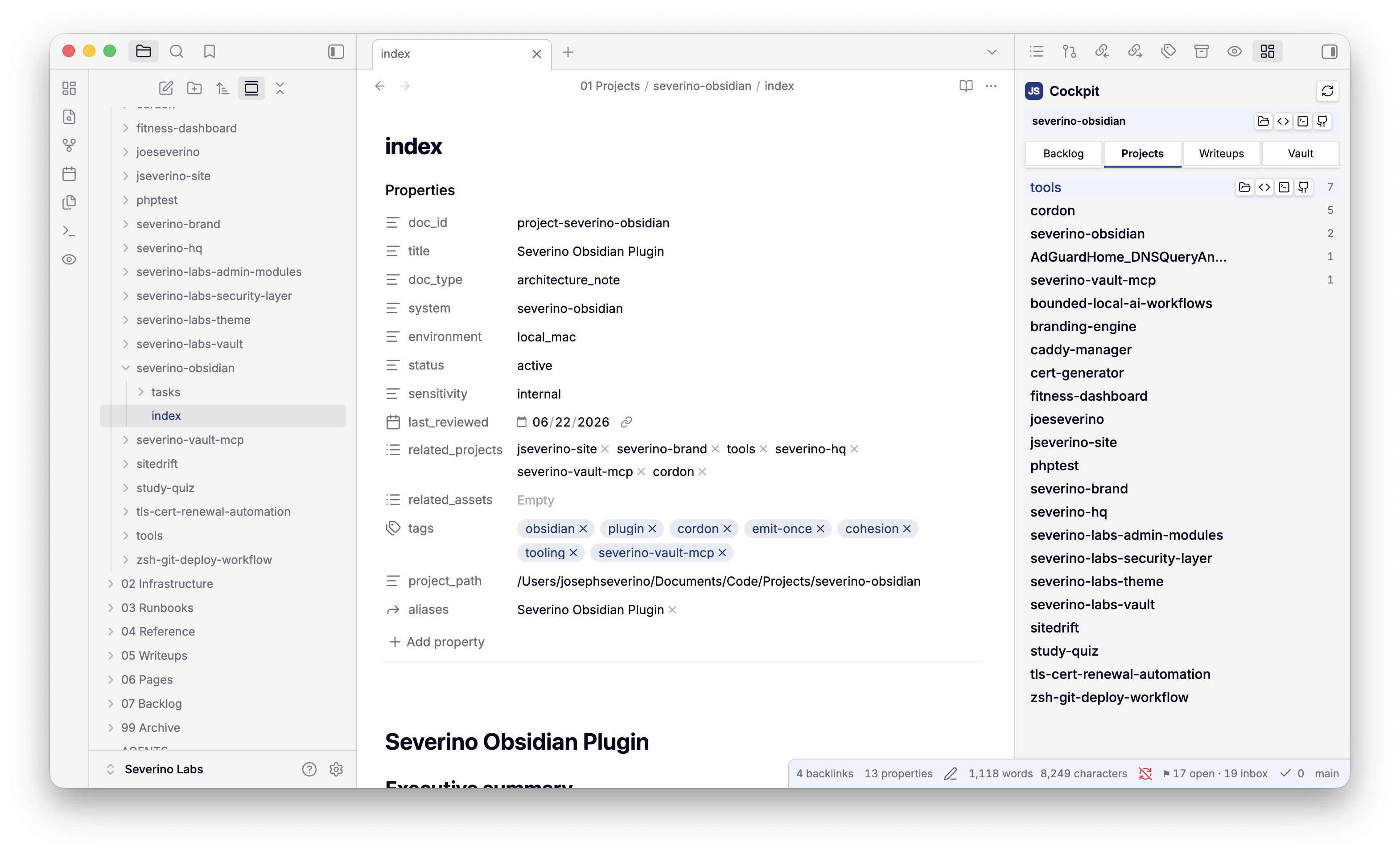
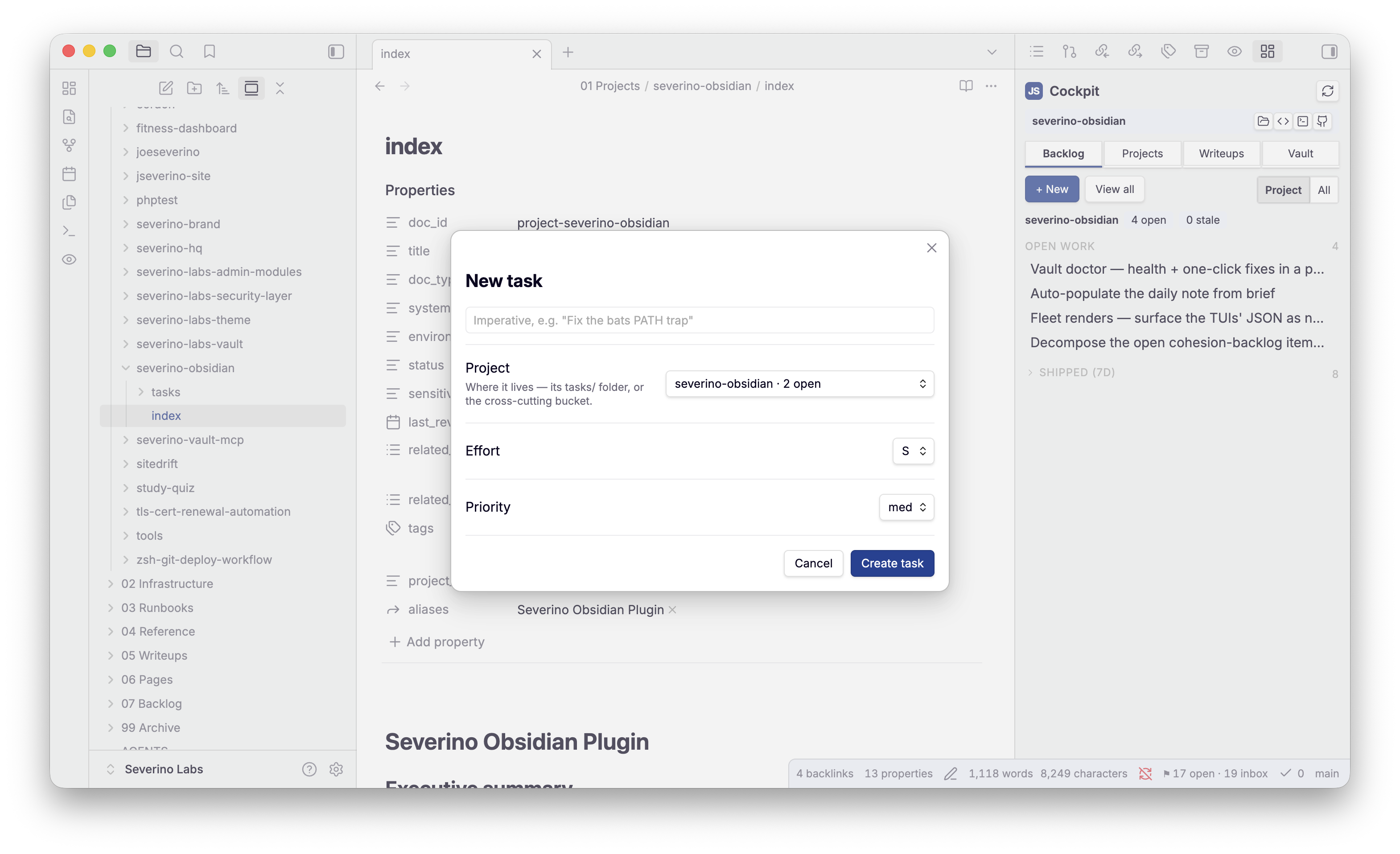
+ Newopens the task modal;View allopens the nativeBacklog.base. - Projects — every project with its open-task count and launch buttons (Finder · VS Code · iTerm · GitHub), revealed on hover.
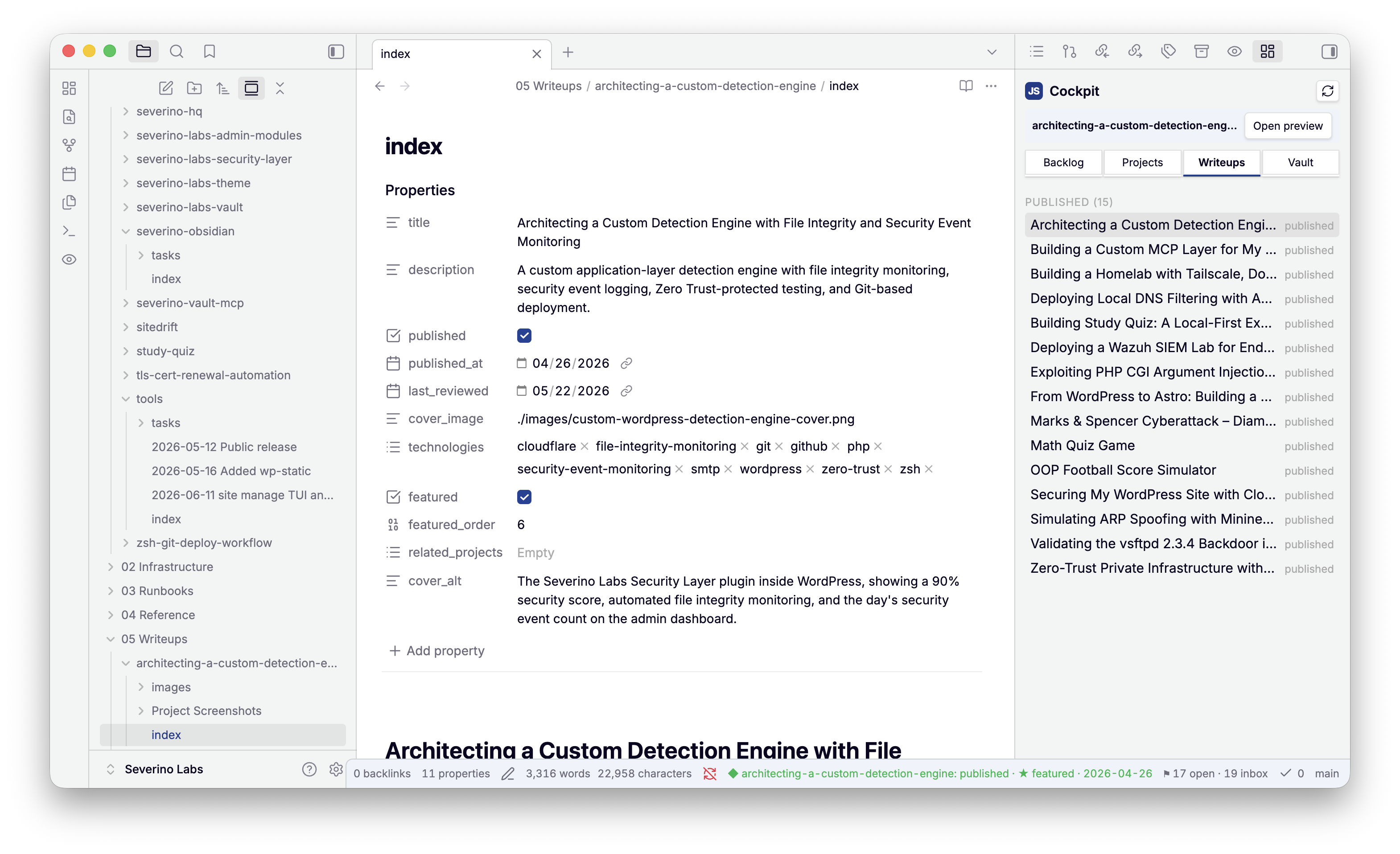
- Writeups — drafts and published, from the site pipeline.
- Vault — health (docs to review, inbox) + inbox triage (promote → task / archive) + a one-click alias fix.
- A status-bar badge (
open · stale · inbox) and a context bar that reacts to the active file (a writeup → Open preview, a project → launch).
Task & vault commands — all thin over the MCP:
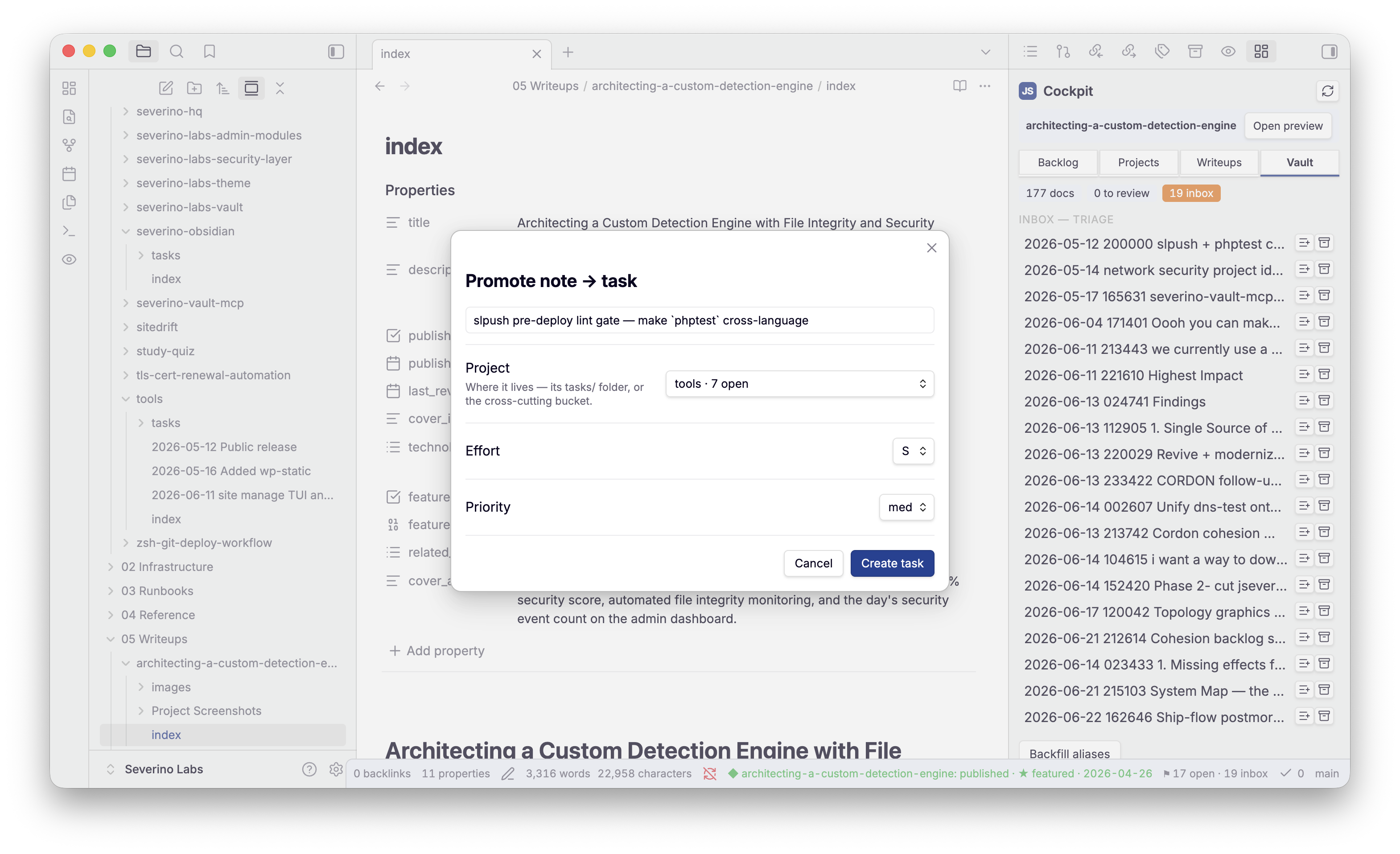
- New task / Promote inbox note to a task — capture, validated and filed
by the MCP (
task-add/promote-note). - Edit relations — set
related_projectsfrom the live registry and status/sensitivity from the schema enums (writes viaupdate-frontmatter). - Ask the vault — the MCP's runbook search through Obsidian's quick-switcher.
Writeup authoring — the original surface, still here:
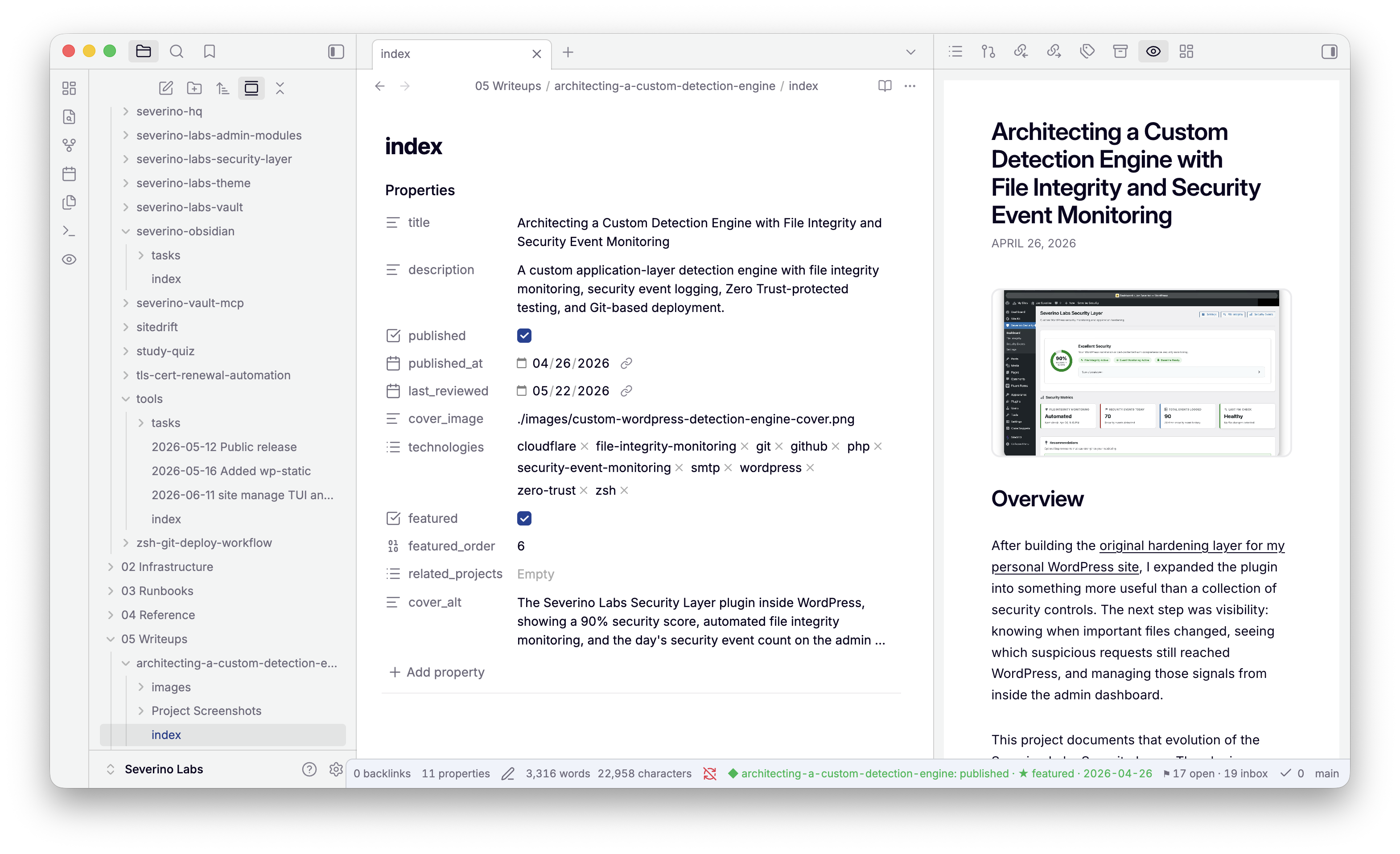
- Site preview — a sandboxed iframe rendering the active writeup exactly as
jseverino.comwill: the page comes from the site's ownsite render --document. - Publish gate, asset doctor, graphics render, schema check, sync to site, DSL inserts, open on site / copy slug.
Screenshots
The cockpit, scoped to the project you're in — open work plus a Shipped (7d) feed, all derived live from the MCP:
| Projects — open counts + launch buttons | Writeups — drafts and published |
|---|---|
 |  |
| New task (MCP-validated) | Promote an inbox note to a task |
|---|---|
 |  |
The site-accurate writeup preview — the active note rendered exactly as
jseverino.com will, the page returned by the site's own site render --document:
The same task-list the cockpit reads, as the native Backlog.base board —
close a task anywhere and all faces agree:
Quick start
npm install
npm run build        # bundles into <vault>/.obsidian/plugins/severino-obsidian/

# overrides (same pattern as severino-brand/sync.mjs)
SITE_DIR=/path/to/jseverino.com VAULT_DIR="/path/to/Severino Labs" npm run build
Then in Obsidian: Settings → Community plugins → enable "Severino Labs", and
open the cockpit from the ribbon. The CLIs it shells out to
(severino-vault-mcp, site, brand, diagram) must be on ~/.local/bin.
Develop
npm run dev             # watch-rebuild into the vault
npm run typecheck       # tsc --noEmit
npm test                # node --test over the pure modules
npm run commands:emit   # regenerate the cordon command contract after editing src/commands.ts
The command surface is declared once in src/commands.ts and rendered into the
live commands, the cordon-v4 contract (contract/obsidian-commands.json), and the
reference below — they cannot drift. Each command carries its effect
(read < local_write < vault_write < remote_write < deploy) and the fleet command
it delegates to.
Everything is TypeScript, scripts and build config included. Node 24 runs the
.ts entry points directly by stripping types, so tsconfig.json sets
erasableSyntaxOnly (no enums, namespaces, or constructor parameter
properties) and verbatimModuleSyntax. The plugin bundle targets ES2022
(Chromium 94 and later); the harness scripts/preview-render.ts targets Node. The only plain-JS file is the
extensionless launcher bin/severino-obsidian.
- Architecture: docs/ARCHITECTURE.md
- Cornerstones / governance: docs/CORNERSTONES.md
Governance
The command surface is derived from package.json scripts via the cordon emitter
(bin/severino-obsidian); regenerate after a scripts change with
npm run describe:write. The reference below is rendered from the contract by
scripts/gen-readme.ts and gate-checked — don't hand-edit it.
severino-obsidian
effect: read
Obsidian plugin suite for the vault: site-accurate writeup preview + authoring power-ups.
Commands
| command | effect | summary |
|---|---|---|
build | local_write | Bundle the plugin into the vault (the brand mark inlined; the preview comes from site render). |
dev | local_write | Watch-rebuild into the vault on change. |
typecheck | read | Type-check the source with tsc --noEmit. |
test | read | Run the unit tests with node --test. |
commands:emit | local_write | Render the cordon-v4 command contract from src/commands.ts. |
commands:check | read | Fail if the committed command contract is stale. |
severino-obsidian-commands
effect: read
Severino Labs Obsidian plugin — in-editor command surface.
Commands
| command | effect | summary |
|---|---|---|
open-site-preview | read | Site preview: open pane — Open the site-accurate writeup preview pane. |
publish-gate | read | Publish gate: check this writeup — Run the site publish gate (draft mode). |
asset-doctor | read | Asset doctor: check images for orphans + missing — Report orphaned and missing writeup images. |
insert-figure | local_write | Insert figure block — Insert a :::figure block skeleton at the cursor. |
insert-table | local_write | Insert table block — Insert a :::table block skeleton at the cursor. |
insert-terminal | local_write | Insert terminal block — Insert a terminal fence skeleton at the cursor. |
graphics-status | read | Graphics: status (unrendered sources) — List graphics sources vs rendered images. |
graphics-render | local_write | Graphics: render unrendered into images/ — Render graphics via brand/diagram into images/. |
sync-to-site | vault_write | Sync writeups to the site repo — Run site sync (vault → site repo). |
schema-check | read | Schema: check this doc’s frontmatter — Lint frontmatter against the MCP schema. |
open-on-site | read | Open writeup on jseverino.com — Open the live writeup URL in the browser. |
copy-slug | read | Copy writeup slug — Copy the active writeup slug to the clipboard. |
new-task | vault_write | New task — Create a task (title + project picker) via the MCP, then open it. |
open-cockpit | read | Cockpit: open — Open the fleet cockpit panel (backlog + stale debt, derived from the MCP). |
ask-the-vault | read | Ask the vault — Quick-switcher over the vault MCP find ranking; opens the hit. |
edit-relations | vault_write | Edit relations — Edit related_projects + status/sensitivity from the registry/schema; writes via the MCP. |
promote-note | vault_write | Promote inbox note to a task — Promote the active inbox note into a task (body preserved) via the MCP, then open it. |
autopopulate-daily | vault_write | Daily note: populate brief region — Fill today’s daily-note brief region (work to ship, review-due, stale backlog, drafts) via vault daily. Also fires once when today’s daily note opens. |
License
MIT © Joe Severino
For plugin developers
Search results and similarity scores are powered by semantic analysis of your plugin's README. If your plugin isn't appearing for searches you'd expect, try updating your README to clearly describe your plugin's purpose, features, and use cases.