Docs Mirror
unlistedby Johannes Kaindl
Mirrors the docs folders of many repos one-way into a small vault
Docs Mirror
🇬🇧 English · 🇩🇪 Deutsch
Copies the docs folders of many repositories, one way, into a small Obsidian vault that you can read on desktop and phone.



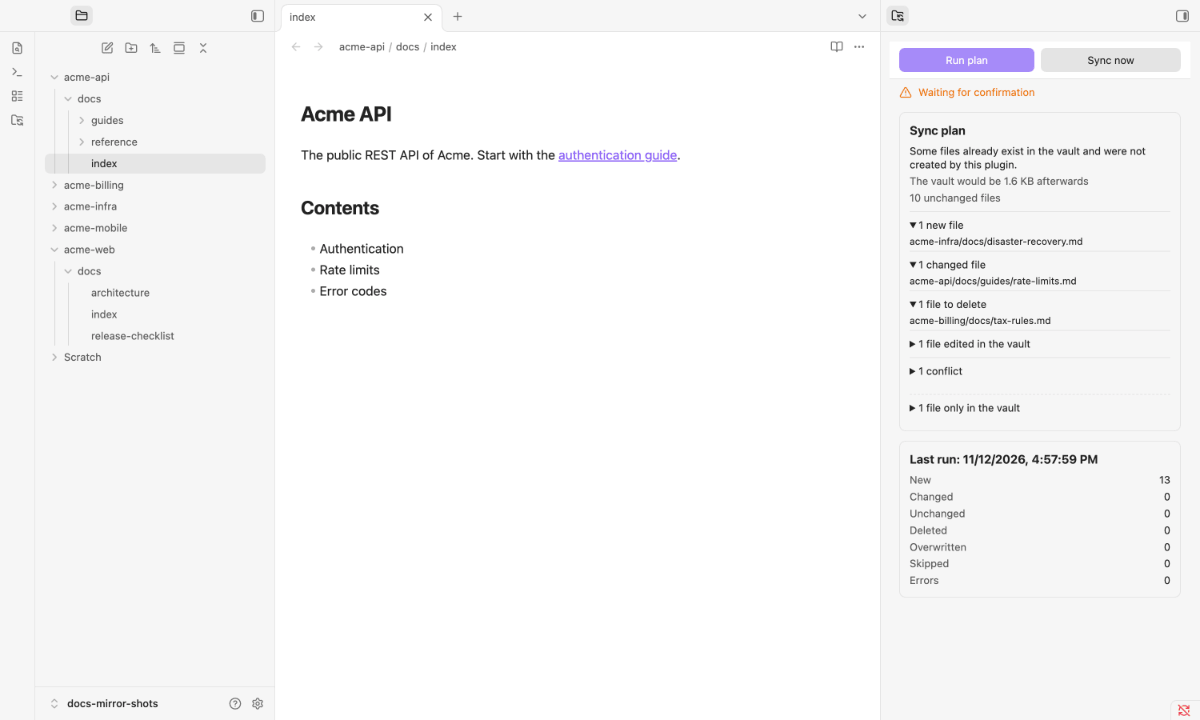
The repositories stay the source of truth. The vault is a reading view: it is never written back into a repository.
Version 0.1.0. The plugin is desktop-only because it reads the source folders with Node.js. On your phone, read the vault through Obsidian Sync; the plugin does not run there.
What it does
- Finds every folder that matches the folder patterns (default
**/docs) under one source root, so a new repository appears without any configuration. - Keeps each file under its path below the source root, so relative links inside a
docsfolder keep working. - Builds a plan before it writes: new, changed, unchanged, to delete, conflicts, and files that exist only in the vault.
- Shows the plan in the sidebar. The first run always waits for your confirmation. If the plan changes between your confirmation and the execution, the run waits again and shows the new plan.
- Deletes and overwrites only files that the plugin mirrored, as recorded in its per-device list. A file already in the vault that the plugin did not create is a conflict: it is overwritten only when you tick it, and if its content equals the source it is adopted into the record without a write. Files that exist only in the vault are never touched.
- Overwrites files you edited in the vault with the source version. A run that waits for confirmation lists them as "edited in the vault"; a run without other reasons overwrites them directly.
- Refuses to delete anything when the source root is missing or yields no files.
- Asks for confirmation before a run with one of five reasons: the first run; many deletions (threshold); settings changed since the last run; the mirrored size exceeds the total size limit; conflicts. Conflicts are overwritten only when you tick them, and case and type conflicts are never overwritten. Details: Sync plan reference and What does a conflict mean.
- Skips symbolic links, hidden (dot) folders unless you include them, files above the size limit, and file types you did not list.
- Writes each file through a temporary file, so no file is ever left half-written; an interrupted replacement can leave a file missing until the next run restores it.
Requirements
- Obsidian 1.11.4 or later, desktop only (
isDesktopOnly: trueinmanifest.json). The plugin reads the source folders with Node.js, so it does not load on mobile. - A source root: a folder on the same computer that contains your repositories. You enter its absolute path in the settings.
- A separate, empty vault for the mirror. Do not use the workspace itself as the vault.
- For reading on the phone: Obsidian Sync (or another way to sync the vault). The plugin itself does not sync.
Installation
The plugin is not yet listed in the community plugin store; the store listing is pending.
To install it by hand, download main.js, manifest.json and styles.css from the latest release, copy them into <vault>/.obsidian/plugins/docs-mirror/ and enable the plugin in the community plugins settings.
To build it from source, run npm install and then npm run build.
For a first setup, follow docs/getting-started.md. The rest of the documentation is indexed in docs/README.md.
Usage
- Enable Docs Mirror in Settings → Community plugins.
- Open the plugin's settings and enter the absolute path of your source root under Source root. Until it is set, the sidebar shows Not set up.
- Open the sidebar with the ribbon icon or the command Open Docs Mirror, then click Sync now.
- The first run never writes directly. The sidebar shows the sync plan; check it, tick any conflict you want to overwrite, click Run plan and confirm in the dialog.
- Later runs go through without a question unless one of the five reasons above applies. If a run waits, it stays in the sidebar until you confirm or cancel it.
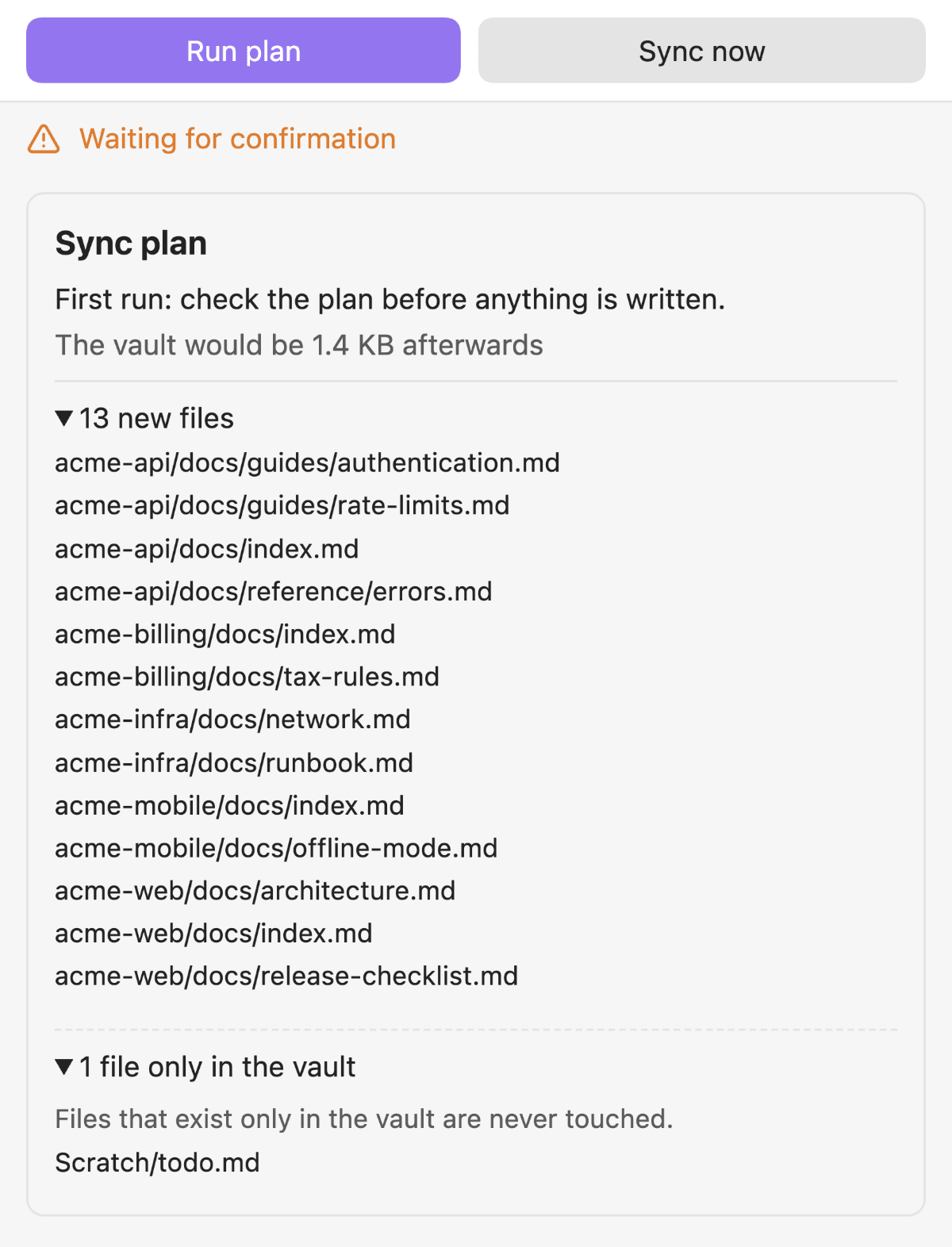
Click the preview for the full-size image
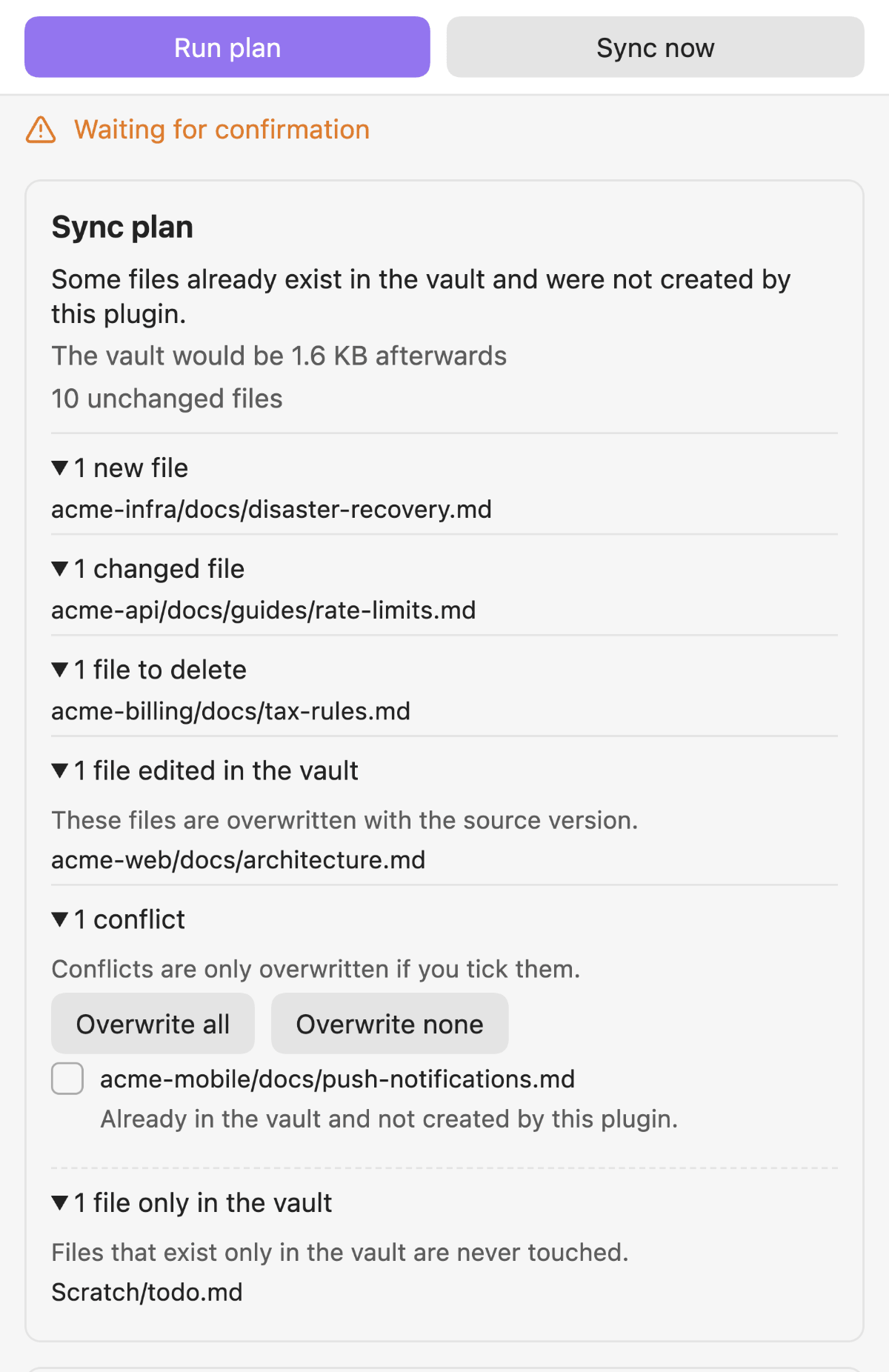
Click the preview for the full-size image
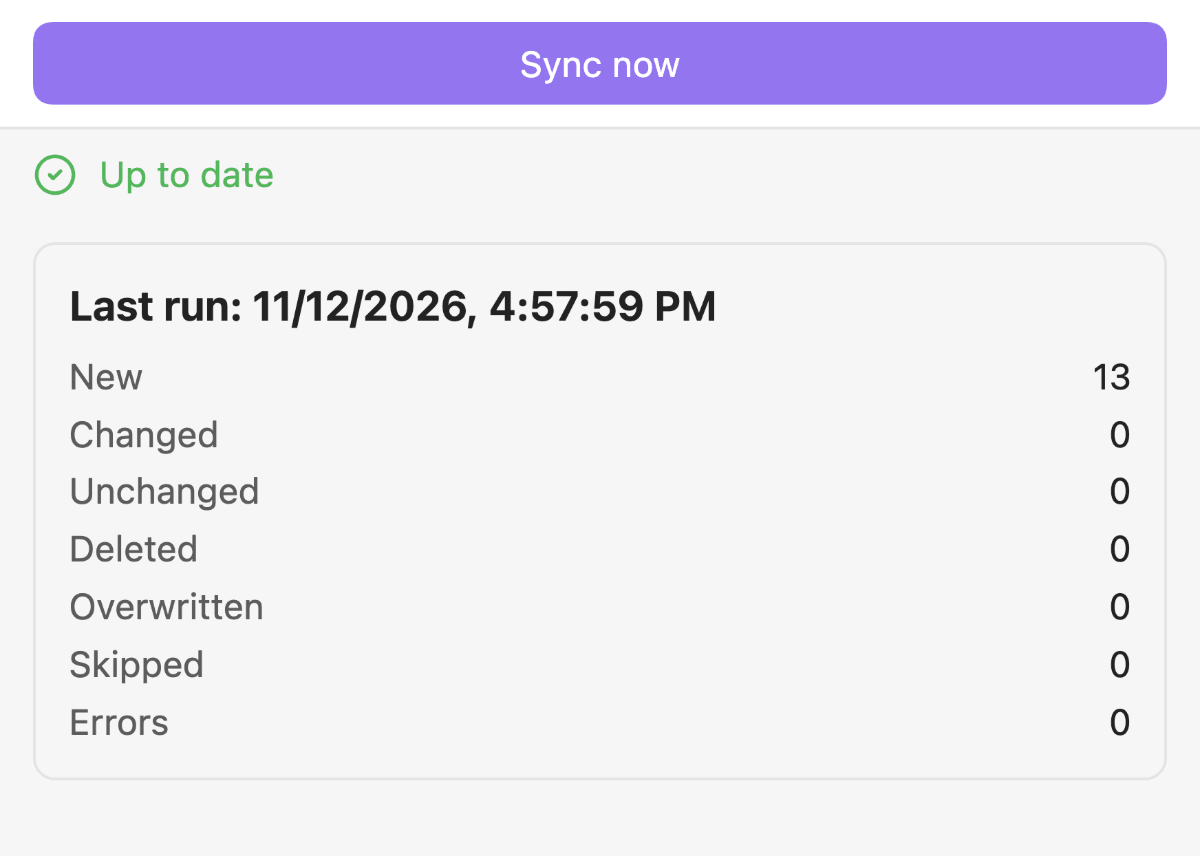
Click the preview for the full-size image
Step by step with the reasons behind it: Getting started.
Commands
- Open Docs Mirror: opens the sidebar. A ribbon icon does the same.
- Sync docs now: runs a sync. The sidebar button does the same.
- Show sync plan: opens the sidebar with a plan that is waiting for confirmation. If no plan is waiting, it says so. All commands, buttons and messages: docs/reference-commands.md.
Configuration
All settings are in Settings → Docs Mirror. The source root is stored per device and must be set on each device; the other settings are saved in the plugin's data.json.
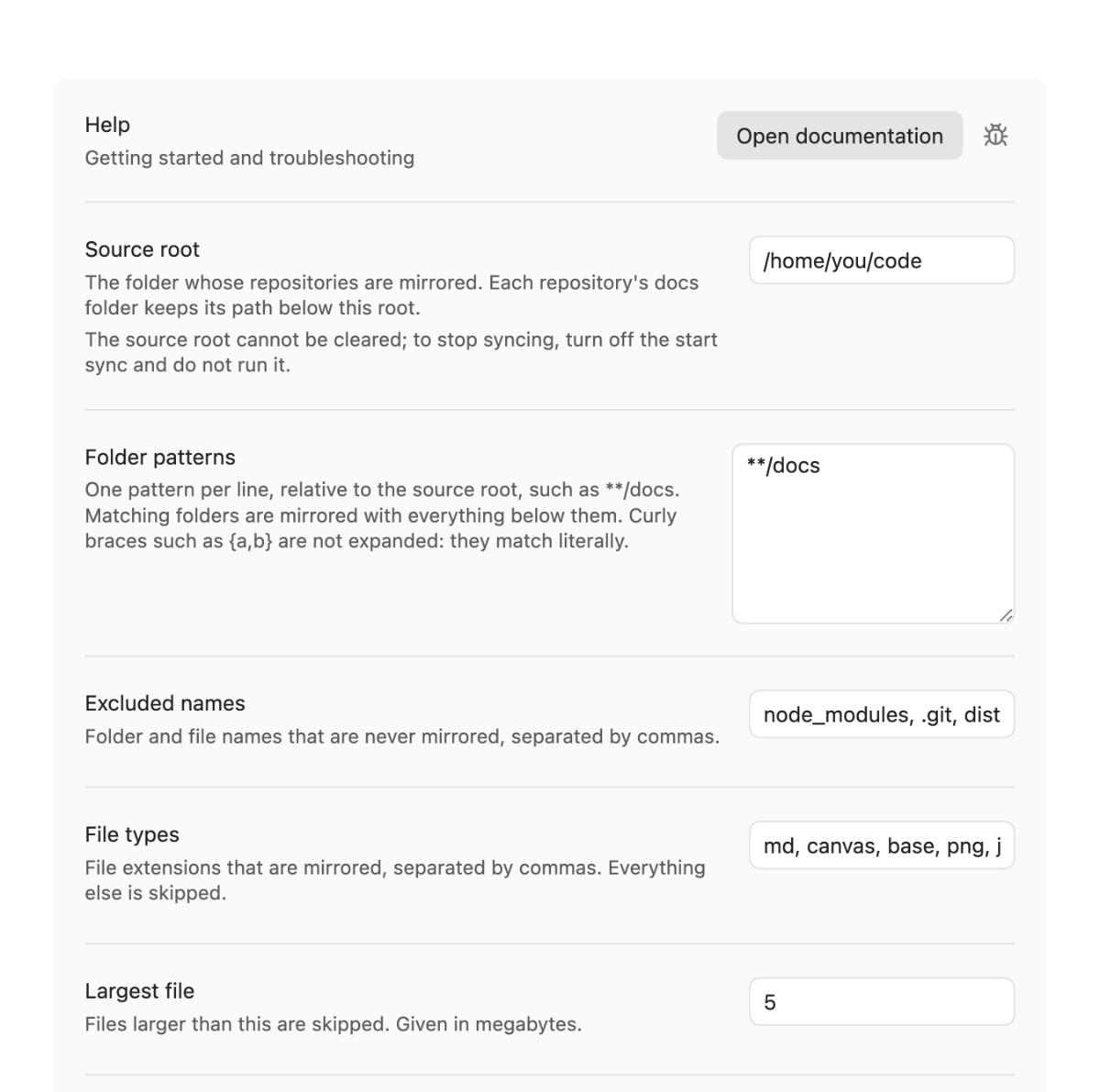
Click the preview for the full-size image
- Source root: the absolute path of the folder whose repositories are mirrored.
~and relative paths are refused. - Folder patterns: one pattern per line, relative to the source root. Matching folders are mirrored with everything below them. See Adjust the folder patterns.
- Excluded names: folder and file names that are never mirrored, separated by commas. Defaults:
node_modules,.git,dist,build,__pycache__,.venv. - File types: extensions that are mirrored, separated by commas. Defaults:
md,canvas,base,png,jpg,jpeg,gif,svg,webp,pdf. - Largest file: files above this size are skipped. Given in megabytes. Default: 5 MB.
- Total size limit: a run that would leave more data in the vault than this asks for confirmation first. Given in megabytes. Default: 1024 MB (1 GB).
- Confirmation threshold: a run that deletes at least this many files, and at least a fifth of the mirrored files, asks for confirmation first. Default: 20 files. The one-fifth share is fixed and not adjustable.
- Dot folders: include folders whose names start with a dot. Off by default.
- Sync when the vault starts: run a sync two seconds after the workspace is ready. Off by default. If the run needs confirmation, it waits in the sidebar and shows a notice instead of a dialog. The start run is skipped silently if a run, a confirmation or a waiting plan already exists. Every setting in detail: Settings reference.
How it works
A run has four steps. The plugin reads the source only; it writes only into the vault, only through Obsidian's vault adapter.
- Scan. It walks the source root with Node.js (
readdir,lstat, read-only), keeps the folders that match the folder patterns and collects their files. Symbolic links, excluded names, unlisted file types and files above the size limit are skipped. If the vault lies below the source root, it is left out of the scan. - Plan. It compares the scan with the vault and with the record of files it mirrored earlier (kept per device in Obsidian's local storage, never in the vault). Each file becomes new, changed, unchanged, to delete, conflict, edited in the vault, or vault only.
- Guards. A missing or empty source blocks the run, so a wrong path cannot empty the vault. Five reasons make the run wait for your confirmation in the sidebar: the first run, many deletions, changed settings, the size limit, conflicts.
- Apply. Deletions come first. Each file is then written to a temporary file and moved into place, and the record is saved in steps, so an abort keeps what was already done.
Why changes flow only one way, what the record is for and what the plugin never touches: docs/explanation-how-it-works.md. The module layout is in AGENTS.md.
Limits
- The mirror is one way. Changes in the vault are never copied back to the repositories. Why, and what is measured: docs/explanation-how-it-works.md.
- There is no file watcher and no schedule. A sync runs when you start it or, if you turned it on, when the vault starts.
- A mirrored file is deleted from the vault when its source disappears, becomes a symbolic link, exceeds the size limit or changes to a type you did not list, but only if you did not edit it in the vault; an edited file stays there, and the plugin forgets it and never deletes it.
- Links that leave the
docsfolder, such as../src/…, break in the vault. - The plugin does not read
.gitignore. Use the excluded names and folder patterns instead. - Mirror into one vault from one device only; each device keeps its own record, so two devices would overwrite each other's files.
- The total size limit compares the size of the mirror after the run with the limit, not the growth of a single run.
Documentation
New here? Start with Getting started. Something not working? The commands, buttons and messages page lists every notice with its cause and what to do. The documentation index lists everything; it follows the Diátaxis scheme:
- Tutorial — set up Docs Mirror once, run the first sync and read the vault on your phone.
- How-to guides — choose which folders are mirrored; understand a conflict and decide what to do with it.
- Reference — every setting, the sync plan, the commands, buttons and messages.
- Explanation — why changes flow only from the repositories into the vault, what the per-device record is for, and what the plugin deletes and never touches.
Status
Version 0.1.0, the first release. The store listing is pending.
Contributing
Issues and pull requests are welcome. Run npm run gate before a commit; see CONTRIBUTING.md and AGENTS.md.
License
- Code: AGPL-3.0-or-later (
LICENSE; dual-license option inLICENSING.md). - Docs/text: CC BY-SA 4.0 (
LICENSE-DOCS).
Copyright © 2026 Johannes Kaindl.
For plugin developers
Search results and similarity scores are powered by semantic analysis of your plugin's README. If your plugin isn't appearing for searches you'd expect, try updating your README to clearly describe your plugin's purpose, features, and use cases.