Development Board
unlistedby julioszeferino
Plan and track development tasks on a Markdown-backed Kanban board in your vault.
Obsidian Development Board
A Markdown-backed Kanban plugin for Obsidian that keeps tasks as plain files in your vault.
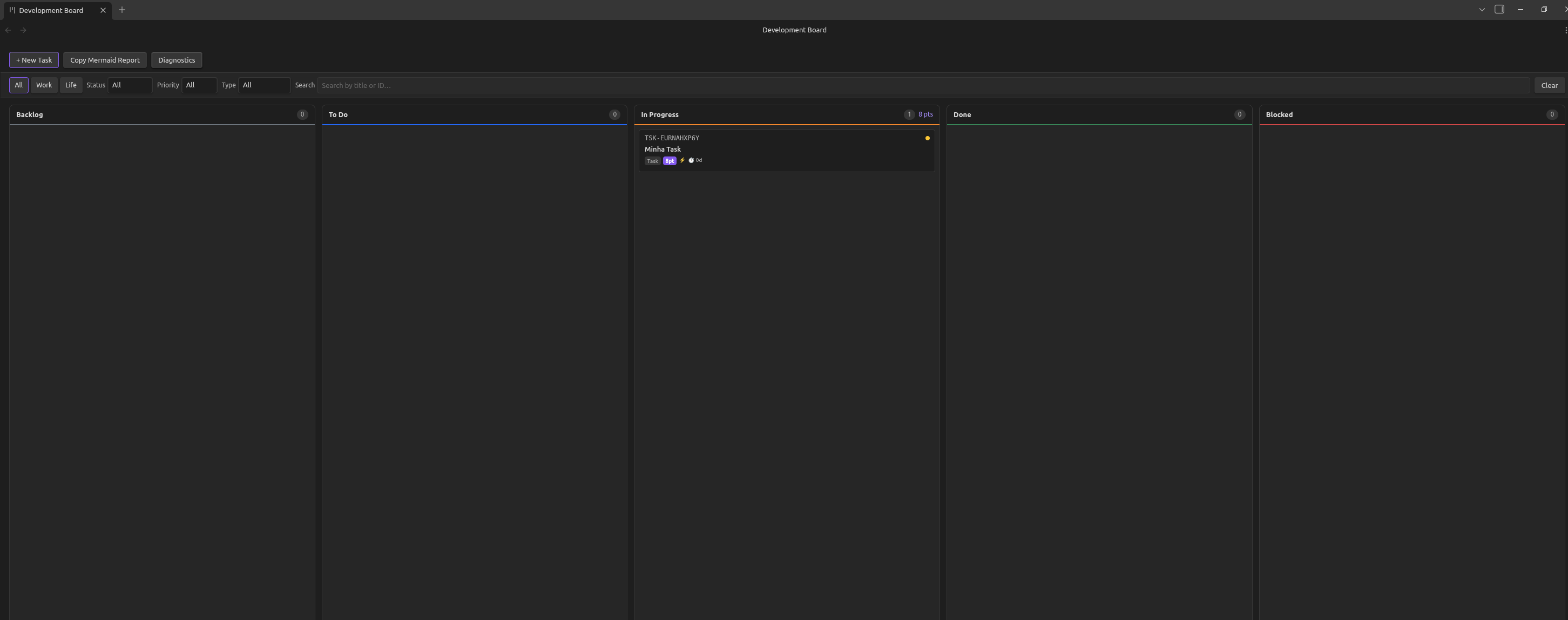
Obsidian Development Board is a native ItemView plugin focused on reliable, file-based task tracking. Tasks are stored as .md files with YAML frontmatter, validated in a 3-layer pipeline, and rendered in a drag-and-drop 5-column board.
This project is designed for users who want transparency and portability: no external database, no hidden storage format, and no lock-in.
Features
- 5-column Kanban board: Backlog, To Do, In Progress, Done, Blocked
- Drag-and-drop with workflow validation rules
- File-first persistence (
tasks/*.md+ YAML frontmatter) - Random collision-resistant task IDs (
TSK-XXXXXXXXXX) for safer multi-device sync - Story points (Fibonacci) and energy level metadata
- Parent/child task relationships with Done-guard validation
- Quick Capture command for fast inboxing
- Filter bar (context, status, priority, type, tags, search)
- Archive workflow to
tasks/archive/YYYY/MM/ - Mermaid board snapshot export
- In-app diagnostics panel with live logs and copy-to-clipboard (mobile debugging)
Quick Start
Prerequisites
- Obsidian 1.4.0+
- Node.js 18+ and npm (for local build/development)
Local Build
npm install
npm run build
Install In Vault
Copy these files to your vault plugin directory:
<vault>/.obsidian/plugins/development-board/
   ├── manifest.json
   ├── main.js
   └── styles.css
Then enable the plugin in Obsidian: Settings -> Community Plugins.
Basic Usage
- Open Command Palette and run Open Development Board.
- Click + New Task or run Quick capture task to Backlog.
- Drag tasks across columns.
- Use Diagnostics button in toolbar when troubleshooting sync/loading issues.
Task File Format
Each task is a regular Markdown file in the configured sandbox folder (default tasks).
Example filename:
tasks/TSK-7K2M9Q4XAB - Revisar PR de autenticacao.md
Example frontmatter:
---
id: TSK-7K2M9Q4XAB
title: "My Task"
status: "Backlog"
type: "Task"
priority: "Medium"
context: "Work"
tags: []
story_points: null
energy_level: null
created_at: "2026-05-02"
updated_at: "2026-05-02"
due_date: null
in_progress_since: null
blocked: false
parent: null
children: []
archived: false
archived_at: null
comments: []
---
State Transition Rules
| From | Allowed transitions |
|---|---|
| Backlog | To Do, Blocked |
| To Do | In Progress, Backlog, Blocked |
| In Progress | Done, Blocked, To Do |
| Blocked | To Do, In Progress |
| Done | Backlog |
Constraint: a task cannot move to Done if any child task is not Done.
Architecture
Vault files (tasks/*.md)
      -> VaultWatcher (events + debounce + mobile retries)
      -> TaskParser (gray-matter)
      -> 3-layer validation
      -> Zustand store
      -> React board UI (ItemView)
      -> writeTaskToVault (serializer)
Core modules:
- Entry point:
src/obsidian-board-design/main.ts - Store:
src/obsidian-board-design/store/boardStore.ts - Parser/serializer:
src/obsidian-board-design/services/taskParser.ts,src/obsidian-board-design/services/taskSerializer.ts - Watcher:
src/obsidian-board-design/services/vaultWatcher.ts - UI root:
src/obsidian-board-design/components/BoardView.tsx
Configuration
Open Settings -> Development Board.
| Setting | Default | Description |
|---|---|---|
| Sandbox folder | tasks | Folder where active task files live |
| Archive folder | tasks/archive | Folder where archived tasks are moved |
| Default context | Work | Context used for quick/new tasks |
| Default type | Task | Type used for quick/new tasks |
| Default priority | Medium | Priority used for quick/new tasks |
| Show story points | true | Show story point badge on cards |
| Show energy level | true | Show energy level badge on cards |
Mobile and Sync Notes
- Cloud sync (for example Google Drive) can delay file content availability after startup.
- The watcher includes progressive mobile retries to recover delayed tasks.
- Diagnostics panel logs watcher/load activity directly in the board UI.
- Use Copy Logs to share full runtime trace during debugging.
Development
Scripts
npm run dev          # esbuild watch
npm run build        # production bundle to main.js
npm test             # Jest (passWithNoTests enabled)
npx tsc --noEmit     # type-check only
npm run validate:submission
Publishing
Release Checklist
- Bump versions in
manifest.jsonandpackage.jsonusingx.y.zformat. - Build assets:
npm run build - Validate submission requirements locally:
npm run validate:submission - Run the GitHub Actions Release workflow and provide the same version tag.
- Ensure release assets include
main.js,manifest.json, andstyles.css.
Community Submission
Submit a PR to obsidianmd/obsidian-releases updating community-plugins.json with:
{
  "id": "development-board",
  "name": "Development Board",
  "author": "julioszeferino",
  "description": "Plan and track development tasks on a Markdown-backed Kanban board inside Obsidian.",
  "repo": "julioszeferino/development-board"
}
Use PR title format: Add plugin: Development Board.
Test Status
- 7 test suites
- 65 tests
- Focused on parser, validation, store, IDs, and report generation
Documentation
| Topic | Link |
|---|---|
| Design spec | design/obsidian-development-board-design.md |
| Requirements | design/obsidian-development-board-requirements.md |
| Changelog | CHANGELOG.md |
| Copilot project context | .github/copilot-instructions.md |
Contributing
- Fork or clone the repository.
- Create a branch for your change.
- Run type-check and tests before opening a PR.
- Keep changes aligned with the existing architecture and file-based task model.
License
MIT (see LICENSE).
For plugin developers
Search results and similarity scores are powered by semantic analysis of your plugin's README. If your plugin isn't appearing for searches you'd expect, try updating your README to clearly describe your plugin's purpose, features, and use cases.