GeodeDrive
unlistedby lif0
Backup, not sync. Push your vault to your own Google Drive, with optional encryption.
GeodeDrive
English · Русский · 简体中文 · Español





GeodeDrive backs up your Obsidian vault to your own Google Drive, and can also encrypt selected files and folders.
Works on desktop and on phones — no Node APIs, no fetch, no runtime dependencies.
[!NOTE] The translations in
docs/were generated by an LLM and have not been reviewed by native speakers. This English file is the source of truth. Corrections are very welcome — edit the file underdocs/and open a PR, or file an issue. Fixing a single awkward line is a useful contribution. New languages are welcome too: copy this file todocs/README.<code>.md, keep the same section order, and add it to the language row above.
Install
From a release
- Download
main.jsandmanifest.jsonfrom the latest release. - Put them in
<your vault>/.obsidian/plugins/geode-drive-backup/. - Restart Obsidian, then enable GeodeDrive in Settings → Community plugins.
From source
git clone https://github.com/lif0/geode-drive-backup.git
cd geode-drive-backup
npm install
npm run build          # typecheck + lint + test + bundle
Copy main.js and manifest.json into your vault's plugin folder, or symlink the repo there and
run npm run dev for a watching build.
Setup: your own Google OAuth client
GeodeDrive never routes your notes through a third party, so you supply the Google credentials. This is a one-time, ten-minute job.
- Open the Google Cloud Console and create a project.
- APIs & Services → Library → enable the Google Drive API.
- APIs & Services → OAuth consent screen. In the current console this opens Google Auth Platform. Press Get started and fill in the app name, your address as the support email, Audience: External, and your address again as contact information.
- Open the Audience tab and press Publish app, so the status reads In production. Read the box below before skipping this — for a backup tool it is not optional.
- Open the Clients tab → Create client → application type TVs and Limited Input devices → give it a name → Create.
- Copy the Client ID and Client secret.
- In Obsidian: Settings → Geode → paste both, then press Connect.
- A dialog shows a short code and a URL. Open the URL on any device you can type on, enter the code, approve access. The dialog closes by itself.
[!IMPORTANT] Do not leave the app in Testing. Google issues every External app whose publishing status is Testing a refresh token that expires after 7 days. GeodeDrive would then fail with "Google revoked this connection" once a week, forever. Publish app fixes it permanently.
Publishing costs nothing here. You remain the only user, and
drive.fileis a non-sensitive scope — it needs no review submission and no security assessment. If the consent screen warns that the app is unverified, that is expected for an app only you use: open Advanced and continue.If you deliberately keep the app in Testing, add your own account under Audience → Test users first. That section only exists while the status is Testing, which is why you will not find it after publishing.
Why that odd client type, why you make your own client, and why publishing is safe: docs/auth-design.md.
GeodeDrive requests exactly one scope: https://www.googleapis.com/auth/drive.file. That grants access
only to files this plugin created — it cannot read anything else in your Drive.
A published token still lapses if you revoke it at myaccount.google.com/permissions, or if six months pass without a single push or pull.
Sign-in fails with "device flow not supported"? Your client is the wrong type. Either recreate it as TVs and Limited Input devices, or switch Sign-in method to Redirect with PKCE in settings. That flow opens a normal Google consent page, redirects to a
127.0.0.1URL that fails to load, and asks you to paste the address bar contents back into Obsidian. Ugly, but it needs no local web server, so it works on phones too.
Only the refresh token is written to disk. Access tokens live in memory and are re-derived on demand.
Usage
Seven commands from the command palette (Ctrl/Cmd+P), a ribbon icon and a status bar item that
both open the panel, and Push now / Pull now buttons at the top of the settings tab:
| Command | What it does |
|---|---|
| Push changes to Drive | Uploads new and changed files. Skips everything else. |
| Pull vault from Drive | Downloads the whole backup. Never overwrites, never deletes. |
| Unlock encryption | Validates your passphrase and caches the key for the session. |
| Connect Google account | Runs the sign-in flow. |
| Show backup status | Connection, folder, tracked file count, encryption state. |
| Show progress panel | Opens the panel. Also the ribbon icon and the status bar. |
| Cancel current operation | Stops after the file in flight. Nothing is left half-written. |
The panel
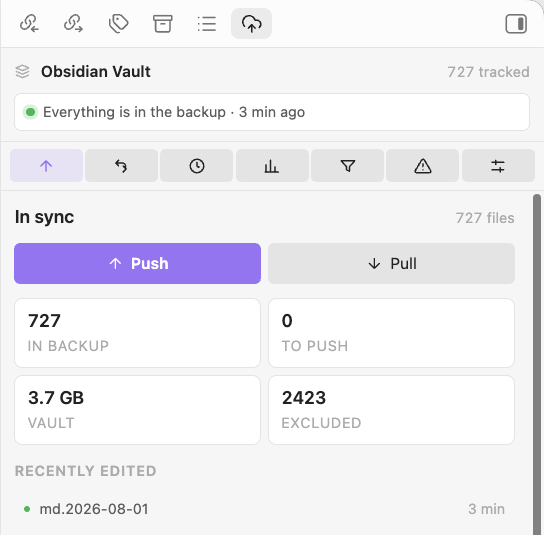
The ribbon icon opens a panel in the right sidebar — the one at the top of this page. It is where a backup is started and where it is watched, and it does not push the moment you touch it: a backup is worth a look before it runs.
Check is a dry run: it works out exactly what a push would send without sending any of it, and asks Drive how much room is left. Nothing is uploaded and the passphrase is never asked for. It is not free — deciding what changed means the same walk a push starts with — which is why it happens on a button rather than every time the panel opens.
The last line is the one that predicts a failure nothing else can fix: a Drive
with no room left answers a push with storageQuotaExceeded, and no amount of
retrying helps. If what you are about to send does not fit, the panel says so
before you send it.
Dots in the file explorer
Every file and folder in Obsidian's sidebar gets a dot saying where it stands:
| Dot | Meaning |
|---|---|
| green | on Drive, and unchanged here since it went up |
| orange | never pushed, or changed since it was |
| grey | excluded — and the row is dimmed |
A folder takes the loudest state of anything inside it, so green on a folder means every file under it is safe. It has to be earned: one unsaved note turns the whole branch orange.
The check is a stat, not a hash — the same shortcut a push uses to decide it need not re-read a file. A file whose hash was recorded as untrustworthy (see the timestamp note below) shows orange, which is accurate rather than pessimistic: the next push really will read it again.
Obsidian gives plugins no API for decorating the file tree, so this is drawn onto the explorer's own markup via the
data-pathattribute every row carries. Nothing private is touched, but it is a dependency on markup rather than on a contract, and it is the first thing to suspect if the dots ever stop appearing. Switch it off with Mark files in the file explorer.
Watching a run
A run reports itself in three places, and none of them can be closed by accident:
- The status bar, bottom right:
Geode 142/486 · 38%. Click it to open the panel. - The panel, which switches to two bars — one for the run, one for the file in flight — with byte counts, the file's name, and a Cancel button. Open it halfway through a push and it shows the push, not an empty shell.
- The closing Notice, with the summary.
The overall bar is measured in bytes, not files, and it is honest from the first frame: the plan knows which files are going and the vault knows how big they are before anything moves. A hundred notes and one video are not a hundred and one equal steps.
The per-file bar only moves for transfers big enough to be sent in pieces — over 5 MB, which take
the resumable route in 1 MB chunks. Everything smaller crosses in a single request, and Obsidian's
requestUrl reports nothing at all until a request returns, so its bar fills in one go. That is
what actually happened, so that is what is shown.
Chunking also means Cancel lands inside a large file, not only between files. A 400 MB video stops within a megabyte instead of at the end.
Obsidian gives plugins no status bar on mobile. There the panel and the ribbon icon carry it.
Typical first run
Connect Google account → Push changes to Drive
The first push creates the Drive folder (default name: Geode) and uploads everything. Later
pushes upload only what changed.
Restoring on a new device
Install Geode → paste the same client ID + secret → Connect → Pull vault from Drive
Pull downloads every file and rebuilds the folder tree from the encoded names. If the vault already
has a file at an incoming path and GeodeDrive cannot prove the two are identical, the incoming copy is
written as note (from drive).md instead — repeated collisions become (from drive 2),
(from drive 3) and so on. Pull never deletes and never overwrites.
"Already has a file there" is decided case-insensitively, even on Linux. Drive keeps Note.md and
note.md apart; APFS, NTFS and the exFAT of an Android SD card do not, and writing the second one
would silently destroy the first. On a genuinely case-sensitive filesystem the cost is one needless
(from drive) copy; the cost of guessing the other way is a lost note.
Stopping a long run
Push and pull can be stopped at any point: press Cancel on the progress notice, or run Cancel current operation. The run finishes the file it is on and then stops, so nothing is left half-uploaded on Drive or truncated in the vault.
Whatever already transferred stays transferred. The index is written every 25 files as well as at the end, so a stopped — or crashed, or battery-dead — run simply resumes where it left off instead of starting over.
Reading the summary
Every run ends with a summary Notice:
Push finished: 12 uploaded, 3 updated, 486 unchanged.

2 skipped — changed on another device:
  Journal/2026-07-30.md
  Projects/roadmap.md
A conflict means the Drive copy changed since this device last wrote it. GeodeDrive will not guess which side wins, so it skips the file and tells you. Resolve it by pulling — you get both copies side by side — or by deciding manually.
A summary can also carry a warning: a path held by two Drive files, or files in the folder that GeodeDrive did not write. Neither shows up in the counts, and both mean the backup is not quite the shape you think it is.
Choosing what gets backed up
A vault is rarely only notes. People keep build output, binaries, whole program folders and large media in there, and none of it belongs in a backup that exists to protect writing.
Two switches, both off by default, both using .gitignore syntax:
| Setting | What it does |
|---|---|
Respect the vault's .gitignore | Reads .gitignore from the vault root and applies it |
| Never upload these paths | Your own rules, applied after the file's |
Because the settings lines come second, a ! there can bring back something the repository's own
ignore file excluded — a vault is a repository first and a backup second, and the two do not always
want the same files.
bin/                    # a folder, at any depth: also Projects/app/bin
[Oo]bj/                 # character classes work
/Drafts                 # leading slash pins it to the vault root
*.mp4                   # any depth, any folder
!Notes/demo.mp4         # …except this one
**/.idea/**/*.iml       # ** crosses folder boundaries
Supported: # comments, ! negation with last-match-wins, / anchoring, trailing / for
directories, *, ?, **, and [abc] / [!a-z] classes. Not supported: nested .gitignore
files below the vault root — only the root one is read.
Three things worth knowing before you turn this on:
- A rule without a slash matches at any depth.
test/excludestest/at the root andNotes/test/. That is git's rule, not an invention, and it is the usual way to lose a folder of real notes by accident. Press Preview exclusions in settings: it applies the rules to this vault and lists what they would leave out, without uploading anything. - Excluding is not deleting. A file that stops being backed up keeps its copy on Drive. GeodeDrive will not upload it, will not update it, and — even with deletion mirroring on — will not delete it. A backup that forgets a file the day you exclude it is not a backup.
- Exclusions apply to push, not to pull. They govern what leaves this device. Anything already in the backup stays restorable, which is the point of having one.
An excluded file is never opened, so the gigabytes you exclude stop costing anything on every push rather than being read and hashed only to be skipped. The summary says how many were left out.
Show what is excluded, in the panel, opens the whole set as a tree. Folders start closed and
carry the count and the weight of everything beneath them, so a few thousand excluded paths become
a dozen rows you can actually read — and a folder called Journal sitting among the build output
is impossible to miss. Heaviest first, because what an exclusion is worth is almost always
concentrated in two or three folders.
Obsidian hides dotfiles and dot-folders from plugins altogether, so .obsidian/, .git/, .idea/
and friends were never in the backup and rules about them do nothing either way.
Encryption
Off by default. When on, files whose path matches one of your prefixes are encrypted before they leave the device.
- Cipher: AES-256-GCM, fresh random 12-byte nonce per file, per push.
- Key: PBKDF2-SHA256, 600,000 iterations, 32-byte key, 16-byte random salt per vault.
- Container:
MAGIC "OBEV" | VERSION 0x01 | SALT (16) | NONCE (12) | ciphertext+tag.
The key is derived once per unlock and cached in memory — deriving it per file would freeze Obsidian on any real vault. It is cleared when the plugin unloads. The passphrase itself is never written anywhere.
Choosing what gets encrypted
One path prefix per line in settings. The rule is deliberately dumb, because a clever rule means a file you thought was encrypted going up in the clear:
| Prefix | Matches | Does not match |
|---|---|---|
Journal | Journal, Journal/2026.md, Journal/a/b | Journalism.md |
Journal/ | same as above | Journalism.md |
Journal* | Journal/2026.md, Journalism.md | Diary.md |
Matching is case-sensitive, * is only special at the end, and lines starting with # are ignored.
The passphrase check file
The first encrypted push writes a small file called __keycheck to the Drive folder. It holds the
vault salt and a known marker string. A new device downloads it first and validates your passphrase
against it before touching any real data — a wrong passphrase aborts immediately, having
changed nothing on disk.
Limitations you should know about
- File names are not encrypted. Paths are base64url-encoded so Drive accepts them, which is encoding, not encryption. Anyone with access to the folder can list every path in your vault.
- File sizes are not hidden. A container is the plaintext length plus 49 bytes.
- There is no recovery. Forget the passphrase and the encrypted files are gone — for you and for everyone else.
- Whether a file is encrypted is decided by the
OBEVheader on download, not by the extension and not by theencflag in Drive metadata. Both of those drift; the header does not.
Disaster recovery without Obsidian
tools/decrypt.mjs is standalone. It imports nothing from src/, needs no npm install and no
build step. Copy that one file next to a downloaded Drive folder and you can get your notes back
with nothing but Node and your passphrase.
# One file to stdout
node tools/decrypt.mjs 5rWL6K-VLm1k

# One file to disk
node tools/decrypt.mjs 5rWL6K-VLm1k -o note.md

# Rebuild a whole vault from a downloaded Drive folder:
# decodes the names, decrypts what is encrypted, copies the rest through
GEODE_PASSPHRASE='…' node tools/decrypt.mjs --dir ./downloaded-Geode --out ./restored

# Prove this tool agrees with the plugin
node tools/decrypt.mjs --verify-vectors test/vectors.json
The passphrase comes from --passphrase, else GEODE_PASSPHRASE, else an interactive prompt.
Golden vectors
test/vectors.json holds four frozen cases — empty file, short ASCII, UTF-8 with Cyrillic and
emoji, and 1 MiB of binary. Each records the passphrase, salt, nonce, plaintext and the exact
expected container.
Two independent implementations must agree on all of them: src/core/container.ts (checked by
npm test) and tools/decrypt.mjs (checked by npm run verify:vectors). CI runs both. Vectors are
append-only — changing the format means bumping VERSION and adding cases, never editing existing
ones.
How change detection works
GeodeDrive decides a file is stale by comparing the SHA-256 of its plaintext against a local index in
data.json.
This matters more than it sounds. Encrypted files get a fresh nonce on every push, so their
ciphertext — and therefore the Drive md5Checksum — changes every single time, even when the note
did not. Any staleness check based on remote checksums would re-upload the entire vault on every
run. The plaintext hash is the only signal that stays still.
The remote md5 is used for exactly one thing: noticing that another device rewrote a file since this one last pushed it. That is a conflict, and GeodeDrive refuses to overwrite it.
The plaintext hash never leaves your device. Uploading it for an encrypted file would let anyone confirm a guess at its contents.
Consequences worth knowing:
- A file whose modification time and size both still match the index keeps its recorded hash and is never opened. On a large vault where little changed, a push stats every file but reads almost none of them. Staleness is still decided only by sha256 — mtime is never evidence that a file changed, only that it might have.
- That shortcut needs the clock to be finer than the edits. FAT32 — which is what an Android SD card usually is — rounds timestamps to two seconds, so an edit landing inside the same tick that leaves the length alone would be invisible to it, forever. A hash taken from a file whose timestamp is younger than one tick is therefore recorded as uncacheable and the file is read once more next time.
- Pull takes no such shortcut and hashes everything. It is the operation you run when something has already gone wrong, and the cost of guessing there is deciding a local file matches the backup and declining to bring the backup down beside it.
- Paths are normalised to Unicode NFC. macOS hands back
éaseplus a combining accent while Windows and Linux use a single code point; left alone, the same note goes up twice under two different names and conflicts with itself forever. - Losing
data.jsonis not fatal. The next push sees files it has no record of, finds them already on Drive, and reports them as conflicts rather than clobbering them. Pull rebuilds the index. - An index entry for a path that is gone from the vault and from Drive is dropped, so
data.jsondoes not grow forever and the tracked-file count stays honest. .obsidian/is never backed up. That is wheredata.jsonlives — and with it your Google refresh token.
Talking to Drive
- Throttling is expected, not an error. Drive answers a burst of uploads with 429 or a transient
5xx as a matter of course. Those are retried with a jittered exponential backoff, honouring
Retry-After, up to five attempts. A rate-limit 403 is retried; astorageQuotaExceeded403 — the one that means your Drive is full — is not, because waiting will not fix it. Cancel is checked while waiting, so a stop does not have to sit out a twenty-second pause. - A run that keeps failing the same way stops. Five consecutive network or credential failures end the run and say so, instead of grinding through two thousand files to report one problem two thousand times. Everything already transferred is recorded.
- Files over 5 MB go through a resumable upload session, 1 MB at a time. Google documents the multipart route for 5 MB and under, and a vault's big attachments are exactly the files a backup must not drop. Sending them in chunks costs a round trip per megabyte and buys the only mid-file progress available, plus a Cancel that works inside one file. Large downloads use ranged requests for the same reason.
- The cached folder id is checked, not trusted. Trash the Drive folder or connect a different Google account and listing it still succeeds — it just comes back empty, which reads as "Drive lost the whole vault". One request per run turns that into a lookup by name.
- Two Drive files can claim one vault path. Drive has no unique-name constraint, so two devices creating the same note in the same minute produces exactly that. GeodeDrive uses the newer one, makes the same choice on every device, and says so in the summary rather than hiding the other copy.
Storage layout in Drive
Flat. One folder, one Drive file per vault file, no mirrored hierarchy:
Geode/
  bm90ZS5tZA                    ← base64url("note.md")
  Sm91cm5hbC8yMDI2LTA4LTAxLm1k  ← base64url("Journal/2026-08-01.md")
  __keycheck
The path lives in the file name because Drive's appProperties cap at roughly 124 bytes per
key/value pair, which any non-ASCII path overflows. appProperties carries only { v, enc }.
Every upload names that folder as its parent, so nothing GeodeDrive writes can land anywhere else — and
drive.file means it cannot even see the rest of your Drive.
The folder is created in the root of My Drive, and the plugin offers no way to choose somewhere
else: with drive.file it has no visibility into your folder tree, so it has no parent id to write.
If you want it filed somewhere tidier, drag it there once in the Drive web UI. GeodeDrive addresses
the folder by its file id, so the move is invisible to it; and if data.json is ever lost, the
fallback lookup searches by name with no parent constraint and finds it wherever you put it.
Settings reference
| Setting | Default | Notes |
|---|---|---|
| Client ID / secret | empty | Your own Google OAuth client |
| Sign-in method | Device | Switch to PKCE only if Google rejects the device flow |
| Drive folder name | Geode | Changing it after a push points at a new folder |
| Respect the vault's .gitignore | off | Reads the root .gitignore and skips what it excludes |
| Never upload these paths | empty | Your own rules, .gitignore syntax, applied after it |
| Mark files in the file explorer | on | A dot per file and folder: green, orange or grey |
| Encrypt selected paths | off | Enables the prefix list below |
| Encrypted paths | empty | One prefix per line |
| Ask for the passphrase | Once/session | Or on every push and pull |
| Mirror deletions to Drive | off | On, a local delete permanently removes the Drive copy |
On mirroring deletions: with it off, a file you delete locally stays in the backup — which is usually the entire point of having one. With it on, pushing deletes the Drive copy permanently, bypassing the Drive trash. A backup that forgets what you deleted cannot get it back for you.
Exclusions are exempt. Even with mirroring on, adding a path to
.gitignorenever deletes its Drive copy — an excluded file is one GeodeDrive stops touching, not one you asked it to erase.
Development
npm run dev             # esbuild watch
npm run typecheck       # tsc across src, test and tools
npm run lint            # eslint, type-aware
npm run test            # vitest over src/core
npm run verify:vectors  # standalone decryptor vs the golden vectors
npm run format
npm run build           # everything, then a production bundle
Layout
src/
  main.ts        lifecycle, commands, wiring — no business logic
  types.ts       branded types, Result, AppError
  settings.ts    settings shape, defaults, migration
  core/          pure logic: container, kdf, path-codec, selector, ignore,
                 diff, backup-state, path-tree, bytes
  drive/         auth-provider, device-flow, pkce-flow, client, dto
  ops/           push, pull, estimate, folder, index-store
  ui/            settings-tab, modals, progress hub, progress panel
test/            vitest over src/core only — no mocks, no Obsidian stub
tools/           standalone decryptor, vector generator, version bump
Two rules the build enforces mechanically rather than by convention:
- Nothing in
src/core/may importobsidian. All I/O is injected, which is what lets the crypto and diff logic be tested in plain Node with no mocks. - Nothing in
src/may touch Node APIs.tsconfig.jsonsetstypes: []soBuffer,processandrequirefail to compile, and ESLint bans them plusfetchby name. All HTTP goes through Obsidian'srequestUrl, the only thing that gets past CORS in the renderer.
Try it: put Buffer.from('x') in any file under src/ and both npm run typecheck and
npm run lint will reject it.
License
For plugin developers
Search results and similarity scores are powered by semantic analysis of your plugin's README. If your plugin isn't appearing for searches you'd expect, try updating your README to clearly describe your plugin's purpose, features, and use cases.