Kibo Tasks
unlistedby Bart van der Meeren
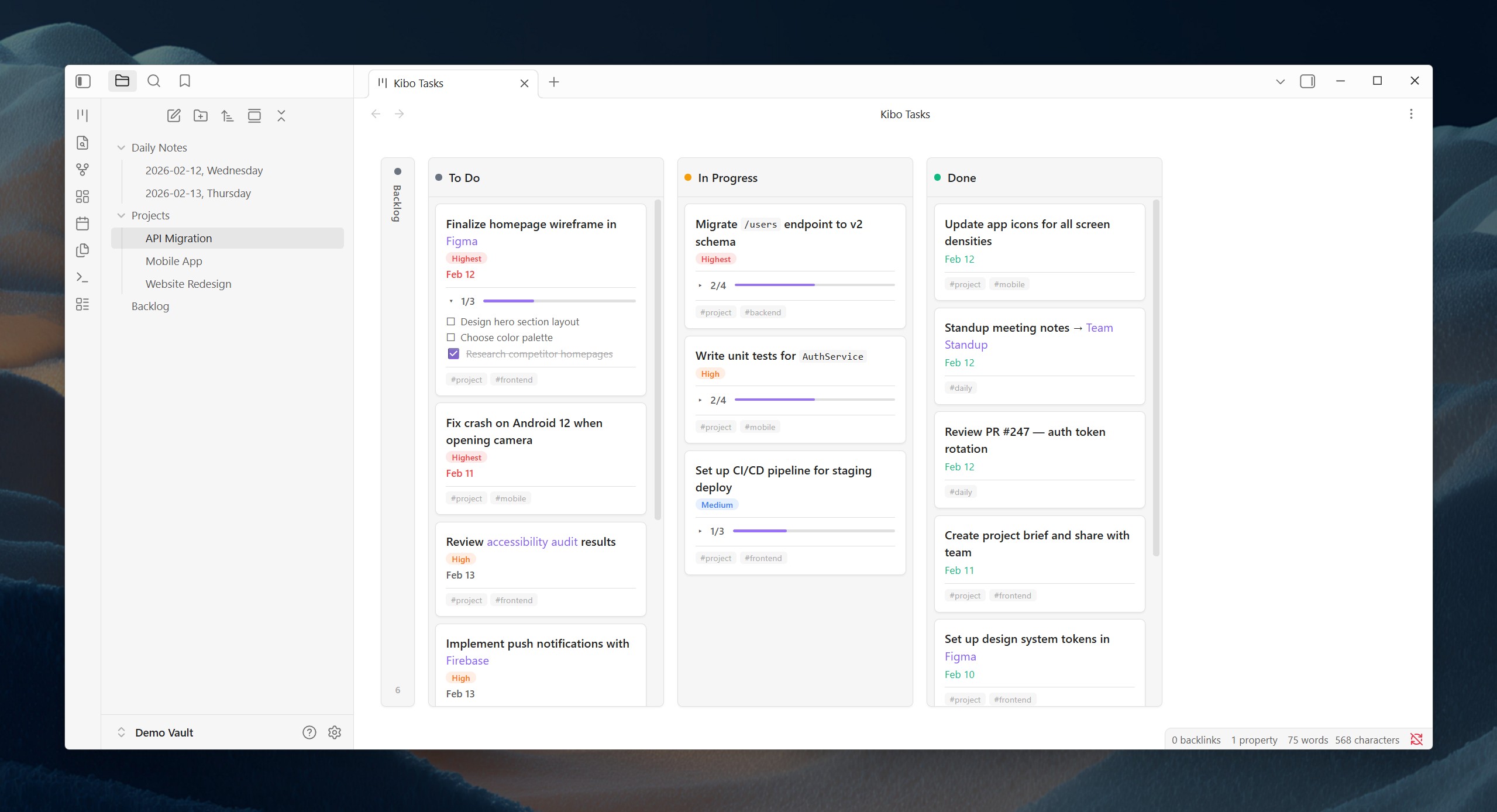
Drag-and-drop Kanban board with tag-based columns that update your markdown files.
Kibo Tasks
A clean, minimal Kanban board for Obsidian that works with the Obsidian Tasks plugin.
Drag tasks between columns to update their status directly in your markdown files.

Features
- Tag-based columns — Dragging a card between columns adds/removes tags in the source file
- Obsidian Tasks compatible — Respects
#taskglobal filter, emoji metadata (📅,✅,⏫), and checkbox statuses - Live updates — Edits in your files reflect on the board within ~300ms
- Drag & drop — Powered by SortableJS for smooth cross-column dragging
- Collapsible columns — Collapsed columns become thin vertical strips to save space
- Kibo UI inspired design — Clean, spacious aesthetic with colored status dots and italic headers
- Theme-aware — Works with light and dark Obsidian themes
Default Columns
| Column | Behavior |
|---|---|
| To Do | Tasks with due date today or overdue |
| In Progress | Tasks tagged #in-progress |
| Done | Completed tasks (- [x]) |
| Backlog | Tasks without a due date (collapsed by default) |
You can add custom tag-based columns (e.g., "Waiting" → #waiting, "Review" → #review) in settings.
How It Works
- To Do → In Progress: Adds
#in-progressto the task line - In Progress → Done: Marks
[x], adds✅ YYYY-MM-DD, removes#in-progress - Done → To Do: Marks
[ ], removes✅date - Any → Custom column: Removes previous column tag, adds new column tag
All file mutations use Obsidian's Vault.process() for atomic read-modify-write operations.
Task Format
Works with standard Obsidian Tasks emoji format:
- [ ] Buy groceries #task 📅 2026-02-13
- [ ] Review PR #task @work ⏫ 📅 2026-02-14
- [x] Ship feature #task ✅ 2026-02-12
Supports all priority emojis: 🔺 highest, ⏫ high, 🔼 medium, 🔽 low.
Installation
From BRAT (recommended for now)
- Install BRAT plugin
- Add
MajesteitBart/kibo-tasksas a beta plugin - Enable "Kibo Tasks" in Community Plugins
Manual
- Download
main.js,manifest.json, andstyles.cssfrom the latest release - Create
.obsidian/plugins/kibo-tasks/in your vault - Place the three files there
- Enable "Kibo Tasks" in Community Plugins
Settings
- Global filter tag — Must match your Tasks plugin config (default:
#task) - To Do filter mode — "Due today + overdue" or "All dated tasks"
- Done limit — Max completed tasks shown (default: 10)
- Excluded folders — Folders to skip when scanning
- Custom columns — Add/remove/reorder tag-based columns
Development
npm install
npm run dev    # development build with sourcemaps
npm run build  # production build
Contributing
Contributions are welcome! Please open an issue or submit a pull request.
Acknowledgments
- Obsidian Tasks by Clare Macrae and contributors — the excellent task management plugin that Kibo Tasks is built to work with
- Kibo UI by Hayden Bleasel — the beautiful shadcn/ui extension library that inspired the design of this plugin
License
MIT
For plugin developers
Search results and similarity scores are powered by semantic analysis of your plugin's README. If your plugin isn't appearing for searches you'd expect, try updating your README to clearly describe your plugin's purpose, features, and use cases.