Vowel Chart
approvedby maplekarine
This plugin has not been manually reviewed by Obsidian staff. Generate IPA style vowel diagrams.
Obsidian Vowel Chart
This plugin generates a vowel diagram used for showing a language inventory of vowels.
Usage
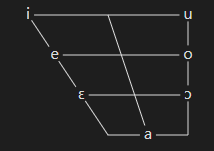
The simplest usage of the plugin is to create a code block with the vowel-chart tag, and write vowels in the IPA:
```vowel-chart
; example: Italian vowels
i e ɛ a ɔ o u
```
Adding vowels
Another way to add vowels is with the add command, with it you can specify a position and a label, there are three ways of specifying position, as follows, they can be mixed freely.
Position by coordinates
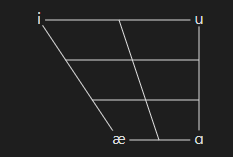
Numerical coordinates start with (0, 0) at the top-left and end in (2, 3) in the bottom-right.
add (0, 0) "i"
add (2, 3) "ɑ"
add (0, 3) "æ"
add (2, 0) "u"
Position by keywords
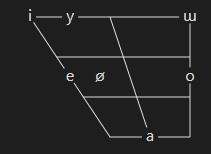
Use the keywords high/low/mid/close/open/front/central/back to position the vowels, the order is irelevant. Also supports the keyword near for intermediary positions.
add high front "i"
add high near-front "y"
add mid front "e"
add mid near-front "ø"
add mid back "o"
add low central "a"
add high back "ɯ"
Position by IPA
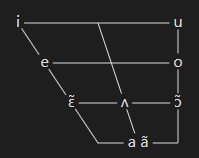
This positions vowels by their position in the IPA chart. In that option the label is optional, if absent the same text in the position is used.
The position is defined just by the first character in brackets, that way diacritics are automatically supported.
add [ɜ] "ʌ"
add [a] "a ã"
add [i]
add [u]
add [e]
add [o]
add [ɛ̃]
add [ɔ̃]
Dot
The commands add right and add left create a dot at the specified position and place the text to the right or left of it:
add [a] "a aː"
add left near-front high-mid "eː"
add right (0, 0) "i"
ɛ ɔ oː u
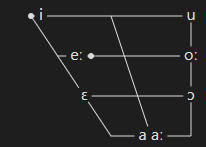
add commands can be used together with the simple usage.
Settings
Positioning of low vowels
In the charts above, the position of the low vowels [æ a] is different from the original IPA chart, this behaviour can be changed by the config centralLowVowel false command:
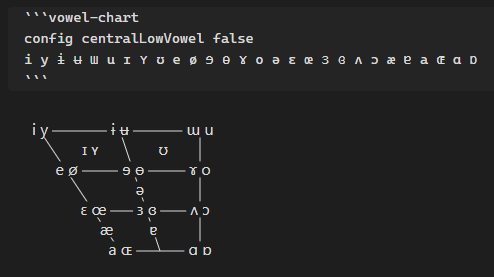
This option can also be turned off by default on the plugin settings.
Layout
There are 4 chart layout options, they can be chosen with the layout command.
-
layout trapezoidlike the original IPA chart -
layout trianglean alternative to the original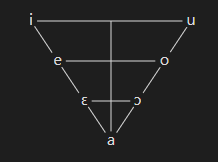
-
layout square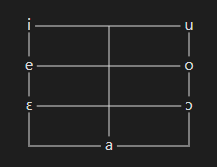
-
layout formantarranged according to formants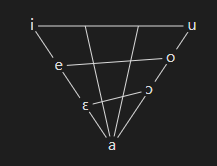
The default layout can be set in the plugin settings.
Size
The command config size <size> defines the size of the chart. The default can be set in the plugin settings.
The size is the vertical distance in pixels from the high line to the high-mid line.
config size 25
i e ɛ a ɔ o u
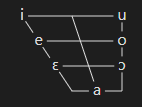
config size 52
i e ɛ a ɔ o u
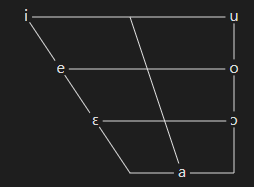
Manually installing the plugin
- Copy over
main.js,styles.css,manifest.jsonto your vaultVaultFolder/.obsidian/plugins/vowel-chart/.
For plugin developers
Search results and similarity scores are powered by semantic analysis of your plugin's README. If your plugin isn't appearing for searches you'd expect, try updating your README to clearly describe your plugin's purpose, features, and use cases.