TUBS Renderer
unlistedby Rupel Rupelsson
Render TUBS (Time Unit Box System) rhythm grids from tubs code blocks, with click-to-play synthesized audio.
TUBS Renderer
An Obsidian plugin that renders TUBS (Time Unit Box System) rhythm grids from fenced
tubs code blocks, and plays them back through a small synthesized kit — no audio files,
no external services.
Think of it like guitar/drum tabs rather than staff notation: no staves, clefs, or note-durations to read. Each row is an instrument, each column is one slice of time, and a mark in a box means "hit here." If you can read a step sequencer (Maschine, an MPC, a DAW piano roll), you can read TUBS at a glance — which makes it great for sketching drum grooves and simple basslines while you produce.
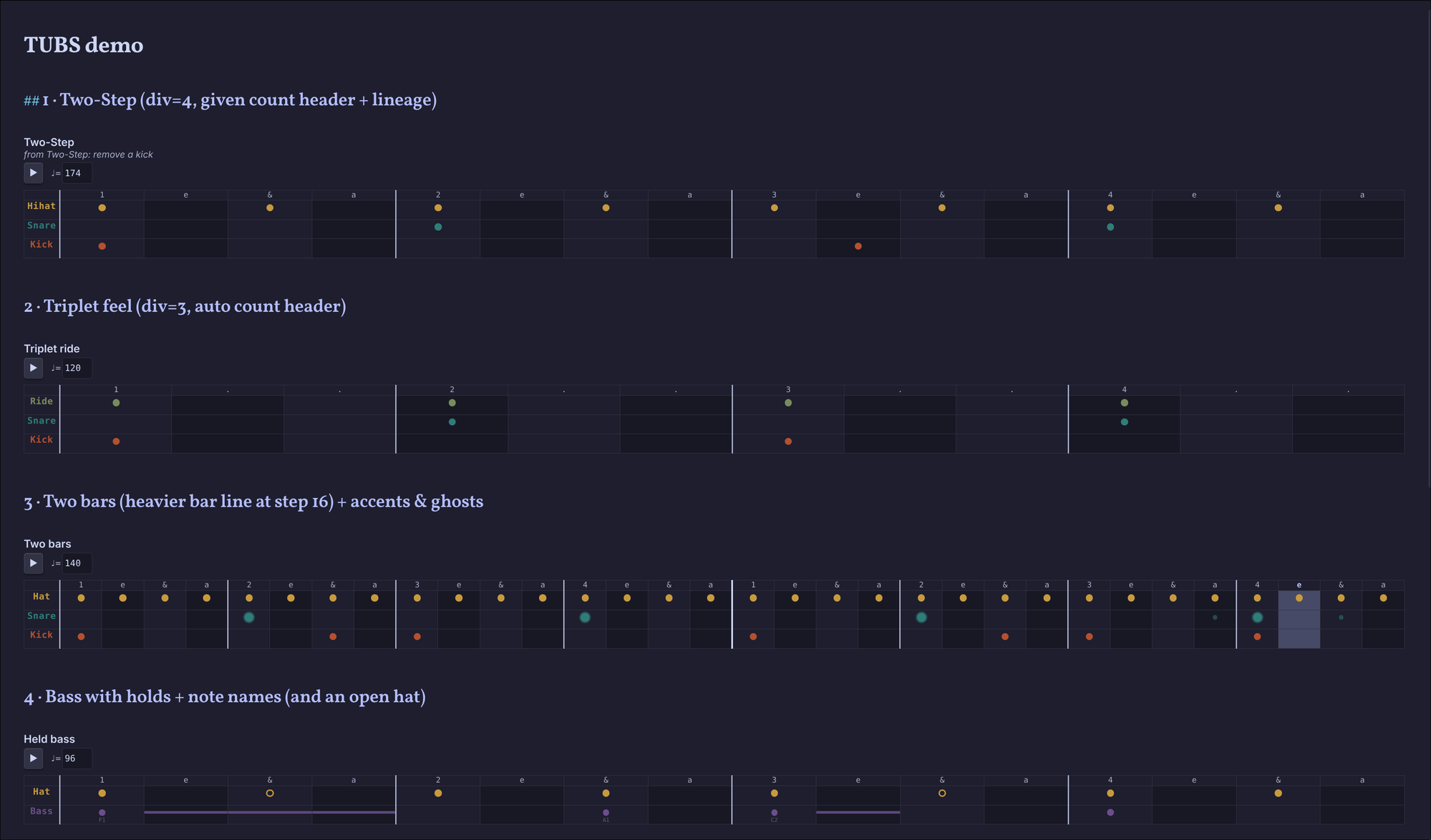
The included demo note rendered in Obsidian (dark theme) — colored per instrument, with held-bass bars, open-hat rings, and a live playhead (the lit column).
@ bpm=174 div=4 title="Two-Step"
> from Two-Step: remove a kick
        1 e & a  2 e & a  3 e & a  4 e & a
Hihat | x . x .  x . x .  x . x .  x . x .
Snare | . . . .  x . . .  . . . .  x . . .
Kick  | x . . .  . . . .  . x . .  . . . .
Press ▶ on a block to hear it loop; press again to stop. Only one block plays at a time.
Features
- Renders
tubsblocks as an aligned, boxed grid — real cell borders, colored per instrument, with a counting header and heavier beat/bar lines. - Click-to-play each block through synthesized Tone.js voices (kick, snare, hi-hat, bass), with a moving playhead that tracks the audio.
- Pitched bass rows — note names per cell (
F1,C#2) or a defaultroot, with_holds that sustain a note across boxes. - Theme-aware and unobtrusive: grids sit in the note (Dataview-style), in both dark and light themes, in Reading view and Live Preview.
- Graceful failure: a malformed block shows a small inline error instead of breaking the note.
Installation
Not yet in the community plugin store. For now, install manually.
Manual: download main.js, manifest.json, and styles.css from a
release, drop them into
<vault>/.obsidian/plugins/tubs-renderer/, and enable TUBS Renderer in
Settings → Community plugins.
From source: see Development.
Syntax
A tubs block is line-based. There are four kinds of line.
Meta line — starts with @
Space-separated key=value pairs; all optional.
| key | default | meaning |
|---|---|---|
bpm | 120 | playback tempo |
div | 4 | steps per beat (4 = 16th grid, 3 = triplet grid) |
beats | 4 | beats per bar (with div, sets steps-per-bar) |
title | — | quoted caption shown above the grid, e.g. title="Two-Step" |
root | C2 | pitch used for a plain x on a bass row (see Bass rows) |
Bars are inferred from the longest row: ceil(steps / (beats × div)). Each bar boundary
gets a heavier column line.
Comment / lineage line — starts with >
Rendered as a small muted caption under the title. Purely informational — a place to note
where a pattern came from (> from Steppa: add ghost snares). Never affects the grid.
Lines starting with # are ignored entirely.
Count header line — optional
A line before the first row with no |, made of counting syllables
(1 e & a, 1 . ., digits, &, e, a, .). If present it's used verbatim as the
column header. If absent, one is generated from div (div=4 → 1 e & a; div=3 →
1 . .).
Row line — Label | tokens
Everything left of the first | is the instrument label; everything right is the
token stream. Whitespace between tokens is cosmetic (use it to group beats) and is
stripped before indexing — so x . x . and x.x. are identical. Rows may differ in
length; the grid is as wide as the longest row, and short rows are rests past their end.
Token vocabulary
| token | meaning | render | playback |
|---|---|---|---|
. | rest | empty cell | silent |
x | hit | filled dot | normal (~0.7) |
X | accent | larger dot + ring | loud (~1.0) |
g | ghost | small faint dot | quiet (~0.35) |
o | open hat | hollow ring | normal, longer decay |
_ | tie / hold | bar extending the previous dot | extends its duration |
F1… | pitched note | dot + tiny pitch label | that pitch (bass) |
Unknown tokens render as ? and never break the block.
Instruments → colors & voices
Mapped by lowercased label (substring match, so Hi-Hat, Closed Hat, Bass Drum all
resolve):
- kick → clay red,
MembraneSynth - snare → teal, short-decay
NoiseSynth - hihat / hat → ochre, very-short
NoiseSynth(orings longer) - bass → violet,
MonoSynth(pitched) - unknown label → a fallback color + neutral click
Colors and voices live in src/tubs/palette.ts and src/tubs/voices.ts — edit them there.
Bass rows (pitched)
A bass row supports both styles, and you can mix them:
- Note names per cell —
F1,A1,C#2,Bb1play that exact pitch. - Plain
x— plays the row'srootpitch (@ root=F1, defaultC2).
_ extends the previous note: F1 _ _ _ is one note held for four steps (rendered as a
bar connecting the boxes). A note name always includes an octave digit, which is how a bass
G2 is told apart from a ghost g.
@ bpm=96 div=4 root=C2 title="Held bass"
Bass | F1 _ _ _  . . A1 .  C2 _ . .  x . . .
More examples
Triplet feel (div=3):
@ bpm=120 div=3 title="Triplet ride"
Ride  | x . .  x . .  x . .  x . .
Snare | . . .  x . .  . . .  x . .
Kick  | x . .  . . .  x . .  . . .
Two bars (beats × div = 16 steps per bar):
@ bpm=140 div=4 beats=4 title="Two bars"
Hat   | x x x x x x x x x x x x x x x x  x x x x x x x x x x x x x x x x
Snare | . . . . X . . . . . . . X . . .  . . . . X . . . . . . g X . g .
Kick  | x . . . . . x . x . . . . . . .  x . . . . . x . x . . . x . . .
A deliberately broken block (shows the inline error path — the note never breaks):
@ bpm=fast div=4
Kick | x . . .
Settings
- Default tempo (BPM) — used when a block has no
@ bpm=. - Enable playback — turn off to render grids only (no Play button, no audio).
- Show count header — show/hide the counting row.
- Default bass root — pitch for a plain
xon a bass row.
Mobile
isDesktopOnly is false, so grids render on Obsidian mobile. Playback depends on the Web
Audio API being available in the mobile app; if it isn't, the grid still renders and the
Play button simply won't produce sound.
Development
Built with bun, TypeScript, Svelte 5, esbuild, and Tone.js.
bun install
bun run dev      # watch + rebuild into main.js
bun run build    # type-check + production bundle
Then symlink the repo into your vault as a plugin folder
(<vault>/.obsidian/plugins/tubs-renderer → this repo) and enable it. Pairs well with the
Hot Reload plugin for live reloads on rebuild.
Layout:
src/
  main.ts            code-block processor → mounts the Svelte UI
  settings.ts        settings tab + defaults
  tubs/
    model.ts         types + TubsError
    parse.ts         text → TubsModel (pure, no Tone/DOM)
    palette.ts       label → color (pure)
    voices.ts        synth kit (Tone)
    playback.ts      TubsPlayback engine (Tone) + reactive stores
  svelte/            TubsBlock / TubsGrid / TubsCell / TubsError
Roadmap / not in v1
Per-instrument legend block · per-row mute/solo · a swing parameter · export a pattern to
.mid · a command to insert a template block. Kept out to keep v1 an honest "render the
text I already type, and let me hear it."
Credits
- TUBS — the Time Unit Box System, a percussion notation attributed to Philip Harland and popularized by James Koetting in the 1960s.
- Audio synthesis by Tone.js.
- Scaffolding based on the Obsidian sample plugin.
License
MIT © Rupel Rupelsson
For plugin developers
Search results and similarity scores are powered by semantic analysis of your plugin's README. If your plugin isn't appearing for searches you'd expect, try updating your README to clearly describe your plugin's purpose, features, and use cases.