MarginAI
unlistedby MarginAI
AI-assisted reading annotations that stay visible in your vault.
MarginAI — Obsidian AI Reading Annotations
选中一段原文,向 AI 提问或写下自己的批注,并把回答留在原文旁边。MarginAI 帮你把阅读中的问题、解释和笔记固定在具体文本上,而不是散落在聊天记录里。
English | 简体中文
简体中文
这个插件解决什么问题?
读长文章、论文、访谈和技术文档时,真正需要理解的往往不是整篇文档,而是某一段具体原文:
- 看到一个概念,想马上问“这是什么意思?”
- 读到一段论证,想确认“作者为什么这么说?”
- 想把自己的理解写下来,但又不想打断原文结构
- 之后复习时,希望能从批注直接跳回原文位置
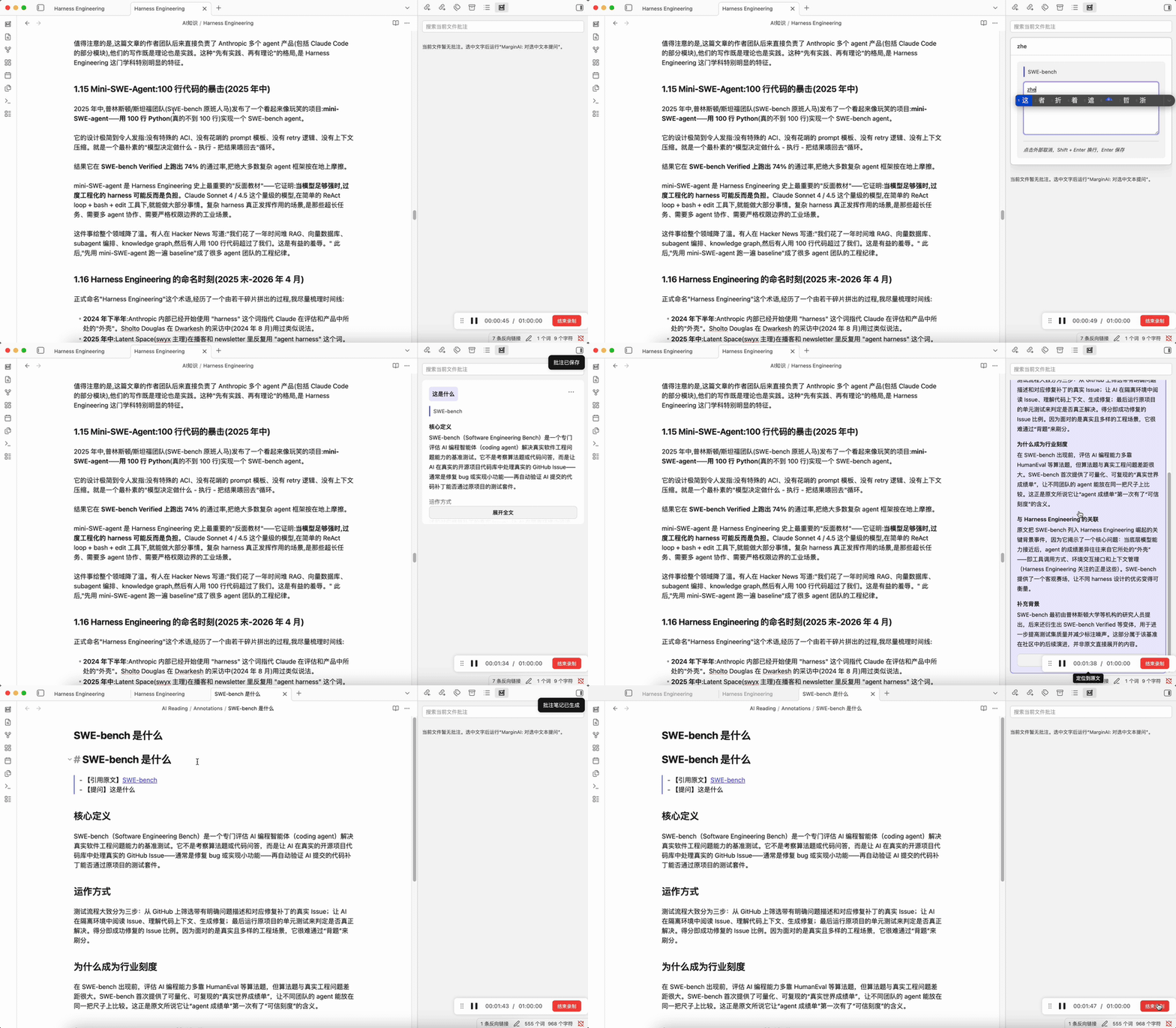
MarginAI 的核心思路是:让批注绑定到你选中的原文片段。你可以向 AI 提问,也可以写个人批注;所有批注都会出现在当前文件的侧边栏里,并按原文顺序排列。
能做什么?
| 功能 | 怎么用 | 结果 |
|---|---|---|
| AI 批注 | 选中原文,运行 MarginAI: 对选中文本提问 | AI 根据选中原文生成解释、总结、翻译或推断 |
| 个人批注 | 选中原文,运行 MarginAI: 增加批注 | 不调用 AI,直接保存自己的阅读笔记 |
| 批注侧边栏 | 打开 Markdown 文件后查看右侧 MarginAI 面板 | 只显示当前文件的批注,并按原文顺序排列 |
| 定位原文 | 点击批注卡片 | 跳回对应原文位置 |
| 编辑批注 | 在卡片菜单中选择编辑 | 修改已生成或手写的批注正文 |
| 保存为笔记 | 在卡片菜单中选择保存为笔记 | 在 vault 中生成独立 Markdown 笔记 |
| 回答 Skills | 使用内置或自定义 JSON skill | 针对解释、总结、翻译、写作等问题使用不同回答策略 |
| 联网搜索 | 在设置中开启 Tavily 或自定义搜索接口 | 为概念解释和延伸讨论补充外部资料 |
安装方法
MarginAI 目前是早期项目,暂未发布到 Obsidian 社区插件市场。可以手动安装:
-
下载或 clone 这个仓库:
git clone https://github.com/Shjjkh/MarginAI.git cd MarginAI/plugin -
安装依赖并构建插件:
npm install npm run build -
在你的 Obsidian vault 里创建插件目录:
.obsidian/plugins/margin-ai/ -
把下面这些文件复制进去:
plugin/manifest.json plugin/main.js plugin/styles.css plugin/skills/ -
重启 Obsidian,进入 Settings -> Community plugins,启用 MarginAI。
快速上手(推荐顺序)
第一步:配置 AI 服务
打开 MarginAI 设置,填写:
API Base URL: https://api.openai.com/v1
API Key: 你的 API key
Model: 你要使用的模型名称
MarginAI 使用 OpenAI-compatible API。你也可以填写兼容 OpenAI 格式的其他服务或本地模型网关。
第二步:选中原文并提问
在 Markdown 文件里选中一段文字,然后运行命令:
MarginAI: 对选中文本提问
侧边栏会出现输入框。输入问题后:
Enter提交Shift + Enter换行
第三步:查看批注卡片
AI 回答生成后会变成当前文件的批注卡片。卡片会按照引用原文在文件中的顺序排列,不按提问时间排序。
第四步:回到原文或保存为笔记
你可以:
- 点击批注卡片,定位回原文
- 展开/收起长回答
- 编辑批注内容
- 将批注保存为 Markdown 笔记
默认生成目录:
MarginAI/Annotations
可选:自定义回答 Skills
内置 skills 位于:
plugin/skills/*.json
它们控制不同问题类型的回答方式,例如概念解释、困惑澄清、总结、翻译、写作和推断。
如果你想覆盖内置策略,可以在 Obsidian vault 中创建:
MarginAI/Skills
放入同样格式的 JSON skill。相同 intent 的自定义 skill 会覆盖内置 skill。
适合谁用?
- 使用 Obsidian 阅读论文、访谈、长文或技术文档的人
- 希望批注和原文绑定,而不是散落在聊天记录里的人
- 想把 AI 回答沉淀成 Markdown 笔记的人
- 想保留自己阅读理解过程的人
- 想本地保存数据、自己配置 AI 服务的人
注意事项
- 这是早期项目,建议先在测试 vault 里试用。
- AI 请求会发送到你配置的 API endpoint。
- API key 保存在本地 Obsidian 插件数据中。
- 如果开启联网搜索,搜索请求会发送到你配置的搜索服务。
- 插件不会提供托管后端,批注数据保存在本地插件数据和你的 vault 中。
English
Select a passage, ask AI a question or write your own note, and keep the answer attached to the source text. MarginAI keeps reading questions, explanations, and annotations close to the exact text they came from.
简体中文 | English
What problem does this plugin solve?
When reading long essays, papers, interviews, or technical documents, the real question usually comes from one specific passage:
- You see a concept and want to ask what it means.
- You read an argument and want to understand why the author says it.
- You want to write down your own interpretation without breaking the source note.
- You want to revisit the exact source text later from the annotation.
MarginAI attaches annotations to selected source text. You can ask AI or write personal notes, and all annotations appear in a sidebar scoped to the current file, sorted by source order.
What can it do?
| Feature | How to use it | Output |
|---|---|---|
| AI annotation | Select text and run MarginAI: 对选中文本提问 | AI-generated explanation, summary, translation, or inference |
| Personal annotation | Select text and run MarginAI: 增加批注 | A saved note without calling AI |
| File-scoped sidebar | Open a Markdown file and view the MarginAI panel | Annotations for the current file only, sorted by source order |
| Source navigation | Click an annotation card | Jump back to the source passage |
| Edit annotation | Use the card menu | Update generated or handwritten annotation content |
| Save as note | Use the card menu | Generate a Markdown note in your vault |
| Answer skills | Use built-in or custom JSON skills | Different prompt strategies for explanation, summary, translation, writing, and inference |
| Web search | Enable Tavily or a custom search endpoint | Add external context for concept explanations and discussions |
Installation
MarginAI is still early and is not yet published to the Obsidian community plugin directory. To install manually:
-
Download or clone this repository:
git clone https://github.com/Shjjkh/MarginAI.git cd MarginAI/plugin -
Install dependencies and build:
npm install npm run build -
Create a plugin folder in your Obsidian vault:
.obsidian/plugins/margin-ai/ -
Copy these files into it:
plugin/manifest.json plugin/main.js plugin/styles.css plugin/skills/ -
Restart Obsidian, then enable MarginAI from Settings -> Community plugins.
Quick Start
Step 1: Configure your AI provider
Open MarginAI settings and fill in:
API Base URL: https://api.openai.com/v1
API Key: your API key
Model: your model name
MarginAI uses an OpenAI-compatible API. You can also use compatible gateways or local model endpoints.
Step 2: Select text and ask a question
Select a passage in a Markdown file and run:
MarginAI: 对选中文本提问
Type your question in the sidebar:
EntersubmitsShift + Enterinserts a new line
Step 3: Review annotation cards
After the answer is generated, it appears as an annotation card for the current file. Cards are sorted by the position of the source text, not by creation time.
Step 4: Revisit source text or save a note
You can:
- click a card to locate the source text
- expand or collapse long answers
- edit the annotation body
- save the annotation as a Markdown note
Default generated note folder:
MarginAI/Annotations
Optional: Custom Answer Skills
Built-in skills live in:
plugin/skills/*.json
They control how MarginAI answers different intents, such as concept explanation, confusion, summary, translation, writing, and inference.
To override built-in behavior, create this folder in your vault:
MarginAI/Skills
Add JSON skill files with the same format. A custom skill with the same intent overrides the built-in version.
Who is this for?
- Obsidian users reading papers, interviews, long essays, or technical docs
- Readers who want annotations attached to exact source passages
- Users who want AI answers saved as durable Markdown notes
- People who want to preserve their reading and thinking process
- Users who prefer local-first data and self-configured AI providers
Notes
- This is an early-stage project. Test it in a separate vault first.
- AI requests are sent to the API endpoint you configure.
- API keys are stored in local Obsidian plugin data.
- If web search is enabled, search requests are sent to your configured search provider.
- MarginAI does not provide a hosted backend. Annotation data stays in local plugin data and your vault.
Development
cd plugin
npm install
npm run typecheck
npm run build
License
MIT
For plugin developers
Search results and similarity scores are powered by semantic analysis of your plugin's README. If your plugin isn't appearing for searches you'd expect, try updating your README to clearly describe your plugin's purpose, features, and use cases.